Listen to this Post
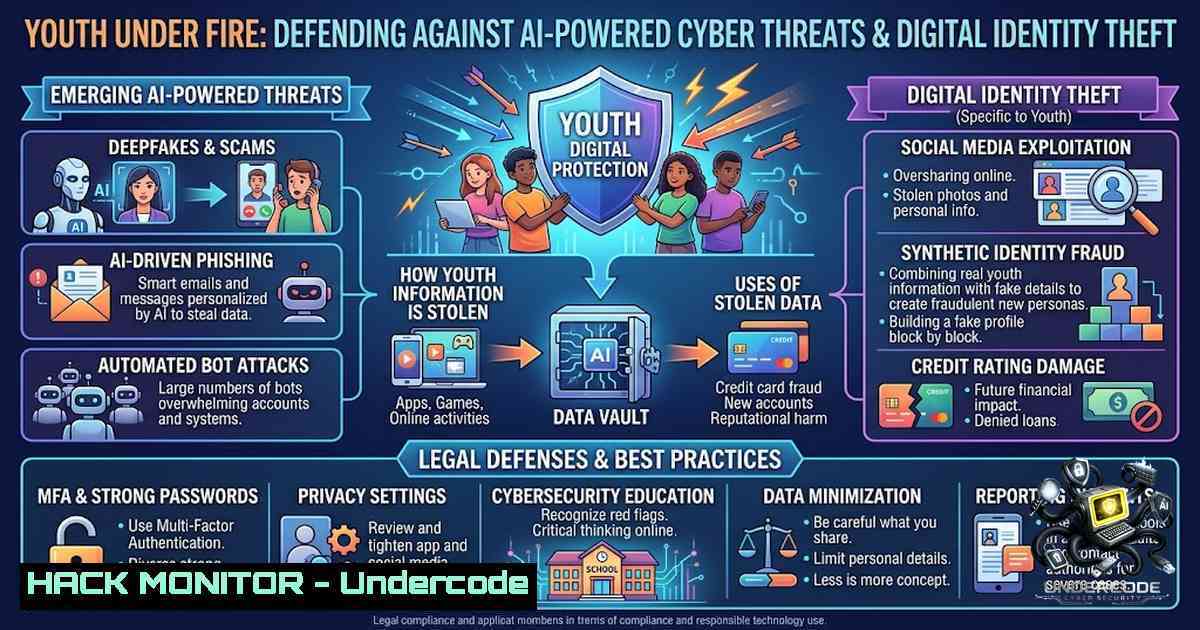
Introduction:
As young people increasingly live their lives online, the attack surface for cybercriminals has never been broader or more dangerous. From AI-generated phishing lures that mimic trusted contacts to sophisticated social engineering campaigns that exploit overshared personal data, the threats targeting the next generation demand more than passive awareness—they require immediate, actionable defense strategies. This article translates the critical lessons from the National Cybersecurity Agency (ANCS) youth awareness initiative into a practical cybersecurity toolkit, equipping young users, educators, and parents with the technical commands, configuration guides, and best practices needed to build a resilient digital presence.
Learning Objectives:
- Identify common attack vectors including AI-enabled phishing, social engineering, and cyberbullying tactics targeting young users.
- Apply Linux and Windows security commands to detect phishing attempts, harden systems, and block malicious traffic.
- Implement NIST-aligned password policies, multi-factor authentication (MFA), and social media privacy controls to protect digital identity.
You Should Know:
1. Phishing Email Header Analysis: Unmasking the Spoof
Phishing remains the primary delivery mechanism for most cyberattacks, and attackers are now using AI to craft grammatically perfect, contextually relevant messages that bypass traditional spam filters. The first line of defense is learning to analyze email headers—the digital fingerprint of every message. A mismatch between the displayed `From:` address and the actual `Return-Path:` is a classic red flag for spoofing.
Step‑by‑step guide:
- Save the suspicious email as a `.eml` file (most email clients allow this via “Save As” or “Export”).
- Extract key headers using command-line tools. On Linux/macOS, run:
cat suspicious_email.eml | grep -E '(From:|Return-Path:|Received:)' | head -10
On Windows PowerShell:
Select-String -Path "suspicious_email.eml" -Pattern "From:|Subject:|Received:|Return-Path:"
These commands filter the raw email file for the most telling header fields.
3. Analyze the output: Compare the `From:` domain with the `Return-Path:` domain. If they differ (e.g., `From: [email protected]` but Return-Path: [email protected]), the email is almost certainly spoofed. Examine the `Received:` headers from bottom to top to trace the email’s true origin path and identify suspicious mail relays.
2. Windows Defender Hardening: Fortifying the Endpoint
For Windows users, the built-in Microsoft Defender Antivirus is a powerful, free tool that is often underutilized. Keeping definitions current and running regular scans is the first line of defense against malware often delivered via phishing links.
Step‑by‑step guide:
- Open PowerShell as Administrator (right-click Start menu > Windows PowerShell (Admin) or Terminal (Admin)).
2. Update virus definitions:
Update-MpSignature
This fetches the latest malware signatures from Microsoft.
3. Run a full system scan:
Start-MpScan -ScanType Full
This initiates a comprehensive scan of all files and running processes.
4. Enable Attack Surface Reduction (ASR) rules to block common exploitation techniques like Office macros from untrusted sources:
Set-MpPreference -AttackSurfaceReductionRules_Ids BE9BA2D9-53EA-4CDC-84E5-9B1EEEE46550 -AttackSurfaceReductionRules_Actions Enabled
This specific rule prevents Office applications from creating child processes, a common vector for malware execution.
- Linux System Hardening: Securing the Server and Workstation
For Linux users, whether running a personal workstation or a cloud server, core security rests on proper file permissions and secure remote access configurations.
Step‑by‑step guide:
- Restrict shell script permissions: Find all `.sh` files in the `/home` directory and set permissions to `700` (read, write, execute for owner only; no access for others):
sudo find /home -type f -1ame ".sh" -exec chmod 700 {} \;This prevents unauthorized users from executing or modifying scripts.
- Protect critical system files: Set permissions for the user database files to `600` (read and write for root only):
sudo chmod 600 /etc/passwd /etc/shadow
This thwarts enumeration attacks that attempt to read these files.
- Secure SSH access: Edit the SSH daemon configuration file:
sudo nano /etc/ssh/sshd_config
Apply these hardening settings:
– `PermitRootLogin no` – Disables direct root login.
– `PasswordAuthentication no` – Disables password-based logins, enforcing key-based authentication.
– `AllowUsers your_username` – Restricts SSH access to specific users only.
4. Restart SSH to apply changes:
sudo systemctl restart sshd
- Social Media Privacy Lockdown: Controlling Your Digital Footprint
Scammers view public social media feeds as a “well-stocked supermarket of personal data,” using details like your school, location, and daily routine to craft convincing phishing lures or even impersonate you. The 2025 NIST Digital Identity Guidelines emphasize moving beyond a “set and forget” mentality, requiring continuous risk management of your digital identity.
Step‑by‑step guide:
- Audit your privacy settings: On every platform (Instagram, TikTok, X, LinkedIn, Facebook), navigate to Settings > Privacy. Set your profile to Private and restrict who can see your posts, send you messages, and tag you.
- Delete unused accounts: Inactive accounts are a security liability. Scammers can hijack them and use them to target your friends.
- Turn off location tagging: Disable automatic location tagging in apps and avoid posting your real-time location.
- Apply the “4 Questions” rule before posting: Ask yourself: Does this reveal my routine, location, family details, or other private matters? If yes, don’t post it.
5. Adopting NIST 2025 Password and Authentication Standards
The 2025 NIST Special Publication 800-63B Revision 4 overhauls traditional password wisdom. The new guidelines prioritize length over complexity, eliminate forced periodic resets, and mandate the use of blocklists for compromised passwords. This is critical because short, complex passwords often follow predictable patterns that AI can easily guess.
Step‑by‑step guide:
- Create long passphrases: NIST now recommends a minimum of 15 characters for user-chosen passwords, with support for up to 64 characters, including spaces and Unicode. Use a memorable phrase like `BlueSky Over GreenHill 2026!` rather than
P@ssw0rd123. - Stop arbitrary resets: Do not force password changes every 90 days. Only reset a password when there is evidence of compromise.
- Enable Multi-Factor Authentication (MFA) everywhere: MFA is so effective that it can prevent virtually all attempts to hack into an account. Use an authenticator app (like Google Authenticator or Microsoft Authenticator) rather than SMS, which is vulnerable to SIM-swapping.
- Use a password manager: This allows you to generate and store unique, complex passwords for every account without needing to remember them.
6. Detecting AI-Enabled Threats and Online Scams
AI is now being used to generate hyper-personalized phishing emails that lack the grammatical errors of traditional scams, making them much harder to spot. Defending against these requires a shift in mindset.
Step‑by‑step guide:
- Verify unexpected requests: Always verify requests for information or money through a separate channel (e.g., call the person directly) rather than replying to the message.
- Be suspicious of pretexting: Attackers will act as if they have met you or create a believable scenario (such as a research collaboration or a mutual friend) to trick you into sending sensitive information.
- Analyze suspicious files in an isolated environment: Before opening any unexpected attachment, hash the file and check it against VirusTotal. On Linux:
sha256sum suspicious_attachment.pdf
On Windows PowerShell:
Get-FileHash -Algorithm SHA256 .\suspicious_attachment.pdf
Never execute suspicious files on your main machine.
What Undercode Say:
- Key Takeaway 1: Cybersecurity awareness is no longer a “nice-to-have” for young people—it is a fundamental life skill. The threats are real, pervasive, and increasingly AI-driven, making proactive education and technical defenses essential for building a resilient and digitally responsible society.
- Key Takeaway 2: The shift from complex passwords to long passphrases and mandatory MFA, as outlined in the 2025 NIST guidelines, represents a paradigm shift that prioritizes usability without compromising security. This is a critical update for organizations and individuals alike to adopt immediately.
- Analysis: The ANCS initiative in Tunisia is a microcosm of a global necessity. As the digital divide narrows and more young people come online, the attack surface expands exponentially. The combination of social media oversharing, weak password hygiene, and the rise of AI-generated phishing creates a “perfect storm” of vulnerability. However, the solution is not despair but empowerment. By equipping youth with practical, hands-on skills—from analyzing email headers to configuring firewalls—we transform them from passive victims into active defenders of their digital lives. The integration of these technical commands and NIST-aligned best practices into educational curricula and family discussions is the most effective long-term strategy for building a safer cyber future.
Prediction:
- -1: The proliferation of AI-generated phishing and deepfake social engineering will continue to outpace traditional detection methods, leading to a significant increase in successful attacks against younger, digitally-1ative populations who are accustomed to trusting online interactions.
- +1: The adoption of phishing-resistant authentication methods like FIDO2 passkeys and the widespread implementation of NIST 2025 password guidelines will dramatically reduce account takeover rates, forcing attackers to shift to more complex and resource-intensive methods.
- +1: Cybersecurity awareness initiatives like the Youth Impact Lab will become a standard component of national education systems, creating a generation of “digital citizens” who are not only resilient to attacks but also contribute to the overall security posture of their communities and nations.
▶️ Related Video (78% Match):
🎯Let’s Practice For Free:
🎓 Live Courses & Certifications:
Join Undercode Academy for Verified Certifications
🚀 Request a Custom Project:
Secure, high-velocity infrastructure and disruptive technological engineering. Contact our engineering team for high-tier development and proprietary systems:
[email protected]
💎 Smart Architecture | 🛡️ Secure by Design | ⭐ Trusted by Thousands
IT/Security Reporter URL:
Reported By: Khedhri Baraa – Hackers Feeds
Extra Hub: Undercode MoN
Basic Verification: Pass ✅


