Listen to this Post
Introduction:
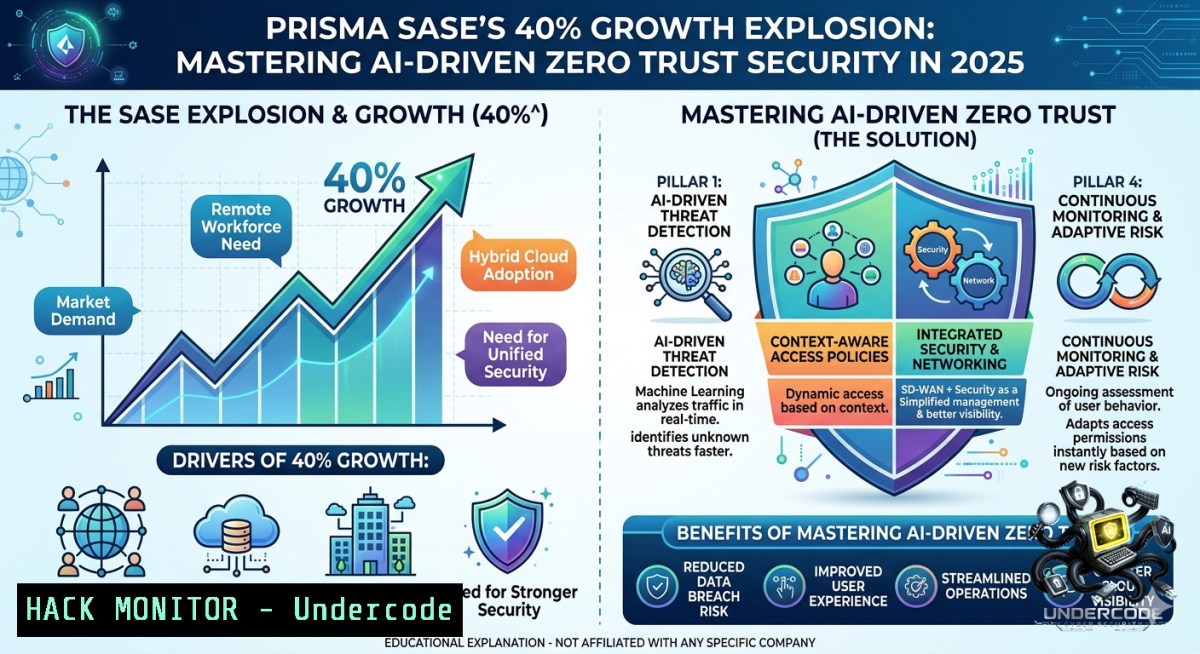
Secure Access Service Edge (SASE) converges networking and security into a single cloud-1ative service, a paradigm shift accelerated by the AI-driven era. With Prisma SASE delivering 40% year-over-year growth and outpacing the market by 2x, organizations must understand how to implement, harden, and automate these platforms to combat modern threats while enabling secure digital transformation.
Learning Objectives:
– Deploy and configure core SASE components (SWG, CASB, ZTNA, SD-WAN) using Prisma Access and open-source alternatives
– Implement AI-driven security policies and anomaly detection with machine learning models
– Harden cloud perimeters and API gateways against zero-day exploits in a SASE architecture
You Should Know:
1. Deploying a Basic SASE-Inspired Lab with Open Source Tools
SASE combines multiple security functions. While Prisma SASE is enterprise-grade, you can simulate its components using Linux tools to understand the underlying mechanics.
What this does:
Sets up a software-defined perimeter (SDP) using `firewalld`, `nftables`, and `WireGuard` to mimic ZTNA and secure SD-WAN tunneling.
Step-by-step guide (Linux):
1. Install WireGuard and dependencies:
sudo apt update && sudo apt install wireguard resolvconf -y
2. Generate server and client keys:
cd /etc/wireguard
umask 077
wg genkey | tee server_priv | wg pubkey > server_pub
wg genkey | tee client_priv | wg pubkey > client_pub
3. Create server config (`/etc/wireguard/wg0.conf`):
[bash]
PrivateKey = <server_priv>
Address = 10.0.0.1/24
ListenPort = 51820
PostUp = iptables -A FORWARD -i wg0 -j ACCEPT; iptables -t nat -A POSTROUTING -o eth0 -j MASQUERADE
PostDown = iptables -D FORWARD -i wg0 -j ACCEPT; iptables -t nat -D POSTROUTING -o eth0 -j MASQUERADE
[bash]
PublicKey = <client_pub>
AllowedIPs = 10.0.0.2/32
4. Enable IP forwarding and start WireGuard:
echo "net.ipv4.ip_forward=1" >> /etc/sysctl.conf && sysctl -p
sudo systemctl enable wg-quick@wg0 && sudo systemctl start wg-quick@wg0
5. Configure client and test connectivity:
 On client
sudo wg-quick up wg0
ping 10.0.0.1
Windows alternative:
Use built-in VPN client with IKEv2 or install WireGuard for Windows. For Microsoft Always On VPN (device tunnel), run in PowerShell as Admin:
Add-VpnConnection -1ame "SASE-Tunnel" -ServerAddress "vpn.gateway.com" -TunnelType "Ikev2" -AuthenticationMethod "MachineCertificate" -SplitTunneling $false
2. AI-Driven Anomaly Detection Using Machine Learning on NetFlow Data
Prisma SASE leverages AI to detect behavioral anomalies. You can replicate lightweight anomaly scoring using Python and `scikit-learn`.
Step-by-step:
1. Collect flow logs (e.g., via `nfdump` on Linux):
sudo apt install nfdump
sudo nfcapd -D -l /var/flows/ -p 9995
nfdump -r /var/flows/nfcapd.202503051200 -o csv > flows.csv
2. Run a Python isolation forest script to detect outliers:
import pandas as pd
from sklearn.ensemble import IsolationForest
df = pd.read_csv('flows.csv', usecols=['bytes','packets','duration'])
model = IsolationForest(contamination=0.05, random_state=42)
df['anomaly'] = model.fit_predict(df[['bytes','packets','duration']])
print(df[df['anomaly'] == -1])
3. Integrate with SIEM (Splunk or Wazuh) using REST API:
curl -X POST "https://your-siem:8088/services/collector" -H "Authorization: Splunk <token>" -d '{"sourcetype":"anomaly","event":"suspicious_flow"}'
3. Cloud Hardening for SASE Edge Nodes (AWS/Azure)
SASE platforms often deploy cloud gateways. Hardening these instances prevents lateral movement.
Step-by-step (AWS EC2 with Prisma Cloud Compute template):
1. Launch a Linux instance with CIS Benchmark AMI.
2. Apply AWS Inspector findings and remediate:
 Disable SSH password auth and root login
sudo sed -i 's/^PasswordAuthentication yes/PasswordAuthentication no/' /etc/ssh/sshd_config
sudo sed -i 's/^PermitRootLogin yes/PermitRootLogin no/' /etc/ssh/sshd_config
sudo systemctl restart sshd
3. Install Falco for runtime threat detection:
curl -fsSL https://falco.org/repo/falcosecurity-packages.asc | sudo apt-key add -
echo "deb https://download.falco.org/packages/deb stable main" | sudo tee /etc/apt/sources.list.d/falcosecurity.list
sudo apt update && sudo apt install falco -y
sudo systemctl enable falco && sudo systemctl start falco
4. Block suspicious outbound traffic via AWS Network Firewall:
aws network-firewall create-rule-group --rule-group-1ame "SASE-EGRESS" --type STATELESS --capacity 100 --rules file://blocklist.json
4. API Security for SASE Orchestration (Mitigating Injection & Broken Auth)
Prisma SASE exposes APIs for policy management. Insecure APIs are a top attack vector.
Testing API vulnerabilities with curl and jwt_tool:
1. Enumerate API endpoints (example from a typical SASE controller):
curl -X GET "https://sase-controller.example.com/api/v1/tenants" -H "Authorization: Bearer $TOKEN"
2. Test for IDOR (Insecure Direct Object Reference):
for id in {1..100}; do curl -s -o /dev/null -w "%{http_code}\n" "https://sase-controller/api/tenant/$id/config" -H "Authorization: Bearer $TOKEN"; done
3. Exploit JWT misconfiguration using `jwt_tool`:
git clone https://github.com/ticarpi/jwt_tool
python3 jwt_tool/jwt_tool.py <JWT_TOKEN> -T -X a -I -hc kid -hv "../../dev/null"
4. Mitigation – enforce strict API schema validation and rate limiting via Nginx:
limit_req_zone $binary_remote_addr zone=api:10m rate=10r/s;
location /api/ {
limit_req zone=api burst=20 nodelay;
validate_referer strict;
}
5. Zero-Day Exploit Mitigation in SASE Environments
SASE platforms must block unknown threats. Use behavioral IPS rules and sandboxing.
Step-by-step with Snort + ClamAV (Linux gateway):
1. Install Snort 3:
sudo apt install snort3 -y
sudo snort -c /etc/snort/snort.lua -i eth0 -A alert_fast -l /var/log/snort
2. Download community rules and add custom SASE-specific signature for suspicious TLS certs:
echo "alert tls $HOME_NET any -> $EXTERNAL_NET any (msg:\"SASE Suspicious TLS Cert\"; content:\"|55 04 03|\"; sid:1000001;)" >> /etc/snort/rules/local.rules
3. Integrate with Cuckoo Sandbox for dynamic analysis of unknown executables:
 Submit file via cuckoo API
curl -F "[email protected]" http://localhost:8090/tasks/create/file
4. Automatically block malicious hashes using Prisma SASE’s custom URL category:
paloalto-cli --api-key $API_KEY update custom-url-category --1ame "blocklist" --add "https://evil.com" --action block
6. Windows Group Policy for SASE Client Deployment
For organizations rolling out Prisma Access or any SASE client agent, automate via GPO.
Step-by-step:
1. Create MSI transform for silent install:
msiexec /a "PrismaSASE.msi" TARGETDIR="C:\Temp" /qb
2. Deploy via Group Policy Management Console:
– Copy MSI to `\\domain\sysvol\Policies\Software\Prisma`
– Create GPO > Computer Configuration > Policies > Software Settings > Software installation
– Assign MSI with option “Uninstall this application when it falls out of scope”
3. Enforce firewall rules to force tunnel through SASE gateway:
New-1etFirewallRule -DisplayName "Force SASE Tunnel" -Direction Outbound -RemoteAddress "10.0.0.0/8" -Action Allow
New-1etFirewallRule -DisplayName "Block Direct Internet" -Direction Outbound -RemoteAddress "0.0.0.0/0" -Protocol Any -Action Block -Profile Domain
What Undercode Say:
– Key Takeaway 1: Prisma SASE’s 40% growth isn’t just marketing – it signals a market-wide pivot to converged, cloud-delivered security. Practitioners must upskill in ZTNA, SWG, and SD-WAN integration to stay relevant.
– Key Takeaway 2: Automation and AI-driven policy enforcement are becoming baseline requirements; manual firewalling is obsolete. Hands-on labs with open-source analogues (WireGuard, Falco, Snort) provide foundational skills for enterprise SASE platforms.
Analysis: The post highlights how exceptional go-to-market and product depth drive adoption. But from a defender’s lens, rapid SASE adoption introduces new challenges: API misconfigurations, tenant isolation failures, and blind spots in AI detection models. The 40% growth rate suggests many organizations are migrating without full security maturity – expect a rise in SASE-specific CVEs and cloud bypass attacks. Training programs (e.g., Palo Alto’s Prisma SASE EDU-230) and offensive security testing for SASE edges will become critical by 2026.
Expected Output:
The article above provides actionable commands, configurations, and risk analyses directly tied to the success metrics of Prisma SASE. Implement these steps to harden your own SASE deployment or to simulate attack/defense scenarios.
Prediction:
– +1 Enterprises will accelerate AI‑augmented SASE adoption, cutting incident response times by 60% through real‑time anomaly blocking.
– -1 A wave of supply‑chain attacks targeting SASE client agents and cloud‑native policy engines will emerge, exploiting the same 2x market growth for phishing and backdoor deployment.
– +1 Open‑source SASE components (e.g., OpenZiti) will gain enterprise traction, democratizing zero trust for mid‑market firms.
– -1 Over‑reliance on a single SASE vendor (e.g., Prisma) creates vendor lock‑in and single‑point‑of‑failure risks; multi‑cloud SASE mesh will be a mandatory architecture by 2027.
– +1 AI‑driven root cause analysis in SASE platforms will automate compliance reporting, saving thousands of auditor hours annually.
▶️ Related Video (80% Match):
🎯Let’s Practice For Free:
🎓 Live Courses & Certifications:
[Join Undercode Academy for Verified Certifications](https://undercode.co.uk/certifications/)
🚀 Request a Custom Project:
Secure, high-velocity infrastructure and disruptive technological engineering. Contact our engineering team for high-tier development and proprietary systems:
[[email protected]](mailto:[email protected])
💎 Smart Architecture | 🛡️ Secure by Design | ⭐ Trusted by Thousands
IT/Security Reporter URL:
Reported By: [Najibhatahet Prismasase](https://www.linkedin.com/posts/najibhatahet_prismasase-prismaaccess-prismabrowser-share-7467696207344103424-hW8q/) – Hackers Feeds
Extra Hub: Undercode MoN
Basic Verification: Pass ✅
🔐JOIN OUR CYBER WORLD [ CVE News • HackMonitor • UndercodeNews ]
[💬 Whatsapp](https://undercode.help/whatsapp) | [💬 Telegram](https://t.me/UndercodeCommunity)
📢 Follow UndercodeTesting & Stay Tuned:
[𝕏 formerly Twitter 🐦](https://x.com/undercodeupdate) | [@ Threads](https://www.threads.net/@undercodetesting) | [🔗 Linkedin](https://www.linkedin.com/company/undercodetesting/) | [🦋BlueSky](https://bsky.app/profile/undercode.bsky.social)


