
Listen to this Post
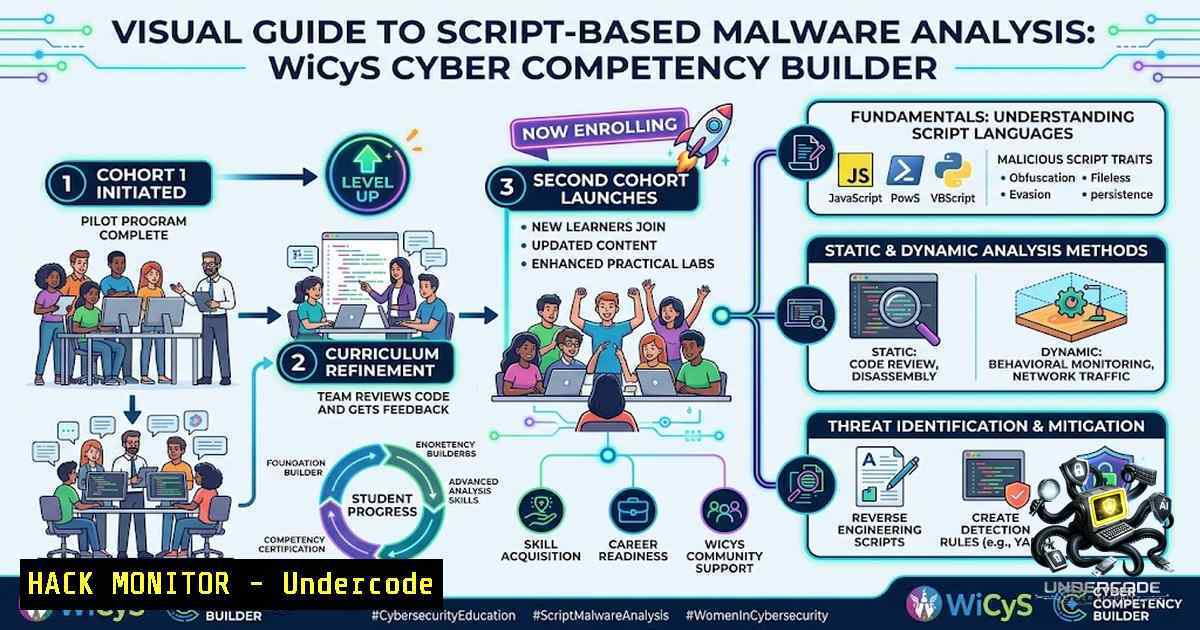
Introduction:
The Women in CyberSecurity (WiCyS) Cyber Competency Builder program, in partnership with Just Hacking Training (JHT), has officially launched its second cohort for Script-Based Malware Analysis. This eight-week program, led by renowned cybersecurity researcher and JHT Co-Founder John Hammond, focuses on analyzing malicious software that can be converted into human-readable code, making it more accessible than traditional binary reverse engineering with debuggers like IDA or Ghidra. Participants will gain hands-on experience through browser-based virtual machines and live mentorship sessions.
Learning Objectives & Secrets:
- Objective 1: Master Static Analysis of Script-Based Malware – Learn to examine malicious scripts (Batch, PowerShell, VBS, JavaScript) without executing them, identifying indicators of compromise (IoCs) and understanding the attacker’s intent through code review and deobfuscation techniques.
- Objective 2 Secret Tip: Leverage CyberChef for Rapid Deobfuscation – Use CyberChef’s “Magic” operation to automatically detect and decode Base64-encoded PowerShell commands, extract embedded payloads, and unravel多层 obfuscation in batch files. Pro tip: Build custom “Recipes” for recurring malware families to streamline your analysis workflow.
- Objective 3 Secret Tip: Automate with YARA Rules and Batch Processing – Create custom YARA rules to detect specific malware families, then use batch scripts to scan entire directories of suspicious files. Combine with VirusTotal’s `vt-cli` for automated hash lookups and threat intelligence enrichment.
You Should Know:
1. Setting Up Your Malware Analysis Lab Environment
Before diving into script-based malware analysis, establishing a safe, isolated lab environment is critical. The JHT course provides pre-configured browser-based VMs, but setting up your own lab offers flexibility for independent research.
Step-by-step guide:
Windows:
 Enable Windows Sandbox (Windows 10/11 Pro/Enterprise)
Enable-WindowsOptionalFeature -Online -FeatureName "Containers-DisposableClientVM" -All

Install FlareVM (FireEye's malware analysis VM)
 Download flarevm.ps1 from GitHub and run:
Set-ExecutionPolicy Unrestricted -Force
.\flarevm.ps1 -hostname "FLAREVM" -password "YourSecurePassword123!"
Linux (REMnux – specialized malware analysis distribution):
 Install REMnux as a virtual machine or Docker container
docker pull remnux/remnux:latest
docker run --rm -it --1ame remnux remnux/remnux:latest /bin/bash

Update REMnux tools
sudo remnux update

Install additional tools
sudo apt-get install -y yara clamav radare2 ghidra
Network Isolation: Configure your VM with Host-Only or NAT networking to prevent accidental malware propagation. Use a dedicated analysis network segment with no access to production systems.
2. Batch Malware Analysis: Techniques and Tools
Batch files (.bat) remain a popular vector for attackers due to their simplicity and native execution on Windows systems. Understanding how to analyze, deobfuscate, and extract payloads from malicious batch scripts is a foundational skill.
Step-by-step guide for analyzing a suspicious batch file:
Step 1: Initial Triage
 Linux - Check file type
file suspicious.bat

Extract strings and comments
grep -v ^:: suspicious.bat > cleaned.bat  Remove comment lines
strings -1 6 suspicious.bat | head -20  Extract readable strings
Step 2: Deobfuscation with Batch-Dump
Batch-Dump is a Python utility that watches directories for compiled batch files and extracts/deobfuscates them.
 Clone and run Batch-Dump
git clone https://github.com/SwezyDev/Batch-Dump.git
cd Batch-Dump
python main.py
 Select option 1 to monitor directories, or option 2 to deobfuscate a specific file
Step 3: Analyze Obfuscated Commands
Common obfuscation patterns include:
- Variable substitution:
%random%,%cd%, `%tmp%`
– Character substitution using `findstr` and `cmd /c`
– Encoded PowerShell payloads embedded in batch
Windows:
 Extract encoded PowerShell from batch
findstr /C:"PowerShell" suspicious.bat
findstr /C:"-enc" suspicious.bat
findstr /C:"IEX" suspicious.bat
Step 4: Dynamic Analysis in Sandbox
Execute the batch file in an isolated VM while monitoring:
– File system changes (Process Monitor, RegShot)
– Network connections (Wireshark, TCPView)
– Process creation (Process Explorer)
3. Script-Based Malware Analysis Tools and Commands
Script-based malware spans multiple languages including PowerShell, VBScript, JavaScript, and Python. Each requires specific analysis approaches.
PowerShell Malware Analysis:
Extract and decode obfuscated PowerShell:
 Extract Base64-encoded commands
Select-String -Path malware.ps1 -Pattern "([A-Za-z0-9+/]{4,}={0,2})" | ForEach-Object { $_.Matches.Value }

Decode Base64
 Log PowerShell execution
Set-ExecutionPolicy Bypass -Scope Process -Force
Start-Transcript -Path "C:\logs\ps_log.txt"
.\malware.ps1
Stop-Transcript
JavaScript Malware Analysis:
Tools for JS deobfuscation:
- box-js – Emulates JScript/WScript environments for safe execution
- JSDetox – Browser-based deobfuscation
- jsunpack-1 – Emulates browser functionality to unpack malicious scripts
Basic JS analysis workflow:
 Extract and beautify JavaScript
curl -s http://malicious-site/payload.js | js-beautify > cleaned.js

Run box-js for emulation
box-js payload.js --output-dir ./analysis/
VBScript Analysis:
' Common VBS obfuscation uses Chr() and Execute()
' Decode using CyberChef or custom Python script
4. Automating Malware Analysis with Ghidra Scripting
While script-based malware is readable, some threats involve compiled components that require reverse engineering. Ghidra’s scripting capabilities enable automated analysis.
Step-by-step guide for Ghidra headless analysis:
Step 1: Install Ghidra and scripts
 Download Ghidra from NSA
wget https://github.com/NationalSecurityAgency/ghidra/releases/download/Ghidra_11.0.3_build/ghidra_11.0.3_PUBLIC_20240425.zip
unzip ghidra_11.0.3_PUBLIC_20240425.zip

Place custom scripts in Ghidra's script directory
cp ExtractMalwareFeatures.java ~/ghidra_11.0.3/Ghidra/Features/Base/ghidra_scripts/
Step 2: Run headless analysis
 Analyze multiple samples in batch
~/ghidra_11.0.3/support/analyzeHeadless /path/to/output -import /path/to/malware_samples -scriptPath /path/to/scripts -postScript ExtractMalwareFeatures.java
Step 3: Automate with Python
 Python wrapper for Ghidra headless automation
import subprocess
import os

samples_dir = "/path/to/malware_samples"
output_dir = "/path/to/analysis_output"

for sample in os.listdir(samples_dir):
cmd = [
"/path/to/ghidra/support/analyzeHeadless",
output_dir,
"-import", os.path.join(samples_dir, sample),
"-postScript", "ExtractMalwareFeatures.java"
]
subprocess.run(cmd)
5. Cloud and API Security for Malware Analysts
Modern malware increasingly leverages cloud services and APIs for command-and-control (C2) and data exfiltration. Understanding API security is essential.
Key API security considerations:
API Key Exposure Detection:
 Search for hardcoded API keys in malware samples
grep -rE "(api[_-]?key|apikey|secret|token|Bearer)" suspicious_directory/
strings malware_sample.exe | grep -E "[a-zA-Z0-9]{32,}"  Potential API keys
Analyzing Malicious API Calls:
 Monitor API calls with mitmproxy or Burp Suite
 Example: Intercept and log API requests
import requests
import json

def analyze_c2_traffic(pcap_file):
 Extract API endpoints and parameters
 Look for suspicious patterns like base64-encoded payloads
pass
Cloud Malware Detection:
- Monitor for unusual API calls to AWS, Azure, or GCP
- Implement IAM policies to restrict service usage
- Use cloud-1ative threat detection (GuardDuty, Defender for Cloud)
6. IOC Extraction and Threat Intelligence Integration
Extracting Indicators of Compromise (IoCs) from malware enables proactive defense and threat hunting.
Step-by-step IOC extraction:
Step 1: Extract Hashes
 Linux
sha256sum malware_sample.exe
md5sum malware_sample.exe

Windows PowerShell
Get-FileHash -Path malware_sample.exe -Algorithm SHA256
Step 2: Extract IPs and Domains
 Extract IP addresses
grep -Eo "([0-9]{1,3}.){3}[0-9]{1,3}" suspicious_file.txt | sort -u

Extract domains
grep -Eo "[a-zA-Z0-9.-]+.[a-zA-Z]{2,}" suspicious_file.txt | sort -u
Step 3: Query VirusTotal API
 Using vt-cli (VirusTotal CLI)
vt file scan malware_sample.exe
vt file report <hash>
vt domain report malicious-domain.com
Step 4: Create YARA Rules
rule Suspicious_PowerShell_Download {
meta:
description = "Detects PowerShell download cradle"
severity = "high"
strings:
$ps1 = "PowerShell" nocase
$download = "DownloadFile" nocase
$webclient = "WebClient" nocase
$iex = "IEX" nocase
condition:
$ps1 and $download and $webclient and $iex
}
What Undercode Say:
- Key Takeaway 1: Script-based malware analysis is more accessible than traditional binary reverse engineering because scripts are human-readable, allowing analysts to understand attacker intent without specialized debugger knowledge. This democratizes malware analysis for junior analysts and sysadmins transitioning into security roles.
-
Key Takeaway 2: The WiCyS Cyber Competency Builder program exemplifies the industry shift toward skills-based, hands-on training that bridges the cybersecurity workforce gap. With 5-7 hours weekly of self-paced coursework and direct access to course authors like John Hammond, participants gain job-ready skills aligned with high-demand roles.
Analysis: The partnership between WiCyS and Just Hacking Training addresses a critical industry need: practical, accessible malware analysis training for women and underrepresented groups in cybersecurity. John Hammond’s background as a DoD Cyber Training Academy instructor and Huntress threat operations team member brings real-world adversarial perspective to the curriculum. The program’s focus on script-based threats is timely, as attackers increasingly use living-off-the-land techniques with PowerShell, Batch, and VBScript to evade detection. The inclusion of browser-based VMs removes technical barriers to entry, allowing participants to focus on learning rather than environment setup. As malware continues to evolve with AI-assisted development, foundational script analysis skills remain essential for both blue team defenders and threat hunters.
Prediction:
- +1 The Script-Based Malware Analysis cohort will produce a new wave of skilled analysts capable of detecting and mitigating script-based threats, directly addressing the global cybersecurity talent shortage.
- +1 Increased participation of women in malware analysis roles will diversify the threat intelligence community, bringing fresh perspectives to attack pattern identification.
- -1 Attackers will likely increase obfuscation complexity in script-based malware to counter the growing analyst community, potentially adopting AI-generated polymorphic scripts.
- +1 The Cyber Competency Builder model will be replicated by other professional organizations, creating a scalable framework for hands-on cybersecurity education.
- -1 Organizations failing to invest in script-based malware detection capabilities will remain vulnerable to living-off-the-land attacks that bypass traditional signature-based defenses.
- +1 Integration of malware analysis training with cloud security and AI defense operations will produce well-rounded security professionals capable of defending modern hybrid environments.
▶️ Related Video (86% Match):
🎯Let’s Practice For Free:
🎓 Live Courses & Certifications:
Join Undercode Academy for Verified Certifications
🚀 Request a Custom Project:
Secure, high-velocity infrastructure and disruptive technological engineering. Contact our engineering team for high-tier development and proprietary systems:
[email protected]
💎 Smart Architecture | 🛡️ Secure by Design | ⭐ Trusted by Thousands
IT/Security Reporter URL:
Reported By: https://lnkd.in/p/eqKiJPyW – Hackers Feeds
Extra Hub: Undercode MoN
Basic Verification: Pass ✅


