
Listen to this Post
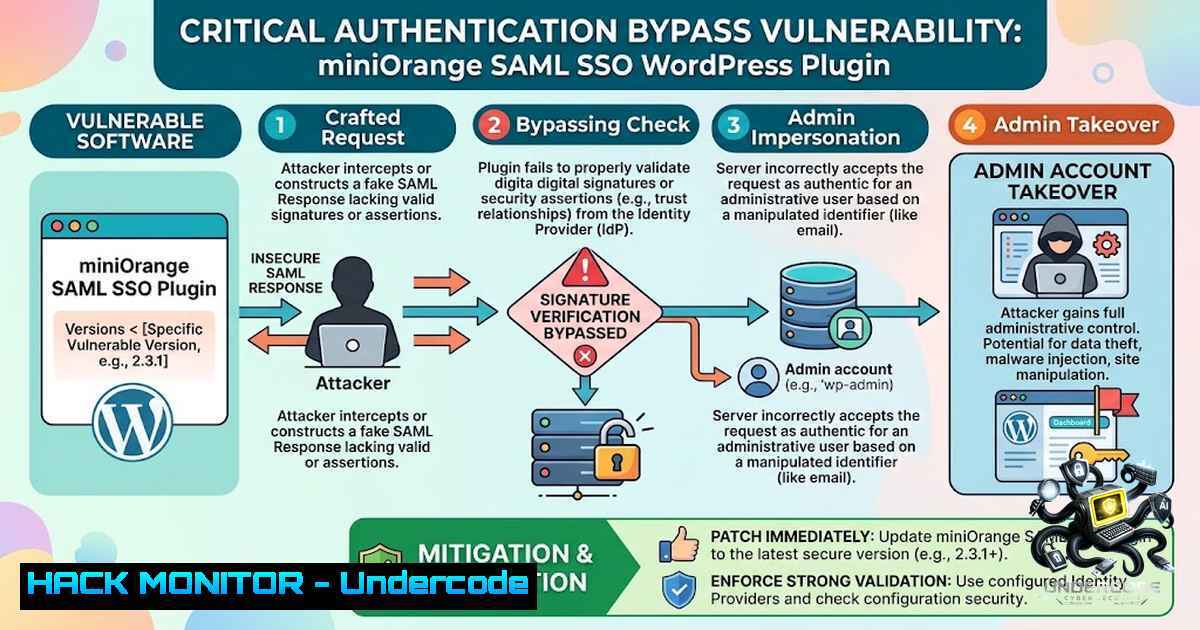
Introduction:
Hackers are actively exploiting two critical authentication bypass vulnerabilities in the miniOrange SAML 2.0 Single Sign On plugin for WordPress, allowing unauthenticated attackers to forge SAML responses and log in as site administrators. The miniOrange SAML SSO plugin transforms WordPress sites into SAML service providers, enabling users to authenticate through corporate identity platforms such as Microsoft Entra ID, Okta, Google Workspace, or OneLogin. With over 10,000 downloads for the free version and 30,000 customers across its paid editions, this plugin is widely deployed across enterprise WordPress environments—making these vulnerabilities a critical supply-chain threat.
Learning Objectives & Secrets:
- Objective 1: Understand the Two-Flaw Chain – Learn how CVE-2026-61979 (signature algorithm confusion) and CVE-2026-15981 (OpenSSL error handling) are chained to bypass authentication entirely.
-
Objective 2 Secret Tip: Signature Algorithm Confusion – Because the plugin accepts the signature algorithm from incoming SAML responses instead of enforcing the configured one, attackers can select HMAC-SHA1, causing the plugin to treat the IdP’s RSA public key as a shared secret—allowing forged signatures.
-
Objective 3 Secret Tip: Loose Boolean Check Exploitation – The `mo_saml_validate_signature()` function performs a loose boolean check on the tri-state integer returned by
openssl_verify(). When `openssl_verify()` returns `-1` (indicating an error), the code incorrectly evaluates it as truthy—treating an OpenSSL processing error as successful signature verification.
You Should Know:
- Vulnerability Deep Dive: CVE-2026-15981 – Unauthenticated Authentication Bypass
This critical vulnerability (CVSS 9.8) affects all versions of the SAML Single Sign On – SSO Login plugin up to and including 5.4.4. The root cause lies in PHP’s loose comparison: `openssl_verify()` returns `1` for valid signatures, `0` for invalid signatures, and `-1` for internal errors. The plugin uses `if ($result)` instead of if ($result === 1), meaning the error condition `-1` is evaluated as true.
Attack Flow:
Attacker crafts SAMLResponse with malformed signature
↓
mo_saml_validate_signature() called
↓
openssl_verify() returns -1 (OpenSSL error)
↓
PHP loose comparison: if ($result) → -1 treated as true
↓
wp_set_auth_cookie() called for attacker-controlled user
↓
Attacker gains authenticated session as Administrator
Step‑by‑step guide to understand the exploitation:
- The attacker identifies a WordPress site running the vulnerable miniOrange SAML SSO plugin (version ≤ 5.4.4)
- The attacker enumerates existing WordPress users via REST API (
/wp-json/wp/v2/users) or author archives (/?author=N) - The attacker crafts a SAMLResponse containing an attacker-controlled NameID and a deliberately malformed signature value
- The malformed signature triggers an OpenSSL internal error during verification
- The plugin’s loose boolean check treats the `-1` error as a successful verification
6. `wp_set_auth_cookie()` is called for the targeted user account, granting an authenticated session
Linux Command to Check Plugin Version:
 Check if vulnerable plugin is installed and its version
wp plugin list --field=name,version | grep -i miniorange-saml

Alternative: grep directly in wp-content
grep -r "Version:" /var/www/html/wp-content/plugins/miniorange-saml-20-single-sign-on/ 2>/dev/null | head -1

Check for the presence of the vulnerable file
ls -la /var/www/html/wp-content/plugins/miniorange-saml-20-single-sign-on/ | grep class-mo-saml-login-validate
- Vulnerability Deep Dive: CVE-2026-61979 – Signature Algorithm Confusion
This vulnerability (CVSS 8.1, High) affects plugin versions up to and including 5.4.3. The plugin accepts the signature algorithm from incoming SAML responses rather than enforcing the server-configured algorithm. By selecting HMAC-SHA1, an attacker causes the plugin to treat the IdP’s RSA public key as a shared secret—since the public key is known, the attacker can forge a signature the plugin accepts as authentic.
Step‑by‑step guide to the chain exploitation:
- Attacker leverages CVE-2026-61979 to force HMAC-SHA1 signature algorithm
- Plugin treats IdP’s public RSA key (publicly known) as the HMAC shared secret
- Attacker forges a valid SAMLResponse signature using the public key
- Attacker then leverages CVE-2026-15981 to bypass verification entirely with malformed signature
5. Combined attack results in unauthenticated administrator session
Windows Command to Check for Vulnerable Plugin:
 Check WordPress plugin directory
dir "C:\inetpub\wwwroot\wp-content\plugins\miniorange-saml-20-single-sign-on\" /s | findstr "class-mo-saml"

Check version in plugin main file
findstr /i "Version:" "C:\inetpub\wwwroot\wp-content\plugins\miniorange-saml-20-single-sign-on\miniorange-saml-20-single-sign-on.php"
3. Detection and Monitoring
Active exploitation attempts have been observed originating from six IP addresses across Europe, Africa, and the United States. DigitalOcean blocked an anomalous WordPress administrator session originating outside its trusted network on August 16, 2026, confirming that attackers are actively chaining these flaws.
Commands to Detect Compromise:
 Check for unexpected administrator users created recently
wp user list --role=administrator --format=table

Check WordPress authentication logs (if using Wordfence or similar)
tail -1 100 /var/www/html/wp-content/wflogs/.log 2>/dev/null | grep -i "admin"

Check for suspicious SAML login attempts in web server logs
sudo grep -i "saml" /var/log/nginx/access.log | grep -i "POST" | tail -20
 For Apache:
sudo grep -i "saml" /var/log/apache2/access.log | grep -i "POST" | tail -20

Check for unusual admin session creation times
sudo grep "wp_set_auth_cookie" /var/log/nginx/access.log 2>/dev/null || \
sudo grep "wp_set_auth_cookie" /var/log/apache2/access.log 2>/dev/null
4. Patch and Remediation
Security firm Patchstack reported that fixes were released in July 2026. However, the vendor’s advisory only covered the free edition, leaving paid edition users unaware and unpatched. The WordPress dashboard does not show update warnings for paid plugin editions—website owners must manually upgrade.
Patched Versions by Edition:
| Edition | Patched Version |
||–|
| Free, single site | 5.4.5 |
| Premium, single site | 13.0.4 |
| Standard, single site | 17.06 |
| Premium/Enterprise/All-Inclusive, multisite | 20.2.8 |
| Enterprise/All-Inclusive, single site | 26.0.3 |
| VIP, single site | 32.0.8 |
| VIP, multisite | 35.0.7 |
Step‑by‑step patching guide:
- Identify your plugin edition – Check your license or purchase history
- Download the patched version from the miniOrange customer portal (not WordPress.org for paid editions)
- Backup your site – Full database and files backup before any update
- Upload and replace the plugin files via FTP or WordPress admin
- Verify the update – Check plugin version in WordPress admin dashboard
- Audit administrator accounts – Remove any unauthorized admin users created during the exposure window
If immediate patching is not possible:
- Temporarily deactivate the SAML Single Sign On plugin
- Restrict network access to the SAML assertion consumer endpoint at the perimeter or WAF level
- Monitor authentication logs for anomalous login events (logins bypassing normal credential entry or originating from unexpected IP ranges)
WAF Rule Example (ModSecurity):
 Block suspicious SAMLResponse POST requests with malformed signatures
SecRule REQUEST_URI "/wp-content/plugins/miniorange-saml-20-single-sign-on/" \
"id:100001,phase:2,deny,status:403,msg:'miniOrange SAML SSO Attack Detected'"

Alternatively, block access to the SAML endpoint entirely
<LocationMatch "/wp-content/plugins/miniorange-saml-20-single-sign-on/">
Require all denied
</LocationMatch>
5. Additional Vulnerabilities in miniOrange Ecosystem
The miniOrange plugin family has been plagued by multiple security issues. CVE-2026-15013 is another critical authentication bypass (CVSS 9.8) affecting versions through 5.4.3, exploiting signature algorithm confusion to forge valid SAML responses. CVE-2026-28148 affects the Headless Single Sign On plugin (versions ≤ 1.6), allowing unauthenticated attackers to spoof trusted identity assertions. CVE-2026-19842 involves a trust anchor override vulnerability where unauthenticated attackers can submit SAML responses with their own certificates to overwrite the trusted signing certificate.
6. Hardening Recommendations
Cloud and Infrastructure Hardening:
- Implement network segmentation – restrict SAML endpoints to trusted IP ranges only
- Deploy Web Application Firewall rules to detect and block SAML response forgery attempts
- Enable fail2ban or similar to block IPs showing suspicious authentication patterns
- Use Cloudflare or similar CDN with WAF capabilities to filter malicious SAML requests
Linux Hardening Commands:
 Block suspicious IPs via iptables (example)
sudo iptables -A INPUT -s <suspicious_ip> -j DROP

Set up fail2ban for WordPress login protection
sudo apt-get install fail2ban
sudo systemctl enable fail2ban
sudo systemctl start fail2ban

Monitor for unauthorized file changes in plugin directory
sudo inotifywait -m -r /var/www/html/wp-content/plugins/miniorange-saml-20-single-sign-on/
What Undercode Say:
- Key Takeaway 1: The combination of CVE-2026-61979 and CVE-2026-15981 represents a textbook example of how seemingly minor coding flaws—accepting unvalidated algorithm parameters and using loose type comparisons—can be chained into a devastating unauthenticated admin takeover. The CVSS 9.8 rating reflects the severity: network-accessible, no privileges required, no user interaction, and full system compromise.
-
Key Takeaway 2: The vendor’s failure to notify paid edition users about critical security fixes is a serious operational failure. With six paid editions lacking update warnings in the WordPress dashboard, thousands of enterprise WordPress sites remain vulnerable to active exploitation. This underscores the importance of maintaining an independent asset inventory and vulnerability management program that doesn’t rely solely on vendor notifications.
Analysis: The active exploitation of these vulnerabilities represents a significant threat to enterprise WordPress deployments. Organizations using miniOrange SAML SSO for integration with Microsoft Entra ID, Okta, or Google Workspace are particularly at risk, as these identity platforms are typically trusted for high-privilege access. The availability of public proof-of-concept exploits dramatically lowers the barrier for threat actors, and the observed scanning from multiple continents indicates widespread reconnaissance. The fact that DigitalOcean detected an actual compromise on August 16 confirms that the attack is already in the wild. Organizations must prioritize patching over any other security initiative—every unpatched site is a potential entry point for ransomware, data theft, or supply chain compromise.
Prediction:
- +1 Organizations that patch promptly and conduct thorough forensic audits will strengthen their incident response capabilities and gain valuable experience in handling third-party plugin vulnerabilities.
-
-1 The availability of public PoC exploits combined with the continued operation of unpatched paid edition sites will likely result in a wave of compromises over the coming weeks.
-
-1 Attackers will increasingly target WordPress plugins that handle enterprise authentication (SAML, OAuth, LDAP) as these provide the highest return on investment—one compromised admin account unlocks the entire site.
-
-1 The miniOrange incident will trigger increased scrutiny of WordPress plugin security by enterprise security teams, potentially leading to more restrictive plugin approval processes and slower deployment cycles.
-
+1 This incident will accelerate the adoption of automated vulnerability scanning and software composition analysis (SCA) tools in WordPress development workflows.
-
-1 Organizations that fail to patch will face significant risk of data breaches, with potential regulatory consequences under GDPR, CCPA, and other data protection frameworks.
▶️ Related Video (80% Match):
https://www.youtube.com/watch?v=285S3vqc1R4
🎯Let’s Practice For Free:
🎓 Live Courses & Certifications:
Join Undercode Academy for Verified Certifications
🚀 Request a Custom Project:
Secure, high-velocity infrastructure and disruptive technological engineering. Contact our engineering team for high-tier development and proprietary systems:
[email protected]
💎 Smart Architecture | 🛡️ Secure by Design | ⭐ Trusted by Thousands
IT/Security Reporter URL:
Reported By: https://lnkd.in/p/ee_9rwzJ – Hackers Feeds
Extra Hub: Undercode MoN
Basic Verification: Pass ✅


