
Listen to this Post
Introduction:
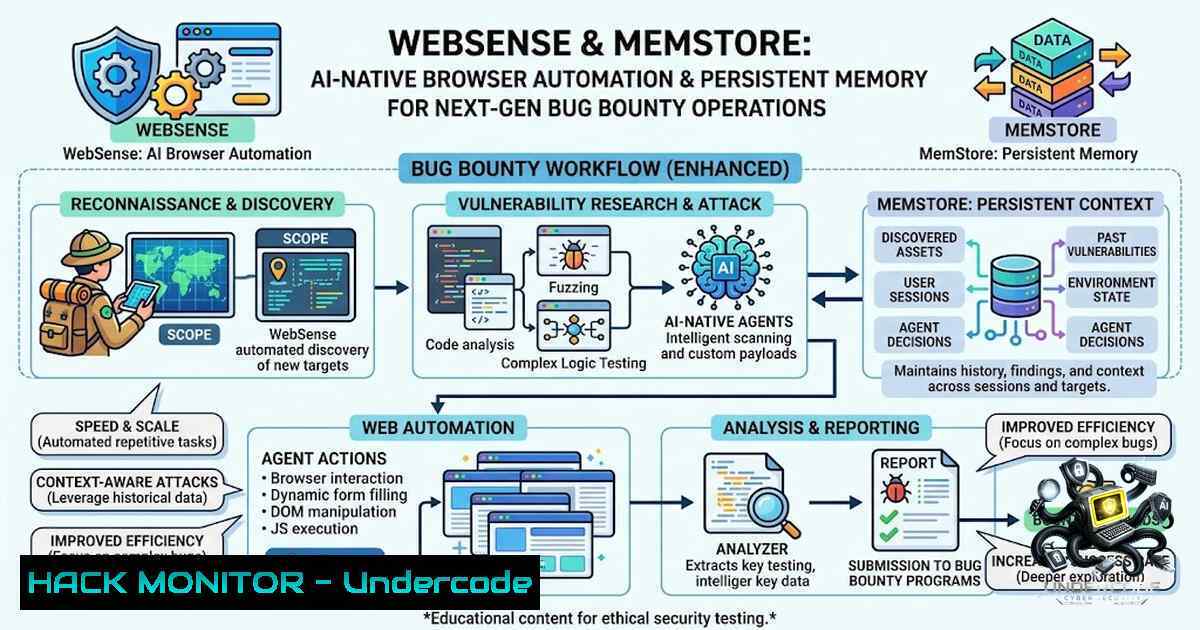
The integration of artificial intelligence into cybersecurity workflows is undergoing a paradigm shift, moving beyond traditional API calls and headless browsers. Two newly released open-source tools, WebSense and MemStore, are pioneering this evolution by enabling AI agents to interact with the web as a human would and retain contextual memory across sessions. This article explores the technical architecture of these tools, their implications for offensive security operations, and provides a comprehensive guide for cybersecurity professionals to deploy and leverage them in bug bounty and penetration testing environments.
Learning Objectives & Secrets:
- Objective 1: Master the implementation of non-vision browser automation using the Semantic Action Graph to evade bot detection while performing reconnaissance.
- Objective 2 Secret Tips: Leverage MemStore for persistent semantic recall to prevent AI agents from losing context during long-running vulnerability assessments.
- Objective 3 Secret Tips: Combine both tools to create an autonomous bug bounty pipeline that can navigate complex web applications and document vulnerabilities without manual intervention.
You Should Know: 1. WebSense Architecture and Deployment
The traditional approach to web automation relies heavily on the Chrome DevTools Protocol (CDP) or headless browsers, which are easily fingerprintable by security controls like Cloudflare or Imperva. WebSense circumvents this by leveraging your real Chrome instance and interacting directly with the Document Object Model (DOM). The core innovation is the “Semantic Action Graph,” which interprets the structure of a webpage to determine actionable elements without relying on screenshots or image recognition.
Step‑by‑step guide explaining what this does and how to use it.
Step 1: Install the MCP Server
Start by cloning the repository and installing dependencies. This setup creates a Model Context Protocol (MCP) server that acts as the bridge between your AI agent (like Claude or a custom LLM) and your local browser.
git clone https://github.com/spliffspliff70-wq/websense-mcp.git
cd websense-mcp
npm install
Step 2: Configure Chrome for Remote Debugging
WebSense requires a running Chrome instance with the remote debugging port enabled. This allows the MCP server to “inject” commands into your real browser profile, maintaining all cookies, sessions, and extensions that a normal user would have.
 Windows (Close Chrome first)
"C:\Program Files\Google\Chrome\Application\chrome.exe" --remote-debugging-port=9222

Linux
google-chrome --remote-debugging-port=9222
Tip: This eliminates the need for CDP and prevents the bot flags often triggered by headless user agents.
Step 3: Define the Semantic Action Graph
Instead of writing brittle XPath selectors, you define actions based on semantic labels. The AI agent sends a JSON structure to the MCP server, which translates it into DOM interactions.
{
"action": "click",
"target": "Login button",
"semantic_context": "Top navigation bar, visible after page load"
}
Step 4: Automate Bug Bounty Recon
You can script the agent to navigate through a target application, extract all forms and endpoints, and log the structure as structured data. This bypasses the rate-limiting checks often imposed on headless scrapers.
You Should Know: 2. MemStore Implementation for Persistent Memory
One of the critical limitations of current AI agents is the stateless nature of their context windows. MemStore solves this by providing a local, versioned, semantic memory store. When an AI agent discovers a vulnerability or a specific parameter, MemStore stores this with a timestamp and semantic recall capabilities. This is particularly useful in large bug bounty scopes where progress needs to be tracked over several days.
Step‑by‑step guide explaining what this does and how to use it.
Step 1: Setting Up the Local Vector Store
MemStore likely utilizes a local vector database (like SQLite with vector extensions) to store embeddings.
 Assuming the tool is installed alongside WebSense
python -m memstore.init
Step 2: Creating a Session Store
When starting a new bug bounty session, initialize a new memory session. This creates a unique namespace for the target.
from memstore import MemoryClient
client = MemoryClient(session_id="target_x")
client.save_context(key="admin_endpoint", value="/hidden-api/v2/admin", metadata={"date": "2026-09-01"})
Step 3: Semantic Recall
During later sessions, the agent can query the memory using natural language.
context = client.recall(query="Where did we find the SQL injection parameter?")
 The system returns the stored vector data with the highest similarity score.
Step 4: Versioning
If the application updates, MemStore allows versioning. The agent can revert to a previous state if a recent vulnerability was patched, allowing for regression testing.
You Should Know: 3. Integration into a Live Action Bug Bounty Pipeline
Combining WebSense and MemStore creates an autonomous reconnaissance machine. The agent uses WebSense to navigate the target site, mapping out the attack surface. Each discovered parameter or subdomain is stored in MemStore. The agent can then decide to run vulnerability scans based on the data recalled.
You Should Know: 4. Security Hardening and API Configuration
When deploying these tools, ensure that the MCP server is not exposed to external networks. Use firewall rules to restrict port 9222 (Chrome debugging) to localhost only. For Linux:
sudo ufw allow from 127.0.0.1 to any port 9222
Additionally, ensure that the memory store is encrypted at rest. MemStore should support encryption keys to protect the data (which may include sensitive internal IP addresses or admin paths).
You Should Know: 5. Vulnerability Exploitation and Mitigation Logic
The semantic action graph can be used to test for Cross-Site Scripting (XSS) or SQL injection without relying on regex patterns. The agent interprets the DOM to determine if input is reflected, and then uses the memory store to track which payloads were successful.
Step‑by‑step guide to Testing with WebSense:
- Navigate: The agent goes to the login page.
- Interact: It enters `` into the username field.
- Observe: It checks the DOM for error messages or execution of the script.
4. Store: It stores the result in MemStore.
What Undercode Say:
- Key Takeaway 1: The “non-vision” approach is a game-changer. By avoiding screenshots and CDP, WebSense effectively operates in a stealth mode that is difficult for WAFs (Web Application Firewalls) to detect, allowing for more accurate and unblocked reconnaissance.
- Key Takeaway 2: Semantic memory is the missing link for autonomous pentesting. MemStore provides the “long-term memory” that enables AI agents to not just find a vulnerability, but to correlate it with other data points across different sessions, mimicking a human pentester’s workflow.
- Analysis: The combination of these tools suggests a future where continuous automated penetration testing is the standard. The AI is no longer just a “co-pilot” but an autonomous operator that can remember, learn, and adapt to the target environment. However, the reliance on the host’s browser exposes a significant risk: malware inside the AI agent could hijack the user’s authenticated sessions. Security teams must sandbox these agents strictly. On the defensive side, blue teams will need to adjust their detection strategies, as this tool mimics legitimate traffic perfectly. This presents a new challenge: differentiating between a human user and an AI agent using the same browser profile.
Prediction:
- +1 The rise of semantic action graphs will lead to a surge in AI-driven red-team exercises, where AI agents can rapidly test entire networks without human oversight, reducing the attack surface window.
- -1 This technology will inevitably be weaponized by attackers, leading to an increase in sophisticated, AI-driven spear-phishing campaigns that use browser automation to mimic human behavior perfectly.
- -1 The reliance on local browser instances introduces a supply chain risk; if the MCP server is compromised, it could allow external control over the user’s web activities, leading to data exfiltration.
- +1 Enterprise security teams will adopt MemStore to create institutional knowledge bases of internal vulnerabilities, accelerating the remediation process by allowing AI to reference past exploits immediately.
- -1 Traditional WAF and bot mitigation tools (e.g., reCAPTCHA) may fail against WebSense, requiring vendors to invest heavily in behavioral biometrics and context-aware filtering to distinguish between legitimate agents and malicious ones.
- +1 The open-source nature of these tools allows for rapid community-driven improvements, enabling the development of a standardized “agent memory” protocol that could revolutionize how we handle incident response data.
- -1 The tools currently require advanced configuration and deep OS integration, which may lead to high operational overhead and potential instability in enterprise environments where Chrome versions are heavily managed.
- +1 We predict a convergence of WebSense and MemStore with existing SIEM solutions, allowing AI agents to automatically import logs, correlate them with active browsing, and suggest mitigation steps based on historical semantic data.
- -1 The potential for hallucination in the AI agent’s navigation logic might cause it to accidentally trigger production processes (e.g., deleting data) if not properly sandboxed, increasing liability.
- +1 This innovation sets the stage for a future of “agent-based compliance,” where AI tools autonomously verify security controls across web applications and store proof of compliance in a semantic, traceable memory layer.
▶️ Related Video (80% Match):
🎯Let’s Practice For Free:
🎓 Live Courses & Certifications:
Join Undercode Academy for Verified Certifications
🚀 Request a Custom Project:
Secure, high-velocity infrastructure and disruptive technological engineering. Contact our engineering team for high-tier development and proprietary systems:
[email protected]
💎 Smart Architecture | 🛡️ Secure by Design | ⭐ Trusted by Thousands
IT/Security Reporter URL:
Reported By: https://lnkd.in/p/egzsmg8Q – Hackers Feeds
Extra Hub: Undercode MoN
Basic Verification: Pass ✅


