
Listen to this Post
Introduction:
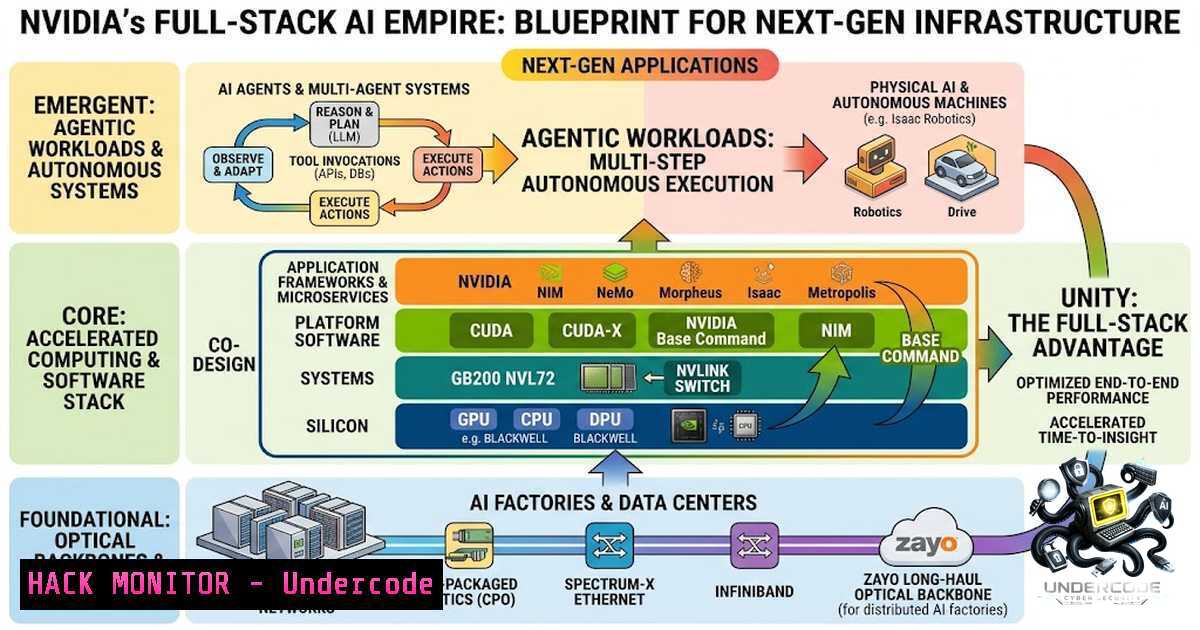
NVIDIA is rapidly transitioning from a discrete GPU vendor to a holistic AI infrastructure powerhouse. The company’s recent announcements—spanning the expansion of physical AI infrastructure with Coherent, the domination of MLPerf benchmarks with the Blackwell platform, and the enablement of large-scale AI agent deployments—underscore a strategic pivot toward full-stack integration. This article dissects the technical components of NVIDIA’s strategy, offering a deep dive into the hardware, software, and security implications of building and maintaining enterprise-grade AI ecosystems, bridging the gap between optical networking and high-performance computing.
Learning Objectives & Secrets:
- Objective 1: Mastering AI Infrastructure Monitoring. Learn how to implement real-time telemetry for GPU clusters using NVIDIA Management Library (NVML) and Prometheus, moving beyond basic `nvidia-smi` usage.
- Objective 2 Secret Tips: Optimizing Data Throughput for Multi-1ode Training. Discover how to fine-tune the NVIDIA Collective Communications Library (NCCL) environment variables to mitigate network bottlenecks, a critical skill when scaling agents across optical backbones.
- Objective 3 Secret Tips: Securing the AI Supply Chain. Implement strict hash verification and digital signatures for containerized AI models and NVIDIA NGC (NVIDIA GPU Cloud) components to prevent man-in-the-middle (MITM) attacks during model deployment.
- Understanding the Optical Backbone: Scaling AI Infrastructure with Coherent
NVIDIA’s investment in Coherent’s expanded facility in Texas highlights a crucial, often overlooked aspect of AI: the physical layer. As AI clusters grow to thousands of GPUs, the optical interconnects become the bottleneck. Coherent provides the dense wavelength-division multiplexing (DWDM) technology that allows data to travel between racks and data centers without significant latency or bit-error rates.
Step‑by‑step guide to analyze optical link performance on Linux:
This process involves checking the error counters on the network interfaces that connect to optical transceivers.
- Identify your optical interfaces: Use `ip link show` to list network interfaces.
- Check transceiver diagnostics: For an interface like
eth0, useethtool -m eth0. This commands reads the SFP/SFP+ module’s EEPROM. Look for parameters like Temperature, Voltage, Tx/Rx Power, and Bias Current. Fluctuations here indicate physical degradation. - Monitor error counters: Run
ethtool -S eth0 | grep -E "errors|discards". A sudden increase in CRC errors or alignment errors suggests optical signal distortion. - Proactive alerting: Use a script to watch these values. If `RxPower` drops below -14 dBm, it is time to physically inspect the cable.
Windows equivalent: For Windows Server environments with RDMA, use `Get-1etAdapterStatistics -1ame “Ethernet”` to check for discards and errors, and vendor-specific tools (like Mellanox `mst` and mlxlink) to query optical power via the command line.
- Benchmarking Domination: Leveraging MLPerf Results for Model Training
NVIDIA Blackwell swept MLPerf Training 6.0, achieving the fastest training times across all seven benchmarks. While impressive, this performance is not automatic; it relies heavily on software optimization. The “secret” lies in the synergy between the new Tensor Cores and optimized kernels.
Step‑by‑step guide to reproduce high-performance training on your own cluster:
To ensure your training loop is not leaving performance on the table, you must profile the actual instruction pipeline.
- Set up nsys profiling: Launch your training script with
nsys profile -o my_profile --capture-range cudaProfilerApi --stop-on-range-end python train.py. This generates a QDREP file. - Analyze kernel occupancy: Open the profile in NVIDIA Nsight Systems. Look for “Kernel” executions. If the “SM Efficiency” (Streaming Multiprocessor) is below 70%, the kernel is underutilized.
- Optimize Batch Size: A common performance killer is the “Small Batch” issue. If the profile shows `cudaMemcpy` taking up significant time, you are I/O bound. Increase the batch size until the GPU memory is at ~95% usage.
- Enable Async Buffering: In PyTorch, enable `torch.backends.cudnn.benchmark = True` and set `torch.set_float32_matmul_precision(‘high’)` to leverage Tensor Cores for FP32 operations automatically.
-
Deploying AI Agents at Scale: Security and API Gateway Configuration
Helping developers deploy AI agents at scale requires a robust API management layer. Agents often act on behalf of users, requiring OAuth 2.0 and API key rotation. A misconfigured API Gateway can expose internal microservices or leak inference data.
Step‑by‑step guide for securing agent APIs using NGINX and OpenID Connect (OIDC):
This tutorial focuses on ensuring only authenticated agents communicate with your internal LLM endpoints.
- Install NGINX: On Ubuntu, run `sudo apt install nginx` and `sudo apt install libnginx-mod-http-auth-jwt` to enable JWT validation.
- Configure JWT Validation: Edit
/etc/nginx/nginx.conf. Add a location block for your agent endpoint:location /agent/v1/chat { auth_jwt "AI Agent Realm" token=$http_authorization; auth_jwt_key_request /_jwks_uri; proxy_pass http://internal-llm-service:8000; } - Rate Limiting: Add `limit_req zone=one burst=5 nodelay;` to prevent DoS attacks from rogue agents.
- Logging headers: Configure `log_format` to capture the `$jwt_claim_sub` (subject) to audit which agent made which request.
Windows Firewall rules: If your agents reside on Windows, use `New-1etFirewallRule -DisplayName “Block Agent Ports” -Direction Inbound -Protocol TCP -LocalPort 443 -Action Block` to restrict non-authenticated traffic.
4. Hardening Physical AI Infrastructure (The “Texas” Strategy)
Building a facility to power AI infrastructure involves more than just pouring concrete; it demands physical and cybersecurity convergence. The “expanded facility” implies industrial control systems (ICS) managing power and cooling are now digital. These are prime targets for ransomware.
Step‑by‑step guide to harden OT (Operational Technology) network segmentation:
Securing the network between the GPU rack management and the HVAC/Power controllers.
- Linux network namespace isolation: Isolate the management interface.
ip netns add ot_ns. Move the power-controller interface into that namespace withip link set enp2s0 netns ot_ns. - Firewall restrictions: Within that namespace, use `iptables` to allow only specific Modbus or BACnet source IPs (the SCADA master).
- Network scanning for rogue devices: Use `nmap -p 502,2222 –open
` (port 502 is Modbus) to identify any unauthorized devices on the management VLAN. - Windows Active Directory (AD) hardening: Ensure the AD server managing the facility’s staff access is isolated via a read-only domain controller (RODC) specifically for the OT network to prevent lateral movement from IT to OT.
-
Setting Performance Benchmarks: Customizing Your Own Stress Tests
While MLPerf is a standard, your specific agent logic may behave differently. You need a custom testing suite that mimics the “chatty” nature of agentic workflows (where an agent makes multiple back-and-forth API calls).
Step‑by‑step guide to simulate agent traffic:
Use `locust` (Python-based load testing) to simulate 1000 agents querying your endpoint.
- Write the locustfile.py: Create a task that generates a prompt, waits, and parses the JSON response.
2. Run the master/slave cluster:
 On Master
locust --master --host=https://your-1vidia-endpoint
 On Workers
locust --worker --master-host=192.168.1.100
3. Monitor GPU metrics during test: Use `nvidia-smi dmon -s pucvmet -f gpu_metrics.csv` to log power consumption, utilization, temperature, and memory usage during the spike.
4. Linux Command to kill stuck processes: If the test hangs due to CUDA contexts not closing, use `fuser -v /dev/nvidia` to find PIDs and `kill -9 PID` to clear the resources.
- Moving from GPUs to Full-Stack: The Role of the “NVIDIA AI Enterprise” License
Understanding the “full-stack” approach means acknowledging the software licensing and security compliance involved. NVIDIA AI Enterprise provides a validated, secure operating system image and container registry.
Step‑by‑step guide to pull and verify a secure container from NGC:
1. Login to NGC: `docker login nvcr.io -u ‘$oauthtoken’ -p
2. Pull the container: `docker pull nvcr.io/nvidia/tensorflow:24.06-tf2-py3`
- Verify the signing key: Use `cosign verify` or
docker trust. Download the public key from NVIDIA’s key server and run `docker trust inspect –pretty nvcr.io/nvidia/tensorflow:24.06-tf2-py3` to ensure the manifest has not been tampered with. - Deploy with security flags:
docker run --gpus all --cap-drop=ALL --cap-add=IPC_LOCK -p 8080:8080 nvcr.io/nvidia/tensorflow:24.06-tf2-py3. Dropping ALL capabilities ensures a compromised container cannot escape to the host.
Windows ACLs: On Windows Server 2025 hosting the container, use `icacls C:\ProgramData\Docker\trust` to set strict permissions, ensuring only the service account can read the trust store.
What Undercode Say:
- Key Takeaway 1: Physical infrastructure (optical) is the silent bottleneck. Engineers must be proficient in `ethtool` and optical diagnostics; you cannot fix AI latency solely in software if the fiber is dirty.
- Key Takeaway 2: Benchmarking (MLPerf) success does not guarantee production success. Agentic workloads are I/O and latency sensitive, not just FLOPS-heavy. Custom load testing is mandatory for real-world AI performance.
- Key Takeaway 3: The “Full-Stack” approach is a double-edged sword. While it allows for extreme performance optimization (via NVLink and custom kernels), it creates a monolithic dependency. If a vulnerability is found in NVIDIA’s proprietary driver or firmware (CVE-2024-XXXX), the entire stack is compromised.
- Key Takeaway 4: AI security is moving left. Shifting from scanning network packets (Layer 4) to verifying JWT claims and container signatures (Layer 7) is the only way to secure billions of AI agents.
- Key Takeaway 5: The geopolitical and physical expansion (Texas facility) implies that AI is an industrial battle. Cybersecurity professionals must now protect power grids, water cooling, and optical transceivers alongside the data itself.
Prediction:
- +1: NVIDIA’s aggressive vertical integration will lead to a new standard in “AI-Tuned Networking.” Expect Coherent’s optical tech to be bundled with NVIDIA NICs, enabling sub-microsecond latency for multi-data center federated learning by Q4 2026.
- +1: The MLPerf dominance will force competitors to open-source their benchmarking tools, leading to a healthier ecosystem where performance is transparent, benefiting developers globally.
- -1: The “Full-Stack” dependency creates a single point of failure. A future Spectre-like side-channel vulnerability in Blackwell’s new Tensor Memory will be catastrophic, potentially allowing tenants in a cloud environment to extract model weights from other users.
- -1: As agents scale, the attack surface for prompt injection and unauthorized data exfiltration will grow exponentially. Current API gateways are not sophisticated enough to handle semantic attacks, leading to a wave of enterprise data leaks in 2026.
- +1: The shift to optical infrastructure will push cloud providers to adopt tighter physical security policies (like zero-trust fiber optics), making data centers significantly more resilient to physical tapping attacks.
▶️ Related Video (78% Match):
🎯Let’s Practice For Free:
🎓 Live Courses & Certifications:
Join Undercode Academy for Verified Certifications
🚀 Request a Custom Project:
Secure, high-velocity infrastructure and disruptive technological engineering. Contact our engineering team for high-tier development and proprietary systems:
[email protected]
💎 Smart Architecture | 🛡️ Secure by Design | ⭐ Trusted by Thousands
IT/Security Reporter URL:
Reported By: https://lnkd.in/p/ewqVUNwR – Hackers Feeds
Extra Hub: Undercode MoN
Basic Verification: Pass ✅


