Listen to this Post
Introduction
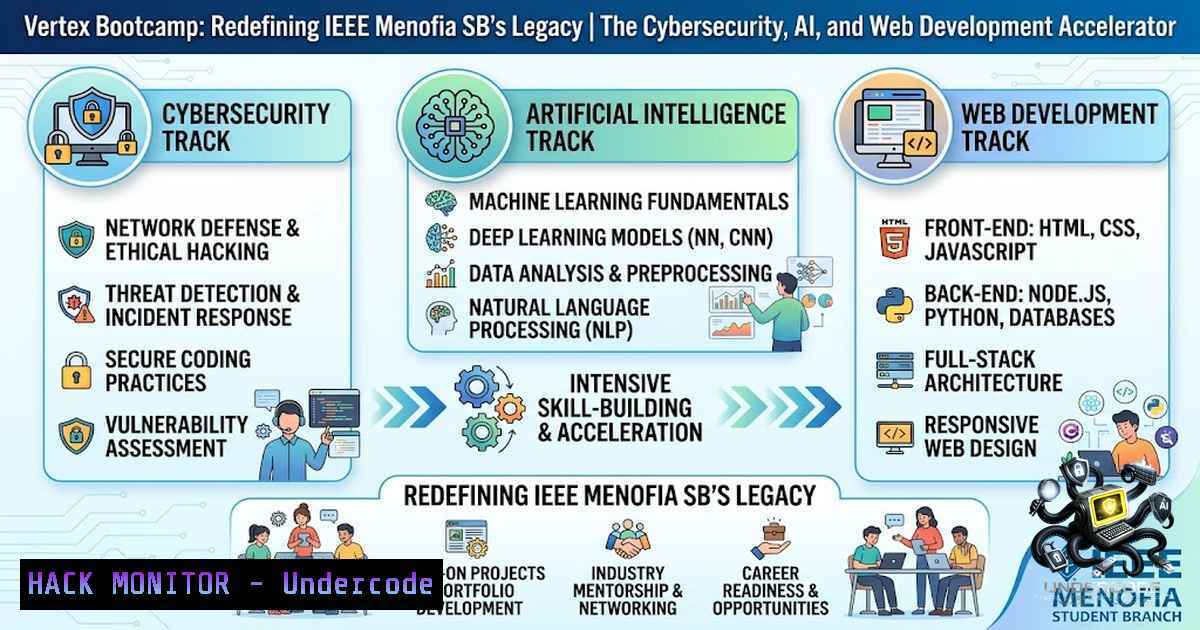
The intersection of cybersecurity, artificial intelligence, and web development represents the most critical frontier in modern technology education. Vertex Bootcamp, launched by IEEE Menofia SB, emerges as a comprehensive, hands-on training program designed to bridge the gap between theoretical knowledge and practical application across these three domains. With a curriculum structured around progressive task accumulation, evaluation systems, and achievement-based rewards, Vertex aims to produce graduates who don’t just understand concepts but can implement, secure, and scale real-world solutions.
Learning Objectives
- Master foundational to advanced concepts in Cybersecurity, Artificial Intelligence, and Web Development through a progressive, task-driven curriculum.
- Develop practical implementation skills through hands-on labs, real-world scenarios, and cumulative projects that simulate industry environments.
- Build a portfolio of demonstrable work across all three tracks, enabling participants to showcase tangible skills to employers and academic institutions.
You Should Know
1. Cybersecurity Fundamentals: From Reconnaissance to Hardening
The cybersecurity track of Vertex Bootcamp is designed to take participants from zero to operational security practitioner. The curriculum covers the full spectrum of defensive and offensive security, emphasizing hands-on application through virtual labs and capture-the-flag (CTF) style challenges.
What This Covers:
Participants begin with network fundamentals, progressing through vulnerability assessment, penetration testing methodologies, and finally to defensive strategies including system hardening, intrusion detection, and incident response. The approach mirrors industry-standard frameworks such as the NIST Cybersecurity Framework and MITRE ATT&CK.
Step-by-Step Guide – Basic Network Reconnaissance and Hardening (Linux):
1. Scan your network for active hosts:
sudo nmap -sn 192.168.1.0/24
This performs a ping sweep to identify all active devices on your local subnet.
- Perform a detailed port scan on a target:
sudo nmap -sS -sV -p- -T4 192.168.1.100
This runs a stealth SYN scan with version detection on all ports.
3. Check for open ports and listening services:
sudo ss -tulpn
Lists all TCP and UDP ports with listening services and their associated processes.
4. Harden SSH configuration:
sudo nano /etc/ssh/sshd_config
– Set `PermitRootLogin no`
– Set `PasswordAuthentication no` (use key-based auth)
– Change default port from 22 to a non-standard port
– Restart SSH: `sudo systemctl restart sshd`
5. Set up a basic firewall with UFW:
sudo ufw default deny incoming
sudo ufw default allow outgoing
sudo ufw allow ssh
sudo ufw enable
sudo ufw status verbose
Windows Equivalent Commands:
- Scan network: `Test-1etConnection -ComputerName 192.168.1.100 -Port 80`
– View open ports: `netstat -an | findstr LISTENING`
– Firewall configuration: `New-1etFirewallRule -DisplayName “Block Port” -Direction Inbound -LocalPort 8080 -Protocol TCP -Action Block`
2. Artificial Intelligence: From Theory to Production-Ready Models
The AI track distinguishes itself through an approach that emphasizes not just algorithm understanding but the entire machine learning lifecycle—from data preparation and model training to deployment, monitoring, and continuous improvement.
What This Covers:
Participants learn supervised and unsupervised learning, neural network architectures, natural language processing, and computer vision. The curriculum integrates MLOps practices, teaching students how to version datasets, track experiments, and deploy models as scalable APIs.
Step-by-Step Guide – Building and Deploying a Simple ML Model with Python and FastAPI:
1. Set up a Python virtual environment:
python3 -m venv vertex_ml_env
source vertex_ml_env/bin/activate  Linux/Mac
 Windows: vertex_ml_env\Scripts\activate
2. Install required dependencies:
pip install scikit-learn pandas numpy fastapi uvicorn joblib
- Train a simple classification model (save as
train_model.py):import pandas as pd from sklearn.datasets import load_iris from sklearn.ensemble import RandomForestClassifier import joblib Load data iris = load_iris() X, y = iris.data, iris.target Train model model = RandomForestClassifier(n_estimators=100, random_state=42) model.fit(X, y) Save model joblib.dump(model, 'iris_model.pkl') print("Model trained and saved successfully!")
4. Create a FastAPI deployment (`app.py`):
from fastapi import FastAPI, HTTPException
from pydantic import BaseModel
import joblib
import numpy as np

app = FastAPI(title="Iris Classifier API")
model = joblib.load('iris_model.pkl')

class IrisFeatures(BaseModel):
sepal_length: float
sepal_width: float
petal_length: float
petal_width: float

@app.post("/predict")
def predict(features: IrisFeatures):
try:
input_data = np.array([[features.sepal_length,
features.sepal_width,
features.petal_length,
features.petal_width]])
prediction = model.predict(input_data)
return {"prediction": int(prediction[bash])}
except Exception as e:
raise HTTPException(status_code=400, detail=str(e))

@app.get("/health")
def health_check():
return {"status": "healthy"}
5. Run the API:
uvicorn app:app --host 0.0.0.0 --port 8000 --reload
6. Test the endpoint:
curl -X POST http://localhost:8000/predict \
-H "Content-Type: application/json" \
-d '{"sepal_length": 5.1, "sepal_width": 3.5, "petal_length": 1.4, "petal_width": 0.2}'
3. Web Development: Secure Full-Stack Implementation
The web development track goes beyond basic CRUD applications, emphasizing secure coding practices, API design, authentication mechanisms, and cloud deployment strategies. Participants learn to build production-grade applications with security baked in from the start.
What This Covers:
Frontend frameworks (React/Vue), backend development (Node.js/Python/Django), RESTful API design, database management (SQL/NoSQL), authentication (JWT, OAuth2), and deployment on cloud platforms with CI/CD pipelines.
Step-by-Step Guide – Building a Secure REST API with JWT Authentication (Node.js/Express):
1. Initialize the project:
mkdir secure-api && cd secure-api
npm init -y
npm install express jsonwebtoken bcryptjs dotenv cors helmet
npm install -D nodemon
2. Create the server (`server.js`):
require('dotenv').config();
const express = require('express');
const jwt = require('jsonwebtoken');
const bcrypt = require('bcryptjs');
const helmet = require('helmet');
const cors = require('cors');

const app = express();
app.use(helmet());
app.use(cors());
app.use(express.json());

const JWT_SECRET = process.env.JWT_SECRET || 'your-secret-key';
const users = []; // In production, use a database

// Register endpoint
app.post('/register', async (req, res) => {
try {
const { username, password } = req.body;
const hashedPassword = await bcrypt.hash(password, 10);
users.push({ username, password: hashedPassword });
res.status(201).json({ message: 'User registered successfully' });
} catch (error) {
res.status(500).json({ error: error.message });
}
});

// Login endpoint
app.post('/login', async (req, res) => {
try {
const { username, password } = req.body;
const user = users.find(u => u.username === username);
if (!user) {
return res.status(401).json({ error: 'Invalid credentials' });
}
const isValid = await bcrypt.compare(password, user.password);
if (!isValid) {
return res.status(401).json({ error: 'Invalid credentials' });
}
const token = jwt.sign({ username }, JWT_SECRET, { expiresIn: '1h' });
res.json({ token });
} catch (error) {
res.status(500).json({ error: error.message });
}
});

// Protected endpoint middleware
const authenticate = (req, res, next) => {
const authHeader = req.headers.authorization;
if (!authHeader) {
return res.status(401).json({ error: 'No token provided' });
}
const token = authHeader.split(' ')[bash];
try {
const decoded = jwt.verify(token, JWT_SECRET);
req.user = decoded;
next();
} catch (error) {
res.status(401).json({ error: 'Invalid token' });
}
};

app.get('/protected', authenticate, (req, res) => {
res.json({ message: 'This is protected data', user: req.user });
});

const PORT = process.env.PORT || 3000;
app.listen(PORT, () => console.log(<code>Server running on port ${PORT}</code>));
3. Add security headers and rate limiting:
npm install express-rate-limit
const rateLimit = require('express-rate-limit');
const limiter = rateLimit({
windowMs: 15  60  1000, // 15 minutes
max: 100 // limit each IP to 100 requests per window
});
app.use('/api', limiter);
4. Run the server:
npx nodemon server.js
5. Test authentication flow:
 Register
curl -X POST http://localhost:3000/register \
-H "Content-Type: application/json" \
-d '{"username":"testuser","password":"securepass123"}'

Login and get token
curl -X POST http://localhost:3000/login \
-H "Content-Type: application/json" \
-d '{"username":"testuser","password":"securepass123"}'

Access protected endpoint
curl -X GET http://localhost:3000/protected \
-H "Authorization: Bearer YOUR_TOKEN_HERE"
4. Cloud Hardening and Infrastructure Security
Modern applications live in the cloud, and securing cloud infrastructure is non-1egotiable. The Vertex curriculum includes comprehensive coverage of cloud security best practices, identity and access management (IAM), and infrastructure-as-code security.
Step-by-Step Guide – AWS IAM Hardening and S3 Security:
- Create an IAM policy for least privilege access (JSON):
{ "Version": "2012-10-17", "Statement": [ { "Effect": "Allow", "Action": [ "s3:GetObject", "s3:PutObject" ], "Resource": "arn:aws:s3:::my-secure-bucket/" }, { "Effect": "Deny", "Action": "s3:", "Resource": "arn:aws:s3:::my-secure-bucket/", "Condition": { "Bool": { "aws:SecureTransport": "false" } } } ] } -
Enable S3 bucket encryption and block public access using AWS CLI:
Create bucket with encryption
aws s3api create-bucket --bucket my-secure-bucket --region us-east-1

Enable default encryption
aws s3api put-bucket-encryption \
--bucket my-secure-bucket \
--server-side-encryption-configuration '{
"Rules": [
{
"ApplyServerSideEncryptionByDefault": {
"SSEAlgorithm": "AES256"
}
}
]
}'

Block all public access
aws s3api put-public-access-block \
--bucket my-secure-bucket \
--public-access-block-configuration '{
"BlockPublicAcls": true,
"IgnorePublicAcls": true,
"BlockPublicPolicy": true,
"RestrictPublicBuckets": true
}'

Set bucket policy to enforce HTTPS
aws s3api put-bucket-policy \
--bucket my-secure-bucket \
--policy file://bucket-policy.json
3. Enable CloudTrail for audit logging:
aws cloudtrail create-trail \
--1ame my-audit-trail \
--s3-bucket-1ame my-cloudtrail-bucket \
--is-multi-region-trail
aws cloudtrail start-logging --1ame my-audit-trail
5. API Security: OWASP Top 10 Mitigation Strategies
APIs are the backbone of modern applications and a primary attack vector. The Vertex curriculum dedicates significant attention to API security, covering authentication, authorization, input validation, rate limiting, and monitoring.
Step-by-Step Guide – Implementing API Security Headers and Validation:
- Add comprehensive security headers in any web framework:
For Nginx
add_header X-Frame-Options "SAMEORIGIN" always;
add_header X-Content-Type-Options "nosniff" always;
add_header X-XSS-Protection "1; mode=block" always;
add_header Strict-Transport-Security "max-age=31536000; includeSubDomains" always;
add_header Content-Security-Policy "default-src 'self'; script-src 'self' 'unsafe-inline';" always;
2. Implement input validation and sanitization (Python/Flask example):
from flask import Flask, request, jsonify
from marshmallow import Schema, fields, ValidationError

app = Flask(<strong>name</strong>)

class UserSchema(Schema):
username = fields.Str(required=True, validate=lambda x: len(x) >= 3)
email = fields.Email(required=True)
age = fields.Int(required=True, validate=lambda x: 18 <= x <= 120)

schema = UserSchema()

@app.route('/api/user', methods=['POST'])
def create_user():
try:
data = schema.load(request.json)
 Process valid data
return jsonify({"message": "User created", "data": data}), 201
except ValidationError as err:
return jsonify({"errors": err.messages}), 400
3. Implement SQL injection prevention (parameterized queries):
 Vulnerable (DO NOT USE):
 cursor.execute(f"SELECT  FROM users WHERE id = {user_id}")

Secure:
cursor.execute("SELECT  FROM users WHERE id = %s", (user_id,))
4. Set up API monitoring and logging:
 Monitor API endpoints with Prometheus and Grafana
 Example: Expose metrics endpoint
curl http://localhost:9090/metrics
6. Linux System Administration and Security Hardening
Linux powers the vast majority of servers and cloud infrastructure. Mastery of Linux system administration and security hardening is essential for any cybersecurity or DevOps professional.
Step-by-Step Guide – Comprehensive Linux Server Hardening:
1. Update and patch the system:
sudo apt update && sudo apt upgrade -y  Debian/Ubuntu
sudo yum update -y  RHEL/CentOS
2. Configure automatic security updates:
sudo apt install unattended-upgrades
sudo dpkg-reconfigure --priority=low unattended-upgrades
- Secure SSH with key-based authentication and disable root login:
Generate SSH key pair
ssh-keygen -t ed25519 -C "[email protected]"

Copy public key to server
ssh-copy-id user@your-server-ip

Edit SSH config
sudo nano /etc/ssh/sshd_config
Set:
PermitRootLogin no
PasswordAuthentication no
PubkeyAuthentication yes
AllowUsers your_username</p></li>
</ol>

<p>sudo systemctl restart sshd
4. Set up Fail2ban to prevent brute-force attacks:
sudo apt install fail2ban -y
sudo cp /etc/fail2ban/jail.conf /etc/fail2ban/jail.local
sudo systemctl enable fail2ban
sudo systemctl start fail2ban
sudo fail2ban-client status sshd
5. Configure auditing with auditd:
sudo apt install auditd -y
sudo auditctl -w /etc/passwd -p wa -k identity_changes
sudo auditctl -w /etc/sudoers -p wa -k sudoers_changes
sudo auditctl -w /var/log/auth.log -p r -k auth_logs
sudo systemctl enable auditd
sudo systemctl start auditd
- Set up a basic intrusion detection system with AIDE:
sudo apt install aide -y
sudo aideinit
sudo mv /var/lib/aide/aide.db.new.gz /var/lib/aide/aide.db.gz
sudo aide --check
Schedule daily checks with cron
What Undercode Say
- “Vertex is not just another bootcamp—it’s the culmination of three years of volunteer work, leadership experience, and a vision to create a lasting impact within IEEE Menofia SB.” The bootcamp represents a shift from traditional lecture-based learning to an immersive, task-driven experience that emphasizes practical application and critical thinking across cybersecurity, AI, and web development.
-
“The curriculum is designed to make you think correctly, apply with your own hands, and emerge with something real that you can build upon.” With progressive task accumulation, evaluation systems, and rewards for top achievers, Vertex aims to produce graduates who are not just knowledgeable but job-ready.
Analysis: The bootcamp’s structure—spanning multiple tracks with hands-on tasks, assessments, and achievement-based incentives—mirrors the most effective modern pedagogical approaches in technical education. By integrating cybersecurity, AI, and web development into a single program, Vertex addresses the growing industry demand for professionals who understand the interconnectedness of these domains. The emphasis on practical application over passive learning ensures that participants develop muscle memory for real-world scenarios. Furthermore, the leadership and volunteerism embedded in the program’s origin story adds a layer of community-building and mentorship that is often missing in commercial bootcamps. The 24-hour registration deadline and limited capacity create urgency while maintaining quality through selective enrollment.
Prediction
- +1 Vertex Bootcamp has the potential to become a template for IEEE student branches across Egypt and the broader Middle East, demonstrating how volunteer-led initiatives can deliver professional-grade technical education at scale.
-
+1 The integration of cybersecurity, AI, and web development into a single cohesive program aligns with industry trends toward full-stack security and AI-1ative development, positioning graduates for high-demand roles in the evolving tech landscape.
-
+1 If the bootcamp succeeds in producing a cohort of skilled practitioners, it could catalyze a self-sustaining ecosystem where alumni return as mentors, instructors, and project leads, amplifying the impact far beyond the initial program.
-
-1 The rapid pace and intensive nature of the bootcamp may lead to participant burnout or superficial learning if not carefully balanced with adequate support, mentorship, and pacing mechanisms.
-
-1 Without robust post-bootcamp engagement—such as job placement assistance, alumni networks, or continued learning pathways—the long-term impact on participants’ careers may be limited despite the quality of the program itself.
-
+1 The emphasis on tasks, evaluations, and rewards creates a gamified learning environment that can significantly boost engagement and retention, especially among younger participants who respond well to achievement-based motivation.
-
+1 By leveraging IEEE’s global network and brand recognition, Vertex graduates gain access to a professional community and credibility that extends far beyond the local branch, opening doors to international opportunities.
-
-1 The reliance on volunteer leadership and the finite nature of the current organizers’ tenure (with only two months remaining in the season) raises questions about the bootcamp’s sustainability and ability to evolve beyond its inaugural iteration.
Registration Link: https://lnkd.in/e5gD7pWf
▶️ Related Video (78% Match):
🎯Let’s Practice For Free:
🎓 Live Courses & Certifications:
Join Undercode Academy for Verified Certifications
🚀 Request a Custom Project:
Secure, high-velocity infrastructure and disruptive technological engineering. Contact our engineering team for high-tier development and proprietary systems:
[email protected]
💎 Smart Architecture | 🛡️ Secure by Design | ⭐ Trusted by ThousandsIT/Security Reporter URL:
Reported By: Abdelrahmansaidai %D9%84%D9%8A%D9%87 – Hackers Feeds
Extra Hub: Undercode MoN
Basic Verification: Pass ✅🔐JOIN OUR CYBER WORLD [ CVE News • HackMonitor • UndercodeNews ]
📢 Follow UndercodeTesting & Stay Tuned:
- Set up a basic intrusion detection system with AIDE:


