Listen to this Post
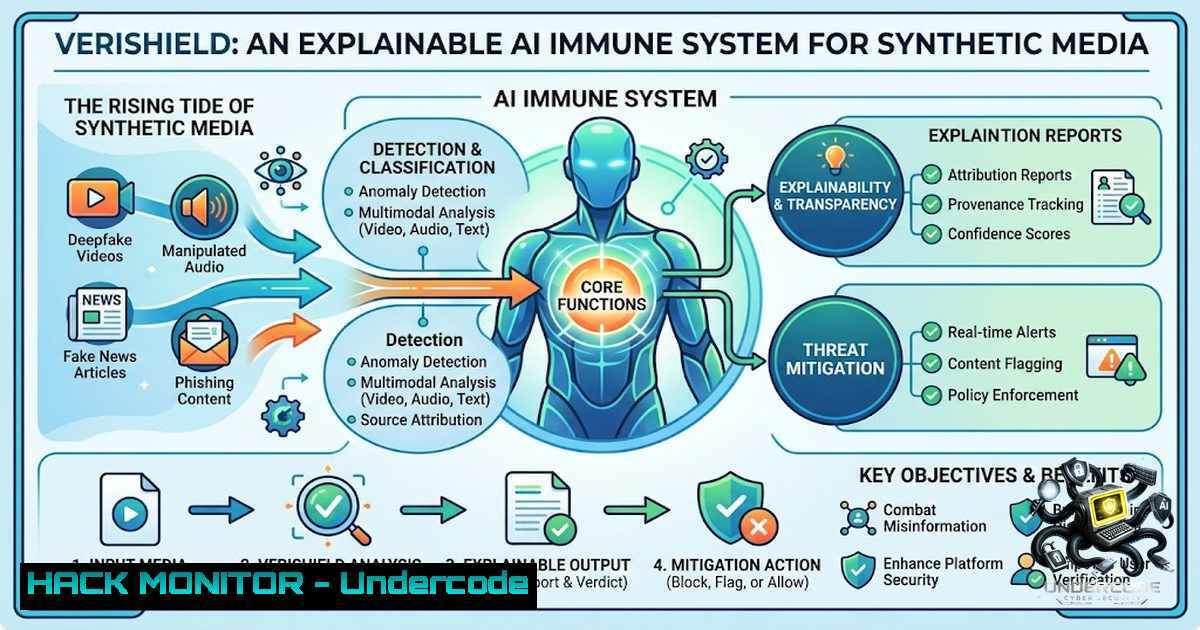
Introduction:
As generative AI models become democratized, the internet is rapidly being flooded with hyper-realistic synthetic media—often referred to as “AI slop.” For cybersecurity professionals and developers, the challenge is no longer just building better generative models; it is about building a robust “immune system” to detect, analyze, and mitigate the risks posed by deepfakes. VeriShield, a multimodal deepfake detection pipeline, addresses this by moving beyond simple binary classification to offer pixel-level, explainable insights into why a piece of media is flagged as synthetic, turning the “black box” of AI forensics into a transparent, verifiable process.
Learning Objectives:
- Understand the architecture of a multimodal deepfake detection pipeline combining video frame extraction and audio analysis.
- Learn how to integrate Explainable AI (XAI) techniques, specifically Grad-CAM, to generate forensic heatmaps for model interpretability.
- Gain practical knowledge of building a real-time data pipeline using Python, OpenCV, and PyTorch, including handling common environment conflicts (Conda/Pip & Windows DLLs).
You Should Know:
- The Core Pipeline: From Webcam Pixels to PyTorch Tensors
The transition from a high-level AI concept to a functioning pipeline is where many projects fail. The VeriShield pipeline begins with real-time video ingestion using OpenCV (Headless). While OpenCV handles the heavy lifting of frame extraction, the critical engineering step involves converting raw pixel data into a format suitable for a neural network like EfficientNet-B0.
Step‑by‑step guide explaining what this does and how to use it:
1. Frame Extraction: Use `cv2.VideoCapture` to read frames from a webcam or video file.
2. Coordinate Mapping: Pass the frame to MediaPipe’s Face Detection module to obtain dynamic bounding box coordinates for the face region.
3. Array Slicing: Extract the Region of Interest (ROI) using NumPy array slicing: face_roi = frame[y_min:y_max, x_min:x_max].
4. Resizing & Normalization: Resize the ROI to `224×224` pixels (the standard input for EfficientNet) using cv2.resize.
5. Tensor Conversion: Normalize the pixel values to the range `[0, 1]` and convert the NumPy array to a PyTorch tensor using torch.from_numpy. Ensure the tensor is in the format [Batch, Channels, Height, Width].
Commands/Troubleshooting for Windows Environment:
If you encounter the infamous OpenCV “DLL Hell” (missing `opencv_world4xx.dll` or Python binding errors), use the following commands to force a clean rebuild:
 Windows: Clean Conda env and reinstall OpenCV headless with Pip to avoid Conda/Channel conflicts
conda deactivate
conda env remove -1 deepfake_env
conda create -1 deepfake_env python=3.9
conda activate deepfake_env
 Force Pip install for OpenCV to link correctly with PyTorch
pip install opencv-python-headless
pip install torch torchvision
2. Implementing Explainable AI (Grad-CAM) for Forensic Forensics
The “black box” nature of deep learning is a liability in cybersecurity, particularly when legal or operational decisions rely on the detection result. Grad-CAM (Gradient-weighted Class Activation Mapping) addresses this by highlighting the spatial regions in the input image that are most influential in the model’s classification decision.
Step‑by‑step guide explaining what this does and how to use it:
1. Forward Pass: Pass the normalized face tensor through the EfficientNet-B0 model to get the classification logits.
2. Backward Pass: Select the class of interest (e.g., “Fake”). Set the gradient of that class score to 1, and all other gradients to 0.
3. Gradient Extraction: Perform backpropagation to compute the gradients of the target class with respect to the feature maps of the last convolutional layer.
4. Weighting: Global Average Pool the gradients to obtain the neuron importance weights.
5. Heatmap Generation: Compute a weighted combination of the feature maps and apply a ReLU activation to produce the heatmap.
6. Overlay: Upsample the heatmap to the original input size and overlay it on the face crop to visualize “where” the AI is looking (e.g., mismatched blending around the jawline or unnatural hair textures).
- Data Pipeline Engineering: The Challenge of Real-Time Synthetic Media Classification
In a 24-hour hackathon environment, the biggest time sink is rarely the model architecture; it is the data pipeline. Translating facial coordinates from MediaPipe into a format that PyTorch can consume requires understanding memory layout and tensor operations.
Linux/Windows Operations:
- MediaPipe to NumPy: MediaPipe returns normalized coordinates. You must convert these to pixel coordinates:
x1 = int(detection.location_data.relative_bounding_box.xmin  frame_width)
y1 = int(detection.location_data.relative_bounding_box.ymin  frame_height)
- Batch Processing: For real-time inference, use PyTorch’s `DataLoader` with a custom `Dataset` class that utilizes `cv2.imdecode` for efficient image loading.
- Audio Integration (Wav2Vec): The next step involves integrating Wav2Vec2 from HuggingFace for audio deepfake detection. Ensure consistency by resampling audio to 16kHz and padding/truncating sequences.
4. Environment Isolation: Overcoming Conda/Pip and OpenCV Hell
Running PyTorch, OpenCV, and MediaPipe simultaneously can lead to dependency conflicts, especially on Windows where shared library linking (DLL) is strict.
The Solution:
- Isolate Environments: Do not mix Conda and Pip packages for core dependencies. Let Conda handle PyTorch (as it manages CUDA versions effectively) and let Pip handle headless OpenCV and MediaPipe.
2. Order of Installation:
conda install pytorch torchvision torchaudio cudatoolkit=11.3 -c pytorch
pip install opencv-python-headless mediapipe numpy
3. Check DLL Dependencies: On Windows, if you encounter ImportError: DLL load failed, ensure you have the Microsoft Visual C++ Redistributable installed and that your `PATH` does not contain conflicting system OpenCV dlls.
5. Mitigating Inversion Attacks and Model Robustness
An often overlooked aspect of deepfake detection is adversarial robustness. Attackers can create subtle perturbations to evade detection. While VeriShield focuses on visual authenticity, hardening the model against evasion is critical for production.
Tactics for Mitigation:
- Data Augmentation: During training, apply transformations like Gaussian blur, JPEG compression, and rotation to force the model to learn robust features rather than overfitting to pixel-level noise.
- Ensemble Methods: Combine the visual output with the audio output (from Wav2Vec) to create a multi-factor authentication decision. If one modality is compromised, the other acts as a failsafe.
- Input Validation: Use MediaPipe’s landmarks to check for biological inconsistencies (e.g., no pulse in facial skin tone variations) to prevent bypass attempts via static image injection.
- The Role of Explainable AI in Incident Response
For Security Operations Centers (SOCs), a “Fake” flag with no explanation is noise. A Grad-CAM heatmap serves as a piece of digital forensics evidence, allowing incident responders to communicate findings to non-technical stakeholders with visual proof.
How to use it for reporting:
1. Generate the heatmap overlay using OpenCV’s `cv2.addWeighted`.
- Save the heatmap as a JSON-styled base64 string alongside the log entry.
- Integrate this into a SIEM dashboard to provide visual context to the alert.
7. Ethical Considerations and Responsible Disclosure
As builders of detection tools, we must also be builders of responsible frameworks. Developing a system that can be weaponized to censor content or invade privacy is a significant risk.
Guardrails to implement:
- Local Processing: Ensure the system can run locally (edge-computing) to prevent storing user videos on servers.
- Transparency: Output the Grad-CAM visualization alongside the binary result, and provide a confidence interval to show uncertainty.
- Data Privacy: Use OpenCV to blur surrounding environments and only extract the face region if consent is explicitly granted.
What Undercode Say:
- The engineering struggle between high-level AI logic and low-level data pipeline operations (array slicing, tensor reshaping) is the most common reason AI projects fail to scale.
- Integrating Explainable AI is not a “nice-to-have” but a “must-have” for regulatory compliance (GDPR Right to Explanation) and building user trust in cybersecurity tools.
- The combination of visual (EfficientNet) and audio (Wav2Vec) modalities creates a robust defense-in-depth strategy, making it significantly harder for attackers to bypass detection by focusing on only one media stream.
Prediction:
- +1 The integration of Grad-CAM and similar XAI techniques will become a standard compliance requirement in SOCs and digital forensics, moving AI from a “black box” to an “evidentiary tool.”
- +1 Multimodal deepfake detection (Audio + Visual) will see a surge in adoption in the financial sector for Know Your Customer (KYC) and biometric authentication processes by 2026.
- -1 As detection models improve, attackers will increasingly pivot to adversarial machine learning (AML) attacks, injecting imperceptible noise into media to poison detection pipelines, requiring a new generation of robust models.
- -1 The current reliance on open-source detection models creates a false sense of security; without rigorous validation against targeted evasion techniques, these systems remain vulnerable to skilled threat actors.
▶️ Related Video (78% Match):
🎯Let’s Practice For Free:
🎓 Live Courses & Certifications:
Join Undercode Academy for Verified Certifications
🚀 Request a Custom Project:
Secure, high-velocity infrastructure and disruptive technological engineering. Contact our engineering team for high-tier development and proprietary systems:
[email protected]
💎 Smart Architecture | 🛡️ Secure by Design | ⭐ Trusted by Thousands
IT/Security Reporter URL:
Reported By: Ihan Mohammed – Hackers Feeds
Extra Hub: Undercode MoN
Basic Verification: Pass ✅


