
Listen to this Post
Introduction:
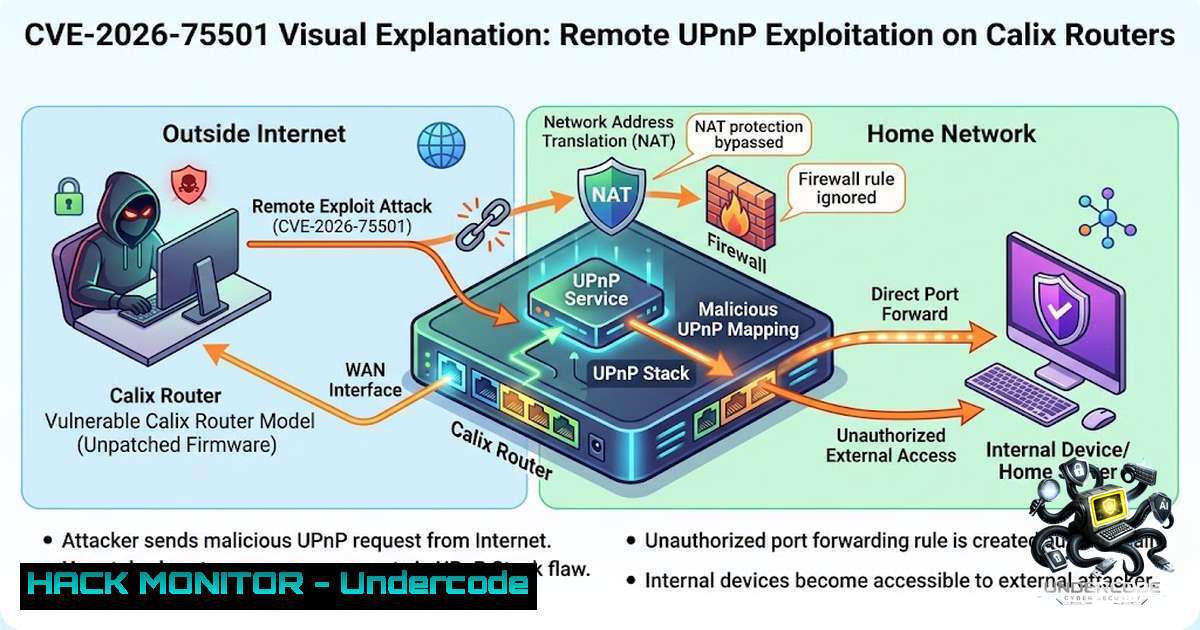
A critical unpatched vulnerability in Calix GS7 XGS (GS5239XG) residential routers enables unauthenticated remote attackers to manipulate NAT port-forwarding rules, exposing internal network devices directly to the public internet. Tracked as CVE-2026-75501, the flaw stems from the MiniUPnPd control endpoint being exposed on the WAN interface via TCP port 5000 without any access controls, effectively rendering the router’s firewall and NAT protections useless. The issue affects devices running EXOS/6.6.47 firmware and was discovered by researcher Brian Khan Quintana, who publicly disclosed the details after Calix failed to respond to multiple notifications.
Learning Objectives & Secrets:
- Objective 1: Understand the Attack Vector – Learn how the UPnP WANIPConnection SOAP service binds to the public WAN interface on TCP port 5000, allowing attackers to send unauthenticated SOAP requests to add, delete, or enumerate port mappings.
-
Objective 2 Secret Tips: Mitigate Without a Patch – Disable UPnP through the router’s administrative interface (Advanced → Security → UPnP) as an immediate workaround. If the setting is locked by the ISP, request that they disable UPnP at the carrier level or filter inbound traffic to TCP port 5000 using an external firewall.
-
Objective 3 Secret Tips: Active Defense & Monitoring – Deploy network segmentation and continuous monitoring for unauthorized port-forwarding rules. Use scripts to periodically enumerate UPnP mappings and alert on anomalies to detect potential exploitation in progress.
You Should Know:
- The Anatomy of CVE-2026-75501: How the UPnP Flaw Works
The Calix GS7 XGS router runs MiniUPnPd version 2.3.7, which by default binds the WANIPConnection SOAP service to the public WAN interface on TCP port 5000. Because no authentication is required, a remote attacker can send crafted SOAP requests directly to the router’s public IP address on port 5000. These requests can:
- Add arbitrary port-forwarding rules (exposing internal devices like cameras, NAS, or administrative interfaces)
- Delete existing NAT mappings (disrupting legitimate services)
- Enumerate current port mappings (gathering intelligence on internal network topology)
- Query the router’s external IP address
The researcher demonstrated that a single unauthenticated request from anywhere in the world can open a permanent hole through the firewall, and the rule survives a reboot. With proof-of-concept code now publicly available, the risk of active exploitation is elevated.
Step-by-step guide to test for exposure:
 Linux: Check if your Calix router exposes port 5000 externally
nmap -p 5000 <your_public_ip>

Or use netcat to probe the UPnP service
nc -zv <your_public_ip> 5000

If the port is open, an attacker can send SOAP requests
 Example: Query external IP via UPnP (using curl)
curl -X POST http://<your_public_ip>:5000/control/WANIPConn1 \
-H "Content-Type: text/xml; charset=utf-8" \
-H "SOAPACTION: urn:schemas-upnp-org:service:WANIPConnection:1GetExternalIPAddress" \
-d '<?xml version="1.0"?><s:Envelope xmlns:s="http://schemas.xmlsoap.org/soap/envelope/" s:encodingStyle="http://schemas.xmlsoap.org/soap/encoding/"><s:Body><u:GetExternalIPAddress xmlns:u="urn:schemas-upnp-org:service:WANIPConnection:1"/></s:Body></s:Envelope>'
Windows (PowerShell) equivalent:
 Test port connectivity
Test-1etConnection -ComputerName <your_public_ip> -Port 5000

Use Invoke-WebRequest to send SOAP request (simplified)
$soapRequest = '<?xml version="1.0"?><s:Envelope xmlns:s="http://schemas.xmlsoap.org/soap/envelope/" s:encodingStyle="http://schemas.xmlsoap.org/soap/encoding/"><s:Body><u:GetExternalIPAddress xmlns:u="urn:schemas-upnp-org:service:WANIPConnection:1"/></s:Body></s:Envelope>'
Invoke-WebRequest -Uri "http://<your_public_ip>:5000/control/WANIPConn1" -Method POST -ContentType "text/xml; charset=utf-8" -Headers @{"SOAPACTION"="urn:schemas-upnp-org:service:WANIPConnection:1GetExternalIPAddress"} -Body $soapRequest
- Immediate Mitigation: Disabling UPnP and Locking Down the Router
Since no vendor patch exists yet, the most effective mitigation is to disable UPnP entirely. However, many ISPs lock this setting, preventing users from making changes.
Step-by-step guide to disable UPnP (if accessible):
- Log in to the Calix router’s administrative interface (typically `http://192.168.1.1`).
2. Navigate to Advanced → Security → UPnP.
3. Toggle the UPnP setting to Disabled.
4. Save changes and reboot the router.
If the setting is locked by your ISP:
- Contact your ISP’s support and explicitly request that they disable UPnP on your router at the carrier level.
- Alternatively, deploy a secondary firewall or edge device that filters inbound traffic to TCP port 5000 before it reaches the Calix router.
Firewall rule examples:
 Linux iptables: Block inbound traffic to port 5000 on the WAN interface
iptables -A INPUT -i eth0 -p tcp --dport 5000 -j DROP

Save the rule (persistent across reboots)
iptables-save > /etc/iptables/rules.v4

Windows (using Netsh): Block port 5000
netsh advfirewall firewall add rule name="Block_UPnP_5000" dir=in action=block protocol=TCP localport=5000

Alternatively, use Windows Firewall with Advanced Security GUI
 Create a new inbound rule blocking TCP port 5000
Verify the block:
 From an external network, test if port 5000 is now filtered
nmap -p 5000 <your_public_ip>
 Expected result: filtered or closed
- Active Defense: Monitoring and Detecting Unauthorized UPnP Mappings
Given that UPnP can be re-enabled or exploited again, continuous monitoring is essential. Security teams and home users should implement scripts to periodically enumerate UPnP mappings and alert on unexpected changes.
Linux script to enumerate UPnP mappings:
!/bin/bash
 upnp_enum.sh - Enumerate UPnP port mappings on a Calix router

ROUTER_IP="192.168.1.1"
UPNP_PORT="5000"

Use upnpc (from miniupnpc package) to list mappings
upnpc -l -u "http://$ROUTER_IP:$UPNP_PORT/control/WANIPConn1"

Or use curl to send SOAP request for enumeration
curl -X POST "http://$ROUTER_IP:$UPNP_PORT/control/WANIPConn1" \
-H "Content-Type: text/xml; charset=utf-8" \
-H "SOAPACTION: urn:schemas-upnp-org:service:WANIPConnection:1GetGenericPortMappingEntry" \
-d '<?xml version="1.0"?><s:Envelope xmlns:s="http://schemas.xmlsoap.org/soap/envelope/" s:encodingStyle="http://schemas.xmlsoap.org/soap/encoding/"><s:Body><u:GetGenericPortMappingEntry xmlns:u="urn:schemas-upnp-org:service:WANIPConnection:1"><NewPortMappingIndex>0</NewPortMappingIndex></u:GetGenericPortMappingEntry></s:Body></s:Envelope>'
Windows PowerShell script for enumeration:
 upnp_enum.ps1 - Enumerate UPnP mappings
$routerIP = "192.168.1.1"
$upnpPort = 5000
$soapAction = "urn:schemas-upnp-org:service:WANIPConnection:1GetGenericPortMappingEntry"

for ($i=0; $i -lt 10; $i++) {
$soapBody = "<?xml version=`"1.0`"?><s:Envelope xmlns:s=`"http://schemas.xmlsoap.org/soap/envelope/`" s:encodingStyle=`"http://schemas.xmlsoap.org/soap/encoding/`"><s:Body><u:GetGenericPortMappingEntry xmlns:u=`"urn:schemas-upnp-org:service:WANIPConnection:1`"><NewPortMappingIndex>$i</NewPortMappingIndex></u:GetGenericPortMappingEntry></s:Body></s:Envelope>"
try {
$response = Invoke-WebRequest -Uri "http://$routerIP`:$upnpPort/control/WANIPConn1" -Method POST -ContentType "text/xml; charset=utf-8" -Headers @{"SOAPACTION"=$soapAction} -Body $soapBody -ErrorAction Stop
Write-Host "Mapping $i : $($response.Content)"
} catch {
break
}
}
Alerting: Integrate these scripts into a cron job (Linux) or Task Scheduler (Windows) to run every 5–10 minutes. If unexpected mappings appear (e.g., ports forwarded to unknown internal IPs), trigger an alert via email or SIEM.
4. Network Segmentation and Zero-Trust Principles
Even with UPnP disabled, adopting a zero-trust architecture for internal networks is crucial. Segment IoT devices, cameras, and NAS devices into separate VLANs with strict firewall rules that prevent them from initiating outbound connections to the WAN unless explicitly required.
Step-by-step VLAN segmentation guide (using a managed switch or router with VLAN support):
- Identify IoT devices – Create an inventory of all smart devices, cameras, and NAS units on your network.
- Create a dedicated IoT VLAN – Assign VLAN ID 10 (e.g., 192.168.10.0/24) for IoT devices.
- Configure firewall rules – Block traffic from the IoT VLAN to the main LAN and restrict outbound internet access to only necessary ports (e.g., allow NTP, DNS, and specific application ports).
- Apply ACLs – On the router or firewall, apply access control lists that deny IoT devices from communicating with the management interface of the Calix router.
Example iptables rules for segmentation:
 Block IoT VLAN from accessing router's admin interface (port 80/443)
iptables -A FORWARD -i vlan10 -d 192.168.1.1 -p tcp --dport 80 -j DROP
iptables -A FORWARD -i vlan10 -d 192.168.1.1 -p tcp --dport 443 -j DROP

Allow IoT devices to reach the internet (but not the main LAN)
iptables -A FORWARD -i vlan10 -o eth0 -m state --state NEW,ESTABLISHED -j ACCEPT
iptables -A FORWARD -i eth0 -o vlan10 -m state --state ESTABLISHED,RELATED -j ACCEPT
5. Future-Proofing: Vendor Disclosure and CVE Lifecycle Lessons
The CVE-2026-75501 saga highlights a troubling trend: vendors ignoring responsible disclosure attempts. Quintana notified Calix on June 7, 2026, and received no response after multiple attempts, prompting CERT/CC to coordinate public disclosure. This delay leaves millions of devices exposed.
Key lessons for security professionals:
- Vendor communication fails – Always have a backup plan for disclosure, including CERT/CC or other CVE Numbering Authorities (CNAs).
- Public PoC accelerates risk – With exploit code now public, attackers can weaponize the flaw quickly. Defenders must act preemptively.
- Default configurations are dangerous – UPnP enabled by default on these routers is a systemic design flaw. Security should be the default, not an afterthought.
Recommendation: Organizations using Calix devices should immediately inventory all affected models (GS5239XG, GigaSpire 7u10txg) and apply the mitigations described above. Consider replacing the hardware if the vendor fails to release a patch within a reasonable timeframe.
What Undercode Say:
- Key Takeaway 1: The CVE-2026-75501 flaw is a textbook example of how UPnP misconfigurations can completely dismantle network perimeter defenses. The exposure of MiniUPnPd on the WAN interface without authentication is a fundamental architectural failure that should never have made it past quality assurance.
-
Key Takeaway 2: The lack of vendor response to responsible disclosure is alarming. Calix’s failure to acknowledge or patch this vulnerability for over two months demonstrates a dangerous disregard for customer security. This incident should serve as a wake-up call for the broadband industry to mandate stricter security baselines for CPE (Customer Premises Equipment).
Analysis: The public availability of proof-of-concept code means that script kiddies and organized threat actors alike can now exploit this vulnerability at scale. The impact is particularly severe because the affected devices are used by major U.S. broadband providers, meaning millions of homes and small businesses are at risk. Internal devices such as security cameras, NAS storage, and even medical IoT devices could be exposed to the open internet, leading to data breaches, ransomware, or physical surveillance. The fact that port-forwarding rules persist after a reboot makes this a persistent backdoor that is difficult to detect without active monitoring. Until a patch is released or ISPs intervene, the only reliable mitigation is to disable UPnP entirely and implement network segmentation.
Prediction:
- +1 This vulnerability will accelerate the adoption of zero-trust networking and SASE (Secure Access Service Edge) architectures in residential and SMB environments, as users realize that traditional perimeter-based security is insufficient.
-
-1 Expect widespread exploitation attempts within the next 30 days, targeting exposed Calix routers on Shodan and Censys. Attackers will likely use this flaw to pivot into home networks, deploy ransomware, or recruit IoT devices into botnets.
-
-1 Calix will face significant reputational damage and potential legal liability if a major data breach is traced back to this unpatched vulnerability, especially given their failure to respond to the researcher’s disclosure.
-
+1 ISPs will be forced to implement carrier-grade UPnP filtering and remote configuration changes, potentially setting a new industry standard for proactive security management of CPE devices.
-
-1 The flaw exposes a systemic issue in the broadband industry: the lack of security update mechanisms for residential gateways. Without mandatory patch deployment, millions of devices will remain vulnerable indefinitely.
-
+1 Security researchers and CERT/CC will use this case to push for legislation requiring vendors to respond to vulnerability disclosures within a mandated timeframe, similar to GDPR’s breach notification rules.
-
-1 Small businesses using Calix routers without dedicated IT staff are at the highest risk, as they lack the expertise to apply mitigations or monitor for exploitation.
-
+1 The public disclosure of this flaw will drive innovation in automated UPnP vulnerability scanners and network monitoring tools, empowering users to detect and block such attacks proactively.
-
-1 The persistence of the port-forwarding rules after reboot means that even if a user temporarily disables UPnP, an attacker who previously exploited the flaw could have left a permanent backdoor that remains active indefinitely.
-
-1 This incident underscores the urgent need for memory-safe languages and secure-by-design principles in embedded systems development, as vulnerabilities like this are entirely preventable with proper access control implementation.
▶️ Related Video (82% Match):
https://www.youtube.com/watch?v=01OV91zZ0JI
🎯Let’s Practice For Free:
🎓 Live Courses & Certifications:
Join Undercode Academy for Verified Certifications
🚀 Request a Custom Project:
Secure, high-velocity infrastructure and disruptive technological engineering. Contact our engineering team for high-tier development and proprietary systems:
[email protected]
💎 Smart Architecture | 🛡️ Secure by Design | ⭐ Trusted by Thousands
IT/Security Reporter URL:
Reported By: https://lnkd.in/p/eNwnnaCM – Hackers Feeds
Extra Hub: Undercode MoN
Basic Verification: Pass ✅


