Listen to this Post
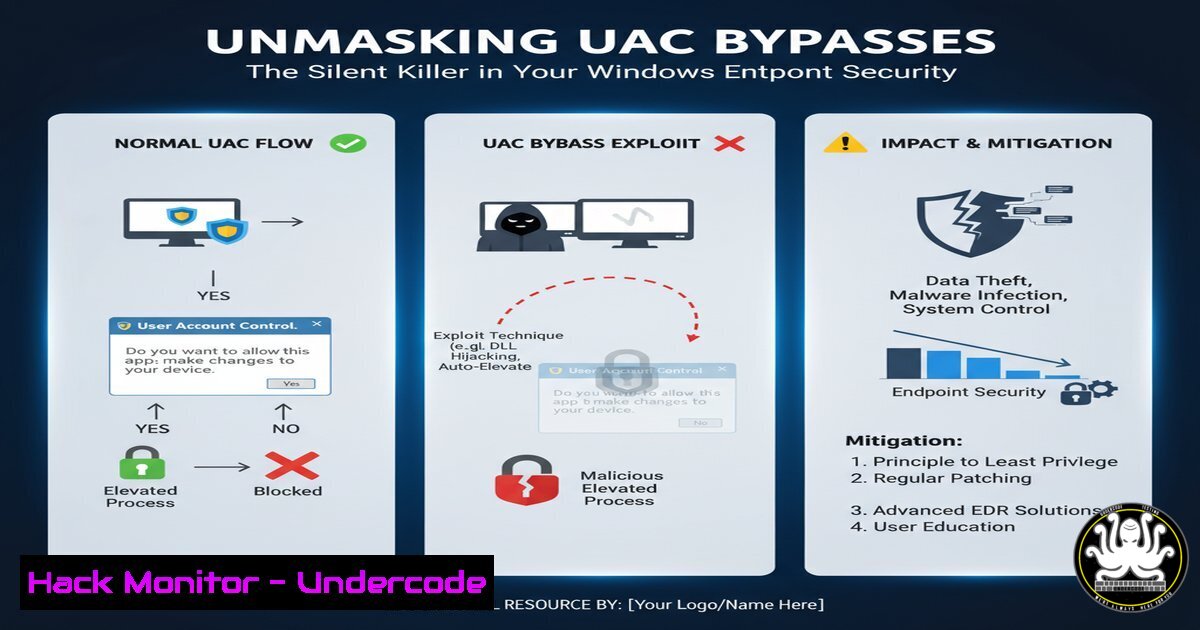
Introduction:
User Account Control (UAC) is a fundamental security feature in Windows, designed to prevent unauthorized changes to the operating system. However, sophisticated attackers consistently develop techniques to bypass UAC, elevating privileges without triggering the familiar consent prompt. Understanding these bypass mechanisms is critical for defenders to harden endpoints effectively against modern threats.
Learning Objectives:
- Understand the core mechanics of common UAC bypass techniques.
- Learn to deploy mitigation strategies and detection rules.
- Gain practical skills through verified commands and configurations to audit your environment.
You Should Know:
- The FodHelper UAC Bypass – A Registry Hijacking Classic
This technique exploits a trusted Windows process,fodhelper.exe, by hijacking registry keys it checks for file associations. Because `fodhelper.exe` is auto-elevated, it runs a payload with high integrity without a UAC prompt.
Step-by-Step Guide:
1. Open Registry Editor (`regedit.exe`).
2. Navigate to `HKCU\Software\Classes\ms-settings\shell\open\command`.
- Create the keys if they do not exist.
- Set the `(Default)` value to the path of your payload executable (e.g.,
C:\Temp\malicious.exe).
5. Set the `DelegateExecute` value to be empty.
- Execute `fodhelper.exe` from the command line or Run dialog. The payload will execute with high integrity.
-
The Event Viewer Bypass – Abusing the “Run as Administrator” Context
This method tricks the Event Viewer (eventvwr.msc) into loading a malicious JavaScript file during its startup process, which runs with elevated privileges.
Step-by-Step Guide:
- Create a malicious JavaScript file named `mmc.exe` in
%USERPROFILE%\AppData\Local\Temp\. - This file is executed when Event Viewer starts because it incorrectly checks for `mmc.exe` in this location.
- Launch Event Viewer. It will load and execute the script with elevated privileges, bypassing the UAC prompt.
3. UACMe and Automated Bypass Discovery
UACMe is a well-known open-source tool that aggregates dozens of UAC bypass methods. It is a valuable resource for security professionals to test and validate the security posture of their systems.
Step-by-Step Guide:
- Download the UACMe tool from its official GitHub repository.
- Compile the project or download a pre-compiled release from a trusted security source.
- Run the executable from a medium-integrity command prompt.
- Specify a bypass method by its ID (e.g.,
Akagi64 33). If successful, you will receive a high-integrity command prompt.
4. Hardening UAC via Group Policy
The most effective mitigation against many UAC bypasses is to configure UAC to always notify, removing the “auto-elevation” feature for trusted Windows binaries.
Step-by-Step Guide:
1. Open the Group Policy Editor (`gpedit.msc`).
- Navigate to `Computer Configuration` > `Windows Settings` > `Security Settings` > `Local Policies` >
Security Options. - Locate the policy “User Account Control: Behavior of the elevation prompt for administrators in Admin Approval Mode”.
- Change the setting from “Prompt for consent” to “Prompt for credentials”. This forces a password entry for any elevation, blocking many bypass techniques.
5. PowerShell Detection Script for Registry Modifications
Proactive detection is key. This PowerShell script scans for common registry hijack points used in UAC bypass attacks.
Step-by-Step Guide:
 Check for suspicious registry modifications in user hives
$Paths = @(
'HKCU:\Software\Classes\ms-settings\shell\open\command',
'HKCU:\Software\Classes\mscfile\shell\open\command'
)

foreach ($Path in $Paths) {
if (Test-Path $Path) {
$Value = Get-ItemProperty -Path $Path -Name "(default)" -ErrorAction SilentlyContinue
if ($Value.'(default)' -ne $null) {
Write-Warning "Suspicious registry key found: $Path"
Write-Host "Value set to: $($Value.'(default)')" -ForegroundColor Red
}
}
}
Run this script in a PowerShell window to check for indicators of compromise related to common UAC bypass methods.
6. Sysmon Monitoring for Image Loads
System Monitor (Sysmon) can be configured to log detailed process creation and image load events, which are crucial for detecting UAC bypass attempts.
Step-by-Step Guide:
- Install Sysmon with a comprehensive configuration, such as SwiftOnSecurity’s config.
- The following Sysmon configuration rule logs when `fodhelper.exe` or `eventvwr.exe` are launched, which is a key event to correlate.
<!-- Example Sysmon Event ID 1 (Process Creation) filter -->
<ProcessCreate onmatch="include">
<Image condition="end with">fodhelper.exe</Image>
<Image condition="end with">eventvwr.exe</Image>
</ProcessCreate>
- Monitor these events in your SIEM for anomalous parent processes or command-line arguments.
-
The Cloud Connection: UAC in Modern Endpoint Management
UAC bypasses are not just an on-premise concern. In cloud-managed environments (e.g., Intune, Jamf), these techniques can be used to compromise a device and pivot to cloud resources.
Step-by-Step Guide:
- Use Microsoft Defender for Endpoint’s advanced hunting to query for UAC-related processes.
// KQL query to hunt for fodhelper spawning unusual children
DeviceProcessEvents
| where FileName =~ "fodhelper.exe"
| where InitiatingProcessFileName !~ "explorer.exe" // Look for non-user initiated launches
| project Timestamp, DeviceName, FileName, InitiatingProcessFileName, ProcessCommandLine
- Correlate these events with subsequent sign-ins to cloud applications (via Azure AD logs) to detect lateral movement attempts.
What Undercode Say:
- UAC is a Gate, Not a Wall. UAC bypass techniques demonstrate that this control is a deterrent, not an immovable barrier. Relying on it as a primary defense is a critical strategic error.
- The Principle of Least Privilege is Non-Negotiable. The most robust mitigation is to operate with standard user accounts, removing the high-integrity token that attackers seek to steal in the first place. Application control policies like AppLocker or WDAC are essential to complement UAC.
Our analysis concludes that UAC bypasses remain a highly effective “living off the land” technique precisely because they abuse trusted Windows components. This creates significant noise for defenders and allows attackers to operate with a low footprint. The security community’s focus must shift from purely preventing the bypass to implementing robust detection and response capabilities around privilege escalation events. The integrity of the entire Windows security model is contingent on the difficulty of obtaining high privileges; UAC bypasses directly challenge this foundation.
Prediction:
The evolution of UAC bypass techniques will continue to parallel Windows security updates, with researchers and threat actors finding increasingly complex logic flaws and component trust abuses. As Microsoft hardens the kernel and introduces new security features like Core Isolation, attackers will pivot towards exploiting application-level and COM interface vulnerabilities to achieve the same bypass goals. The future battleground will be the integrity of the Windows scripting hosts and the .NET runtime, where fileless attacks can execute sophisticated payloads entirely in memory, rendering many file-based detections obsolete. Proactive hunting and behavior-based blocking will become the standard, not the exception.
🎯Let’s Practice For Free:
IT/Security Reporter URL:
Reported By: Subhashpaudel Uac – Hackers Feeds
Extra Hub: Undercode MoN
Basic Verification: Pass ✅


