Listen to this Post
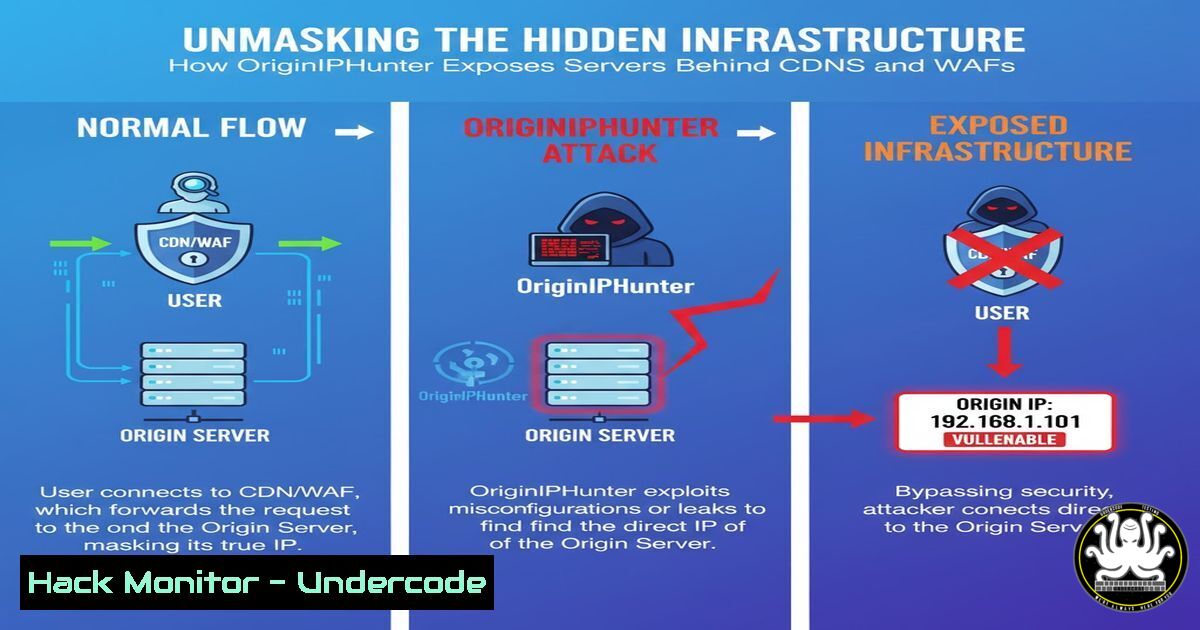
Introduction:
In the modern cybersecurity landscape, Content Delivery Networks (CDNs) and Web Application Firewalls (WAFs) serve as the first line of defense, obfuscating the true origin IP addresses of web servers. This article delves into the techniques and tools, like the newly released OriginIPHunter, that security professionals use to pierce this veil, revealing the underlying infrastructure for legitimate penetration testing and bug bounty reconnaissance.
Learning Objectives:
- Understand the core methodologies for discovering origin IP addresses obscured by protective services.
- Master a suite of verified commands and techniques for infrastructure discovery across multiple platforms.
- Learn how to validate findings and integrate these reconnaissance methods into a comprehensive security assessment workflow.
You Should Know:
1. Leveraging DNS History with Passive Reconnaissance
A server’s origin IP is often exposed in historical DNS records before a CDN is implemented. SecurityTrails is a premier source for this data.
Command: SecurityTrails API Query via curl
curl "https://api.securitytrails.com/v1/history/$DOMAIN/dns/a" \
-H "APIKEY: YOUR_API_KEY"
Step-by-step guide:
This command queries the SecurityTrails API to retrieve the historical A records for a target domain. Replace `$DOMAIN` with your target (e.g., example.com) and `YOUR_API_KEY` with your valid API key. The output will be a JSON object containing a list of historical IP addresses the domain has resolved to. Scrutinize the older records, as they are likely to contain the origin IP before the CDN migration. Correlate these IPs with current CDN ranges to identify candidates for the true origin.
2. SSL Certificate Fingerprinting with JARM
JARM is an active TLS server fingerprinting tool that can help identify unique server configurations, potentially revealing the origin server even if it shares a hostname with the CDN.
Command: JARM Scan
python3 jarm.py -v example.com
Step-by-step guide:
JARM works by sending a series of custom TLS packets to a target server and fingerprinting the responses. Run this command from a directory containing the `jarm.py` tool. The `-v` flag provides verbose output. First, scan the target domain behind the CDN to get its JARM fingerprint. Then, scan the historical IP addresses you discovered. If a historical IP returns the same JARM fingerprint as the domain, it is a strong indicator that you have found the origin server.
3. Favicon Hash Analysis for Server Identification
The favicon’s hash can act as a unique identifier. If the same hash is found on a server on a non-standard port, it may be the origin.
Command: Calculating Favicon Hash with cURL and OpenSSL
curl -s -k 'https://$TARGET/favicon.ico' | openssl md5 | cut -d' ' -f2
Step-by-step guide:
This command fetches the favicon.ico file from a target and calculates its MD5 hash. Use this on your primary target to get the reference hash. Then, use tools like Shodan to search for this specific hash across the internet. A Shodan search query would look like http.favicon.hash:$HASH. This can reveal other domains or IPs, including the origin server, that are serving the same application.
4. Shodan Host Discovery and Filtering
Shodan continuously scans the internet, indexing banners and services. It can often find servers that are not publicly advertised.
Command: Shodan CLI Search for a Specific
shodan host --fields "ip_str,port,org" $IP_CANDIDATE
shodan search "http.title:'Company Login' org:'Amazon'"
Step-by-step guide:
After installing the Shodan CLI and initializing it with your API key (shodan init YOUR_API_KEY), use the `host` command to get detailed information about a specific IP candidate. The `search` command is powerful for finding hosts based on specific criteria, such as HTML title, organization, or geographic location. Use filters to exclude known CDN IP ranges (e.g., -net:CLOUDFLARE) to narrow down results to potential origin servers.
5. Certificate Transparency Log Searching
Certificates are often issued for the origin server’s IP address or internal hostname before being deployed to the CDN. These are logged in public CT logs.
Command: Using `certfinder` to Search CT Logs
certfinder --domain example.com --logs crt.sh
Step-by-step guide:
Tools like `certfinder` or manually browsing `crt.sh` allow you to search Certificate Transparency logs for all certificates associated with a domain. Look for certificates that contain not only the target domain but also IP addresses or internal hostnames (e.g., server01.internal.example.com). These hostnames can then be resolved via DNS or added to your `/etc/hosts` file for direct testing, potentially bypassing the CDN entirely.
6. HTTP Header Analysis and Virtual Host Brute-Forcing
The origin server might respond differently to HTTP requests, especially if you specify the `Host` header for an internal hostname.
Command: Virtual Host Brute-Forcing with ffuf
ffuf -w /usr/share/wordlists/seclists/Discovery/DNS/subdomains-top1million-5000.txt -u http://$ORIGIN_IP_CANDIDATE -H "Host: FUZZ.example.com" -fs 0
Step-by-step guide:
This command uses the `ffuf` fuzzer to try thousands of subdomains against a specific IP address candidate. Replace `$ORIGIN_IP_CANDIDATE` with the IP you suspect is the origin. The `-H` flag sets the Host header, and `-fs 0` filters out responses with a size of 0, which are common for invalid vhosts. A different response size or status code indicates that the IP is serving content for that specific hostname, confirming its role as a web server.
7. Automated Validation with a Custom HTTP Client
Automation is key. A simple script can be used to validate that a discovered IP is live and serving the expected content.
Command: Basic Validation Script
for ip in $(cat candidate_ips.txt); do
echo "Checking $ip";
curl -s -H "Host: example.com" "http://$ip" | grep -q "Company Name" && echo ">> Potential Origin: $ip";
done
Step-by-step guide:
This Bash script reads from a file named `candidate_ips.txt` containing your discovered IP addresses. For each IP, it sends an HTTP request, but critically, it sets the `Host` header to the target domain. It then checks the response body for a unique string, like “Company Name”. If found, it prints the IP as a potential origin. This mimics how a CDN would forward a request and is a reliable method for validation.
What Undercode Say:
- The automation of origin IP discovery is rapidly leveling the playing field, forcing a re-evaluation of “security through obscurity” provided by CDNs alone.
- Defenders must adopt a zero-trust network architecture, where the origin server is never exposed to the public internet, even if its IP is discovered.
The release of tools like OriginIPHunter signifies a maturation in the reconnaissance phase of security testing. It’s no longer a manual, artisanal process but an automated, scalable one. For bug bounty hunters, this increases efficiency. For defenders, the implication is stark: relying solely on a CDN or WAF to hide your origin IP is a failing strategy. The focus must shift to robust, layered security controls on the origin server itself, treating its eventual discovery not as a failure, but as an inevitability to be defended against. Proactive measures like strict firewall rules, intrusion detection systems on the origin, and comprehensive certificate management are no longer optional.
Prediction:
The ongoing arms race between infrastructure obfuscation and discovery will intensify. We will see a rise in AI-driven reconnaissance tools that can correlate disparate data points from dozens of sources with higher accuracy. In response, CDN and cloud providers will develop more sophisticated “origin cloaking” services that actively mimic the origin’s responses, making fingerprinting techniques like JARM less reliable. The future of external network security will hinge on dynamic, intelligent defense systems rather than static hiding places.
🎯Let’s Practice For Free:
IT/Security Reporter URL:
Reported By: Rix4uni Bugbounty – Hackers Feeds
Extra Hub: Undercode MoN
Basic Verification: Pass ✅


