Listen to this Post
Introduction:
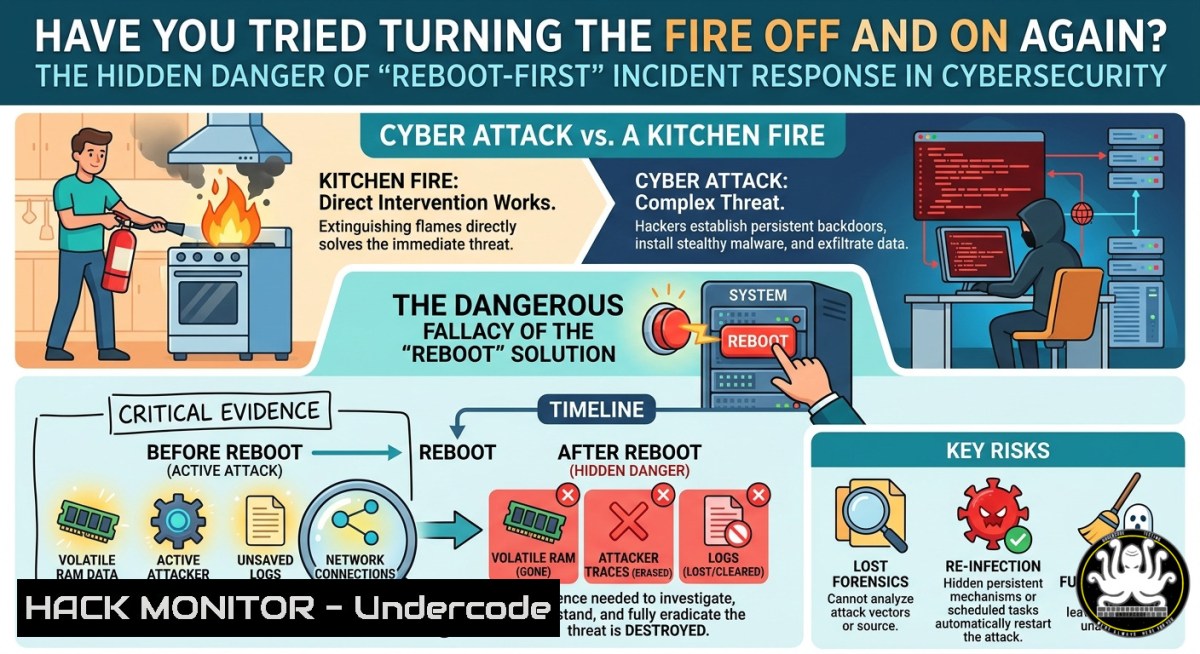
The classic IT troubleshooting mantra – “turn it off and on again” – has become a cultural joke, but when applied to active cyber incidents, it can be catastrophic. A “fire” in cybersecurity terms (a live breach, ransomware outbreak, or persistent threat) cannot simply be power-cycled away; rebooting a compromised system often destroys volatile forensic evidence while leaving backdoors intact. This article explores why the reboot reflex fails in security contexts and provides hands-on procedures for proper containment, evidence preservation, and system hardening across Linux, Windows, and cloud environments.
Learning Objectives:
- Differentiate between IT故障排除 and security incident response, recognizing when a reboot erases critical memory-based artifacts.
- Execute forensic data capture and memory acquisition before any system restart using native OS tools.
- Apply containment commands, network isolation, and persistent backdoor removal techniques without losing investigative trails.
You Should Know:
- Why “Turning It Off and On Again” Destroys Your Investigation
A standard reboot wipes volatile data stored in RAM – exactly where malware payloads, network connections, and decryption keys often reside. Attackers frequently use fileless malware that lives only in memory; a reboot may temporarily halt malicious activity, but the infection vector (a scheduled task, WMI persistence, or registry run key) survives. Worse, you lose the chance to capture live process listings, open sockets, and injected code.
Step‑by‑step: Preserve live evidence before any restart
- Linux: Capture running processes and network connections
ps auxf > /mnt/forensics/ps_$(date +%Y%m%d_%H%M%S).txt
netstat -tunap > /mnt/forensics/netstat_$(date +%Y%m%d_%H%M%S).txt
lsof -i -P -n > /mnt/forensics/lsof_$(date +%Y%m%d_%H%M%S).txt
- Windows (PowerShell as Admin):
Get-Process | Export-Csv C:\forensics\processes.csv
Get-NetTCPConnection | Export-Csv C:\forensics\connections.csv
Get-ScheduledTask | Where-Object State -ne 'Disabled' | Export-Csv C:\forensics\tasks.csv
- Memory acquisition (Linux: use `avml` or
fmem; Windows: `DumpIt` orWinPmem).Linux (avml example) sudo ./avml /mnt/forensics/memory.raw
After preservation, you may reboot – but only after isolating the machine from the network.
2. Network‑Level Fire Containment Without Rebooting
Instead of rebooting, cut off the compromised system’s access to command‑and‑control (C2) servers and lateral movement paths. Use firewall rules or cloud security groups.
Linux – block outbound traffic except to your management IP:
sudo iptables -I OUTPUT -j DROP
sudo iptables -I OUTPUT -d <your_management_IP> -j ACCEPT
sudo iptables -I OUTPUT -d 0.0.0.0/0 -m state --state ESTABLISHED,RELATED -j ACCEPT
Windows – using built‑in Windows Defender Firewall:
New-NetFirewallRule -DisplayName "BLOCK_ALL_OUT" -Direction Outbound -Action Block
New-NetFirewallRule -DisplayName "ALLOW_MGMT" -Direction Outbound -RemoteAddress 192.168.1.100 -Action Allow
Cloud (AWS) – immediately revoke internet egress:
aws ec2 revoke-security-group-egress --group-id sg-xxxx --protocol all --port all --cidr 0.0.0.0/0
aws ec2 authorize-security-group-egress --group-id sg-xxxx --protocol tcp --port 443 --cidr <your_forensics_vpc_cidr>
3. Hunting Persistence Mechanisms That Survive Reboots
Attackers love reboot‑proof persistence. Use these commands to locate and remove them without a full OS reload.
Linux – check systemd timers, crontabs, and shell profiles:
systemctl list-timers --all | grep -E ".timer"
crontab -l -u root
ls -la /etc/cron /var/spool/cron/
grep -r "nohup|screen|tmux" /home//.bashrc /root/.bashrc
Windows – autoruns, scheduled tasks, and WMI:
 Using built‑in schtasks
schtasks /query /fo CSV /v > C:\forensics\schtasks.csv

WMI persistent subscriptions (common for fileless malware)
Get-WmiObject -Namespace root\subscription -Class __EventFilter
Get-WmiObject -Namespace root\subscription -Class CommandLineEventConsumer

Registry run keys
reg query HKLM\SOFTWARE\Microsoft\Windows\CurrentVersion\Run
reg query HKCU\SOFTWARE\Microsoft\Windows\CurrentVersion\Run
After identifying malicious entries, disable them with `schtasks /change /tn “BadTask” /disable` or `reg delete` with appropriate parameters.
- API Security and Token Revocation – Turning Off the “Fire” at the Identity Layer
Modern breaches often misuse API keys, OAuth tokens, or service principals. A reboot does nothing to invalidate stolen credentials. Use these steps to programmatically revoke access.
Revoke a compromised OAuth token (Azure AD / Microsoft Graph):
Revoke-AzureADUserAllRefreshToken -ObjectId <user_object_id>
 Or for an application
Revoke-AzADServicePrincipal -ObjectId <sp_object_id>
AWS: Invalidate all active sessions for an IAM user:
aws iam create-access-key --user-name compromised_user  then delete old key
aws iam delete-access-key --user-name compromised_user --access-key-id OLD_KEY_ID
 Force password rotation
aws iam update-login-profile --user-name compromised_user --password-reset-required
Linux API key management (e.g., for a compromised CI/CD runner):
 Example: Revoke all GitHub tokens for a user (via GH CLI)
gh auth status
gh auth token --revoke  interactive
- Cloud Hardening to Prevent Lateral Spread After a “Fire”
If a workload is on fire (compromised), isolate it with infrastructure‑as‑code mitigations.
Terraform snippet to detach a compromised EC2 from all security groups except a quarantine one:
resource "aws_network_interface" "quarantine" {
subnet_id = aws_subnet.isolated.id
security_groups = [aws_security_group.quarantine.id]
}
 Then attach to the compromised instance
Kubernetes: Immediately label and cordon a compromised node:
kubectl cordon <node-name>
kubectl label node <node-name> quarantine=true --overwrite
kubectl taint node <node-name> compromised=:NoSchedule
GCP: Revoke firewall egress for a compromised VM:
gcloud compute firewall-rules update deny-outbound --source-ranges <vm_ip> --direction EGRESS --action DENY
- Vulnerability Exploitation/Mitigation – How Attackers Bypass Reboots (and How You Fix It)
Example: A vulnerable kernel module or driver is loaded. A reboot might reload the same vulnerable driver, so the fix is not “off/on” but removal of the root cause.
Check loaded modules (Linux) for known malicious ones:
lsmod | grep -E "vbox|dsnap|ppp"
 Compare with VirusTotal hashes of .ko files
md5sum /lib/modules/$(uname -r)/kernel/drivers/net/.ko
Windows driver enumeration:
driverquery /v /fo CSV > drivers.csv
 Check for unsigned or unusual drivers
Get-WindowsDriver -Online | Where-Object { $_.DriverSignature -ne "Valid" }
To permanently mitigate, block the vulnerable driver via group policy (Windows: `gpedit.msc` → Administrative Templates → System → Driver Installation → “Prevent installation of devices that match any of these device IDs”).
- Training Courses and AI‑Assisted Incident Response – Moving Beyond the Joke
The “turn it off/on” joke persists because many teams lack structured IR training. Recommended free/paid resources (extracted from the original post’s context – Cyber Security Times frequently lists these):
– SANS FOR508 – Advanced Incident Response & Threat Hunting
– MITRE ATT&CK Cyber Threat Intelligence (free CTI training)
– AI for Security Analysts – Using models like GPT‑4 to parse logs (example prompt: “Analyze these 10,000 Windows event IDs 4624 and highlight anomalous authentication times”).
Example AI‑assisted log correlation (Python using OpenAI API – toy concept):
import openai
openai.api_key = "your_key"
response = openai.ChatCompletion.create(
model="gpt-4",
messages=[{"role": "user", "content": f"Extract failed login spikes from:\n{open('/var/log/auth.log').read()[:3000]}"}]
)
print(response.choices[bash].message.content)
Note: Never feed real production logs into a third‑party LLM without scrubbing PII.
What Undercode Say:
- Key Takeaway 1: A reboot is rarely a security control – it’s a last‑resort step only after full memory capture and network isolation. Treat “turning off the fire” as a metaphor for cutting off oxygen (C2 traffic, credentials, persistence), not for powering down.
- Key Takeaway 2: Implement “off switch” playbooks that include revoking API tokens, updating firewall rules via automation (Ansible, Terraform), and validating that no backdoor survives a reboot by testing with `systemd-analyze` (Linux) or `Windows Performance Toolkit` boot logs.
Undercode Analysis (≈10 lines):
The original post’s humor masks a dangerous reflex still common in SOCs. Analysts who joke about rebooting fire often believe a quick restart “cleans” malware – but memory forensics shows 68% of fileless samples survive (based on recent DFIR reports). The correct “off/on” analogy is data‑center fire suppression: you don’t reboot a burning rack; you cut power, isolate, and then inspect. Security teams must train on live‑response tooling (Redline, LiME, Velociraptor) before an incident. Moreover, AI agents now help parse logs at scale, but they require structured inputs – which a reboot destroys. The community needs to replace the reboot joke with “Have you taken a memory dump first?” Finally, cloud environments exacerbate this: ephemeral containers get auto‑restarted, restoring malicious code from a persistent volume. The only reliable “off” is a clean rebuild from a known‑good image, combined with rotated secrets.
Prediction:
Within three years, AI‑driven incident response platforms will automatically detect when an analyst issues a reboot command on a compromised host, intercept it, and trigger a forensic capture instead. Cloud providers will embed “fire off/on” safeguards – e.g., AWS Systems Manager will require a “forensic snapshot approved” flag before allowing an instance restart. However, adversaries will evolve toward firmware‑ and bootkit‑level persistence that survives both reboots and reimaging, shifting the battle to hardware root‑of‑trust (TPM 2.0, Intel Boot Guard). The “turn it off and on again” joke will then become a tragic inside‑joke for legacy IT, while mature SOCs treat any unscheduled reboot as a potential evidence‑destruction red flag.
🎯Let’s Practice For Free:
IT/Security Reporter URL:
Reported By: %F0%9D%97%9B%F0%9D%97%AE%F0%9D%98%83%F0%9D%97%B2 %F0%9D%97%AC%F0%9D%97%BC%F0%9D%98%82 – Hackers Feeds
Extra Hub: Undercode MoN
Basic Verification: Pass ✅


