Listen to this Post
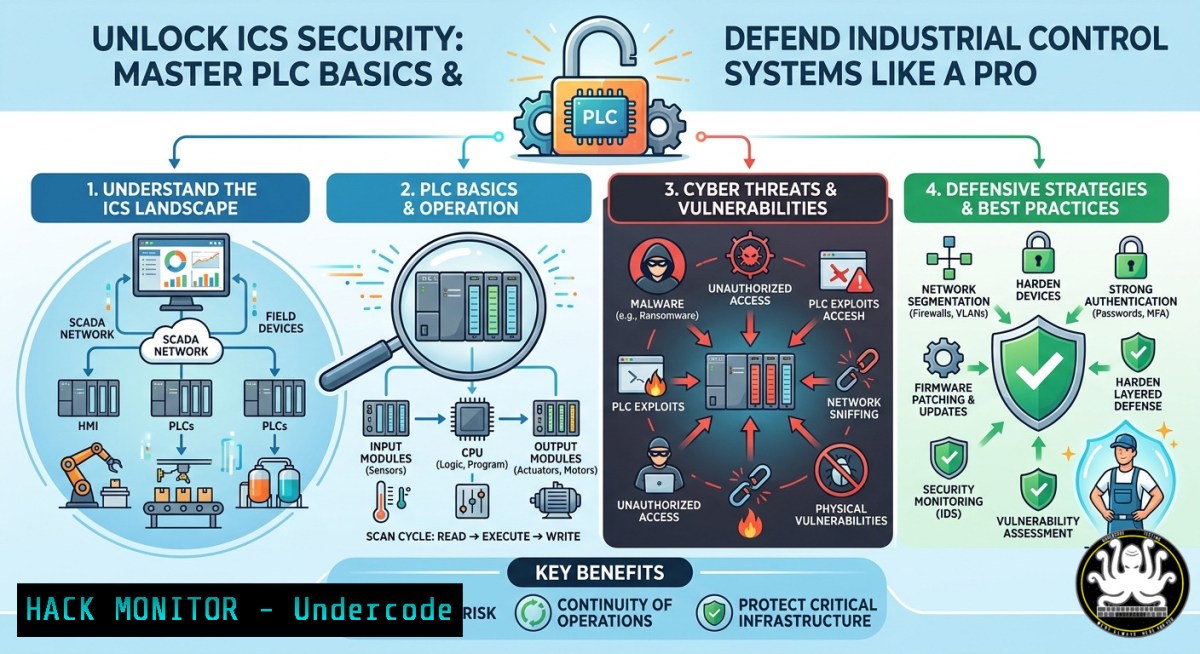
Introduction:
Programmable Logic Controllers (PLCs) are the brains behind modern industrial infrastructure—from power grids to water treatment plants. A basic understanding of PLC operations, ladder logic, and communication protocols is the first step toward securing these critical systems against cyber threats. This article extracts key technical insights from a recent PLC basics demonstration and expands into hands-on cybersecurity practices, including network reconnaissance, protocol analysis, and hardening techniques for both IT and OT environments.
Learning Objectives:
- Understand core PLC architecture, programming paradigms (ladder logic), and real-time I/O processing.
- Perform passive and active reconnaissance on industrial control networks using Linux/Windows tools.
- Apply basic security hardening configurations on PLCs and their supporting servers (Windows/Linux).
You Should Know:
1. PLC Communication Reconnaissance with Modbus and Nmap
Industrial PLCs often communicate using open protocols like Modbus TCP (port 502), which lack authentication and encryption. Attackers can scan, read, or write to coils and registers without credentials.
Step‑by‑step guide to discover and enumerate PLCs on a network (Linux):
- Scan for open port 502 (Modbus) using Nmap:
sudo nmap -p 502 --open -sV 192.168.1.0/24
This identifies hosts running Modbus services and grabs banner information (e.g., vendor, firmware version).
-
Use `modbus-cli` (Python tool) to read coil status:
pip install modbus-cli
mbpoll -a 1 -r 0 -c 10 -1 192.168.1.100
Replace `192.168.1.100` with the target PLC IP. This reads the first 10 coils (digital outputs). Unauthorized access could allow toggling pumps, valves, or breakers.
-
For Windows, use Modbus Scanner from Nmap Zenmap GUI or download `ModbusPal` (a simulation tool) and `ModScan32` to test read/write operations.
What this does:
It verifies if your PLCs are exposed on the OT network. If an attacker gains access, they can issue `write single coil` commands (function code 05) to disrupt physical processes.
Mitigation command examples:
- Restrict Modbus to specific IPs using iptables on a Linux gateway:
sudo iptables -A INPUT -p tcp --dport 502 -s 192.168.1.0/24 -j ACCEPT
sudo iptables -A INPUT -p tcp --dport 502 -j DROP
- On Windows Server hosting a SCADA front‑end, use Windows Defender Firewall with advanced security to create an inbound rule blocking port 502 except from authorized engineering workstations.
2. Analyzing Ladder Logic for Vulnerable Code Patterns
Ladder logic is the graphical programming language for most PLCs. Common insecure patterns include missing fault traps, hard‑coded credentials in logic comments, and lack of input validation.
Step‑by‑step guide to extract and review ladder logic (using Rockwell Studio 5000 demo):
- Connect to the PLC over Ethernet: Open Studio 5000, go to `Communications` >
Who Active. Select the PLC via its IP. - Upload the project: Right‑click the controller and choose
Upload. This pulls the current running logic. - Navigate to the main routine (e.g.,
MainRoutine). Look for:
– `XIC` / `OTE` instructions controlling critical outputs without interlocking.
– Direct mapping of network‑accessible tags to physical outputs.
– Comment fields containing passwords or instructions (e.g., Factory reset code = 1234).
4. Simulate an attack using `pyModbus` (Python):
from pymodbus.client import ModbusTcpClient
client = ModbusTcpClient('192.168.1.100')
client.write_coil(0, True)  Energize output coil at address 0
client.close()
If the ladder logic does not validate the coil’s state against safe limits, physical actuation occurs.
Tutorial for securing ladder logic:
Implement two‑handed control patterns (requiring two separate inputs before energizing a dangerous output) and add checksum verification for network‑written registers.
3. Hardening Windows‑Based HMI (Human‑Machine Interface) Servers
Most HMIs run on Windows and collect data from PLCs. A compromised HMI can be a pivot point to manipulate PLC logic.
Step‑by‑step Windows hardening commands (run as Admin):
- Disable unnecessary services – especially Print Spooler and SMBv1:
Stop-Service Spooler -Force
Set-Service Spooler -StartupType Disabled
Disable-WindowsOptionalFeature -Online -FeatureName SMB1Protocol
-
Apply AppLocker to whitelist only approved HMI executables:
New-AppLockerPolicy -RuleType Exe -User Everyone -Path "C:\Program Files\Rockwell Software\" -Action Allow
Set-AppLockerPolicy -PolicyXmlFile .\policy.xml
3. Enable PowerShell logging to detect malicious enumeration:
New-ItemProperty -Path "HKLM:\SOFTWARE\Policies\Microsoft\Windows\PowerShell\ScriptBlockLogging" -Name "EnableScriptBlockLogging" -Value 1 -PropertyType DWord
What this does:
Prevents attackers from running unapproved tools (e.g., Mimikatz) on the HMI and ensures scripts are logged for incident response.
- Linux‑Based OT Network Segmentation with VLANs and Firewalld
PLCs should reside on an isolated OT VLAN, with strict allow‑list rules to permit only essential traffic (e.g., HMI to PLC, historian to PLC).
Step‑by‑step guide (Linux router with two interfaces: eth0=IT, eth1=OT):
1. Create VLAN 100 for OT devices:
sudo ip link add link eth1 name eth1.100 type vlan id 100
sudo ip addr add 10.10.10.1/24 dev eth1.100
sudo ip link set up eth1.100
- Use firewalld to allow only HMI (192.168.1.10) to access PLCs on port 502:
sudo firewall-cmd --permanent --new-zone otzone
sudo firewall-cmd --permanent --zone=otzone --add-interface=eth1.100
sudo firewall-cmd --permanent --zone=otzone --add-rich-rule='rule family="ipv4" source address="192.168.1.10" port protocol="tcp" port="502" accept'
sudo firewall-cmd --reload
-
Block all other traffic to the OT subnet from IT side:
sudo iptables -A FORWARD -i eth0 -o eth1.100 -j DROP
sudo iptables -A FORWARD -i eth1.100 -o eth0 -m state --state ESTABLISHED,RELATED -j ACCEPT
Why this matters:
Many industrial breaches (e.g., Triton, Havex) spread because OT networks were flat. Proper segmentation limits lateral movement.
5. AI‑Assisted Anomaly Detection for PLC Cycle Times
Machine learning models can baseline normal PLC scan cycles and detect deviations caused by rogue firmware or logic changes.
Step‑by‑step tutorial using Python and Wireshark logs:
1. Capture Modbus traffic to a PCAP file:
sudo tcpdump -i eth1 -w plc_traffic.pcap -s 0 port 502
2. Extract request‑response timing with `tshark`:
tshark -r plc_traffic.pcap -Y "modbus" -T fields -e frame.time_relative -e modbus.trans_id -e modbus.func_code -e modbus.data_len
3. Train a simple isolation forest model (Python):
from sklearn.ensemble import IsolationForest
import numpy as np
 Assume data is list of response delays (in ms)
delays = np.array([12, 14, 11, 13, 200, 12, 13])  200 ms anomaly
model = IsolationForest(contamination=0.1)
model.fit(delays.reshape(-1, 1))
anomalies = model.predict([[bash]])
print("Anomaly detected" if anomalies[bash] == -1 else "Normal")
What this does:
Detects when a PLC is slow to respond—possible sign of a denial‑of‑service attack, firmware modification, or high CPU usage from malicious logic.
6. Windows Command Line Collection of PLC‑Related Logs
During incident response, quickly gather evidence from the HMI/engineering workstation.
Step‑by‑step batch script (save as `collect_plc_forensics.bat`):
@echo off
set LOGDIR=C:\Forensics\%date:~10,4%%date:~4,2%%date:~7,2%
mkdir %LOGDIR%
echo Collecting event logs...
wevtutil epl System %LOGDIR%\System.evtx
wevtutil epl Security %LOGDIR%\Security.evtx
echo Collecting recent RDP connections...
reg query "HKEY_CURRENT_USER\Software\Microsoft\Terminal Server Client\Default" > %LOGDIR%\RDP_history.txt
echo Collecting running processes...
tasklist /v > %LOGDIR%\processes.txt
echo Collecting network connections for port 502...
netstat -ano | findstr ":502" > %LOGDIR%\port502_conn.txt
echo Forensics data saved to %LOGDIR%
Run as Administrator. This captures logs that may show unauthorized access attempts to the PLC from external IPs.
7. Training Courses & Certifications for PLC Cybersecurity
Based on the initial PLC demo content, the following resources are recommended to build practical skills:
- SANS ICS410 (ICS/SCADA Security Essentials) – Covers protocol analysis, Nessus scans for OT, and hands‑on PLC hacking labs.
- Dragos’s “PLC Attack & Defend” Workshop – Real‑world Modbus exploitation and detection engineering.
- Free course: “Cybersecurity for Industrial Control Systems” from INE (formerly eLearnSecurity).
- YouTube channel: “PLC Attack” by Zach (likely the original poster) – Includes ladder logic reverse engineering and demo exploits.
Command to check for available ICS security tools in Kali Linux:
apt search ics | grep -E "modbus|plc|scada"
What Undercode Say:
- Key Takeaway 1: PLC basics are not just about programming—they’re the foundation for attack surface mapping. Understanding how to read coils and registers with `modbus-cli` reveals why unauthenticated protocols are a critical risk.
- Key Takeaway 2: AI‑powered anomaly detection on PLC cycle times provides a low‑false‑positive indicator for compromised controllers, especially when signature‑based AV fails in OT environments.
Analysis: The demo content highlights a dangerous gap: many industrial engineers learn PLC logic without any security mindset. For instance, ladder logic comments often contain hard‑coded password hashes or reset sequences. By combining passive reconnaissance (Nmap scans) with active testing (writing coils), defenders can prove business risk and justify network segmentation. Moreover, the Windows HMI is routinely overlooked—yet basic commands like `wevtutil` and `AppLocker` can block 80% of common attack paths. The rise of AI in OT security is promising but requires clean baseline traffic; without proper VLAN isolation, noise from IT traffic corrupts anomaly detection models. Finally, the lack of free, accessible PLC hacking labs is a training gap—hands‑on with Modbus simulators or cheap PLCs (e.g., Click PLC) is non‑negotiable for building real skills.
Prediction:
Within two years, regulatory bodies (e.g., CISA, ENISA) will mandate that all new PLC deployments support cryptographic authentication for Modbus/TCP (e.g., Modbus Secure) and enforce signed ladder logic uploads. Attackers will shift from directly writing coils to exploiting OPC UA servers that aggregate PLC data. Consequently, blue teams will adopt eBPF‑based monitoring on Linux OT gateways to inspect every Modbus transaction in real time. Training courses will pivot from generic cybersecurity to “PLC‑specific hardening” with simulation‑based exams—turning a niche skill into a baseline requirement for industrial control engineers.
▶️ Related Video (80% Match):
🎯Let’s Practice For Free:
IT/Security Reporter URL:
Reported By: Zakharb Plc – Hackers Feeds
Extra Hub: Undercode MoN
Basic Verification: Pass ✅
🎓 Live Courses & Certifications:
Join Undercode Academy for Verified Certifications
🚀 Request a Custom Project:
Secure, high-velocity infrastructure and disruptive technological engineering. Contact our engineering team for high-tier development and proprietary systems:
[email protected]


