
Listen to this Post
Introduction:
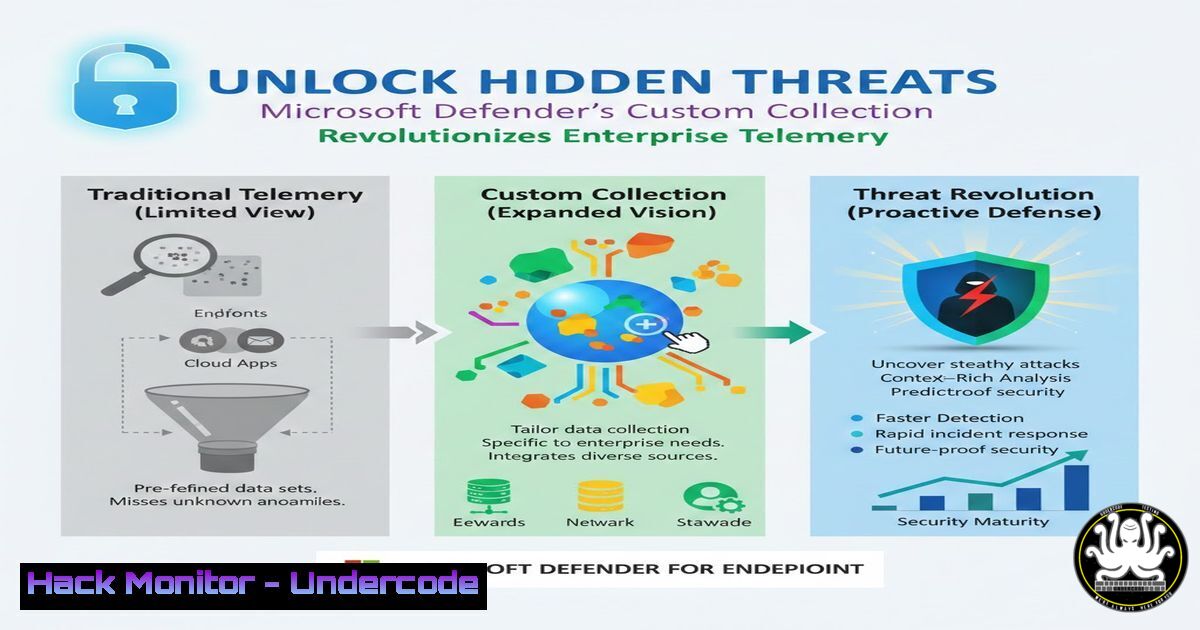
Microsoft Defender for Endpoint’s new Custom Collection feature represents a paradigm shift in endpoint visibility, allowing security teams to define precisely what telemetry to collect beyond standard sensor data. This groundbreaking capability, developed with design partners like FalconForce, enables organizations to close detection gaps and gather critical forensic evidence that was previously unavailable through conventional EDR channels.
Learning Objectives:
- Understand the architecture and deployment methodologies for MDE Custom Collection
- Master the creation of custom collection rules using YAML configuration files
- Implement FalconForce’s Telemetry Collection Manager for enterprise-scale deployment
You Should Know:
1. Understanding Custom Collection Architecture
Custom Collection operates as an extension to Microsoft Defender for Endpoint’s existing sensor framework, allowing security teams to define custom YAML-based rules that specify exactly what processes, file operations, registry changes, or network activities to monitor. Unlike traditional EDR that collects predetermined telemetry, this feature enables targeted collection based on organizational-specific threat models and detection requirements.
Step-by-step guide explaining what this does and how to use it:
– The feature integrates directly with MDEClientAnalyzer and leverages the existing MDE sensor infrastructure
– Custom rules are defined in YAML format and deployed through Group Policy or MDM solutions
– Each rule specifies event types (process creation, file writes, registry modifications) and filtering criteria
– Deployed rules run alongside standard MDE collection without requiring additional agents
2. Creating Your First Collection Rule
Effective custom collection begins with well-structured YAML rules that balance comprehensive coverage with performance considerations. Rules can target specific processes, file extensions, registry keys, or network connections that align with your threat hunting priorities.
Step-by-step guide explaining what this does and how to use it:
 Example rule to monitor suspicious process activity
version: 1.0
rules:
- name: Suspicious Process Execution
events:
- type: ProcessCreation
filters:
- field: Image
operator: contains
value:
- "rundll32.exe"
- "regsvr32.exe"
- field: CommandLine
operator: contains
value:
- "javascript:"
- "scrobj.dll"
collection:
- field: Image
- field: CommandLine
- field: User
- field: ParentCommandLine
3. Deploying Rules at Enterprise Scale
Manual deployment of custom collection rules becomes impractical in large environments. Organizations should establish centralized management processes using existing enterprise deployment tools or FalconForce’s specialized management solution.
Step-by-step guide explaining what this does and how to use it:
– Create rule packages using the MDE rule schema
– Deploy via Group Policy (for on-premises environments):
 PowerShell deployment script example
$RulePath = "C:\ProgramData\Microsoft\Windows Defender Advanced Threat Protection\CustomRules"
New-Item -Path $RulePath -ItemType Directory -Force
Copy-Item ".yaml" -Destination $RulePath -Force
Restart-Service -Name "Sense" -Force
– For Intune-managed devices, create a custom configuration profile containing the YAML rules
– Validate deployment using MDE client analyzer to confirm rule activation
4. Monitoring Critical System Areas
Custom Collection excels at monitoring traditionally under-instrumented system components. Security teams should prioritize areas frequently exploited by attackers but often missed by standard EDR telemetry.
Step-by-step guide explaining what this does and how to use it:
 Rule to monitor WMI event subscription creation
- name: WMI Event Subscription Monitoring
events:
- type: WmiEventConsumer
filters:
- field: Operation
operator: equals
value: Created
- type: WmiEventFilter
filters:
- field: Operation
operator: equals
value: Created
collection:
- field: ConsumerName
- field: FilterName
- field: Query
- field: User
5. Leveraging FalconForce’s Telemetry Collection Manager
FalconForce’s open-source Telemetry Collection Manager (TCM) simplifies the deployment and maintenance of Custom Collection rules across diverse enterprise environments. The tool provides rule validation, version control, and deployment auditing capabilities.
Step-by-step guide explaining what this does and how to use it:
– Download TCM from: https://github.com/FalconForceTeam/MDECustomRules
– Install using the provided PowerShell module:
Install-Module -Name TelemetryCollectionManager
Import-Module TelemetryCollectionManager
Initialize-TCMRepository -Path "C:\TCM-Rules"
Add-TCMRule -Path "C:\TCM-Rules\suspicious_processes.yaml"
Deploy-TCMRules -ComputerGroup "Domain Computers"
– Use TCM’s reporting features to track rule deployment status and collection metrics
– Integrate with CI/CD pipelines for automated rule testing and deployment
6. Performance Optimization and Best Practices
While Custom Collection provides unprecedented visibility, improperly configured rules can impact endpoint performance. Organizations must implement monitoring and optimization practices to maintain system stability.
Step-by-step guide explaining what this does and how to use it:
– Start with targeted rules focusing on high-value security use cases
– Monitor endpoint performance counters after rule deployment:
 Linux performance monitoring
ps aux --sort=-%cpu | head -10
iotop -ao
 Windows performance monitoring
Get-Counter "\Process()\% Processor Time" | Sort-Object -Property CookedValue -Descending | Select-Object -First 10
– Use exclusion filters to reduce noise from trusted processes and system binaries
– Establish a rule review process to remove obsolete collections and optimize existing rules
7. Integrating Custom Collection with Detection Engineering
The true value of Custom Collection emerges when telemetry is operationalized into detection rules and investigation workflows. Security teams should develop parallel detection content that leverages the newly available data.
Step-by-step guide explaining what this does and how to use it:
– Create Advanced Hunting queries that reference custom-collected events:
// Hunt for suspicious WMI persistence patterns
DeviceWmiEvents
| where ActionType == "WmiEventConsumerCreated"
| where AdditionalFields.CustomCollection == "true"
| project Timestamp, DeviceName, ConsumerName, FilterName, Query
– Build custom detections in Microsoft Defender leveraging the extended telemetry
– Develop Azure Logic Apps or Power Automate flows to automate response to custom-collected events
What Undercode Say:
- Custom Collection transforms MDE from a standardized security product into a customizable visibility platform that adapts to organizational-specific threats
- The feature represents Microsoft’s strategic shift toward open security architectures that empower defenders to instrument their environments precisely
- FalconForce’s TCM tool demonstrates the security community’s critical role in operationalizing advanced security features at enterprise scale
Analysis: Microsoft’s Custom Collection feature fundamentally changes the endpoint detection and response landscape by giving defenders granular control over telemetry collection. This addresses long-standing criticism that EDR solutions operate as “black boxes” with limited visibility into specific attack techniques. By working closely with elite security teams like FalconForce during development, Microsoft has ensured the feature meets real-world operational needs. The simultaneous release of open-source management tools exemplifies modern security vendor-community collaboration, accelerating enterprise adoption and maximizing defensive impact.
Prediction:
Within two years, customizable telemetry collection will become a standard expectation for enterprise EDR platforms, forcing competitors to develop similar capabilities. This feature will spawn an ecosystem of specialized rule packs targeting specific industries, compliance requirements, and threat actor TTPs. As organizations accumulate custom telemetry, machine learning models will become more accurate at detecting organization-specific anomalies, creating a virtuous cycle of improved detection and refined collection requirements.
🎯Let’s Practice For Free:
IT/Security Reporter URL:
Reported By: Falconforce Mde – Hackers Feeds
Extra Hub: Undercode MoN
Basic Verification: Pass ✅


