
Listen to this Post
Introduction:
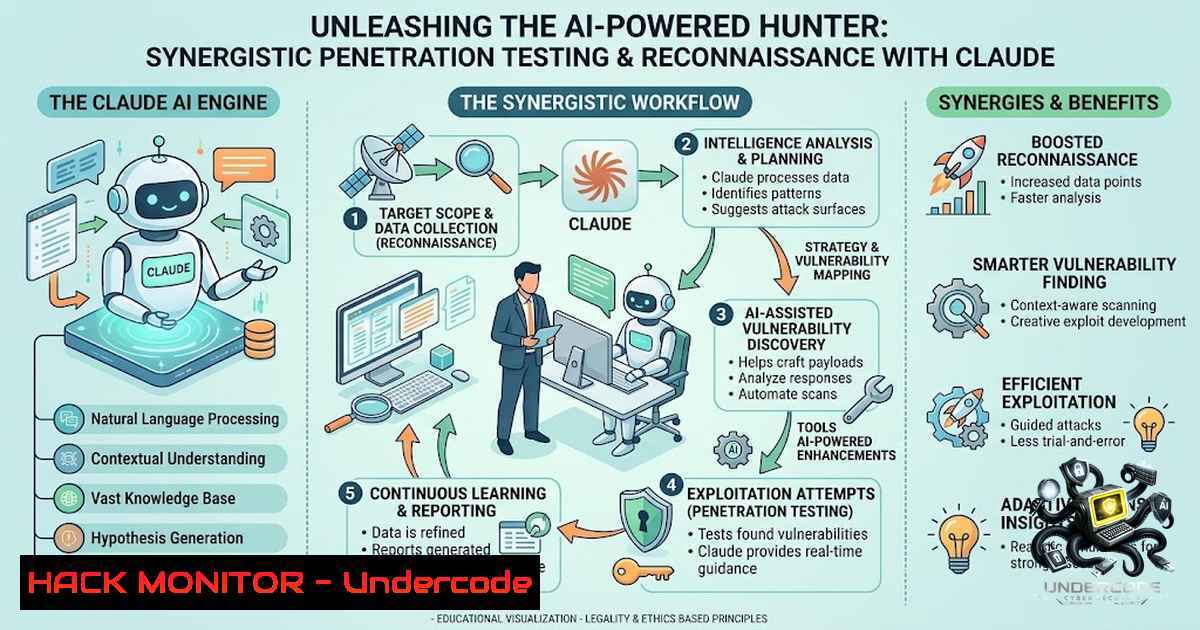
The modern cybersecurity landscape demands a shift from purely manual methodologies to a hybrid approach that leverages the analytical prowess of Large Language Models (LLMs) alongside specialized tools. Vaidik Pandya, a renowned bug hunter and security trainer, has articulated a powerful vision for this synergy, detailing a “Claude Setup” that transforms the AI from a simple chatbot into a proactive security hunting partner. This article dissects that setup, providing a technical deep-dive into the plugins, Model Context Protocols (MCPs), and operational mission that define this cutting-edge workflow, offering a blueprint for security professionals to supercharge their reconnaissance and vulnerability discovery processes.
Learning Objectives & Secrets:
- Objective 1: Master the Integration of Contextual Tools. Learn how to connect Claude to external data sources like program trackers and code repositories, turning static AI into a dynamic entity that understands the ever-changing attack surface.
- Objective 2 Secret Tip: Optimize Model Selection for Task Complexity. Don’t use a sledgehammer to crack a nut. Learn when to deploy the rapid, cost-effective analysis of Claude Sonnet 4.6 versus the deep, nuanced reasoning of Opus 5 for complex vulnerability chains.
- Objective 3 Secret Tip: Engineer a “Hunting Persona.” The real secret is in the system prompt. By defining a consistent mission and “persona” for each session, you ensure the AI maintains focus on security objectives, reducing hallucination and increasing the relevancy of its output.
You Should Know:
1. Installing and Configuring the Core MCPs
The power of Pandya’s setup lies in the Model Context Protocol (MCP), which allows the AI to interact directly with external applications. Here is how to set up the foundational plugins.
Prerequisites: Node.js (v16+), Python (v3.8+), and Git installed on your system.
Step‑by‑Step Guide:
- Clone the MCP Host Repository: This is the server that will run your tools.
git clone https://github.com/modelcontextprotocol/servers.git
cd servers
- Configure the
claude_desktop_config.json: This file tells the Claude Desktop app which MCP servers to spawn. The configuration is typically located in `~/Library/Application Support/Claude/` (macOS) or `%APPDATA%\Claude\` (Windows). - Add the `github-mcp` Server: This enables code leak detection and dependency analysis.
{ "mcpServers": { "github": { "command": "npx", "args": ["-y", "@modelcontextprotocol/server-github"], "env": { "GITHUB_PERSONAL_ACCESS_TOKEN": "YOUR_GITHUB_TOKEN" } } } } - Integrate Semgrep Guardian: For static analysis, you can run Semgrep in a Docker container and have the AI execute commands to trigger scans.
docker pull semgrep/semgrep
Run a scan and save the output for AI ingestion
docker run --rm -v "${PWD}:/src" semgrep/semgrep semgrep scan --json > semgrep_results.json
The AI can then read the JSON file and summarize the findings.
2. Automating Program Reconnaissance with BBRadar
BBRadar is an essential tool for tracking bug bounty program updates. The “secret” is to configure it to send alerts that Claude can interpret.
Step‑by‑Step Guide:
1. Install BBRadar:
git clone https://github.com/LeonardoEwald/BBRadar.git
cd BBRadar
pip install -r requirements.txt
2. Configure Targets: Create a `config.yaml` file defining which HackerOne or Bugcrowd programs to monitor.
3. Create a Notification Script: Write a script that parses the new scopes and saves them to a file (e.g., new_targets.txt).
4. AI Integration: Instruct Claude (via the system prompt) to read `new_targets.txt` at the start of every session and automatically run a reconnaissance suite against those targets. This creates a feedback loop where the hunter is always up-to-date.
3. Weaponizing “Claude-in-Chrome” for Browser Interaction
This MCP allows the AI to control a browser, enabling live interaction with web applications. This is critical for automating tasks like form submissions, OAuth flow testing, and bypassing client-side validation.
Step‑by‑Step Guide:
- Set up the Chrome DevTools Protocol (CDP): Launch Chrome with remote debugging enabled.
google-chrome --remote-debugging-port=9222
2. Install the Chrome MCP:
npx -y @modelcontextprotocol/server-chrome
3. Task Execution: Provide Claude with a command, such as: “Navigate to the target login page, analyze the JavaScript for hidden parameters, and check for DOM-based XSS.”
4. Code Snippet: Here is a basic Python script using PyCDP to interact with the browser, which can be executed by the AI.
import asyncio
from pycdp import CDPClient

async def get_page_source():
client = CDPClient()
await client.connect('localhost', 9222)
 ... command to execute JavaScript and return the HTML
4. Structured Workflows with “Superpowers”
The Superpowers plugin enforces a structured workflow (e.g., “Plan -> Execute -> Review”). This is crucial for preventing the AI from going down rabbit holes.
Step‑by‑Step Guide:
- Define the Workflow: In your Claude session prompt, define the steps. Example:
– Phase 1 (Plan): “Identify all subdomains for target.com.”
– Phase 2 (Execute): “Run subfinder -d target.com.”
– Phase 3 (Review): “Analyze the results for potential takeover vulnerabilities.”
2. Enforce with System Add a directive to Claude: “You must respond with your current phase (Plan/Execute/Review) before any action.”
3. Tool Execution: Use the `execute_command` function within the MCP to run the tools and feed the output back into the AI’s context for review.
5. Code Leak Detection and Dependency Analysis
A significant portion of successful hacks comes from exposed API keys or vulnerable dependencies. The GitHub MCP is central to this.
Step‑by‑Step Guide:
- Token Setup: Ensure the `GITHUB_PERSONAL_ACCESS_TOKEN` has permissions to search code.
- Crafting the You can instruct Claude to use the GitHub search API to look for specific strings.
“Search GitHub for ‘target.com’ AND ‘API_KEY’ in the last month.” - Analyzing Dependencies: Ask Claude to read a `package.json` or `requirements.txt` file found in a repository and check the versions against the National Vulnerability Database (NVD) to identify outdated, vulnerable packages.
Example of a command to extract dependencies locally
cat package.json | jq '.dependencies'
6. API Security and Cloud Hardening
This section focuses on using the AI to harden cloud configurations based on best practices.
Step‑by‑Step Guide:
- Generate a Terraform Plan: Have Claude generate a Terraform script for an AWS EC2 instance.
- Security Review: Instruct Claude: “Review this Terraform script for security misconfigurations like open security groups (port 22 to 0.0.0.0/0).”
- Mitigation Code: Ask the AI to output the corrected code, replacing `0.0.0.0/0` with a specific IP range.
What Undercode Say:
- Key Takeaway 1: Automation is the New Reconnaissance. The “Hunting Persona” leverages MCPs to automate the boring, time-consuming parts of security testing. This allows the hunter to focus on logic flaws and complex chaining that AI and automation tools cannot yet fully grasp, turning the AI into a force multiplier.
- Key Takeaway 2: Context is King for AI. The success of this setup hinges on the quality of the context provided to Claude. By integrating tools like Semgrep and GitHub, the AI moves from being a generalist to a specialist capable of deep, context-aware analysis. The system prompt that creates the “mission” is the orchestrator that ensures all actions are aligned toward the goal of discovering vulnerabilities.
Prediction:
- +1: The integration of agentic AI into bug bounty and penetration testing will democratize high-level security testing, enabling junior researchers to perform complex analyses and learn from the AI’s reasoning, ultimately raising the global security baseline.
- -1: As defenders adopt this technology, attackers will inevitably weaponize it to automate exploitation at scale, leading to a surge in sophisticated, AI-driven attacks that could outpace human-led incident response teams if detection mechanisms do not evolve in parallel.
▶️ Related Video (80% Match):
🎯Let’s Practice For Free:
🎓 Live Courses & Certifications:
Join Undercode Academy for Verified Certifications
🚀 Request a Custom Project:
Secure, high-velocity infrastructure and disruptive technological engineering. Contact our engineering team for high-tier development and proprietary systems:
[email protected]
💎 Smart Architecture | 🛡️ Secure by Design | ⭐ Trusted by Thousands
IT/Security Reporter URL:
Reported By: https://lnkd.in/p/eq_9JyvZ – Hackers Feeds
Extra Hub: Undercode MoN
Basic Verification: Pass ✅


