
Listen to this Post
Introduction:
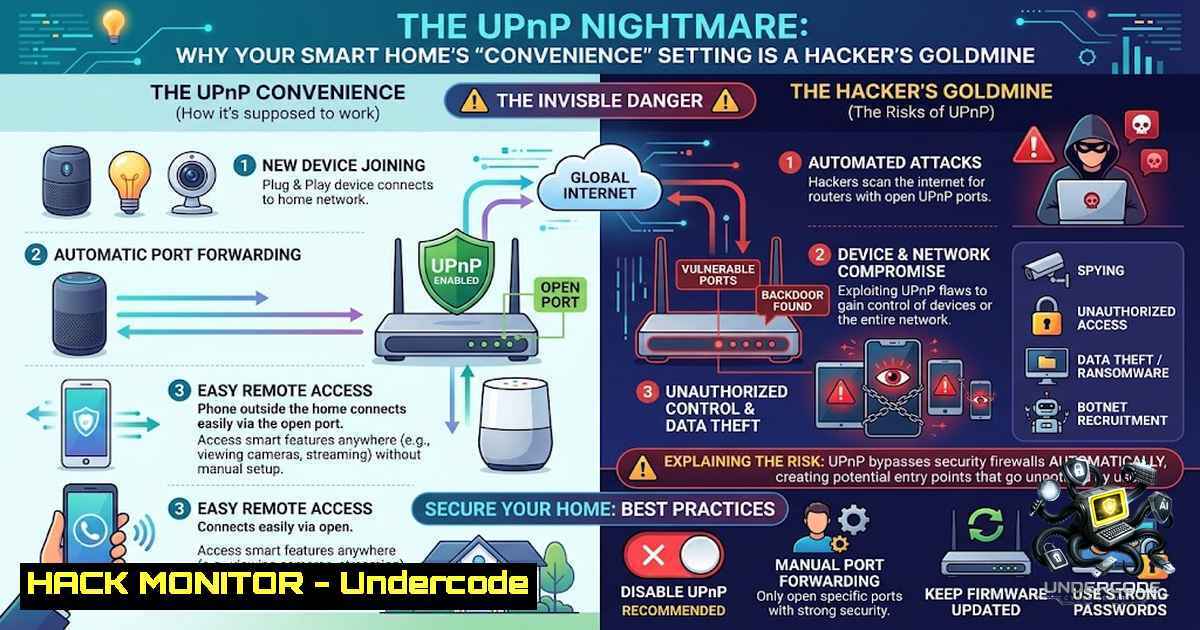
The convenience of smart home automation is often built upon a foundation of insecure network protocols, where ease of use is prioritized over robust security. A critical oversight, the Universal Plug and Play (UPnP) protocol, is enabled by default on over 90% of consumer routers and smart hubs, acting as an open door for cybercriminals to bypass network encryption and compromise connected devices. This article dissects the technical realities of smart home vulnerabilities, moving beyond myths to explore the exact misconfigurations, commands, and hardening techniques required to secure modern residential networks.
Learning Objectives & Secrets:
- Objective 1: Understand the inherent dangers of UPnP and its role in facilitating external network probing and device hijacking.
- Objective 2 Secret Tip: Identify background audio caching not as a malicious spy tool, but as a data processing vector that can be exploited if the device’s firmware is vulnerable.
- Objective 3 Secret Tip: Learn to manually audit and disable UPnP across all network segments, effectively eliminating a primary attack surface that vulnerability scanners actively target.
You Should Know:
- The UPnP Exploit: Why “Plug and Play” Means “Pwn and Pay”
UPnP is a set of networking protocols that allows devices to discover each other on a network and automatically open ports to establish services. While designed for seamless connectivity, it operates without any authentication, making it a prime target for external attackers. Cybercriminals actively scan residential IP ranges for UPnP-enabled devices. Once found, they can issue commands to the router’s UPnP service to forward external ports directly to internal devices, such as unpatched smart TVs, cameras, or even printers.
This bypasses the router’s stateful packet inspection (SPI) firewall, rendering it useless. An attacker can map an internal device’s port 80 (HTTP) to a public port, gaining access to the device’s web interface from anywhere in the world. This is often the precursor to lateral movement within the network, where compromised IoT devices serve as jump boxes to attack more sensitive endpoints like laptops or NAS storage.
To verify if UPnP is enabled on your network, you can use tools like nmap. Run the following command from a Linux or macOS terminal to scan for UPnP services on your local subnet:
sudo nmap -sU -p 1900 --script=upnp-info <your-router-ip>/24
If UPnP is active, the script will return information about available services. On Windows, you can use the `netsh` command to view the port forwarding state, though it doesn’t directly list UPnP. Instead, you should manually check your router’s web interface under the “Port Forwarding” or “NAT” settings to see if any rules are automatically populated, which is a clear sign UPnP is active.
To disable UPnP:
- Access your router’s administrative panel (typically via 192.168.1.1 or 192.168.0.1).
- Log in and navigate to the “Advanced,” “Firewall,” or “NAT” settings.
- Locate the “UPnP” option and set it to “Disable” or “Off.”
- Save the settings and reboot the router to ensure all UPnP leases are cleared.
-
Caching and Consent: The Reality of Background Audio Processing
The myth that smart speakers only record when the wake word is spoken is a misunderstanding of how “wake word detection” works. These devices utilize a low-power, always-on microphone to listen for specific acoustic patterns. This involves a localized circular buffer, or cache, that continuously stores a few seconds of audio before discarding it. While this data doesn’t leave the device, it is “recorded” in the sense that it is processed and analyzed in real-time on the edge.
This mechanism creates a vulnerability window. An attacker who compromises a smart speaker via a firmware vulnerability—like the infamous Amazon Echo or Google Home exploits seen in recent years—can potentially access this audio buffer. They can exfiltrate snippets of conversation or, worse, alter the device’s configuration to persistently record and stream audio.
Hardening against this requires network segmentation. Isolate all IoT devices on a separate VLAN (Virtual Local Area Network). This ensures that even if a device is compromised, the attacker cannot reach your primary computer or phone. To implement VLANs on a compatible router, you typically:
1. Navigate to “Network” -> “VLAN” or “IP Settings.”
2. Create a new VLAN ID (e.g., ID 10) for IoT devices.
3. Assign a specific subnet to this VLAN, like 192.168.2.0/24.
4. Set up firewall rules to block traffic from the IoT VLAN from accessing the main LAN but allow the main LAN to initiate connections to IoT devices for management.
3. Exploiting Default Credentials and Insecure Firmware
While a strong Wi-Fi password prevents outside connection, it does nothing to stop a device from reaching out to the internet. Many smart home cameras and plugs have embedded credentials for cloud communication. Worse, they often contain hardcoded backdoor passwords in their firmware, allowing malware like Mirai to infect them and launch DDoS attacks.
You should regularly scan your network for all connected devices using tools like `arp-scan` on Linux or `Advanced IP Scanner` on Windows. Identifying unknown devices is the first step. The second is to change the default passwords on every IoT device immediately upon installation.
For specific vulnerability testing, the `nmap` NSE script `http-default-accounts` can be run to check for common default credentials on web interfaces:
nmap --script=http-default-accounts -p 80,8080,443 <device-ip>
If a vulnerability is found, the router’s firewall should be configured to block that device’s internet access if it doesn’t require cloud functionality. Use outbound firewall rules to limit all IoT devices to only necessary IP addresses.
4. Micro-Segmentation and Zero Trust for IoT
Modern network hardening relies on Zero Trust principles. This means “never trust, always verify.” For IoT, this translates to micro-segmentation, where each device or group of devices is placed in its own isolated network segment with granular firewall rules.
Step-by-step guide:
- Use your router’s “Guest Network” feature as a primitive IoT network, ensuring it is set to “Allow clients to access local network? No.”
- For advanced users, install a firewall like pfSense or OPNSense on a dedicated machine. Here, you can define aliases and rules. For example, you can create an alias called “IoT” and a rule to block all traffic from IoT to “RFC1918” (private IP space) except for your NTP server (time sync) and DNS server.
- Employ Application Layer Gateways (ALGs) to inspect the traffic. Specifically, disable SIP ALG for VoIP and allow only specific ports for cloud communication if needed (like 443 for HTTPS).
- API Security and Cloud Dependency in Smart Hubs
Smart hubs rely heavily on cloud APIs. Attackers don’t need to compromise your local network if they can compromise your cloud account. A breach of a vendor’s OAuth token or a phishing attack on the user can give an attacker full control over the hub.
Mitigation:
- Enable Multi-Factor Authentication (MFA) on all smart home cloud accounts.
- Review authorized OAuth applications and revoke unused ones.
- Implement certificate pinning in mobile apps to prevent man-in-the-middle (MitM) attacks. While this isn’t user-configurable, being aware of the API threat is critical. For advanced users, analyzing the API calls can be done using Burp Suite or Fiddler to intercept traffic from the app.
What Undercode Say:
Key Takeaway 1: The assumption that a complex Wi-Fi password secures a network is fundamentally flawed; network security is determined by configuration and protocol hygiene, not encryption strength alone.
Key Takeaway 2: UPnP is a legacy protocol that trades security for convenience and must be disabled immediately to prevent remote exploitation and firewall bypass.
Analysis: The post highlights a critical gap in consumer understanding: that cybersecurity is proactive, not passive. The industry’s move towards “seamless integration” has created a generation of devices with massive attack surfaces. The real threat isn’t a hacker brute-forcing a password; it’s automated bots scanning for misconfigurations. The “convenience” of UPnP and cloud connectivity is weaponized by attackers to turn a smart lightbulb into a gateway for ransomware. This requires a paradigm shift where users must treat their smart home as a public-facing infrastructure, not a private sanctuary. The vulnerability lies not in the technology but in the default configurations that manufacturers prioritize for user experience.
Prediction:
-P: The increasing awareness of UPnP vulnerabilities will drive manufacturers to adopt more secure alternatives like mDNS and DNS-SD with authentication, potentially making consumer networks more resilient in the next 2 years.
-1: The rise of 5G and edge computing will exponentially increase the number of connected devices per household, expanding the attack surface faster than the average user’s ability to secure it, leading to a significant uptick in IoT botnet activity.
-P: Regulatory bodies like the FTC and EU will likely mandate the disabling of UPnP by default in new router firmware, forcing a baseline security improvement.
-1: Cybercriminal groups are already developing AI-based scanners that can automatically fingerprint and exploit IoT vulnerabilities, making mass-scale residential network breaches more automated and financially devastating.
🎯Let’s Practice For Free:
🎓 Live Courses & Certifications:
Join Undercode Academy for Verified Certifications
🚀 Request a Custom Project:
Secure, high-velocity infrastructure and disruptive technological engineering. Contact our engineering team for high-tier development and proprietary systems:
[email protected]
💎 Smart Architecture | 🛡️ Secure by Design | ⭐ Trusted by Thousands
IT/Security Reporter URL:
Reported By: https://lnkd.in/p/e9gJccZh – Hackers Feeds
Extra Hub: Undercode MoN
Basic Verification: Pass ✅


