
Listen to this Post
Introduction:
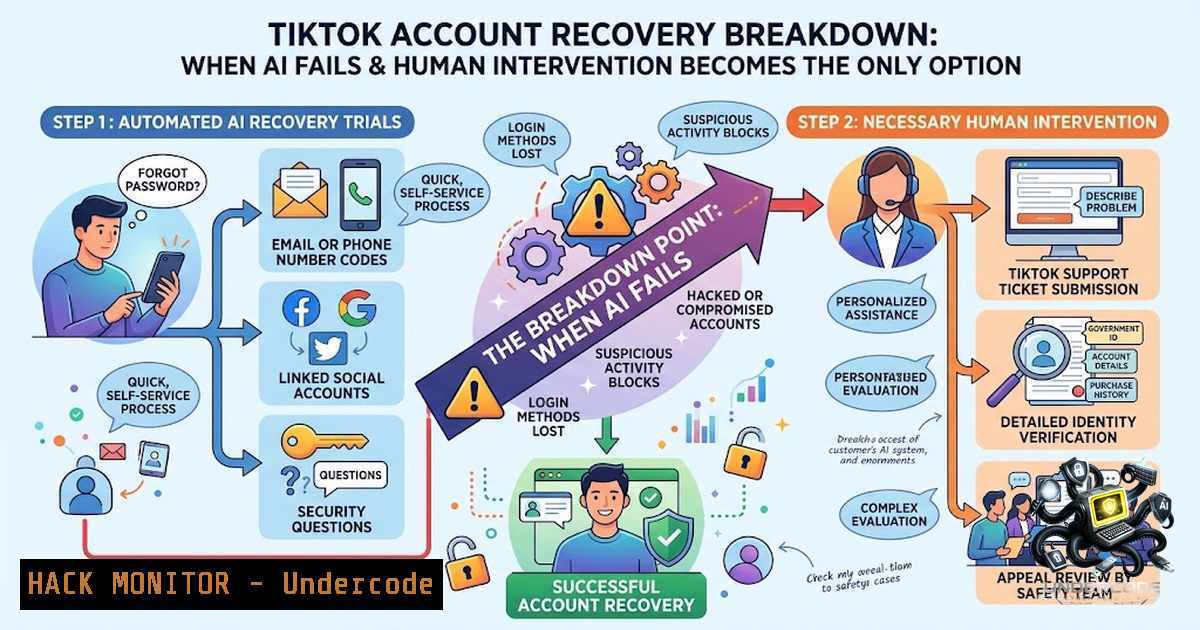
The August 2026 compromise of a TikTok account with 356,000 followers—resulting in the loss of 300 original videos and 3.5 million views—exposes a critical vulnerability in how social media platforms handle account recovery. Despite the account holder filing a police report, contacting TikTok support, and opening a dispute with the Appeals Centre Europe, the platform’s AI-driven support system ran in circles for three weeks, unable to diagnose a system error linking two accounts sharing the same Apple ID. Only after sustained public pressure—through social media posts, journalist outreach, and formal disputes—did a human TikTok support agent intervene and restore access, albeit to less than 10% of the original content. This incident underscores a growing crisis: AI-powered customer support systems, while efficient for routine queries, are dangerously ill-equipped to handle complex account takeovers, and the delay in human escalation can result in permanent data loss.
Learning Objectives & Secrets:
- Objective 1: Master the Account Takeover Response Timeline — Understand the “golden response window” for containing a breach. Within the first 2 minutes of detecting suspicious activity, users must secure remaining access, change passwords on linked accounts, and document all evidence. The longer the delay, the greater the irreversible damage—as demonstrated by the 21-day recovery window in this case.
-
Objective 2 Secret Tip: Bypass AI Support Loops with Multi-Channel Escalation — AI chatbots are designed to handle routine queries but struggle with edge cases like account-linking conflicts. The successful trigger for human intervention in this case was not a single support ticket but a coordinated multi-channel approach: filing police reports, submitting formal disputes with regulatory bodies, engaging specialized journalists, and mobilizing followers to publicly call out the hacker’s account. Document every communication and escalate through every available channel simultaneously.
-
Objective 3 Secret Tip: Preserve Proof of Ownership Before Losing Access — The most critical takeaway: maintain offline records of account creation dates, original email confirmations, linked device identifiers, and content upload logs. When the account was restored, only 20 of 300 videos reappeared—yet the promotion history for every single video remained in the app’s records. This metadata can serve as forensic evidence to prove ownership and potentially recover deleted content through legal channels.
You Should Know:
- The AI Support Authorization Failure: Why Chatbots Can’t Handle Account Recovery
The core problem isn’t that AI is “dumb”—it’s that AI systems placed inside sensitive support workflows are given the ability to facilitate account recovery actions without sufficient independent verification. In the TikTok case, the AI system couldn’t identify the system error linking two accounts sharing the same Apple ID—a logic problem that a human engineer resolved in hours.
Recent incidents with Meta’s AI support chatbot demonstrate the same vulnerability: attackers manipulated the AI into attaching attacker-controlled email addresses to Instagram accounts they did not own, effectively bypassing two-factor authentication. Meta ultimately disabled the chatbot’s autonomous email association and password reset capabilities, routing all sensitive account changes through human review. The lesson: AI should assist, not autonomously execute, sensitive account recovery actions.
Linux Command — Audit Linked Accounts and Sessions:
 Check for active sessions on compromised platforms using browser developer tools
 For Chromium-based browsers, extract cookies and session tokens:
sqlite3 ~/.config/google-chrome/Default/Cookies \
"SELECT host_key, name, value FROM cookies WHERE host_key LIKE '%tiktok%';"

Monitor for unauthorized access attempts via system logs:
sudo journalctl -f | grep -i "auth|login|session"

For Apple ID-linked accounts, check keychain for stored credentials:
security dump-keychain | grep -i "apple|tiktok"
Windows Command — Audit Account Activity:
 Check for suspicious logins from Windows Event Logs:
Get-WinEvent -LogName Security | Where-Object { $<em>.Id -in 4624,4625 } |
Select-Object TimeCreated, @{N='User';E={$</em>.Properties[bash].Value}}, @{N='IP';E={$_.Properties[bash].Value}} |
Format-Table -AutoSize

Extract saved passwords from Credential Manager:
cmdkey /list
 To delete a stored credential: cmdkey /delete:<target>
- The Golden Response Window: Containment Within 2 Minutes
Cybersecurity frameworks establish a “golden response window” for account takeovers: the first 2 minutes after detection are critical for containment. Users who still have access must immediately:
- Change passwords on all linked accounts, starting with the primary email
- Enable multi-factor authentication (MFA) using app-based authenticators rather than SMS, which is vulnerable to SIM-swap attacks
- Check account activity logs to identify the breach timestamp and source IP
- Revoke all active sessions and API tokens
- Document everything with screenshots before the attacker changes recovery details
In the TikTok case, the victim likely lost the ability to perform these actions because the attacker changed recovery details early in the compromise. Attackers often change recovery details, connect malicious apps, or gain access to other business tools to maintain persistence.
Step-by-Step: Immediate Account Lockdown
- From a known-good device (not the compromised one), attempt to log in.
- If successful, go to Settings > Security & Permissions and immediately change the password.
- Enable 2-step verification using at least two methods (authenticator app + backup codes).
- Navigate to “Devices” or “Active Sessions” and terminate all sessions except your current device.
- Check recovery email and phone number—if changed, use TikTok’s “Forgot Password” flow to reset through registered email or phone.
- If recovery details were changed, submit a recovery request directly to TikTok Support with identity verification and proof of account ownership.
3. Apple ID Account Linking: The Silent Vulnerability
The root cause of this incident was a system error linking two accounts sharing the same Apple ID. Apple ID account recovery is notoriously complex: losing access to trusted devices, phone numbers, or recovery keys can permanently lock users out. When multiple social media accounts share the same Apple ID, a compromise of one can cascade to others.
Apple ID Hardening Checklist:
- Set up a recovery key—print it and store it offline in multiple secure locations.
- Add at least one account recovery contact—a trusted person who can help reset your Apple ID password.
- Keep at least one trusted Apple device signed in, protected with a passcode, and regularly connected to the internet.
- Maintain at least two trusted phone numbers—if the primary number is lost, the secondary reduces lockout risk.
- Never store recovery keys in Apple Passwords, iCloud Photos, Notes, or iCloud Drive.
iOS Command (via Shortcuts or Terminal on jailbroken devices):
 Check Apple ID account status via command line (requires developer tools):
defaults read /Users/$USER/Library/Preferences/com.apple.preferences.AppleIDPrefs.plist

View iCloud account details:
brctl log -w | grep -i "account|auth"
4. Evidence Preservation and Metadata Forensics
Perhaps the most ironic detail in this case: although almost all 300 videos were deleted, the promotion history for every single video remained intact in the app’s records. This metadata—views, engagement metrics, upload timestamps, and promotional campaigns—can serve as forensic evidence.
Step-by-Step: Preserve Forensic Evidence
- Before losing access, use the platform’s data export feature to download all account data (TikTok allows this under Settings > Privacy > Download Your Data).
- Take screenshots of every post, message, or demand the attackers publish.
- Document the breach timeline: note when you first noticed suspicious activity, when recovery details were changed, and all communication with support.
- Preserve IP logs if available—TikTok’s Security Checkup shows login history and device access.
- File a police report and obtain a case number—this adds legal weight to recovery requests.
- Submit formal disputes with regulatory bodies like the Appeals Centre Europe.
- Engage specialized journalists—media pressure can trigger human escalation.
5. Multi-Factor Authentication: App-Based vs. SMS
The security community consistently recommends app-based authenticators over SMS, which is vulnerable to SIM-swap attacks. TikTok supports multiple 2FA methods: authenticator apps, SMS, and passkeys.
TikTok 2FA Setup (Mobile):
- Tap Profile > Menu (☰) > Settings and Privacy
2. Tap Security & Permissions > 2-step verification
- Choose at least two of the three recommended verification methods
- For authenticator apps: scan the QR code with Google Authenticator, Microsoft Authenticator, or Authy
- Save backup codes offline—these are the only way to regain access if you lose your authenticator device
Passkey Setup (Recommended):
TikTok now supports passkeys—device-based authentication using Face ID, Touch ID, or PIN. Passkeys are phishing-resistant and cannot be intercepted like SMS codes. Enable passkeys under Security & Permissions > Passkey.
- The Human Escalation Problem: Why AI Support Fails
The TikTok case raises a fundamental question: what finally triggered human intervention after three weeks of AI-driven circular responses? The answer appears to be a combination of factors: social media posts, the dispute filed with the Appeals Centre Europe, and contacts from a specialized journalist.
This mirrors the Meta AI incident, where users complained there was no effective way to escalate problems to a human representative once access was lost. Cybersecurity analysts warn that deploying AI systems for sensitive support functions without robust verification safeguards creates systemic risk.
Practical Escalation Strategy:
- Day 1-3: Submit support tickets through all available channels (in-app “Report a Problem,” web forms, email)
- Day 4-7: File police report and regulatory disputes
- Day 8-14: Engage journalists and media outlets; mobilize followers to publicly tag the platform’s official accounts
- Day 15+: Consider legal action and data protection authority complaints
What Undercode Say:
- Key Takeaway 1: AI support systems are not ready for complex account recovery. The TikTok incident demonstrates that AI-driven support cannot diagnose system-level errors like account-linking conflicts. Human intervention remains the only reliable resolution mechanism—but it took 21 days and multi-channel public pressure to trigger it. Organizations must implement clear escalation paths from AI to human agents for sensitive account actions.
-
Key Takeaway 2: The “golden response window” is measured in minutes, not days. Had the human intervention come sooner, recovering the full account would have been far simpler. The longer a compromise persists, the more data is permanently lost. Users must have incident response playbooks ready before a breach occurs, including offline proof-of-ownership records, multi-factor authentication already enabled, and recovery contacts already configured.
Analysis: The TikTok account takeover case is not an isolated incident—it’s a symptom of a broader industry failure. Social media platforms are deploying AI chatbots to reduce support costs without adequately addressing the security implications of granting these systems authority over sensitive account functions. The result is a support ecosystem where routine queries are handled efficiently but complex compromises languish in automated loops, causing permanent data loss and user harm. The solution requires a hybrid approach: AI for triage and routine tasks, but mandatory human review for any account recovery action that involves changing recovery details, linking accounts, or restoring deleted content. Until platforms implement these safeguards, users must treat account recovery as a self-service responsibility—and prepare for the worst before it happens.
Prediction:
- +1 The TikTok incident will accelerate regulatory pressure on social media platforms to provide mandatory human support escalation paths for account recovery, similar to GDPR-mandated data access rights. Expect new legislation within 12-18 months requiring platforms to respond to account recovery requests within 72 hours and provide human review upon request.
-
-1 AI support systems will continue to be deployed for cost-cutting despite known vulnerabilities. The Meta AI chatbot incident and the TikTok case demonstrate that platforms prioritize efficiency over security. Until a major class-action lawsuit or regulatory fine changes the calculus, AI-driven support will remain the default—and account takeovers will continue to result in permanent data loss.
-
+1 The rise of passkeys and device-based authentication will reduce account takeover success rates. Passkeys are phishing-resistant and cannot be intercepted like SMS codes. As platforms like TikTok, Apple, and Google adopt passkeys, the attack surface for credential theft will shrink significantly over the next 2-3 years.
-
-1 The “metadata paradox” revealed in this case—where content is deleted but promotion history remains—will be exploited by attackers to gaslight victims into believing their content never existed. Platforms must implement immutable content hashing and blockchain-based content provenance to prevent this form of digital erasure.
▶️ Related Video (80% Match):
https://www.youtube.com/watch?v=1Zb5O3nDHms
🎯Let’s Practice For Free:
🎓 Live Courses & Certifications:
Join Undercode Academy for Verified Certifications
🚀 Request a Custom Project:
Secure, high-velocity infrastructure and disruptive technological engineering. Contact our engineering team for high-tier development and proprietary systems:
[email protected]
💎 Smart Architecture | 🛡️ Secure by Design | ⭐ Trusted by Thousands
IT/Security Reporter URL:
Reported By: https://lnkd.in/p/e4jMMJrJ – Hackers Feeds
Extra Hub: Undercode MoN
Basic Verification: Pass ✅


