Listen to this Post
Introduction:
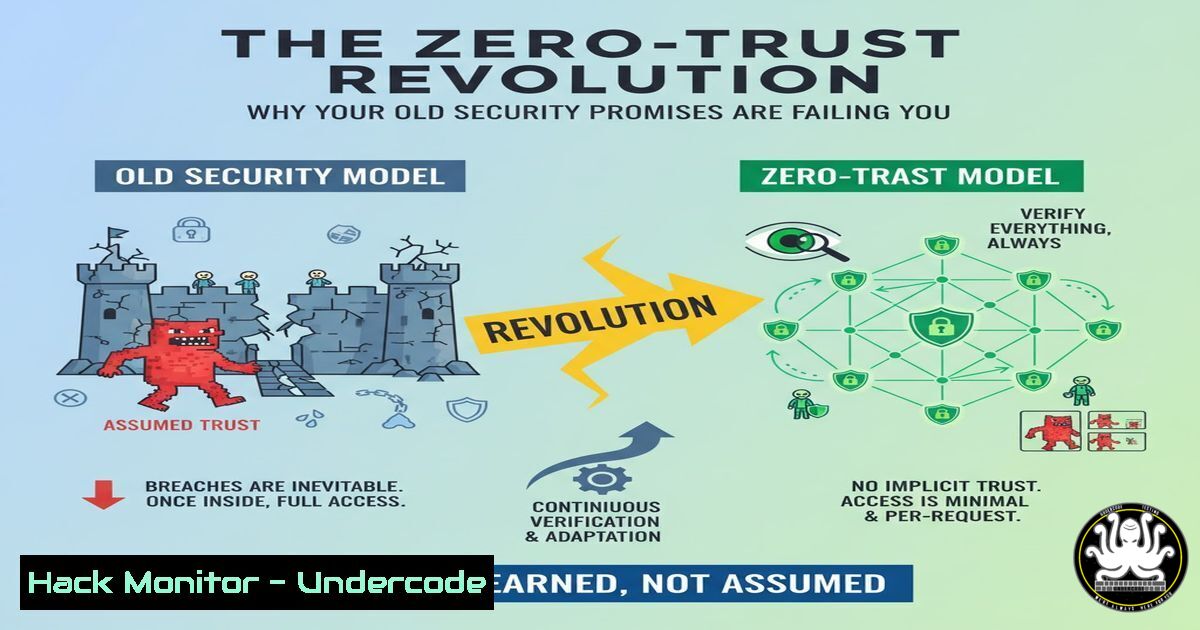
The traditional perimeter-based security model, built on the promise of a trusted internal network, is fundamentally broken. As cloud adoption and remote work dissolve the corporate network boundary, organizations must pivot to a Zero-Trust architecture, which operates on the principle of “never trust, always verify.” This paradigm shift requires re-evaluating every access request, regardless of its origin.
Learning Objectives:
- Understand the core principles and components of a Zero-Trust security model.
- Implement critical commands and configurations to enforce Zero-Trust in hybrid environments.
- Develop strategies for continuous verification and lateral movement prevention.
You Should Know:
1. Enforcing Least Privilege with IAM Policies
In a Zero-Trust model, users and systems should only have the permissions absolutely necessary to perform their functions.
Verified AWS IAM Policy Snippet:
{
"Version": "2012-10-17",
"Statement": [
{
"Effect": "Allow",
"Action": [
"s3:GetObject",
"s3:ListBucket"
],
"Resource": [
"arn:aws:s3:::secure-bucket/",
"arn:aws:s3:::secure-bucket"
],
"Condition": {
"IpAddress": {
"aws:SourceIp": "192.0.2.0/24"
}
}
}
]
}
Step-by-step guide: This JSON policy enforces least privilege by only allowing `s3:GetObject` and `s3:ListBucket` actions on a specific S3 bucket. The `Condition` block adds a layer of context-aware security by restricting access to requests originating from a specific IP range (192.0.2.0/24). To use it, navigate to the IAM console, create a new policy, and paste this JSON, modifying the `Resource` ARN and `SourceIp` to match your environment.
2. Micro-Segmentation with Windows Firewall
Prevent lateral movement by segmenting your network internally using host-based firewalls.
Verified Windows Firewall Command:
New-NetFirewallRule -DisplayName "Block SMB Lateral" -Direction Inbound -Protocol TCP -LocalPort 445 -Action Block -Profile Domain,Private,Public
Step-by-step guide: This PowerShell command, executed in an administrative session, creates a new Windows Firewall rule that blocks inbound Server Message Block (SMB) traffic on port 445 across all network profiles. SMB is commonly exploited for lateral movement by threats like ransomware. The rule is named “Block SMB Lateral” for easy identification. Verify the rule is active with Get-NetFirewallRule -DisplayName "Block SMB Lateral".
3. Implementing Application Allow-Listing with AppLocker
Restrict executable code to an approved list, a core tenet of Zero-Trust.
Verified AppLocker PowerShell Script:
 Create a default deny-all rule for executables
Set-AppLockerPolicy -XmlPolicy (Get-AppLockerPolicy -Local).ToXml() -Merge
New-AppLockerPolicy -RuleType Publisher, Path, Hash -User Everyone -Action Deny -Path %OSDRIVE% -RuleName "Default Deny" -Xml | Set-AppLockerPolicy -Merge
Step-by-step guide: This script first retrieves the current local AppLocker policy. It then creates and merges a new policy that, by default, denies everyone from running any executable on the OS drive. This establishes a strict baseline. You must then create and deploy explicit “Allow” rules for approved applications (e.g., from trusted publishers like “Microsoft Windows Publisher”) using the AppLocker MMC snap-in.
4. Continuous Verification with Multi-Factor Authentication (MFA) Enforcement
Ensure that access is continuously verified, not just at initial login.
Verified Azure AD / Microsoft 365 PowerShell Command:
New-MsolConditionalAccessPolicy -DisplayName "Require MFA for All Admins" -Enabled $True -UsersOrGroupsIncluded "admin_group_id" -UsersOrGroupsExcluded $null -AdminTypes $null -CloudAppTypes "All" -DevicePlatformInclude "All" -DevicePlatformExclude $null -AccessControlRequireMfa $True
Step-by-step guide: This command uses the Azure AD module to create a Conditional Access policy named “Require MFA for All Admins.” It targets a specific group containing administrative accounts (admin_group_id). The `-AccessControlRequireMfa $True` parameter mandates MFA for any access attempt by these users. Replace `”admin_group_id”` with the actual ObjectId of your admin group, which can be found with Get-MsolGroup.
- Securing Linux Servers with Mandatory Access Control (SELinux)
Apply fine-grained access control to Linux systems to limit the damage from compromised processes.
Verified SELinux Commands:
 Check SELinux status
sestatus

Set SELinux to enforcing mode permanently
sudo sed -i 's/SELINUX=permissive/SELINUX=enforcing/g' /etc/selinux/config

View audit logs for denials
sudo ausearch -m avc -ts today

Apply the correct context to a web directory
sudo semanage fcontext -a -t httpd_sys_content_t "/var/www/html(/.)?"
sudo restorecon -R /var/www/html
Step-by-step guide: First, use `sestatus` to verify SELinux is installed and check its current mode. The `sed` command modifies the main configuration file to set SELinux to `enforcing` upon reboot. The `ausearch` command is critical for troubleshooting; it displays access vector cache (AVC) denials from the current day. The final two commands demonstrate how to properly label a web server directory so SELinux allows the httpd process to serve its content.
6. Zero-Trust for APIs: Validating JWT Tokens
APIs are a primary attack surface and must validate every request.
Verified Node.js (Express) JWT Validation Snippet:
const jwt = require('jsonwebtoken');
const jwksClient = require('jwks-rsa');

const client = jwksClient({
jwksUri: 'https://your-tenant.auth0.com/.well-known/jwks.json'
});

function verifyToken(req, res, next) {
const token = req.headers.authorization?.split(' ')[bash];
if (!token) return res.sendStatus(401);

jwt.verify(token, getKey, { algorithms: ['RS256'] }, (err, decoded) => {
if (err) return res.sendStatus(403);
req.user = decoded;
next();
});
}

function getKey(header, callback) {
client.getSigningKey(header.kid, (err, key) => {
const signingKey = key.publicKey || key.rsaPublicKey;
callback(null, signingKey);
});
}
// Use middleware: app.use(verifyToken);
Step-by-step guide: This code sets up a middleware function for an Express.js API. It extracts a JWT from the `Authorization` header. Instead of using a shared secret, it uses the `jwks-rsa` library to fetch the public key from a JWKS endpoint (like those provided by Auth0 or AWS Cognito) to verify the token’s signature. This ensures the token was issued by a trusted identity provider and has not been tampered with, a key verification step in Zero-Trust.
7. Cloud Asset Discovery and Inventory
You cannot protect what you do not know exists. Continuous discovery is essential.
Verified AWS CLI & Bash Commands for Inventory:
 List all S3 Buckets
aws s3api list-buckets --query "Buckets[].Name" --output text

List all EC2 Instances (ID and State)
aws ec2 describe-instances --query "Reservations[].Instances[].[InstanceId, State.Name]" --output table

List all IAM Users
aws iam list-users --query "Users[].UserName" --output text

Script to run all and output to a dated file
!/bin/bash
INVENTORY_FILE="aws_inventory_$(date +%Y%m%d).txt"
{
echo "=== S3 Buckets ==="
aws s3api list-buckets --query "Buckets[].Name"
echo -e "\n=== EC2 Instances ==="
aws ec2 describe-instances --query "Reservations[].Instances[].[InstanceId, State.Name, [Tags[?Key=='Name'].Value] [bash][0]]"
echo -e "\n=== IAM Users ==="
aws iam list-users --query "Users[].UserName"
} > $INVENTORY_FILE
Step-by-step guide: This set of commands uses the AWS CLI to perform a basic inventory of critical resources. The first three commands individually list S3 buckets, EC2 instances (with name tags), and IAM users. The bash script combines these into a single, automated process that outputs the results to a time-stamped file. This inventory should be run regularly to detect unauthorized or shadow IT resources, a foundational activity for maintaining a Zero-Trust posture.
What Undercode Say:
- The perimeter is already gone; security must be intrinsic and continuous, not bolted-on at the edge.
- Identity is the new perimeter, and its compromise is the primary attack vector.
The paradigm of a trusted internal network is not just outdated; it’s dangerously negligent. The LinkedIn post’s metaphor of broken promises aligns perfectly with the failure of legacy security models that trusted IP addresses and network locations. Modern attacks, from sophisticated APTs to ransomware, exploit this misplaced trust for lateral movement. The industry’s shift to Zero-Trust is not a product rollout but a fundamental architectural and philosophical change. It demands that we stop making promises about the safety of a “network” and start making verifiable assertions about every single “request.” This involves a cultural shift as much as a technical one, moving from a castle-and-moat mentality to one of continuous, evidence-based verification for every user, device, and application flow.
Prediction:
The failure to adopt a holistic Zero-Trust framework will be the single greatest contributor to catastrophic data breaches over the next three years. Organizations clinging to perimeter-based models will face increasingly sophisticated attacks that effortlessly bypass their outer defenses, leading to unchecked lateral movement and exfiltration. Conversely, the early adopters of identity-centric, micro-segmented Zero-Trust architectures will see a dramatic reduction in breach impact and will be able to contain incidents to isolated segments, transforming security from a promise into a provable, enforceable state.
🎯Let’s Practice For Free:
IT/Security Reporter URL:
Reported By: Shannonsmithjdms I – Hackers Feeds
Extra Hub: Undercode MoN
Basic Verification: Pass ✅


