Listen to this Post
Introduction:
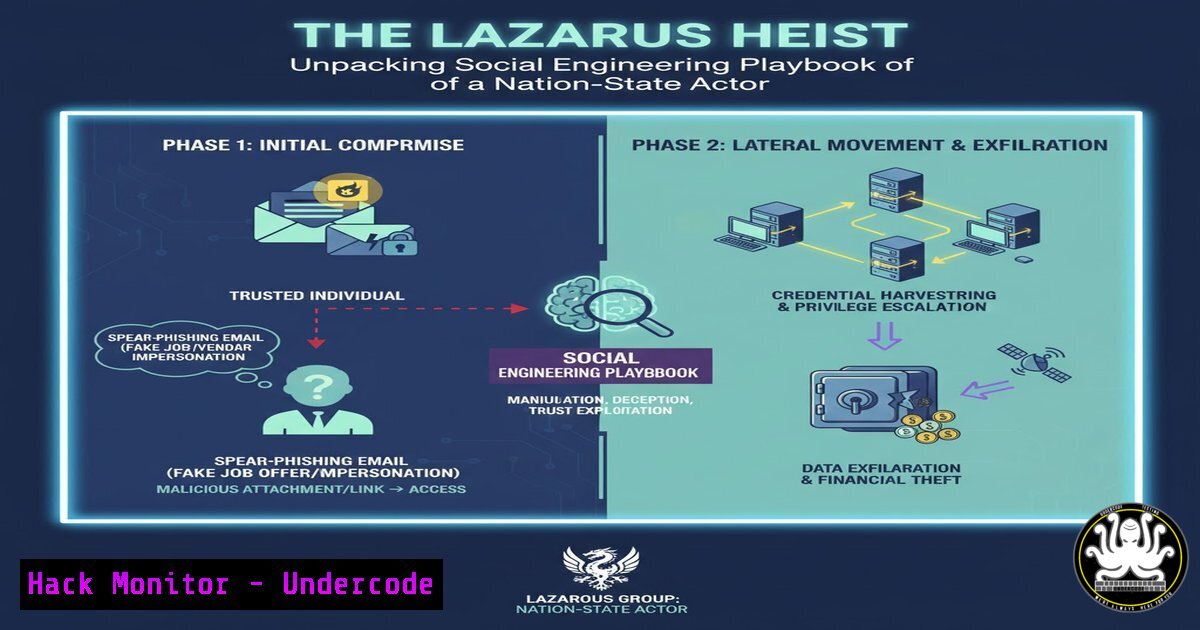
The recent LinkedIn post by Maor Brantz offers a chilling, first-hand account of a sophisticated social engineering attack, attributed to the North Korean Lazarus Group. This incident is not a crude phishing email but a multi-layered, psychological operation designed to build trust and manipulate the target into executing the attacker’s commands. It underscores a critical shift in the cyber threat landscape, where human vulnerability is the primary exploit.
Learning Objectives:
- Understand the tactics, techniques, and procedures (TTPs) used in a sophisticated social engineering engagement.
- Learn essential command-line and forensic techniques to identify and investigate such compromises.
- Implement proactive security controls to harden systems and train personnel against advanced persistent threats (APTs).
You Should Know:
1. Initial Reconnaissance and Infrastructure Analysis
The attacker’s first success was establishing a believable persona. Security professionals must be able to trace and analyze potentially malicious infrastructure.
Verified Commands & Tutorials:
`nslookup suspicious-domain.com`
`whois attacker-linked-domain.org`
`curl -I https://suspicious-domain.com` (to check HTTP headers)
`dig A suspicious-domain.com`
`traceroute suspicious-domain.com` (Linux) / `tracert suspicious-domain.com` (Windows)
Step-by-step guide:
Before engaging with any unknown contact, perform due diligence. Use `nslookup` to resolve the domain to an IP address. Cross-reference this IP with threat intelligence feeds. The `whois` command provides registration details; look for recent creation dates or anonymized registrant information. HTTP headers retrieved via `curl -I` can reveal the server type and sometimes scripting languages, offering clues about the infrastructure’s legitimacy. Traceroute helps understand the network path and hosting provider.
2. Detecting Untrusted Process Execution
The target was tricked into running a malicious binary. System administrators must be adept at identifying rogue processes.
Verified Commands & Tutorials:
`ps aux | grep -i “suspicious_process”` (Linux)
`Get-Process | Where-Object {$_.ProcessName -like “suspicious”}` (Windows PowerShell)
`tasklist /svc | findstr “suspicious”` (Windows Command Prompt)
`netstat -tulnp | grep :443` (Linux – find process using specific port)
`Get-NetTCPConnection | Where-Object {$_.RemotePort -eq 443}` (Windows PowerShell)
Step-by-step guide:
On a Linux system, `ps aux` lists all running processes. Piping it to `grep` allows you to filter for known suspicious names. In Windows PowerShell, `Get-Process` is the equivalent cmdlet. To correlate network activity with processes, use `netstat -tulnp` on Linux to see which process (-p) is listening on a specific port (e.g., 443 for HTTPS). The Windows equivalent, Get-NetTCPConnection, shows active connections and their owning process ID.
3. Forensic Timeline Creation with System Logs
After a suspected breach, creating a timeline of events is crucial for understanding the attack scope.
Verified Commands & Tutorials:
`sudo journalctl –since “2024-01-01 00:00:00” –until “2024-01-02 00:00:00″` (Linux – systemd)
`Get-WinEvent -LogName Security -MaxEvents 50 | Where-Object {$_.TimeCreated -gt “01/01/2024”}` (Windows PowerShell)
`last` (Linux – login history)
`Get-WinEvent -FilterHashtable @{LogName=’System’; ID=7045}` (Windows – New Service creation)
Step-by-step guide:
On modern Linux systems, `journalctl` is the primary tool for querying system logs. The `–since` and `–until` flags help narrow down the investigation to the relevant time window. In Windows, the `Get-WinEvent` PowerShell cmdlet is incredibly powerful. Filtering the Security log for specific Event IDs (like 4624 for successful logon, 4688 for process creation, or 7045 for new service installation) can reveal the attacker’s actions. The `last` command provides a quick view of user logins, which can identify unauthorized access.
4. Analyzing File Integrity and Malware
The binary executed was likely a payload dropper. Analyzing files for signs of malware is a core defensive skill.
Verified Commands & Tutorials:
`file suspicious_file.exe`
`strings suspicious_file.exe | grep -i “http\|api\|key”`
`md5sum suspicious_file.exe` / `sha256sum suspicious_file.exe`
`ls -la suspicious_file.exe` (check file permissions and timestamps)
`sigcheck -accepteula -a suspicious_file.exe` (Sysinternals tool for Windows)
Step-by-step guide:
The `file` command identifies the file type, which attackers often obfuscate. The `strings` command extracts human-readable text from a binary, which can reveal hardcoded IP addresses, URLs, or encryption keys. Generating MD5 or SHA256 hashes with md5sum/sha256sum allows you to check the file against VirusTotal or other threat intelligence platforms. On Windows, the Sysinternals `sigcheck` tool is invaluable for verifying digital signatures; a lack of a valid signature is a major red flag for common software.
5. Memory Acquisition for Deep Analysis
Volatile memory (RAM) can contain forensic gold, including decrypted malware and active network connections.
Verified Commands & Tutorials:
`sudo dd if=/dev/mem of=/evidence/mem.dd bs=1M` (Linux – if supported)
`LiME` (Linux Memory Extractor) kernel module
`WinPmem` (Windows memory acquisition tool)
`Volatility -f mem.dd imageinfo` (Memory analysis framework)
Step-by-step guide:
Acquiring memory must be done with care to avoid contamination. While the classic `dd` command can be used, dedicated tools like `LiME` for Linux and `WinPmem` for Windows are designed for reliable, forensically sound acquisition. Once you have a memory dump (e.g., mem.dd), you can load it into the Volatility framework. The first command is often `volatility -f mem.dd imageinfo` to identify the correct OS profile, which is required for all subsequent analysis plugins.
6. Network Isolation and Containment
At the first sign of compromise, containing the threat is paramount to prevent lateral movement or data exfiltration.
Verified Commands & Tutorials:
`sudo iptables -A INPUT -s
`sudo ufw deny from
`New-NetFirewallRule -DisplayName “BlockAttacker” -Direction Inbound -Protocol Any -RemoteAddress
`netsh advfirewall firewall add rule name=”BlockAttacker” dir=in action=block remoteip=
Step-by-step guide:
Immediately block the attacker’s known command-and-control (C2) IP address. On a Linux system using iptables, the `-A INPUT` flag appends a rule to the input chain to `DROP` all packets from the source IP. For simpler firewall management with ufw, the command `sudo ufw deny from
7. Proactive Hardening with Application Whitelisting
Preventing unauthorized executables from running is a foundational mitigation against social engineering payloads.
Verified Commands & Tutorials:
`sudo apt-get install apparmor-profiles` (Linux – AppArmor)
`sudo aa-status` (Check AppArmor status)
`Get-CimInstance -ClassName Win32_Service -Filter “State=’Running'”` (Windows – list running services)
`Get-Service | Where-Object {$_.Status -eq ‘Running’}` (Windows PowerShell)
Configuring Windows Defender Application Control (WDAC) or AppLocker policies.
Step-by-step guide:
Application whitelisting is a “default-deny” approach. On Linux, Mandatory Access Control systems like AppArmor or SELinux can confine applications to their intended capabilities. Use `aa-status` to view active AppArmor profiles. On Windows, WDAC and AppLocker are the native solutions. While GUI-based configuration is common, PowerShell is used to audit the current state. `Get-Service` lists all services, allowing you to identify and disable unnecessary ones that could be exploited. Implementing these policies significantly reduces the attack surface.
What Undercode Say:
- The Human Firewall is the Last Line of Defense. Technical controls are essential, but this attack bypassed them all by manipulating the user. Continuous, realistic security awareness training is non-negotiable.
- Assume Breach, Hunt Proactively. The timeline from initial contact to payload execution can be hours. Organizations must have robust monitoring and threat-hunting capabilities to detect anomalous activity that evades signature-based defenses.
This incident is a textbook example of a highly resourced APT leveraging social engineering as a primary weapon. The Lazarus Group’s investment in building a credible persona over time demonstrates a level of patience and sophistication that standard email filters cannot catch. The key insight is that modern cybersecurity is a psychological battle as much as a technical one. Defensive strategies must now encompass behavioral analysis, zero-trust principles applied to human interactions, and advanced endpoint detection that focuses on behavior rather than known-bad indicators. The fact that the target was a professional in the field is a stark reminder that no one is immune.
Prediction:
The success of this long-con social engineering tactic will lead to its widespread adoption by other nation-state and financially motivated actors. We will see a rise in “deepfake” audio and video being used in these engagement campaigns to add a layer of undeniable “proof,” making the impersonation even more convincing. This will force the development and adoption of AI-powered verification tools to authenticate digital communications, creating a new arms race in the social engineering domain. Furthermore, insurance and regulatory bodies will begin mandating specific social engineering penetration tests and training protocols as a condition for coverage or compliance.
🎯Let’s Practice For Free:
IT/Security Reporter URL:
Reported By: Maorbrantz %D7%90%D7%99%D7%96%D7%94 – Hackers Feeds
Extra Hub: Undercode MoN
Basic Verification: Pass ✅


