
Listen to this Post
Introduction:
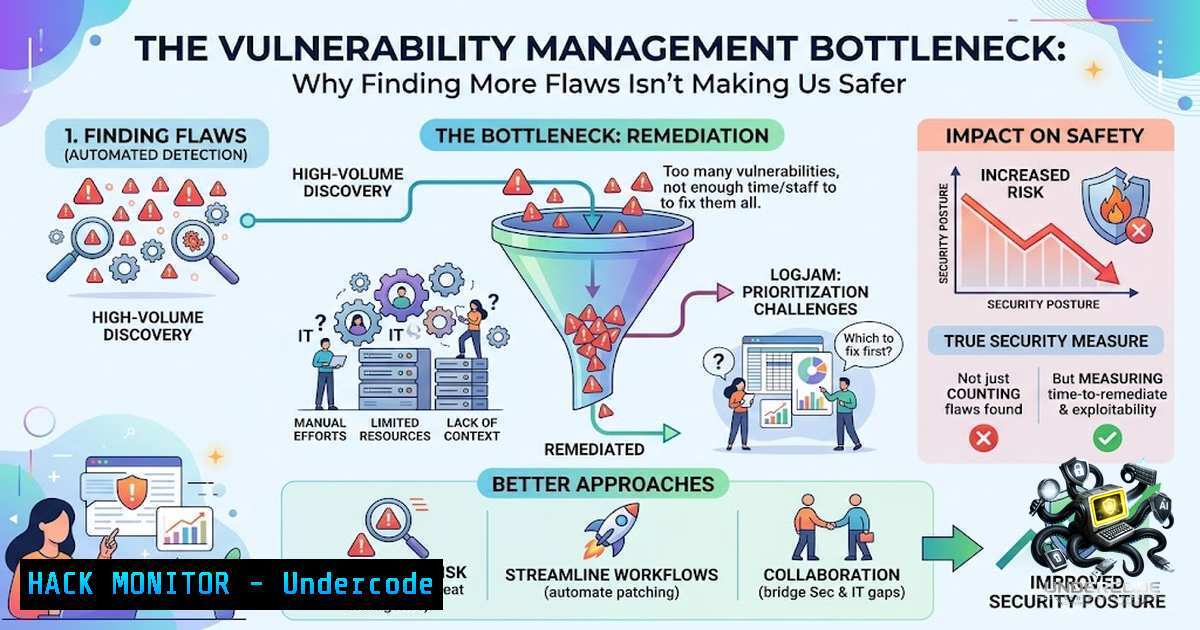
The cybersecurity industry has achieved remarkable efficiency in discovering software vulnerabilities, driven by AI-powered code analysis, automated scanners, and expanding bug bounty programs. However, this influx of raw data has created a new and critical challenge: the prioritization and remediation bottleneck. As organizations drown in a sea of findings, the true measure of a security program is shifting from detection capability to the ability to validate, contextualize, and drive effective fixes.
Learning Objectives & Secrets:
- Objective 1: Master Contextual Risk Prioritization – Learn to move beyond CVSS scores to assess exploitability, business impact, and data sensitivity. The secret is integrating asset inventory and business criticality into your vulnerability management pipeline.
- Objective 2: Automate Validation & Triage – Discover how to use scripting and AI tools to filter false positives and correlate findings with environmental data. The secret tip is implementing a “triage-as-code” workflow using custom rules to automatically close noise.
- Objective 3: Drive Remediation Through Ownership – Uncover strategies to automate bug assignment and SLA enforcement. The secret is creating dynamic dashboards that link vulnerabilities to specific development teams and product owners, turning raw findings into actionable Jira tickets.
You Should Know:
1. Automating Validation with Custom Scripts
The post highlights that a vulnerability report lacks context. To solve this, security engineers can write scripts to enrich findings. For example, using the Nmap Scripting Engine (NSE) or Python to check if a reported CVE is actually exploitable against a specific running service version.
Step-by-step guide:
- Linux (Bash): Use `curl` to query the NVD API and compare a CVE ID against your asset’s service version.
Fetch CVE details for a specific ID
curl -s "https://services.nvd.nist.gov/rest/json/cves/2.0?cveId=CVE-2023-XXXX" | jq '.vulnerabilities[].cve.impact'
- Windows (PowerShell): Use `Invoke-RestMethod` to fetch exploit availability from exploit-db.
$cve = "CVE-2023-XXXX"
Invoke-RestMethod -Uri "https://exploit-db.com/search?cve=$cve" -UseBasicParsing
- Purpose: This filters out vulnerabilities that don’t affect your specific software version, reducing noise significantly.
2. Asset Contextualization & Exposure Mapping
The author asks, “Is the affected system exposed?” This requires integrating vulnerability scanners with your cloud provider’s API to check public IPs or security groups.
Step-by-step guide:
- AWS CLI: Query the EC2 security group rules to see if a vulnerable port (e.g., 22, 3389) is open to
0.0.0.0/0.aws ec2 describe-security-groups --group-ids sg-123456 --query 'SecurityGroups[].IpPermissions[?ToPort==<code>22</code>]'
- Combine with Scans: Pipe the list of internal IPs from a scanner into a check for public IP association. This tells you if the vulnerability is internet-facing (Critical) or internal-only (Medium).
- Tool Configuration: Configure Tenable or Qualys to use dynamic asset tags that update based on these API queries, automatically adjusting risk scores.
3. Data Sensitivity & Privilege Mapping
“Who owns the fix?” requires mapping the service account to a business owner. Using Active Directory (AD) or Identity Providers (IdP).
Step-by-step guide:
- Linux (AD Query): Use `ldapsearch` to find the owner of the service account running a vulnerable process.
ldapsearch -x -H ldap://ldap.company.com -b "dc=company,dc=com" "(&(objectClass=user)(name=svc_account))" manager
- Automation: Create a script that parses scanner output, extracts the executable path, queries the process owner via
ps -ef, and then looks up the manager email in the corporate directory.
4. Prioritization with CVSS Environmental Metrics
The standard CVSS base score is insufficient. You must use the Environmental (CVSS: E) and Temporal (CVSS: T) metrics.
Step-by-step guide:
- Custom Formula: Adjust the CVSS score based on your specific asset value (Confidentiality, Integrity, Availability requirements).
- Linux Command: Use `jq` to process scanner JSON output and modify the score.
Assuming scanner output has a "base_score" field
cat scan.json | jq '.findings[] | .adjusted_score = (.base_score  (if .is_internet_facing then 1.2 else 1.0 end))'
- Tool Configuration: In DefectDojo or Faraday, set up risk acceptance rules that automatically approve low-severity findings on non-production, non-internet-facing assets.
5. Integrating Findings into CI/CD (Shift-Left)
To prevent the backlog from growing, integrate scanners into the development pipeline. Use exit codes to block builds only on “Critical” findings.
Step-by-step guide:
- GitLab CI/CD: Use `trivy` to scan a container image.
trivy image --severity HIGH,CRITICAL --exit-code 1 my-app:latest
- Jenkins Pipeline: Use the OWASP Dependency Check plugin to scan libraries. If a vulnerability with a score > 9.0 is found and the application is public-facing, fail the build. This ensures issues are fixed before deployment.
6. Risk Acceptance & Incident Response
The post notes, “Who accepts the risk?” This requires a structured workflow.
Step-by-step guide:
- Create a Risk Register: Use a simple script to generate a “Risk Acceptance Form” in Markdown or JSON.
- Automation: If a vulnerability is unreachable or mitigated by WAF, create a suppression rule. Use `auditd` or `sysmon` to monitor if that suppression is breached (e.g., the WAF is disabled), automatically re-opening the ticket.
Windows Sysmon config to monitor WAF service status
<Sysmon> <EventFiltering> <RuleGroup> <ProcessCreate onmatch="include"> <CommandLine condition="contains">waf_service.exe --stop</CommandLine> </ProcessCreate> </RuleGroup> </EventFiltering> </Sysmon>
7. AI-Assisted Triage and Summarization
Use AI APIs to summarize reports for the remediation owner, reducing the time they spend reading technical jargon.
Step-by-step guide:
- Script: Use `curl` to send the vulnerability description to an LLM API (e.g., OpenAI) with a prompt asking for a “non-technical summary and remediation steps.”
curl https://api.openai.com/v1/chat/completions -H "Authorization: Bearer $API_KEY" -d '{"model":"gpt-4","messages":[{"role":"user","content":"Summarize this CVE in plain English for a developer: [CVE Data]"}]}' - Integration: Pipe this output into an email or Slack notification, effectively replacing a 5-page report with a 5-line action item.
What Undercode Say:
- Key Takeaway 1: The bottleneck isn’t discovery; it’s the ability to filter out the 80% of findings that are irrelevant due to environmental factors.
- Key Takeaway 2: Automation must move beyond scanning and into the realm of “validation” and “assignment” to bridge the gap between “found” and “fixed.”
Analysis:
The post correctly identifies that the era of “finding everything” is over. It highlights a systemic failure in organizational workflows where the sheer volume of alerts leads to alert fatigue, causing critical issues to be ignored. The solution lies in a “trust but verify” approach—using AI and automation not to find more bugs, but to provide the context necessary for business leaders and developers to make swift decisions. The shift from vulnerability scanning to vulnerability “orchestration” is essential.
Prediction:
- +1: The rise of AI-powered automated remediation pipelines will drastically reduce Mean Time to Remediate (MTTR) for common vulnerabilities by suggesting and testing patches automatically.
- -1: The reliance on AI to summarize and triage will introduce a new attack vector where threat actors attempt to poison training data to force false negatives.
- -1: Smaller organizations without the resources to build custom context-enrichment tools will suffer disproportionately, widening the security gap between enterprises and SMEs.
- +1: We will see a surge in “Risk-Based Vulnerability Management” platforms that integrate natively with CMDBs, dramatically improving decision-making efficiency.
- -1: Over-reliance on automation could lead to a deskilling of security analysts, making them dependent on tools and less capable of manual, nuanced risk assessment.
▶️ Related Video (84% Match):
🎯Let’s Practice For Free:
🎓 Live Courses & Certifications:
Join Undercode Academy for Verified Certifications
🚀 Request a Custom Project:
Secure, high-velocity infrastructure and disruptive technological engineering. Contact our engineering team for high-tier development and proprietary systems:
[email protected]
💎 Smart Architecture | 🛡️ Secure by Design | ⭐ Trusted by Thousands
IT/Security Reporter URL:
Reported By: https://lnkd.in/p/epd4aXH8 – Hackers Feeds
Extra Hub: Undercode MoN
Basic Verification: Pass ✅


