Listen to this Post
Introduction:
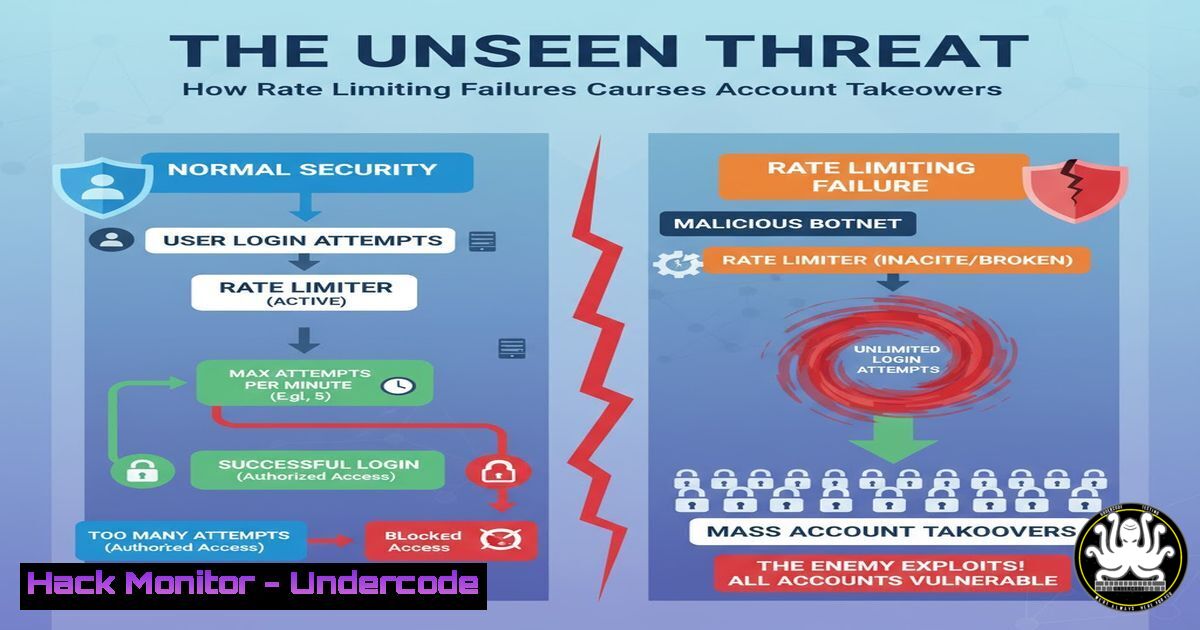
A simple misconfiguration in an authentication endpoint can lead to a devastating Account Takeover (ATO). As highlighted in a recent bug bounty discovery, the lack of rate limiting on login, password reset, and MFA verification functions is a critical vulnerability allowing attackers to brute-force their way into user accounts. This article provides a professional toolkit for both identifying these flaws and defending against them.
Learning Objectives:
- Understand the technical mechanisms behind rate limiting bypass attacks.
- Learn to test authentication endpoints for rate limiting deficiencies.
- Implement robust defensive controls on both Linux/Windows web servers and application code.
You Should Know:
1. Testing for Login Brute-Force Vulnerabilities with Hydra
Hydra is a premier tool for testing the strength of network authentication. A lack of rate limiting makes it exceptionally effective.
hydra -L userlist.txt -P passlist.txt target-website.com http-post-form "/login:username=^USER^&password=^PASS^:F=Invalid" -t 10 -w 10
Step-by-step guide:
-L userlist.txt: Specifies a file containing a list of usernames.-P passlist.txt: Specifies a file containing a list of passwords.http-post-form: Defines the protocol and form parameters."/login:username=^USER^&password=^PASS^:F=Invalid": This is the core. It points to the `/login` endpoint, injects the username and password from the lists, and looks for the string “Invalid” in the response to identify failed attempts. If this string is absent, a login is likely successful.-t 10: Runs 10 parallel tasks to speed up the attack.-w 10: Waits 10 seconds between requests to avoid naive triggers (often unnecessary if no rate limit exists).
2. Automating MFA/Bypass Code Brute-Force with ffuf
One-time passwords (OTPs) and MFA bypass codes are often short and predictable. Without rate limiting, they can be easily brute-forced.
ffuf -w /usr/share/seclists/Passcodes/6-digit-numbers.txt -u https://target.com/verify-otp -X POST -d "otp=FUZZ" -H "Content-Type: application/json" -mr "success"
Step-by-step guide:
-w .../6-digit-numbers.txt: Uses a wordlist of all possible 6-digit codes (000000-999999).- `-u https://target.com/verify-otp`: The target OTP verification endpoint.
-X POST -d "otp=FUZZ" ...: Sends a POST request with the JSON body{"otp": "FUZZ"}, where `FUZZ` is replaced by each code from the wordlist.-mr "success": Only shows results where the response contains the word “success”, filtering out failures.
- Implementing Application-Level Rate Limiting in Node.js with express-rate-limit
Defense begins in the application code. This middleware for Express.js is a standard solution.const rateLimit = require('express-rate-limit');</li> </ol> const authLimiter = rateLimit({ windowMs: 15 60 1000, // 15 minutes max: 5, // Limit each IP to 5 login attempts per `windowMs` message: { error: 'Too many login attempts, please try again after 15 minutes.' }, standardHeaders: true, // Return rate limit info in the `RateLimit-` headers legacyHeaders: false, // Disable the `X-RateLimit-` headers }); app.use('/login', authLimiter); app.use('/reset-password', authLimiter); app.use('/verify-2fa', authLimiter);Step-by-step guide:
windowMs: Defines the time window for tracking requests.max: The maximum number of allowed requests from a single IP within the window.message: The JSON response returned when the limit is exceeded.- Apply the middleware specifically to sensitive authentication endpoints to prevent abuse.
4. Web Server-Level Rate Limiting with Nginx
For a broader, infrastructure-level defense, Nginx’s `ngx_http_limit_req_module` is highly effective.
http {
limit_req_zone $binary_remote_addr zone=auth:10m rate=5r/m;

server {
location /login {
limit_req zone=auth burst=10 nodelay;
proxy_pass http://myapp_backend;
}
location /forgot-password {
limit_req zone=auth burst=5 nodelay;
proxy_pass http://myapp_backend;
}
}
}
Step-by-step guide:
limit_req_zone ... zone=auth:10m rate=5r/m;: Creates a shared memory zone named `auth` (10MB) that allows an average of 5 requests per minute per client IP ($binary_remote_addr).limit_req zone=auth burst=10 nodelay;: Applied to the `/login` location. The `burst=10` allows up to 10 excess requests to be queued, and `nodelay` processes them without delay up to the burst limit, then rejects further requests.
- Advanced Defense: Blocking IPs with Fail2ban After Repeated Offenses
Fail2ban scans log files and bans IPs that show malicious signs, such as too many password failures.Create a new Fail2ban jail filter for auth attempts sudo nano /etc/fail2ban/jail.d/auth.conf
Add the following configuration:
[auth-ratelimit]
enabled = true
filter = auth
logpath = /var/log/auth.log
maxretry = 10
findtime = 600
bantime = 3600
action = iptables-multiport[name=auth, port="http,https", protocol=tcp]
Step-by-step guide:
[auth-ratelimit]: Defines a new jail.filter = auth: Uses the pre-defined filter for authentication logs (you may need to create a custom one for web app logs).maxretry = 10: The number of failures before a ban is enacted.findtime = 600: The time window in seconds (10 minutes) in which the `maxretry` must occur.bantime = 3600: The duration in seconds (1 hour) for which the IP will be banned.- This provides a dynamic, stateful layer of defense beyond simple rate limiting.
6. Windows Command for Testing Account Lockout Policies
While not a direct web defense, understanding and testing Active Directory lockout policies is crucial for internal security.
net accounts
Step-by-step guide:
Running this command in a Command Prompt with administrative privileges will display the current domain password policy, including:
–Lockout threshold: The number of bad logon attempts before an account is locked.
–Lockout duration: How long the account remains locked.
–Reset lockout counter after: The time before the bad logon counter is reset.
This information is critical for ensuring that corporate policies are configured to mitigate brute-force attacks effectively.7. Exploiting Password Reset Functionality with curl
Password reset endpoints often generate a unique token sent via email. An attacker can bomb this endpoint to spam a user or brute-force the token.
for i in {1..50}; do curl -X POST https://target.com/forgot-password -d "[email protected]" -H "X-Forwarded-For: 203.0.113.$i"; doneStep-by-step guide:
- This loop sends 50 consecutive password reset requests.
- The `X-Forwarded-For` header is manipulated with a fake IP address for each request (
203.0.113.$i) in a primitive attempt to bypass IP-based rate limiting. - This can lead to denial-of-service for the victim (email flooding) or, if the token is weak and guessable, allow an attacker to hijack the reset process.
What Undercode Say:
- Automation is the Attacker’s Greatest Ally: The absence of rate limiting transforms a simple authentication function into a wide-open gate for automated tools. Defenses must be designed to withstand not just human-speed attacks, but machine-speed assaults.
- Defense in Depth is Non-Negotiable: Relying on a single control, like application-level rate limiting, is insufficient. A robust strategy involves multiple layers: precise application logic, broad web server controls, and stateful intrusion prevention systems like Fail2ban. This layered approach ensures that if one control is bypassed, others remain to protect the asset.
The core issue is a fundamental misalignment between developer assumptions and attacker capabilities. Developers often build for legitimate use, forgetting that every input is a potential attack vector. The solution requires a security-first mindset that bakes in protections like rate limiting by default, treating every endpoint as a potential target for abuse. Continuous security testing, including automated scans for these specific misconfigurations, is essential for modern application development.
Prediction:
The simplicity and high impact of rate limiting failures will keep them a top finding in bug bounty programs and a primary vector for real-world data breaches. As MFA becomes more ubiquitous, we predict a significant rise in automated attacks targeting MFA bypass and OTP verification endpoints specifically. Organizations that fail to implement granular, adaptive rate limiting—which can distinguish between legitimate user traffic and automated scripts—will face increasing ATO incidents, leading to data theft, financial fraud, and severe reputational damage. The future of authentication security lies not just in strong credentials, but in intelligently throttling the attempts to use them.
🎯Let’s Practice For Free:
IT/Security Reporter URL:
Reported By: Saif Eldin – Hackers Feeds
Extra Hub: Undercode MoN
Basic Verification: Pass ✅🔐JOIN OUR CYBER WORLD [ CVE News • HackMonitor • UndercodeNews ]
📢 Follow UndercodeTesting & Stay Tuned:


