Listen to this Post
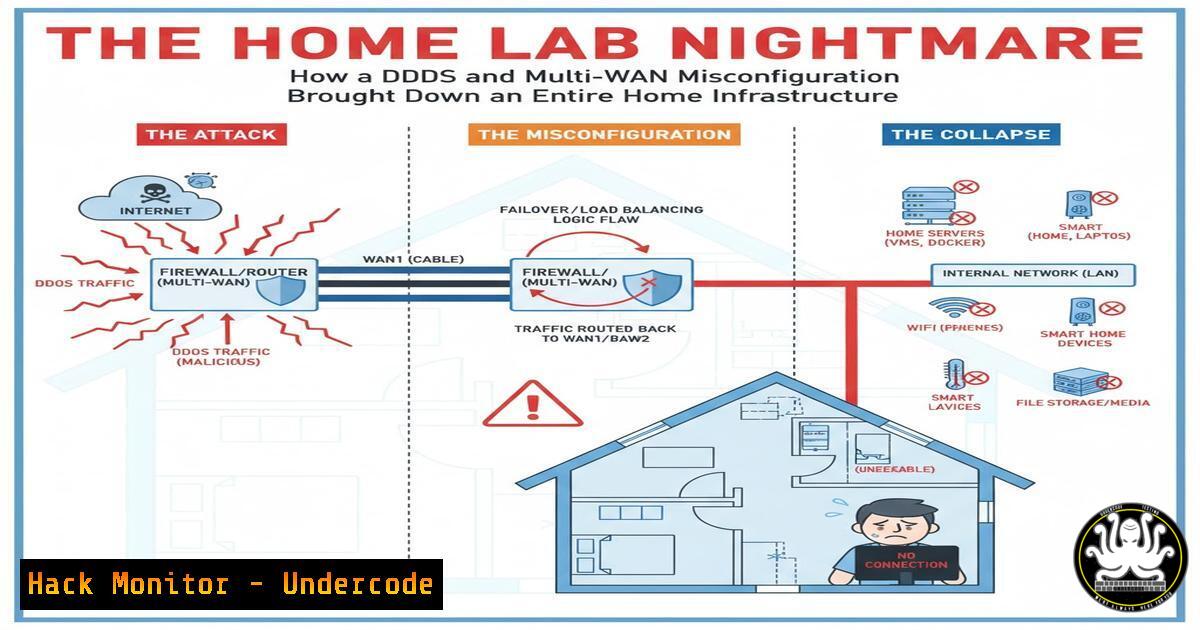
Introduction:
A CTO’s casual remark about stable infrastructure was swiftly followed by a catastrophic weekend outage, revealing critical vulnerabilities in home lab security. The convergence of a massive DDoS attack from Ukrainian IPs and an unstable multi-WAN configuration created a perfect storm that crashed their entire network, demonstrating how enterprise-level threats can target even personal infrastructures.
Learning Objectives:
- Understand multi-WAN configuration pitfalls and stabilization techniques
- Implement effective DDoS mitigation strategies for home environments
- Master network monitoring and forensic analysis commands
- Configure proper failover and load balancing protocols
- Develop incident response procedures for home infrastructure
You Should Know:
1. Multi-WAN Configuration Stability and Monitoring
`cat /proc/net/bonding/bond0` or `show interface brief` (Cisco)
This Linux command displays bonding interface statistics showing packet errors, link failures, and slave interface status. For multi-WAN setups, monitor this continuously to detect failing links before they cause cascading failures. Run every 5 minutes via cron to catch instability early.
`netsh interface show interface` (Windows)
Display all network interfaces and their operational status. Critical for identifying which WAN links are active in multi-homed setups and detecting flapping interfaces that indicate underlying connectivity issues.
2. DDoS Detection and IP Blocking with CrowdSec
`crowdsec metrics` and `cscli decisions list`
Monitor CrowdSec’s real-time threat detection metrics and active blocking decisions. When under DDoS, this shows blocked IP counts and which scenarios are triggering, helping identify if false positives are affecting legitimate traffic.
`iptables -L -n -v –line-numbers | head -20`
View the first 20 firewall rules with packet counts to identify which blocking rules are receiving the most traffic during an attack. High counts on CrowdSec rules indicate effective blocking but may signal infrastructure strain.
3. Network Traffic Analysis During Incidents
`tshark -i eth0 -f “net 192.168.0.0/16” -w capture.pcap -c 10000`
Capture 10,000 packets from eth0 targeting internal networks to analyze traffic patterns during outages. This provides forensic data to determine if internal or external traffic caused the crash.
`netstat -tulpn | grep :443` (Linux) or `netstat -ano | findstr :443` (Windows)
Identify what processes are listening on critical ports like HTTPS (443). During DDoS events, verify services remain bound to correct interfaces and haven’t crashed due to connection exhaustion.
4. Load Balancer Health Checking
`haproxy -c -f /etc/haproxy/haproxy.cfg`
Validate HAProxy configuration before applying changes. For multi-WAN setups, this prevents deploying broken configurations that could take down all internet connectivity.
`echo “show stat” | socat stdio /var/run/haproxy/admin.sock | cut -d ‘,’ -f 1,2,18,19`
Extract HAProxy backend server health status and session counts. Critical for identifying when backends are marked DOWN due to WAN failures and need manual intervention.
5. DNS Infrastructure Hardening
`dig @resolver-ip example.com A +time=3 +tries=2`
Test DNS resolver performance with strict timeouts. During network instability, aggressive timeouts prevent application hangs when primary resolvers become unreachable.
`nsd-control stats_noreset`
Display DNS server statistics without resetting counters. Monitor query rates, dropped requests, and zone transfer failures that indicate DNS-based DDoS attacks or resolver misconfigurations.
6. Cloud vs On-Premise Security Boundaries
`aws ec2 describe-security-groups –group-ids sg-xxxxxxxxx`
Audit AWS security group rules to compare cloud vs home infrastructure protection. Home labs often lack the sophisticated DDoS protection that cloud providers like Azure offer natively.
`terraform validate && terraform plan -var-file=production.tfvars`
Validate infrastructure-as-code configurations before deploying network changes. This prevents misconfigurations that expose services to unexpected external access.
7. Incident Response and Recovery Procedures
`systemctl list-units –failed –all`
Quickly identify crashed services that need restarting after an outage. This command provides immediate visibility into what components failed during the incident.
`journalctl -u crowdsec -f –since “1 hour ago”`
Monitor CrowdSec logs in real-time during active attacks. Tailoring the time window helps focus on recent events rather than being overwhelmed by historical data.
`tar -czf /backup/$(date +%Y%m%d)-full-config-backup.tar.gz /etc/{crowdsec,haproxy,netplan,nsd}`
Create comprehensive configuration backups before making changes. Regular backups enable rapid restoration when configurations cause instability.
What Undercode Say:
- Home infrastructure requires enterprise-level DDoS protection when exposed to the public internet
- Multi-WAN configurations introduce complexity that can destabilize entire networks during stress events
- The psychological factor of “safety first” often conflicts with the desire for feature-rich home labs
The incident demonstrates that even technically sophisticated users underestimate the attack surface of home infrastructure. The comment about not being ready to “host all Azure infrastructure at home” reveals the fundamental misunderstanding of scale and protection levels between enterprise cloud and personal setups. The edited comment about filtering at the edge suggests the community recognized insufficient inbound traffic filtering, highlighting a common blind spot where users focus on outbound redundancy but neglect inbound threat management.
Prediction:
Within two years, sophisticated botnets will increasingly target poorly secured home infrastructures as entry points for larger attacks, forcing home lab enthusiasts to adopt enterprise-grade security measures. The line between professional and personal infrastructure security will blur as attacks become more automated and targeted, making current “good enough” approaches completely inadequate for anyone exposing services to the internet.
🎯Let’s Practice For Free:
IT/Security Reporter URL:
Reported By: Ines Wallon – Hackers Feeds
Extra Hub: Undercode MoN
Basic Verification: Pass ✅


