Listen to this Post
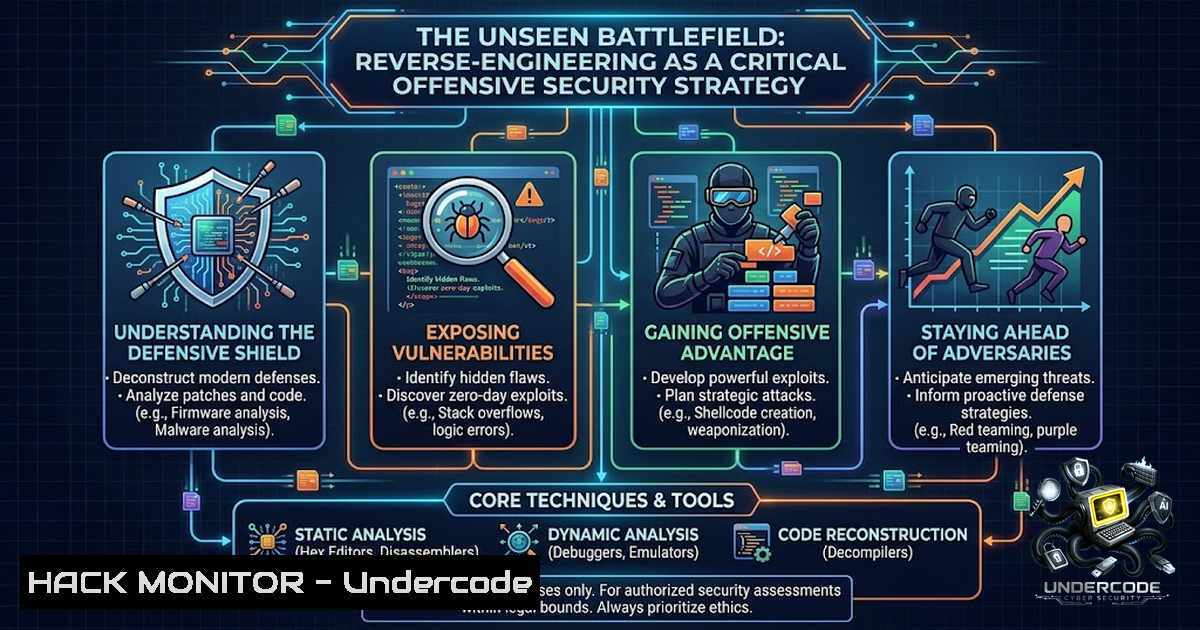
Introduction:
The modern cybersecurity landscape has evolved beyond simple perimeter defense into a complex arena where understanding the adversary’s perspective is paramount. Reverse engineering, the process of deconstructing a product or system to understand its design and functionality, has become a cornerstone of advanced threat research and vulnerability discovery. By simulating the actions of malicious actors—whether they are cracking proprietary algorithms or mapping out the architecture of a target application—security professionals can anticipate attack vectors and harden their own systems against sophisticated exploitation, effectively turning the tables on potential intruders.
Learning Objectives:
- Master the core concepts and methodologies of reverse engineering as applied to offensive security and vulnerability assessment.
- Learn to identify and analyze proprietary algorithms and hidden functionalities within compiled software and firmware.
- Develop practical skills in using industry-standard disassemblers, debuggers, and network analysis tools to extract actionable intelligence.
You Should Know:
1. Deconstructing the Binary: Static Analysis Fundamentals
Static analysis is the first step in the reverse engineering process, where you examine the code without executing it. This involves using a disassembler like IDA Pro or Ghidra to convert machine code into assembly language, providing a map of the program’s logic. This technique is invaluable for identifying hardcoded credentials, vulnerable API calls, or proprietary algorithms that are often the target of industrial espionage. Understanding the structure of Portable Executable (PE) files on Windows or Executable and Linkable Format (ELF) files on Linux is crucial for this phase.
A practical command for Linux to quickly extract human-readable strings from a binary is:
strings -1 8 ./target_binary | grep -i "api|key|secret|pass"
This filters for meaningful text strings that might reveal sensitive endpoints or keys. For Windows, a similar approach using the Sysinternals tool `strings.exe` can be employed:
strings64.exe -1 8 C:\path\to\target.dll | findstr /i "api key secret"
Step‑by‑step guide explaining what this does and how to use it:
1. Identify the Target: Locate the binary or firmware file you intend to analyze.
2. Choose Your Tool: For a quick scan, `strings` is a fast and efficient way to extract all ASCII and Unicode text.
3. Execute the Command: Run the `strings` command with a minimum length filter (-1) to avoid noise from single characters.
4. Analyze the Output: Pipe the output to `grep` (Linux) or `findstr` (Windows) with keywords like http, pass, or `admin` to immediately pinpoint potential security flaws. This provides a high-level overview of the program’s surface area.
2. Dynamic Analysis: Observing the Application in Motion
Dynamic analysis involves executing the binary within a controlled environment, such as a sandbox or a debugger, to monitor its behavior in real-time. Tools like x64dbg for Windows or GDB for Linux allow security researchers to set breakpoints, inspect memory registers, and modify execution flow to understand complex routines. This is particularly effective for bypassing anti-tampering mechanisms or decoding encrypted payloads, a common tactic used by malware authors and advanced persistent threat (APT) groups.
This process can be simulated and monitored using command-line utilities that track system calls. On Linux, `strace` can be used to trace the system calls and signals of a running process:
strace -e trace=network,file,process ./suspicious_app
This command reveals what files the application accesses and any network connections it attempts to establish, which is critical for identifying command-and-control (C2) communication.
Step‑by‑step guide explaining what this does and how to use it:
1. Prepare the Environment: Always execute potentially malicious or unknown code within an isolated virtual machine.
2. Run with Tracing: Launch the application using `strace` (Linux) or `Process Monitor` (Windows) to log every system interaction.
3. Filter the Noise: As a binary performs thousands of operations, filter the trace to focus on high-risk activities like open, connect, or execve.
4. Review and Correlate: Analyze the logs to identify suspicious file creations (e.g., .exe, .dll) or outbound network connections to unknown IP addresses.
3. Extracting the Matrix: Network Protocol Reverse Engineering
Many applications, especially in IoT and enterprise software, communicate using proprietary or obscured network protocols. Reverse engineering these protocols often involves intercepting traffic using a proxy like Burp Suite or Wireshark and then analyzing the byte structure to understand fields like length, checksum, and data payloads. By understanding how the application formats and transmits data, an attacker can craft malicious packets to trigger buffer overflows or inject arbitrary commands. This is closely related to API security testing, where understanding the request/response cycle is key to identifying injection points.
Linux commands can be used to analyze network traffic directly from the terminal. `tcpdump` can capture packets, and `tshark` (the command-line version of Wireshark) can be used to parse and filter that data:
sudo tcpdump -i eth0 -w capture.pcap port 443
tshark -r capture.pcap -Y "http.request" -T fields -e http.host -e http.request.uri
This captures HTTPS (port 443) traffic and then extracts HTTP request details from the capture file, revealing API endpoints and potentially sensitive data in URLs.
Step‑by‑step guide explaining what this does and how to use it:
1. Capture Traffic: Use `tcpdump` to write network traffic to a `pcap` file.
2. Analyze with Wireshark: Open the `pcap` file in Wireshark’s GUI for a visual representation, or use `tshark` for command-line scripting.
3. Follow Streams: In Wireshark, right-click on a packet and select “Follow TCP Stream” to rebuild the entire conversation, making it easier to see the structure of the data being exchanged.
4. Cloud Hardening and API Security
As applications migrate to the cloud, reverse engineering provides an opportunity to audit API security. By analyzing client-side code or mobile apps, researchers can uncover API keys, authentication tokens, and endpoint URLs hardcoded into the application. A common attack vector is the manipulation of API requests to exploit business logic flaws. This involves intercepting traffic and modifying parameters such as user IDs, prices, or permissions using a tool like `curl` or a specialized proxy.
For example, to test for insecure direct object references (IDOR), you can use `curl` to modify a `user_id` parameter in a request:
curl -X GET "https://api.target.com/v1/user/12345" -H "Authorization: Bearer <leaked_token>"
An attacker would then change the `user_id` to `12346` to see if they can access another user’s data without proper authorization.
Step‑by‑step guide explaining what this does and how to use it:
1. Capture the Request: Use a proxy to intercept a legitimate API request.
2. Modify Parameters: Copy the request and use `curl` to resend it with altered values.
3. Analyze the Response: If the server returns the data belonging to a different user, you have identified a critical vulnerability.
5. Vulnerability Exploitation and Mitigation Strategies
Understanding the “break” allows for a better “build.” By reverse engineering a product to find vulnerabilities, security teams can exploit them in a controlled manner to test defense mechanisms like Endpoint Detection and Response (EDR) and Web Application Firewalls (WAF). This process informs the creation of specific security rules and signatures to block malicious activity. The final step is to apply patches, restrict access, and implement robust input validation to mitigate the found issues. This proactive approach, often termed “offensive security,” is a core component of any mature DevSecOps pipeline.
6. Memory Forensics and Analysis
Memory analysis is a critical component of reverse engineering, especially when dealing with malware that evades disk-based scanning. By dumping the memory of a running process, security analysts can identify injected code, unpacked malware, and active network connections. Tools like `Volatility` (Linux) or `DumpIt` (Windows) are standard for capturing and analyzing memory dumps. For Linux, a quick extraction of a process’s memory map can be performed using the `/proc` filesystem:
sudo cat /proc/<PID>/mem > memory_dump.bin
This command allows a security professional to pull the memory content of a specific process for further analysis in a disassembler.
Step‑by‑step guide explaining what this does and how to use it:
1. Identify the Process: Use `ps aux | grep
2. Capture the Memory: Execute the `cat /proc/
3. Analyze the Dump: Load this file into a hex editor or a forensic tool like Volatility to scan for known strings, malicious code patterns, or hidden processes.
What Undercode Say:
- Key Takeaway 1: Reverse engineering is not just for malware analysts; it is a fundamental skill for offensive security teams, enabling them to simulate sophisticated threat actors and identify zero-day vulnerabilities before they are exploited.
- Key Takeaway 2: A comprehensive approach combining static, dynamic, and memory analysis—along with cloud and API security testing—is essential for a holistic security posture. This methodology aligns with industry best practices like the MITRE ATT&CK framework, turning defensive knowledge into offensive action.
Prediction:
- +1 The increasing adoption of AI and machine learning will lead to new reverse engineering tools that can automatically decompile code and identify vulnerability patterns faster than human analysts, drastically reducing the time to patch. This will empower the defender’s ability to secure complex systems at scale.
- -1 Conversely, as businesses become more reliant on proprietary algorithms for AI and automation, the economic incentive for industrial espionage will skyrocket. The future will see a surge in attacks focused on reverse engineering proprietary models and business logic to steal a company’s competitive advantage, making robust anti-tampering and obfuscation techniques a business imperative.
▶️ Related Video (88% Match):
🎯Let’s Practice For Free:
🎓 Live Courses & Certifications:
Join Undercode Academy for Verified Certifications
🚀 Request a Custom Project:
Secure, high-velocity infrastructure and disruptive technological engineering. Contact our engineering team for high-tier development and proprietary systems:
[email protected]
💎 Smart Architecture | 🛡️ Secure by Design | ⭐ Trusted by Thousands
IT/Security Reporter URL:
Reported By: https://lnkd.in/p/eypRHzBZ – Hackers Feeds
Extra Hub: Undercode MoN
Basic Verification: Pass ✅


