
Listen to this Post
Introduction:
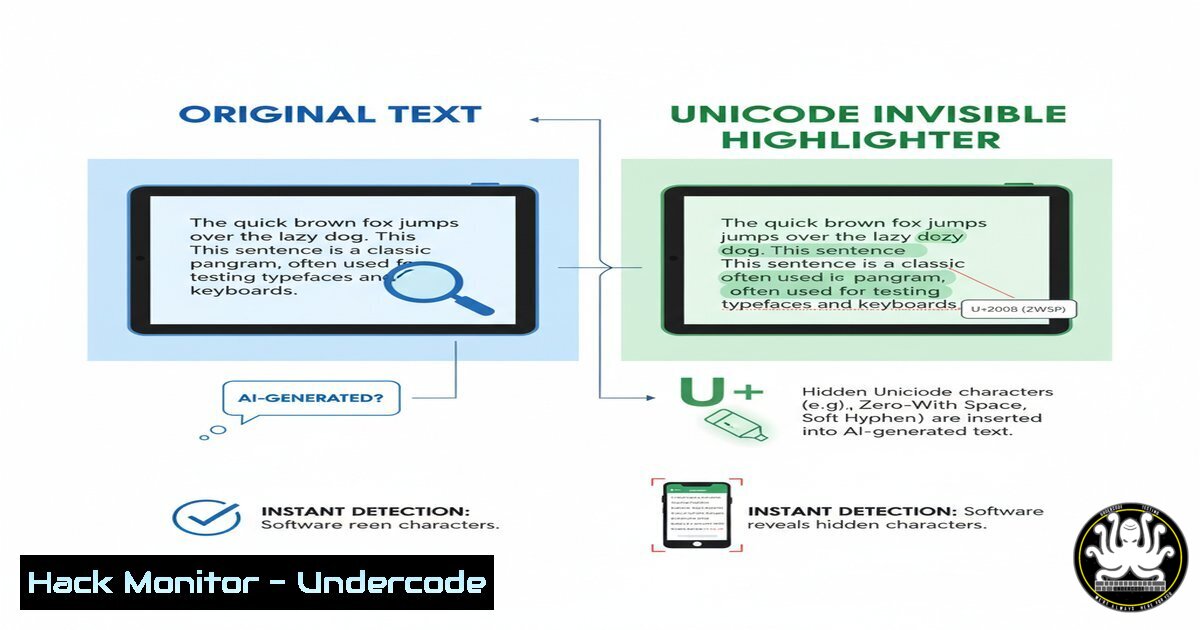
The digital landscape is now saturated with AI-generated text, blurring the lines between human and machine authorship. A novel proposal leverages the Unicode standard to create an invisible, universal “track changes” for the AI age, embedding metadata directly within text to ensure provenance and authenticity. This method could fundamentally reshape content verification, cybersecurity, and digital trust.
Learning Objectives:
- Understand the core mechanism of using Unicode control characters for AI content marking.
- Learn how to detect and analyze these Unicode markers in text across different platforms.
- Develop mitigation strategies to handle potential misuse and encoding-based attacks.
You Should Know:
1. The Core Concept: Zero-Width Non-Joiner (U+200C)
The proposed system uses invisible Unicode control characters, like the Zero-Width Non-Joiner (U+200C), to mark AI-generated text. Each AI-generated character could be preceded by such a marker, creating a hidden, machine-readable signature without altering the visual output for human readers.
`echo -e “This is human text.\u200cThis is AI text.” | hexdump -C`
Step-by-step guide:
This command uses `echo -e` to interpret backslash escapes and `hexdump -C` to display the hexadecimal and ASCII representation of the text. The `\u200c` is the escape sequence for the ZWNJ character. In the output, you will see the hexadecimal value `e2 80 8c` (the UTF-8 encoding for U+200C) inserted before the “AI” portion of the text, providing a detectable, albeit invisible, marker.
2. Detection Scripting with Python
Security professionals and content moderators can use Python to scan and detect the presence of these Unicode control characters in text files, emails, or web content.
`python3 -c “import sys; text = sys.stdin.read(); chars = [f’U+{ord(c):04X}’ for c in text if ord(c) < 32 or (0x200B <= ord(c) <= 0x200F)]; print('Control chars found:', chars)"`
Step-by-step guide:
This one-liner Python script reads input from standard input (sys.stdin). It iterates through each character, checking for those with a Unicode code point in the “General Punctuation” block that contains common zero-width characters (U+200B to U+200F). If found, it prints their Unicode code points, allowing for quick identification of potentially marked AI content.
3. Validating Text Provenance in Web Applications
For web applications that need to validate user-generated content, integrating a client-side or server-side check for these markers can prevent undisclosed AI content from being submitted.
`function containsAIMarkers(text) { return /[\u200B-\u200F\u2060-\u2064\uFEFF]/.test(text); }`
Step-by-step guide:
This JavaScript function uses a regular expression to test a string for the presence of common invisible Unicode characters, including various zero-width joiners/non-joiners and the Zero-Width No-Break Space (U+FEFF). Integrating this function into a form’s `onsubmit` event handler can flag or block content containing these hidden markers before it is sent to the server.
4. Forensic Analysis with Command-Line Tools
Security analysts can use powerful command-line tools like `grep` to perform initial forensic scans on large datasets or log files for content containing these specific Unicode sequences.
`grep -nPa “[\xE2\x80\x8B-\xE2\x80\x8F]” suspect_file.txt`
Step-by-step guide:
This `grep` command uses the `-P` flag for Perl-compatible regular expressions and `-a` to treat the file as text. The pattern `[\xE2\x80\x8B-\xE2\x80\x8F]` matches the UTF-8 byte sequences for the Unicode range U+200B to U+200F. The `-n` flag displays the line numbers where these sequences are found, enabling rapid triage of potentially manipulated documents.
5. Hardening Systems Against Encoding Attacks
While designed for good, this marking system could be abused for steganography or to bypass text filters. System hardening involves normalizing text inputs by stripping non-essential control characters.
`tr -d ‘\200-\237\200B-\200F\2060-\2064\FEFF’ < input.txt > sanitized_output.txt`
Step-by-step guide:
The `tr` (translate) command is used here to delete (-d) a specified set of characters. The list includes ranges for C0/C1 control codes (\200-\237), the key zero-width characters, and the byte order mark. Piping input through this command creates a sanitized version, mitigating the risk of hidden data exfiltration or filter evasion.
6. API Security: Input Sanitization
APIs must be protected against malicious payloads hidden with invisible characters. A robust input validation layer should include Unicode normalization.
`from unicodedata import normalize
def sanitize_api_input(user_input):
return normalize(‘NFKC’, user_input).encode(‘utf-8’, ‘ignore’).decode(‘utf-8’)`
Step-by-step guide:
This Python function uses the `unicodedata` library. `normalize(‘NFKC’)` applies compatibility composition, which can convert full-width characters to their standard form and resolve some compatibility characters. Subsequent encoding and decoding with ‘ignore’ will remove any characters that cannot be represented, providing a strong layer of defense against homoglyph and control character attacks.
7. Building a Proactive Content Scanner
Organizations can build a dedicated microservice to scan all incoming digital content, from documents to code commits, for the presence of unauthorized AI markers or other suspicious Unicode patterns.
`!/bin/bash
Simple AI Marker Scanner
SCAN_FILE=$1
if grep -qPa “[\xE2\x80\x8B-\xE2\x80\x8F]” “$SCAN_FILE”; then
echo “WARNING: File $SCAN_FILE contains potential AI provenance markers.”
exit 1
else
echo “CLEAN: No markers detected in $SCAN_FILE.”
exit 0
fi`
Step-by-step guide:
This Bash script encapsulates the `grep` command into a reusable tool. It takes a filename as an argument ($1). The `-q` flag makes `grep` quiet, and the script uses the exit code to signal success (0 for clean, 1 for detection). This can be integrated into CI/CD pipelines, file upload handlers, or email gateways for automated, proactive monitoring.
What Undercode Say:
- Provenance is the New Perimeter. As AI content becomes indistinguishable, verifying the origin and authorship of digital assets will become as critical as network security. This Unicode method provides a lightweight, platform-agnostic foundation for this new trust layer.
- A Double-Edged Sword. The same technique designed for transparency can be co-opted for malicious steganography, hiding commands or data in plain sight, demanding new defensive postures in text normalization and analysis.
The proposal is elegant but its success hinges on universal, voluntary adoption by AI model vendors—a significant hurdle. Without enforcement or standardization, it remains a theoretical solution. Furthermore, it creates a new attack vector; bad actors could falsely mark human content as AI to sow distrust, or use different, non-standard control characters to evade detection. The cybersecurity community must prepare for an arms race in text encoding, developing more sophisticated parsers and normalization tools to maintain the integrity of our digital communications.
Prediction:
This “Unicode highlighter” concept, while in its infancy, will catalyze a new niche in the cybersecurity market focused on textual integrity and content provenance. Within two years, we predict the development of dedicated SaaS offerings, EDR plugins, and regulatory standards mandating the disclosure of AI-generated content in critical sectors like finance and news media. This will force a fundamental evolution in data loss prevention and content filtering systems, moving beyond simple keyword matching to deep semantic and encoding-based analysis to ensure trust in the age of AI.
🎯Let’s Practice For Free:
IT/Security Reporter URL:
Reported By: Alistaircroll A – Hackers Feeds
Extra Hub: Undercode MoN
Basic Verification: Pass ✅


