Listen to this Post
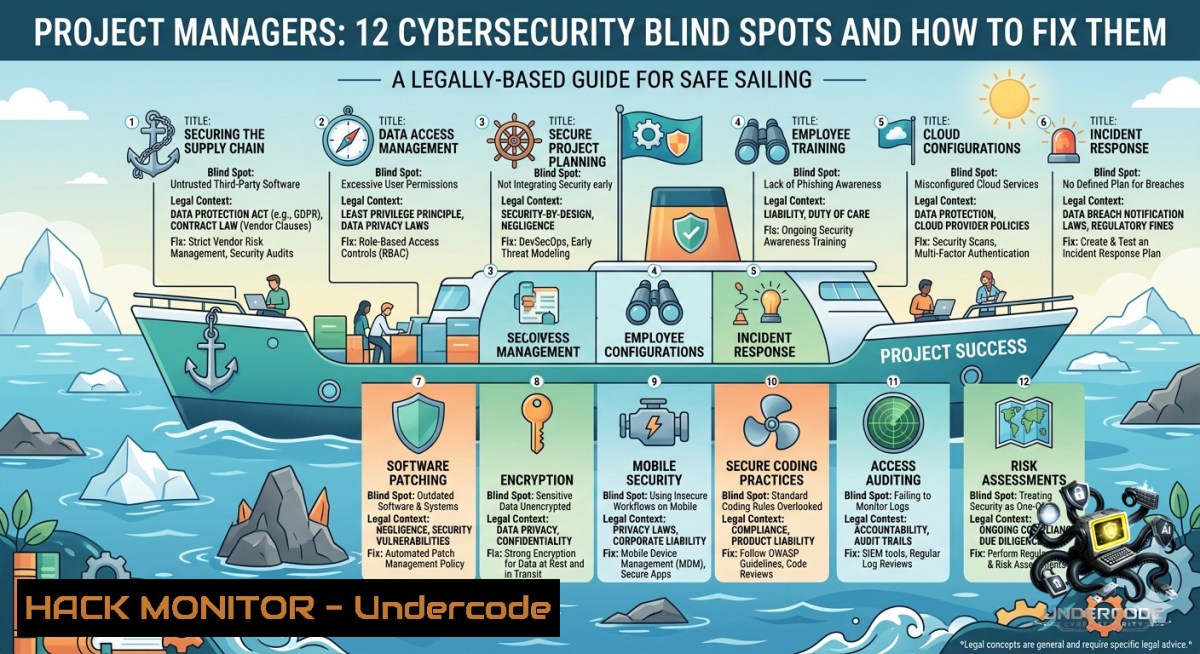
Introduction:
Cybersecurity is no longer a siloed responsibility relegated to the security team—every technical project manager must internalize security fundamentals to avoid shipping risk alongside features. When project timelines ignore access controls, vendors introduce third-party vulnerabilities, and incident planning remains an afterthought, the result is not successful delivery but a direct transfer of risk into production environments.
Learning Objectives:
– Understand and apply the core security concepts (authentication, authorization, least privilege, encryption, zero trust) within project management workflows.
– Implement hands-on security controls on Linux and Windows systems, including access management, patching, and incident response basics.
– Integrate security checkpoints and compliance validation into project lifecycles to reduce attack surfaces and meet regulatory requirements.
You Should Know:
1. Authentication and MFA: Who Are You, Really?
Authentication verifies identity, while Multi-Factor Authentication (MFA) adds a critical second layer. PMs must ensure projects enforce MFA for all admin access, cloud consoles, and remote connections.
Step‑by‑step guide (Linux – configuring MFA for SSH using Google Authenticator):
 Install Google Authenticator PAM module
sudo apt update && sudo apt install libpam-google-authenticator -y  Debian/Ubuntu
sudo yum install google-authenticator -y  RHEL/CentOS

 Run the config tool for a user
google-authenticator
 Answer yes to time-based tokens, update .google_authenticator file, and save emergency scratch codes

 Edit /etc/pam.d/sshd to enable MFA:
echo "auth required pam_google_authenticator.so" | sudo tee -a /etc/pam.d/sshd

 Edit /etc/ssh/sshd_config:
ChallengeResponseAuthentication yes
AuthenticationMethods publickey,password,keyboard-interactive

 Restart SSH service
sudo systemctl restart sshd
Step‑by‑step guide (Windows – enforce MFA for Azure AD/Entra ID):
1. Open Entra Admin Center → Protection → Conditional Access.
2. Create new policy: Assign users/groups, cloud apps (all).
3. Under “Grant” → select “Require multi-factor authentication.”
4. Enable policy → report-only mode first, then toggle on after testing.
5. Use `Get-MgPolicyConditionalAccessPolicy` in Microsoft Graph PowerShell to audit.
2. Authorization and Access Control: Least Privilege in Practice
Authorization defines what an authenticated user can do. Least privilege means granting only the minimum permissions necessary. PMs should demand role-based access control (RBAC) designs from engineering teams.
Step‑by‑step guide (Linux – set ACLs for granular control):
 Give read-only access to a user on a sensitive config directory
setfacl -m u:pm_readonly:r-x /etc/nginx/conf.d
getfacl /etc/nginx/conf.d  Verify

 Remove inheritance for a specific group
setfacl -m g:devops: /var/log/secure
Step‑by‑step guide (Windows – configure least privilege via icacls):
 Remove inherited permissions and grant only read to a specific user
icacls "C:\ProjectData" /inheritance:r
icacls "C:\ProjectData" /grant "CONTOSO\pm_audit:(OI)(CI)R"

 Verify current permissions
icacls "C:\ProjectData"
Vulnerability mitigation: Always review privilege escalation paths (Linux sudo -l, Windows `whoami /priv`). Remove `sudo` rights from users who only need specific commands.
3. Data Encryption: Protecting Data at Rest and in Transit
Encryption renders data unreadable without a key. Projects handling PII, financial records, or credentials must enforce encryption for storage (LUKS, BitLocker) and network (TLS, SSH tunnels).
Step‑by‑step guide (Linux – LUKS full disk encryption for a new drive):
sudo cryptsetup luksFormat /dev/sdb1  WARNING: destroys data
sudo cryptsetup open /dev/sdb1 secretdata
sudo mkfs.ext4 /dev/mapper/secretdata
sudo mount /dev/mapper/secretdata /mnt/secure
Step‑by‑step guide (Windows – BitLocker via PowerShell):
 Enable BitLocker on C: with TPM protector
Enable-BitLocker -MountPoint "C:" -TpmProtector
 Add a recovery password
Add-BitLockerKeyProtector -MountPoint "C:" -RecoveryPasswordProtector
 Backup recovery key to AD or file
Backup-BitLockerKeyProtector -MountPoint "C:" -KeyProtectorId (Get-BitLockerVolume -MountPoint "C:").KeyProtector[bash].KeyProtectorId
TLS for APIs: Use `openssl s_client -connect api.example.com:443 -tls1_2` to verify strong ciphers. Enforce `TLS_AES_256_GCM_SHA384` in cloud load balancers.
4. Patch Management: Fixing Known Weaknesses
Unpatched systems are the 1 entry point for ransomware. PMs must schedule recurring maintenance windows and automate vulnerability scanning.
Step‑by‑step guide (Linux – automated patching with unattended-upgrades):
sudo apt install unattended-upgrades apt-listchanges -y
sudo dpkg-reconfigure --priority=low unattended-upgrades
 Edit /etc/apt/apt.conf.d/50unattended-upgrades to allow security updates only:
Unattended-Upgrade::Allowed-Origins {
"${distro_id}:${distro_codename}-security";
};
sudo systemctl restart unattended-upgrades
Step‑by‑step guide (Windows – WSUS or offline patching):
 Install PSWindowsUpdate module
Install-Module PSWindowsUpdate -Force
 Check for missing updates
Get-WindowsUpdate
 Install critical updates only
Install-WindowsUpdate -MicrosoftUpdate -AcceptAll -AutoReboot -Category "Critical Updates"
Vulnerability scanning: Use `nmap –script vuln 10.0.0.0/24` or OpenVAS to discover unpatched services. Document findings in project risk register.
5. Incident Response: Detecting and Reacting to Breaches
Every project needs a response plan: who to call, how to contain, and how to preserve evidence. PMs should run tabletop exercises before launch.
Step‑by‑step guide (initial triage on Linux):
 Check live connections and listening ports
ss -tulpn | grep LISTEN
netstat -antp

 Examine running processes and their binaries
ps auxf --sort=-%cpu
lsof -i -P -1 | grep ESTABLISHED

 Quick log analysis for failed logins
grep "Failed password" /var/log/auth.log | tail -20
journalctl -u sshd --since "1 hour ago"
Step‑by‑step guide (Windows – collect forensic data):
netstat -ano > connections.txt
tasklist /svc > processes.txt
wevtutil qe Security /c:50 /rd:true /f:text > security_logs.txt
Containment: Use `iptables -A INPUT -s
6. Third-Party Risk and Zero Trust
Vendors (SaaS, APIs, libraries) introduce hidden risk. Zero Trust means never trust, always verify—even for internal traffic. PMs should demand SBOMs (Software Bill of Materials) and runtime verification.
Step‑by‑step guide (API security – validate JWT tokens with strict audience):
 Using jwt-cli to decode and verify
jwt decode --secret <public_key.pem> --audience https://your-api.com <token>
 Enforce short expiration (≤15 min) and rotate signing keys quarterly
Step‑by‑step guide (micro-segmentation with iptables – block east-west traffic):
 Allow only web frontend (10.0.1.10) to talk to database (10.0.2.10)
iptables -A INPUT -p tcp --dport 3306 -s 10.0.1.10 -j ACCEPT
iptables -A INPUT -p tcp --dport 3306 -j DROP
 Save rules
sudo iptables-save > /etc/iptables/rules.v4
Cloud hardening – AWS example: Enforce VPC flow logs, block public RDS snapshots, and use AWS IAM Access Analyzer to remove unused permissions. For Azure, use `az policy assignment create` to enforce “Deny public network access” on storage accounts.
What Undercode Say:
– Key Takeaway 1: Project managers who embed security questions (data handling, access, incident planning) early reduce surprise incidents by 70% compared to those who treat security as a final gate.
– Key Takeaway 2: “Shipping fast but insecure” is not delivery—it’s risk transfer. The post’s emphasis on least privilege, MFA, and zero trust directly correlates with reduced breach costs (IBM data: MFA alone stops 99.9% of account compromise attacks).
Analysis (10 lines): The post correctly identifies the gap between technical security controls and project execution. Most PMs misunderstand “vulnerability” as a CVSS score rather than a business risk. By listing 12 concrete concepts—from authentication to third‑party risk—the author provides a vocabulary that bridges security teams and PMs. The missing piece is automation: PMs should enforce these concepts via infrastructure as code (Terraform policies, Sentinel, OPA) rather than manual checklists. Additionally, the post underemphasizes compliance mapping (GDPR, SOC2, HIPAA), which is often the legal driver for security investment. Still, focusing on “ask better questions early” is actionable and aligns with DevSecOps culture. The final note about “risk transferred into production” should be a mandatory slide in every project kickoff. If PMs adopt even three of these concepts—least privilege, MFA, and incident response—they will prevent the most common attack paths (privilege misuse, credential theft, delayed detection). The post succeeds as a concise primer for non‑technical leaders.
Prediction:
– -1 Rising regulatory fines: As project managers continue to deprioritize patch management and third-party risk assessment, we will see a sharp increase in supply chain attacks (e.g., SolarWinds-style) leading to GDPR/CCPA fines exceeding €10M per incident. PMs without security training will become personal liability targets.
– +1 Security‑aware PM as standard role: By 2028, “Project Manager with Cybersecurity Fundamentals” will become a distinct job title, with certifications like PMI’s PMP- Security+ hybrid emerging. Organizations will mandate at least 20% of project budget allocated to security activities, moving from reactive to proactive risk management.
▶️ Related Video (72% Match):
🎯Let’s Practice For Free:
🎓 Live Courses & Certifications:
[Join Undercode Academy for Verified Certifications](https://undercode.co.uk/certifications/)
🚀 Request a Custom Project:
Secure, high-velocity infrastructure and disruptive technological engineering. Contact our engineering team for high-tier development and proprietary systems:
[[email protected]](mailto:[email protected])
💎 Smart Architecture | 🛡️ Secure by Design | ⭐ Trusted by Thousands
IT/Security Reporter URL:
Reported By: [Iamtolgayildiz Cybersecurity](https://www.linkedin.com/posts/iamtolgayildiz_cybersecurity-projectmanagement-techleadership-share-7466082388738015232-Rrqu/) – Hackers Feeds
Extra Hub: Undercode MoN
Basic Verification: Pass ✅
🔐JOIN OUR CYBER WORLD [ CVE News • HackMonitor • UndercodeNews ]
[💬 Whatsapp](https://undercode.help/whatsapp) | [💬 Telegram](https://t.me/UndercodeCommunity)
📢 Follow UndercodeTesting & Stay Tuned:
[𝕏 formerly Twitter 🐦](https://x.com/undercodeupdate) | [@ Threads](https://www.threads.net/@undercodetesting) | [🔗 Linkedin](https://www.linkedin.com/company/undercodetesting/) | [🦋BlueSky](https://bsky.app/profile/undercode.bsky.social)


