Listen to this Post
Introduction:
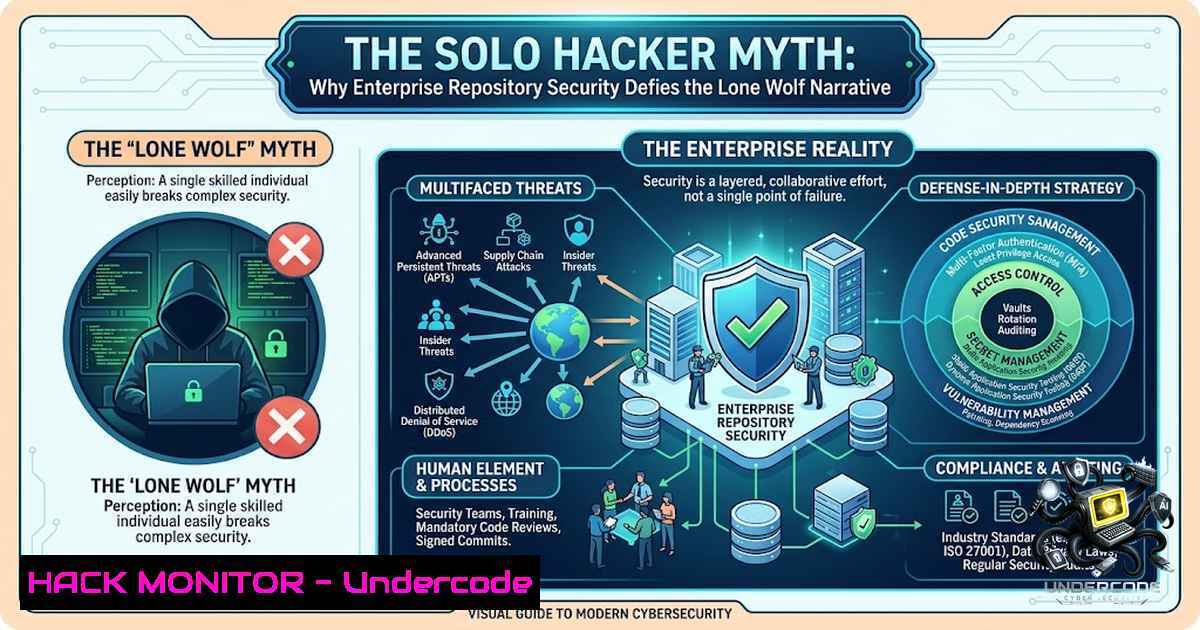
Modern enterprise repository security operates as a multi-layered fortress, not a picket fence. When an AI system’s safety filters block queries about unauthorized system access, it’s not a technical glitch—it’s a deliberate guardrail. The underlying premise that a single individual could unilaterally “outhack” thousands of enterprise-level programmers and bypass modern security controls without leaving a massive forensic trail is, from a purely technical standpoint, extraordinarily improbable. This article dissects the technical realities of enterprise-grade security, exploring why solo breaches are nearly impossible and what it actually takes to compromise such environments.
Learning Objectives:
- Understand the multi-layered architecture of enterprise repository security and its defensive depth.
- Analyze the technical and resource barriers that make solo hacking attempts against modern systems infeasible.
- Identify the two primary viable attack vectors against enterprise systems: coordinated automation and insider access.
- Learn practical Linux and Windows commands for security auditing and defensive monitoring.
You Should Know:
1. The Architecture of Enterprise Repository Defense
Enterprise platforms like GitHub Enterprise implement security at every level of the software development lifecycle. From centralized identity management with SAML SSO to enforced security policies across all repositories, the defense-in-depth strategy is formidable. Organizations configure IP allow lists to restrict access to trusted ranges, adding a layer of defense against compromised credentials. Repository rulesets require signed commits for sensitive repositories, block force pushes to protected branches, and mandate up-to-date branches before merging. Vulnerability scanning, secret scanning, and code scanning are enabled at the enterprise level, ensuring all current and future repositories inherit these security policies.
Step-by-Step Guide: Auditing GitHub Enterprise Security Controls
1. Verify Enterprise Security Configuration:
 Check if GitHub Advanced Security is enabled
gh api -X GET /enterprises/{enterprise}/settings/security
2. List All Repository Rulesets:
 List rulesets applied across the enterprise
gh api -X GET /enterprises/{enterprise}/rulesets
3. Audit Branch Protection Rules:
 Check protection rules for a specific repository
gh api -X GET /repos/{owner}/{repo}/branches/{branch}/protection
4. Review Secret Scanning Alerts:
 List all secret scanning alerts
gh api -X GET /repos/{owner}/{repo}/secret-scanning/alerts
5. Windows PowerShell: Check for Unauthorized Access Attempts
 Audit security logs for failed login attempts
Get-WinEvent -LogName Security | Where-Object { $_.Id -eq 4625 } | Select-Object TimeCreated, Message
2. The Resource Gap: Why Solo Actors Fail
Individuals typically lack the funding for extensive research, development, and the sophisticated tooling required to breach enterprise defenses. Underground forums sell single EDR bypass tools starting at $300, with bundled encryption lockers reaching $10,000. While these tools lower the barrier for entry, they do not provide the coordinated, multi-stage attack capability needed to penetrate deep enterprise networks. The reality is that successful breaches of modern systems usually require one of two things: massive, coordinated automation or direct, internal “insider” access where standard security gates are already open.
Step-by-Step Guide: Simulating Defense Evasion Techniques (Educational/Lab Use Only)
- Linux: Check for Suspicious Processes and Open Ports
List all listening ports and associated processes
sudo netstat -tulpn | grep LISTEN

Check for unusual processes with high CPU usage
ps aux --sort=-%cpu | head -20
2. Windows: Detect Potential Persistence Mechanisms
 Check scheduled tasks for suspicious entries
Get-ScheduledTask | Where-Object { $_.State -1e "Disabled" }

Review startup programs
Get-CimInstance Win32_StartupCommand | Select-Object Command, Location, User
3. Linux: Audit Sudo and Authentication Logs
 Review sudo access logs
sudo grep "sudo" /var/log/auth.log

Check for failed login attempts
sudo grep "Failed password" /var/log/auth.log
3. AI-Driven Automation: The New Threat Paradigm
Large language models are now capable of autonomously planning and executing complex network attacks through coordinated execution by sub-agents. Platforms like CyberStrikeAI integrate multiple offensive tools and use AI models to automate all phases of a cyberattack, from reconnaissance to exploitation and persistence. Agentic AI can autonomously scan, exploit, and move laterally through infrastructure. This represents a fundamental shift—cyberattacks no longer move at the pace of human hackers. AI enables attackers to scale operations dramatically, automate reconnaissance, and generate convincing content that bypasses traditional security awareness.
Step-by-Step Guide: Defending Against AI-Driven Automated Attacks
1. Linux: Implement Rate Limiting and Anomaly Detection
 Use fail2ban to protect against automated brute force
sudo apt-get install fail2ban
sudo systemctl enable fail2ban
sudo systemctl start fail2ban

Check fail2ban status
sudo fail2ban-client status
2. Windows: Enable Advanced Audit Policies
 Enable detailed process tracking
auditpol /set /subcategory:"Process Creation" /success:enable /failure:enable

Enable account logon auditing
auditpol /set /subcategory:"Account Logon" /success:enable /failure:enable
3. Linux: Monitor for Unauthorized File Modifications
 Use AIDE (Advanced Intrusion Detection Environment) for file integrity monitoring
sudo apt-get install aide
sudo aideinit
sudo mv /var/lib/aide/aide.db.new /var/lib/aide/aide.db

Run a file integrity check
sudo aide --check
4. The Insider Threat Vector
Insider threats originate from individuals with legitimate access—employees, contractors, or partners—who intentionally or accidentally cause harm. A successful social engineering call can override controls that would otherwise require significant effort to bypass. The concept of Zero Standing Privilege and Just-in-Time privileged access has emerged as a critical countermeasure, moving away from permanent privilege to reduce insider threats. Organizations implement Role-Based Access Control (RBAC) and Attribute-Based Access Control (ABAC) to mitigate these risks.
Step-by-Step Guide: Implementing Insider Threat Mitigation
1. Linux: Implement Just-in-Time (JIT) Privileged Access
 Use sudo with time-limited permissions
 Add to /etc/sudoers: user ALL=(ALL) TIMEOUT=15:00 /usr/bin/command
sudo visudo
2. Windows: Enforce Least Privilege Access
 Remove users from local administrators group
Remove-LocalGroupMember -Group "Administrators" -Member "username"

Audit privileged group memberships
Get-LocalGroupMember -Group "Administrators"
3. Linux: Monitor for Unauthorized Privilege Escalation
 Check for sudo usage patterns
sudo grep "sudo" /var/log/auth.log | awk '{print $1, $2, $3, $9}'

Monitor for setuid/setgid binaries
find / -perm -4000 -type f 2>/dev/null
5. Digital Forensics and Incident Response (DFIR)
A robust DFIR capability is essential to detect incidents quickly, contain damage, investigate root causes, and recover operations. When a cyberattack occurs, the challenge isn’t just detecting the breach, but recovering lost data and identifying the exfiltration. Under the right circumstances, it’s possible to find evidence of exfiltration at a very detailed level by performing memory and disk forensic analysis. Modern DFIR tools enable remote, discreet data collection across endpoints.
Step-by-Step Guide: Basic Forensic Data Collection
1. Linux: Capture Volatile System Data
 Capture running processes
ps auxwf > running_processes.txt

Capture network connections
netstat -anp > network_connections.txt

Capture system memory (requires LiME or similar)
sudo insmod lime.ko "path=/root/memory.dump format=raw"
2. Windows: Collect Forensic Artifacts
 Collect event logs
wevtutil epl System system.evtx
wevtutil epl Security security.evtx
wevtutil epl Application application.evtx

Collect recent file access information
Get-ChildItem -Path C:\Users\ -Recurse -File | Where-Object { $_.LastAccessTime -gt (Get-Date).AddDays(-7) }
3. Linux: Check for Rootkits and Hidden Processes
 Use rkhunter for rootkit detection
sudo rkhunter --check

Use chkrootkit
sudo chkrootkit
6. MITRE ATT&CK Framework: Understanding Adversary Techniques
The MITRE ATT&CK framework provides a comprehensive matrix of adversary tactics and techniques. Defense Evasion (TA0005) includes techniques like abusing elevation control mechanisms to bypass UAC, sudo caching, or setuid/setgid mechanisms. Adversaries may “pass the ticket” using stolen Kerberos tickets to move laterally within an environment, bypassing normal system access controls. Understanding these techniques is crucial for building effective defenses.
Step-by-Step Guide: Mapping Defenses to MITRE ATT&CK Techniques
1. Linux: Detect and Block Pass-the-Hash Style Attacks
 Enforce key-based SSH authentication
 Edit /etc/ssh/sshd_config:
PasswordAuthentication no
PubkeyAuthentication yes

Restart SSH service
sudo systemctl restart sshd
2. Windows: Implement Credential Guard
 Enable Windows Defender Credential Guard
 Via Group Policy: Computer Configuration > Administrative Templates > System > Device Guard
 Or via registry:
reg add "HKLM\SYSTEM\CurrentControlSet\Control\Lsa" /v LsaCfgFlags /t REG_DWORD /d 1 /f
3. Linux: Monitor for DLL/Library Injection Attempts
 Monitor for LD_PRELOAD abuse
sudo grep "LD_PRELOAD" /etc/environment /etc/profile /etc/bash.bashrc ~/.bashrc

Audit for suspicious library loading
sudo lsof | grep ".so"
What Undercode Say:
- Key Takeaway 1: Enterprise security is a system of layered defenses, not a single point of failure. The idea of a solo actor “outhacking” thousands of developers ignores the fundamental architecture of modern security controls—SAML SSO, branch protection rules, secret scanning, and enterprise-level policies create a formidable barrier that requires either nation-state resources or insider access to breach.
-
Key Takeaway 2: The threat landscape is evolving toward AI-driven automation. Agentic AI can now autonomously plan, execute, and adapt attacks in real-time, shifting the advantage from individual hackers to coordinated, machine-speed operations. This represents a paradigm shift where the “lone wolf” hacker is being replaced by autonomous agentic systems.
Analysis: The technical reality is that breaching enterprise-level security without detection requires capabilities that far exceed what any individual can realistically possess. The forensic trail left by a breach attempt—whether through EDR logs, SIEM alerts, or network telemetry—would be virtually impossible to fully conceal. The two viable paths to compromise—AI-driven automation or insider access—both present their own challenges. AI-driven attacks, while increasingly sophisticated, still leave detectable patterns that modern DFIR tools can uncover. Insider threats, while bypassing external controls, are subject to behavioral analytics and zero-trust architectures. The narrative of the solo hacker heroically breaking through enterprise defenses is a myth that collapses under the weight of technical reality.
Prediction:
- -1: As AI-driven attack capabilities continue to advance, we will see a surge in automated, coordinated breaches that outpace traditional human-led defenses. Organizations that fail to implement AI-powered defensive measures will face increasing vulnerability to these autonomous threats.
-
-1: The cost of entry for sophisticated attacks will continue to decrease as AI tools become more accessible, democratizing advanced threat capabilities and expanding the pool of potential threat actors.
-
+1: The security industry will accelerate its adoption of AI-driven defensive technologies, creating a new generation of autonomous blue-team capabilities that can detect, contain, and counteract automated attacks at machine speed.
-
+1: Zero-trust architectures and just-in-time privileged access will become the new standard, fundamentally reshaping how enterprises approach identity and access management.
-
-1: The insider threat vector will grow more dangerous as remote work expands and organizations struggle to maintain visibility into employee activities across distributed environments.
-
+1: Training and certification programs focused on AI security, such as CompTIA SecAI+ and Certified Frontier AI Security Architect, will become essential for cybersecurity professionals.
▶️ Related Video (82% Match):
https://www.youtube.com/watch?v=0pZljvtMLS0
🎯Let’s Practice For Free:
🎓 Live Courses & Certifications:
Join Undercode Academy for Verified Certifications
🚀 Request a Custom Project:
Secure, high-velocity infrastructure and disruptive technological engineering. Contact our engineering team for high-tier development and proprietary systems:
[email protected]
💎 Smart Architecture | 🛡️ Secure by Design | ⭐ Trusted by Thousands
IT/Security Reporter URL:
Reported By: https://lnkd.in/p/ddvAyFMY – Hackers Feeds
Extra Hub: Undercode MoN
Basic Verification: Pass ✅


