Listen to this Post
Introduction
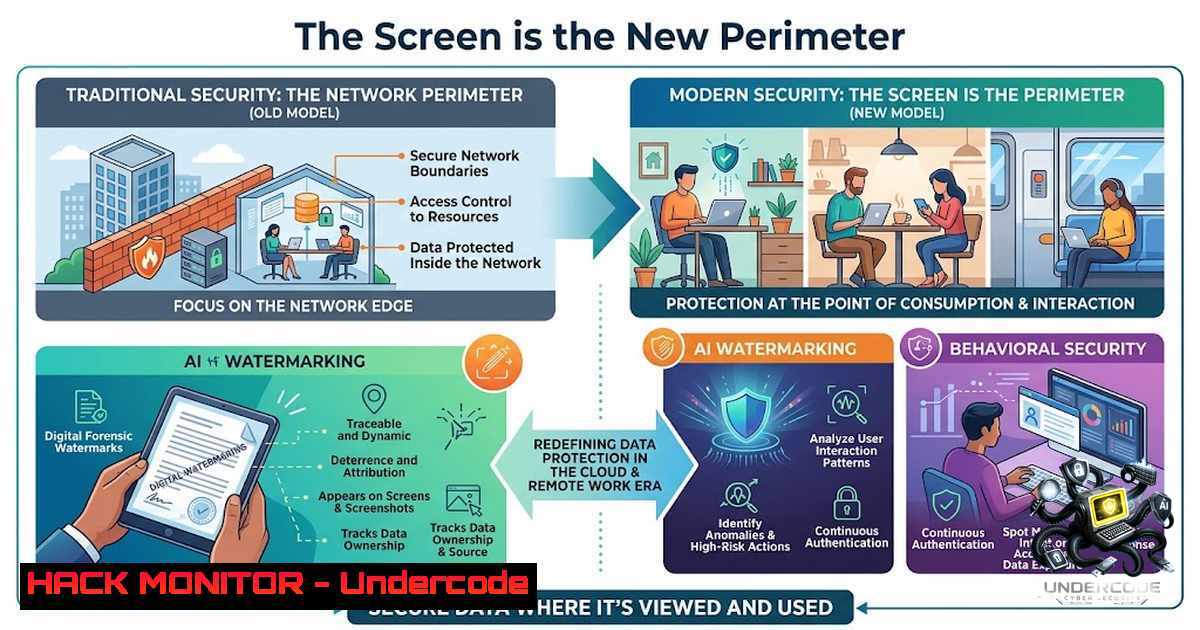
The cybersecurity industry has invested trillions of dollars in perimeter defenses, encryption, zero-trust architectures, and AI-driven threat detection—yet the simplest exfiltration vector remains largely unaddressed: the human eye and the smartphone camera. Anthropic’s recent announcement regarding machine-readable watermarks and signed provenance metadata for AI-generated content represents a critical advancement in digital provenance, but it simultaneously exposes a fundamental vulnerability that no firewall can resolve: once sensitive information renders on a display, it exists in a physical space where digital controls cease to function.
Learning Objectives
- Understand the gap between digital provenance controls and physical screen-level exfiltration vectors
- Implement technical controls for screen watermarking and behavioral deterrence across Windows and Linux environments
- Deploy monitoring and audit mechanisms to detect anomalous screen-capture behavior in enterprise settings
You Should Know
- The Screen Exfiltration Problem: Why Digital Provenance Is Not Enough
Digital watermarking and cryptographic provenance—such as Anthropic’s approach using C2PA (Coalition for Content Provenance and Authenticity) standards—provide robust mechanisms for tracing content back to its origin. However, these controls operate exclusively within the digital domain. When content renders on a physical screen, it undergoes a digital-to-analog conversion that strips away machine-readable metadata. A photograph taken with a smartphone captures the visual representation without any embedded signatures, hashes, or cryptographic proofs.
From a technical perspective, screen-capture exfiltration bypasses every layer of the traditional cybersecurity stack:
– Network DLP (Data Loss Prevention): No data traverses the network
– Endpoint DLP: No file is written, copied, or emailed
– Identity and Access Management (IAM): The user is legitimately authenticated
– SIEM (Security Information and Event Management): No log entry is generated for visual observation
Verification Command (Linux): To identify potential screen-recording processes that may indicate unauthorized capture tools:
ps aux | grep -E "screencapture|scrot|gnome-screenshot|spectacle|import"
Verification Command (Windows – PowerShell):
Get-Process | Where-Object {$_.ProcessName -match "SnippingTool|ScreenSketch|ShareX|Greenshot|OBS"}
The challenge is that legitimate screen-capture tools are often whitelisted, making behavioral detection the only viable technical control.
- Implementing Screen Watermarking for Visual Deterrence and Attribution
Screen watermarking technologies overlay identifying information—user ID, timestamp, session identifier, or IP address—directly onto rendered content. Unlike digital watermarks embedded in the file structure, visual watermarks survive the camera exfiltration process. Modern watermarking solutions employ:
- Dynamic QR encoding: Embed session-specific identifiers that resolve to audit logs
- Forensic watermarking: Use imperceptible patterns that survive compression and resizing
- Visible watermarking: Display user identification in semi-transparent overlays
Technical Implementation (Linux – using FFmpeg for overlay testing):
ffmpeg -i input.mp4 -vf "drawtext=text='USER: %{localtime:%X} - IP: 192.168.1.100':fontcolor=white:fontsize=24:box=1:[email protected]:x=10:y=10" -codec:a copy output.mp4
For Windows Active Directory Integration:
 Example: Retrieve current user session for watermark injection
$env:USERNAME
$env:COMPUTERNAME
Get-WmiObject Win32_ComputerSystem | Select-Object Domain
Step‑by‑Step: Configuring Screen Watermarking in a VDI Environment
- Deploy a screen-watermarking client (e.g., Forcepoint, Digital Guardian, or open-source solutions like Watermarker) to all endpoints
2. Configure the watermark policy to include:
– `%USERNAME%` or `%DOMAIN%\%USERNAME%`
– `%DATE%` and `%TIME%`
– `%SESSION_ID%` for session correlation
3. Test rendering across applications: ensure watermarks overlay on top of all application windows, including full-screen applications
4. Validate that watermarks persist when the screen is photographed or video-recorded
5. Audit watermark visibility under various screen resolutions and color depths
The deterrence effect is well-established: when users know that any captured image will contain their identity, the perceived risk of detection increases, modifying behavior before the exfiltration event occurs.
3. Behavioral Analytics for Insider Threat Detection
While watermarks provide attribution after an event, behavioral analytics aim to predict and detect potential screen-based exfiltration in real-time. Key indicators include:
- Out-of-band observation patterns: A user who frequently looks away from the screen or positions their phone at unusual angles during sensitive transactions
- Accelerometer and gyroscope anomalies: Mobile devices near workstations exhibit measurable motion patterns consistent with camera alignment
- Screen-capture software usage spikes: Sudden increases in screen-recording tool usage, especially during off-hours
Technical Detection (Windows Event Logs):
 Query for screen capture application events
Get-WinEvent -LogName Security | Where-Object { $_.Id -in [4624, 4648] } | Select-Object TimeCreated, Message

Monitor USB device connection events (potential for external storage)
Get-WinEvent -LogName System | Where-Object { $_.ProviderName -match "Microsoft-Windows-DriverFrameworks-UserMode" }
Linux Audit Log Monitoring:
 Monitor for X11 screenshot events
sudo ausearch -m USER_END -ts recent
 Track clipboard access
sudo ausearch -m USER_CMD -k clipboard
Step‑by‑Step: Deploying Behavioral Monitoring
- Implement a UEBA (User and Entity Behavior Analytics) platform (e.g., Splunk UBA, Exabeam, or open-source Wazuh)
- Define baseline behavior for each user: typical work hours, application usage, and screen-capture frequency
- Configure alerts for deviations: screen-capture activity during non-business hours, concurrent mobile device proximity (via Bluetooth or Wi-Fi triangulation), and unusual file viewing patterns
- Establish a tiered response: low-risk anomalies trigger user awareness nudges, high-risk anomalies escalate to SOC for investigation
- Regularly review false positives and fine-tune thresholds based on operational requirements
4. AI-Generated Content Provenance and the Human-Readable Dilemma
Anthropic’s approach to embedding machine-readable marks in AI-generated text and signed provenance metadata for supported files addresses the origin authenticity problem but does not solve the human-readable exfiltration vector. When AI-generated content—such as proprietary analysis, source code, or strategic recommendations—is displayed on a screen, it becomes vulnerable to unauthorized physical capture. This introduces a layered risk:
Risk Layer 1: AI-generated content may contain sensitive reasoning chains, proprietary algorithms, or competitive intelligence
Risk Layer 2: The content is consumed by humans with varying levels of security awareness
Risk Layer 3: No digital provenance survives the screen-to-camera transition
Recommended Mitigation:
- Apply visual watermarks to AI-generated content before rendering on end-user devices
- Use content classification to tag AI-generated documents with visual indicators (e.g., “DRAFT”, “PROPRIETARY”, “AI-GENERATED”)
- Implement ambient video monitoring in sensitive work areas to detect unauthorized photography
5. Cloud Hardening for Screen-Level Security
Cloud-based applications and virtual desktop infrastructure (VDI) add complexity to screen-level security. In cloud environments, the screen is often the only interface through which users interact with sensitive data. Cloud providers offer limited native controls for screen exfiltration:
AWS Workspaces: Enable session recording and screen-capture prevention via Group Policy
Azure Virtual Desktop: Use Azure Monitor to track session activity and implement screen-watermarking through third-party extensions
Google Cloud VDI: Leverage BeyondCorp Enterprise for context-aware access and screen-level DLP
Configuration Example (AWS Workspaces Group Policy – Windows):
 Disable clipboard redirection to prevent copy-paste exfiltration
Set-ItemProperty -Path "HKLM:\SOFTWARE\Policies\Microsoft\Windows NT\Terminal Services" -1ame "fDisableClipboardRedirection" -Value 1

Disable drive redirection
Set-ItemProperty -Path "HKLM:\SOFTWARE\Policies\Microsoft\Windows NT\Terminal Services" -1ame "fDisableDriveRedirection" -Value 1
Step‑by‑Step: Securing Cloud Desktops Against Screen Capture
- Configure group policies to disable screen-capture shortcuts (Print Screen, Alt+1rint Screen, Snipping Tool)
2. Implement session recording with timestamp overlays
3. Apply watermarking policies through the VDI broker
- Monitor session durations and application usage patterns for anomalies
- Conduct regular penetration testing to validate screen-exfiltration controls
-
API Security and the Proliferation of AI-Generated Content
APIs are the primary conduit for AI-generated content delivery to end-user applications. Securing the API layer is critical to preventing unauthorized access to content before it reaches the screen. Best practices include:
- OAuth 2.0 with PKCE: Ensure that content requests are authenticated and authorized
- Rate limiting: Prevent automated scraping of AI-generated content
- Payload encryption: Encrypt sensitive content in transit using TLS 1.3
- Audit logging: Record every content request with user identity, timestamp, and context
REST API Security Configuration Example (Python/Flask):
from flask import Flask, request, jsonify
from flask_limiter import Limiter
from flask_limiter.util import get_remote_address

app = Flask(<strong>name</strong>)
limiter = Limiter(get_remote_address, app=app, default_limits=["200 per day", "50 per hour"])

@app.route('/api/ai-content', methods=['GET'])
@limiter.limit("10 per minute")
def get_ai_content():
 Authenticate user via JWT
auth_header = request.headers.get('Authorization')
if not auth_header:
return jsonify({"error": "Unauthorized"}), 401
 Return AI-generated content with watermarking flags
return jsonify({
"content": "Sensitive AI-generated analysis...",
"watermark": "user_123_session_456",
"timestamp": "2026-08-14T10:30:00Z"
})
What Undercode Say
- Key Takeaway 1: Digital provenance controls are necessary but insufficient; screen-level security requires physical deterrence through visible attribution.
- Key Takeaway 2: The behavioral shift from “detection” to “deterrence” changes the risk calculus for potential exfiltrators, reducing the likelihood of casual unauthorized photography.
Analysis: The cybersecurity industry has historically prioritized technical controls over human-centric risks, yet the screen is the point where digital and physical worlds converge. Anthropic’s watermarking initiative is commendable, but it addresses post-exfiltration attribution rather than pre-exfiltration prevention. Organizations must adopt a layered approach: digital provenance for content origin, visual watermarking for screen-level deterrence, and behavioral analytics for real-time threat detection. The cost of implementing screen-level security is minimal compared to the potential damage from intellectual property theft, trade secret exposure, or regulatory non-compliance resulting from a single photograph. Furthermore, as remote work and BYOD (Bring Your Own Device) policies persist, the risk of uncontrolled physical environments increases exponentially. Screen-level security is no longer optional—it is a fundamental component of any comprehensive data protection strategy. The technical challenges, such as watermark interference with UI/UX, can be mitigated through careful design and user feedback loops. Organizations should pilot these controls in high-risk departments (e.g., legal, R&D, executive teams) and gradually extend them enterprise-wide.
Prediction
- +1: The integration of AI-generated content provenance with screen-level visual watermarking will become a mandated compliance requirement for industries handling personally identifiable information (PII) and protected health information (PHI) within the next 24–36 months, driving vendor innovation and market consolidation.
-
-1: If organizations fail to address the screen-level exfiltration vector, the increasing sophistication of AI-generated content—which reduces the perceived value of individual documents—may paradoxically increase the volume of unauthorized photography, as users rationalize that “AI can always regenerate it.”
-
+1: Behavioral analytics platforms will evolve to incorporate computer vision that detects mobile device presence near screens, using existing webcam feeds to alert security teams of potential unauthorized photography in real-time, significantly reducing incident response times.
-
-1: The cat-and-mouse dynamic will continue: as watermarking becomes prevalent, adversaries will deploy AI-powered image reconstruction and watermark removal techniques, necessitating continuous innovation in forensic watermarking and steganographic methods.
▶️ Related Video (76% Match):
https://www.youtube.com/watch?v=1Fzv9EULZak
🎯Let’s Practice For Free:
🎓 Live Courses & Certifications:
Join Undercode Academy for Verified Certifications
🚀 Request a Custom Project:
Secure, high-velocity infrastructure and disruptive technological engineering. Contact our engineering team for high-tier development and proprietary systems:
[email protected]
💎 Smart Architecture | 🛡️ Secure by Design | ⭐ Trusted by Thousands
IT/Security Reporter URL:
Reported By: https://lnkd.in/p/dSEBjqJG – Hackers Feeds
Extra Hub: Undercode MoN
Basic Verification: Pass ✅


