Listen to this Post
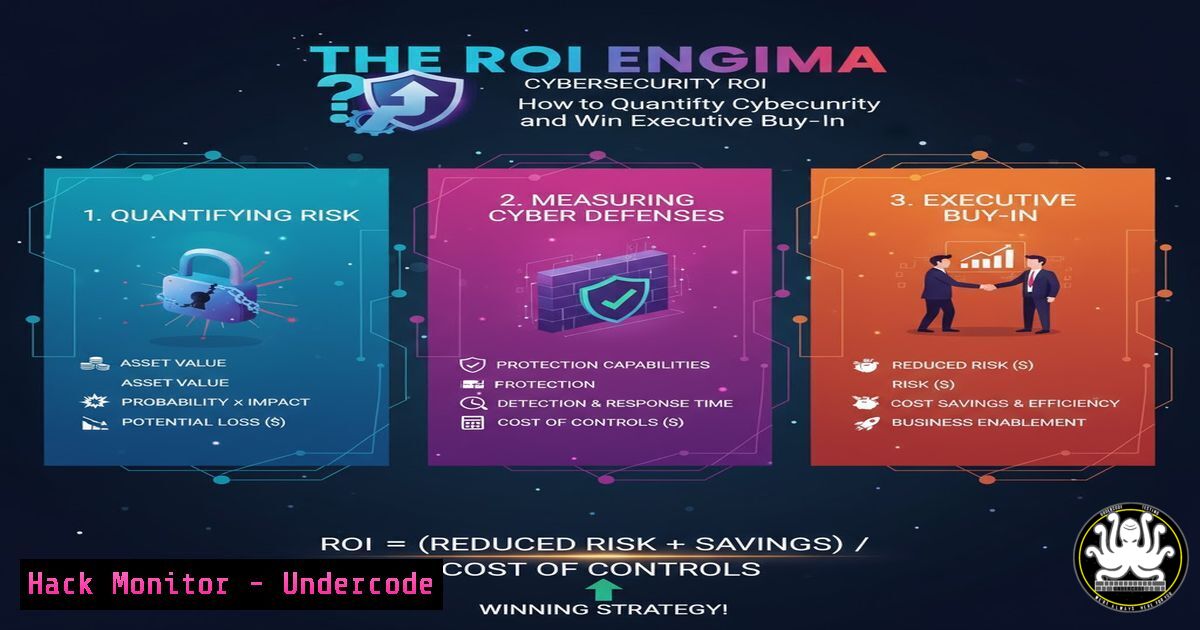
Introduction:
Calculating the Return on Investment (ROI) for cybersecurity initiatives is a perennial challenge for security professionals. Unlike traditional business functions, security’s primary value lies in preventing losses that may never occur. This article deconstructs a practical framework for translating abstract security controls into tangible business value, moving the conversation from technical cost to strategic investment.
Learning Objectives:
- Understand how to calculate “expected loss avoidance” using quantitative risk scenarios.
- Learn to identify and quantify productivity gains from security tools for analysts and IT teams.
- Master the art of communicating cybersecurity value in business-centric language that resonates with C-suite executives.
You Should Know:
1. Quantifying Risk with the FAIR Model
The Factor Analysis of Information Risk (FAIR) model provides a standardized way to calculate financial risk. It moves beyond qualitative labels like “High” or “Medium” risk to actual monetary figures.
Example Calculation:
`Risk ($) = Threat Frequency (events/year) x Loss Magnitude ($/event)`
Step-by-step guide:
- Define a Scenario: You are defending against a specific threat, such as phishing-based credential theft.
- Estimate Threat Frequency: Based on historical data or industry benchmarks, estimate how often this incident occurs. For example, you might experience 2 successful phishing incidents per year.
- Estimate Loss Magnitude: Calculate the total cost of a single incident. This includes investigation time, system restoration, potential downtime, and any regulatory fines. For this example, assign a cost of $5,000 per incident.
- Calculate Total Risk:
2 incidents/year x $5,000/incident = $10,000 annual risk. - Propose a Control: Introduce a security solution (e.g., a multi-factor authentication system) costing $2,000 that reduces the incident frequency from 2 to 1 per year.
- Calculate Security ROI:
(($10,000 - $5,000 - $2,000) / $2,000) x 100 = 150% ROI.
2. Calculating Analyst Productivity Gains
Security tools are often justified by their ability to make analysts more efficient, which is a direct, calculable cost saving.
Productivity Formula:
`Annual Savings ($) = Time Saved (hours/day) x Hourly Rate ($/hour) x Workdays/Year`
Step-by-step guide:
- Determine Fully Loaded Cost: Calculate the total annual cost of a security analyst, including salary, benefits, and overhead. Example: $100,000 per year.
- Calculate Hourly Rate:
$100,000 / (52 weeks 40 hours) ≈ $48/hour. - Quantify Time Saved: If a new Security Information and Event Management (SIEM) tool saves the analyst 1 hour per day by automating alert triage, the daily saving is $48.
- Calculate Annual Savings:
$48/day x 220 workdays/year = $10,560 in annual productivity gains. This amount can be directly offset against the tool’s cost.
3. Command-Line Efficiency for Security Teams
Efficiency isn’t just about GUI tools. Mastering command-line utilities can drastically reduce investigation and response times.
Verified Linux Commands for Log Analysis:
grep -i "failed password" /var/log/auth.log | wc -l: Counts failed SSH login attempts.awk '{print $1}' access.log | sort | uniq -c | sort -rn | head -10: Lists the top 10 IP addresses hitting a web server.find / -type f -perm -4000 -ls 2>/dev/null: Finds all SUID files, which are potential privilege escalation vectors.netstat -tuln | grep LISTEN: Shows all listening network ports.tcpdump -i eth0 -w capture.pcap host 192.168.1.10: Captures all network traffic to/from a specific host for analysis.
Step-by-step guide for log analysis:
1. SSH into the server in question.
- Use `grep` to filter logs for specific patterns, like
grep "Invalid user" /var/log/secure. - Pipe (
|) the output to `awk` to extract specific fields, such as the source IP address. - Use `sort | uniq -c` to count the frequency of each unique IP.
- This rapid analysis allows you to identify brute-force attacks and quickly implement block rules via `iptables` or a firewall.
4. PowerShell for Proactive Windows Hardening
Windows environments can be hardened and monitored efficiently using PowerShell, providing measurable improvements to your security posture.
Verified Windows PowerShell Commands:
Get-NetFirewallRule | Where-Object {$_.Enabled -eq "True"} | Select-Object Name, DisplayName, Direction: Audits all active firewall rules.Get-LocalUser | Where-Object {$_.Enabled -eq "True"} | Format-Table Name, LastLogon: Lists all enabled local user accounts and their last logon time.Get-Service | Where-Object {$_.Status -eq "Running"} | Export-Csv C:\temp\runningservices.csv: Exports a list of all running services for audit.Test-NetConnection -ComputerName 192.168.1.1 -Port 443: Tests if a specific port is open on a remote host.Get-WinEvent -LogName Security -MaxEvents 10 | Where-Object {$_.Id -eq 4625}: Retrieves the last 10 failed logon events from the Security log.
Step-by-step guide for service audit:
1. Open PowerShell as Administrator.
2. Run `Get-Service` to list all services.
- Pipe the results to `Where-Object` to filter for services that are set to start automatically (
$_.StartType -eq "Automatic") but are not required for business function. - Use `Set-Service -Name “ServiceName” -StartupType Disabled` to harden the system by disabling unnecessary services, reducing the attack surface. Documenting this process shows a clear, actionable security improvement.
5. Leveraging API Security Scans
APIs are a critical attack vector. Using tools to scan for vulnerabilities provides quantifiable data on risk reduction.
Verified Commands with OWASP ZAP:
docker run -v $(pwd):/zap/wrk/:rw -t owasp/zap2docker-stable zap-baseline.py -t https://your-test-api.com -g gen.conf -r testreport.html: Runs a baseline scan against a target API.docker run -v $(pwd):/zap/wrk/:rw -t owasp/zap2docker-stable zap-full-scan.py -t https://your-test-api.com -g gen.conf -r testreport.html: Runs a full active scan.
Step-by-step guide:
1. Install Docker on your scanning machine.
- Pull the OWASP ZAP image:
docker pull owasp/zap2docker-stable. - Run a baseline scan against your development or staging API endpoint.
- Review the generated HTML report (
testreport.html) which will list vulnerabilities found, such as “Missing Anti-CSRF Tokens” or “SQL Injection.” - The number and severity of vulnerabilities patched after a development cycle become a direct metric for the ROI of your application security program.
6. Cloud Security Posture Management (CSPM) Commands
Misconfigurations in cloud environments like AWS are a leading cause of breaches. Using CLI tools to check and enforce configuration provides measurable compliance.
Verified AWS CLI Commands:
aws iam get-account-password-policy: Checks the password policy for your AWS account.aws ec2 describe-security-groups --filters Name=ip-permission.cidr,Values=0.0.0.0/0 --query "SecurityGroups[].[GroupId,GroupName]": Finds security groups with overly permissive rules (open to the world).aws s3api list-buckets --query "Buckets[].Name": Lists all S3 buckets, the first step in an audit.aws s3api get-bucket-acl --bucket YOUR_BUCKET_NAME --query "Grants[?Grantee.URI==http://acs.amazonaws.com/groups/global/AllUsers`]”`: Checks if an S3 bucket is publicly accessible.
Step-by-step guide for S3 hardening:
1. Authenticate your AWS CLI.
2. Run the command to list all buckets.
- For each bucket, check its public access using the `get-bucket-acl` command.
- If public access is found, remediate it using the AWS console or CLI (
aws s3api put-public-access-block). Each remediated misconfiguration is a prevented potential data breach, the value of which can be modeled using the FAIR methodology.
What Undercode Say:
- Speak the Language of Business, Not Technology. The most sophisticated security control has zero value if its purpose and benefit cannot be articulated in terms of financial risk, productivity, and business enablement. Frame security as a business assurance policy.
- Quantify the Invisible by Focusing on Efficiency. While preventing multi-million dollar breaches is the goal, the most credible and immediately understandable ROI often comes from the hard dollars saved through operational efficiency and time savings for highly paid staff.
The persistent failure of cybersecurity leaders to secure adequate budget stems from a communication gap, not a value gap. By adopting the quantitative and business-centric approaches outlined here, security professionals can shift their perceived role from a cost center to a strategic business partner. The frameworks and technical commands provided offer a concrete path to building a compelling, data-driven business case that aligns security initiatives with core organizational objectives, finally solving the ROI enigma.
Prediction:
The future of cybersecurity budgeting will become increasingly data-driven and integrated with enterprise risk management platforms. We will see a rise in “Security Value Management” offices that operate similarly to IT Value Management, using standardized metrics and real-time data from security tools to continuously demonstrate value and optimize spending. AI will play a key role in predicting attack probabilities and loss magnitudes with greater accuracy, making ROI calculations for security investments as routine and rigorous as those for any other capital expenditure.
🎯Let’s Practice For Free:
IT/Security Reporter URL:
Reported By: Julie Cornu – Hackers Feeds
Extra Hub: Undercode MoN
Basic Verification: Pass ✅


