Listen to this Post
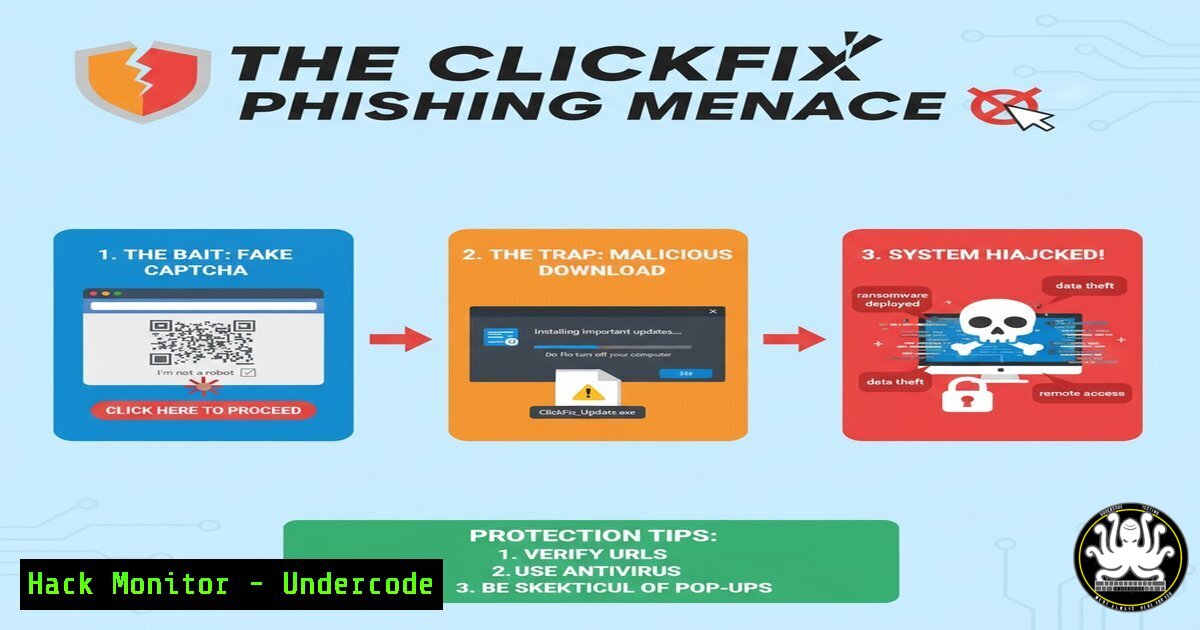
Introduction:
A new, sophisticated phishing campaign dubbed “ClickFix” is leveraging fake captcha pages and full-screen Windows update lures to deceive users. This multi-stage attack culminates in malicious code being silently copied to the victim’s clipboard, ready for execution, posing a significant risk to enterprise and personal security.
Learning Objectives:
- Understand the attack vector and methodology of the ClickFix phishing campaign.
- Learn how to identify and analyze such threats using command-line forensics.
- Implement mitigation strategies to prevent successful exploitation.
You Should Know:
1. Identifying Suspicious Processes with PowerShell
Get-Process | Where-Object {$.ProcessName -like “captcha” -or $.ProcessName -like “update” -or $_.CPU -gt 50} | Format-Table ProcessName, Id, CPU -AutoSize
Step-by-step guide explaining what this does and how to use it.
This PowerShell command scans all running processes for names containing “captcha” or “update,” which are common lures in this attack. It also flags any process using over 50% of the CPU, a potential sign of malicious activity. Execute this in an administrative PowerShell window to quickly identify suspicious programs that shouldn’t be running. The output displays the process name, its PID, and CPU usage for further investigation.
2. Inspecting Clipboard Content for Malicious Payloads
powershell “Get-Clipboard”
Step-by-step guide explaining what this does and how to use it.
A core component of the ClickFix attack is placing a malicious command or script into the user’s clipboard. This simple PowerShell command displays the current content of the Windows clipboard. If you see a long, obfuscated command, a PowerShell one-liner, or a strange script, do not paste it into any terminal or document, as this is likely the final payload intended for execution.
3. Analyzing Network Connections for Callbacks
netstat -ano | findstr ESTABLISHED
Step-by-step guide explaining what this does and how to use it.
After exploitation, malware often establishes a connection to a command-and-control (C2) server. This Windows command lists all active network connections and their associated Process ID (PID). Look for unknown processes making external connections. Cross-reference the PID with the Task Manager or `tasklist` command to identify the culprit application.
4. Forensic Browser History Analysis
Google Chrome
type “%LOCALAPPDATA%\Google\Chrome\User Data\Default\History” | findstr /i “captcha update clickfix”
Mozilla Firefox
type “%APPDATA%\Mozilla\Firefox\Profiles\.default-release\places.sqlite” | findstr /i “captcha update clickfix”
Step-by-step guide explaining what this does and how to use it.
These commands search the local database files of Chrome and Firefox for URLs related to the attack. If a user was redirected through the fake captcha page, a trace might be left in the browser history. This is a crucial step for incident responders to confirm a compromise and identify the initial phishing domain.
5. Windows Event Log Analysis for PowerShell Activity
Get-WinEvent -LogName “Microsoft-Windows-PowerShell/Operational” | Where-Object {$.Id -eq 4104 -or $.Id -eq 4103} | Select-Object -First 10 | Format-List
Step-by-step guide explaining what this does and how to use it.
Attackers often use PowerShell to run the payload they place in the clipboard. This command queries the PowerShell operational log for Event IDs 4103 (Warning) and 4104 (Verbose), which log script block execution. Reviewing these logs can reveal the exact malicious code that was executed, even if it was run from the clipboard.
6. Hardening System Against Clipboard-based Execution
Set PowerShell execution policy to Restricted (Windows Client)
Set-ExecutionPolicy Restricted -Force
Enable Windows Defender Attack Surface Reduction Rule against Office macros
Add-MpPreference -AttackSurfaceReductionRules_Ids D4F940AB-401B-4EFC-AADC-AD5F3C50688A -AttackSurfaceReductionRules_Action Enabled
Step-by-step guide explaining what this does and how to use it.
The first command sets the system’s PowerShell execution policy to ‘Restricted,’ which prevents any PowerShell scripts from running, effectively neutralizing a common payload delivery method. The second command enables a specific Windows Defender ASR rule that blocks executable content from Office applications, adding another layer of defense.
- Creating a Canary File to Detect Unauthorized Access
fsutil file createnew C:\canary.txt 0
Step-by-step guide explaining what this does and how to use it.
A canary file is a trap—a file that has no legitimate reason to be accessed. This command creates an empty, hidden file named `canary.txt` in the root of the C: drive. You can then set up a File System Audit policy to alert you if this file is ever read or modified, which could indicate a successful breach and post-exploration activity by an attacker.
What Undercode Say:
- Social engineering is evolving beyond simple email links, now manipulating fundamental UI elements like captcha and system updates to create a false sense of legitimacy.
- The attack chain demonstrates a clear shift towards user-interactive payload delivery, where the final exploit requires a simple, seemingly innocuous action (pasting) from the victim.
The ClickFix campaign is a stark reminder that the human interface is the most exploited vulnerability. By combining a trusted security checkpoint (captcha) with a critical system process (Windows Update), attackers have crafted a highly convincing narrative. The technical sophistication isn’t in a zero-day exploit, but in the psychological manipulation and the abuse of built-in system features like the clipboard. This makes traditional signature-based detection less effective, placing a greater emphasis on user education, behavioral monitoring, and application hardening. Defenders must now assume that a user will click, and build security layers that can intercept and analyze actions after the initial click but before code execution.
Prediction:
This “clipboard-to-execution” vector will be rapidly adopted by other threat actors, leading to a surge in similar campaigns targeting cryptocurrency wallets (by replacing wallet addresses), developers (by replacing Git commands), and system administrators. We predict the next evolution will involve browser-level exploits that can automatically paste and execute the clipboard content without any user interaction, or the use of AI to generate highly personalized and context-aware lures in real-time, making them nearly indistinguishable from legitimate system alerts.
🎯Let’s Practice For Free:
IT/Security Reporter URL:
Reported By: Mamun Infosec – Hackers Feeds
Extra Hub: Undercode MoN
Basic Verification: Pass ✅


