
Listen to this Post
Introduction:
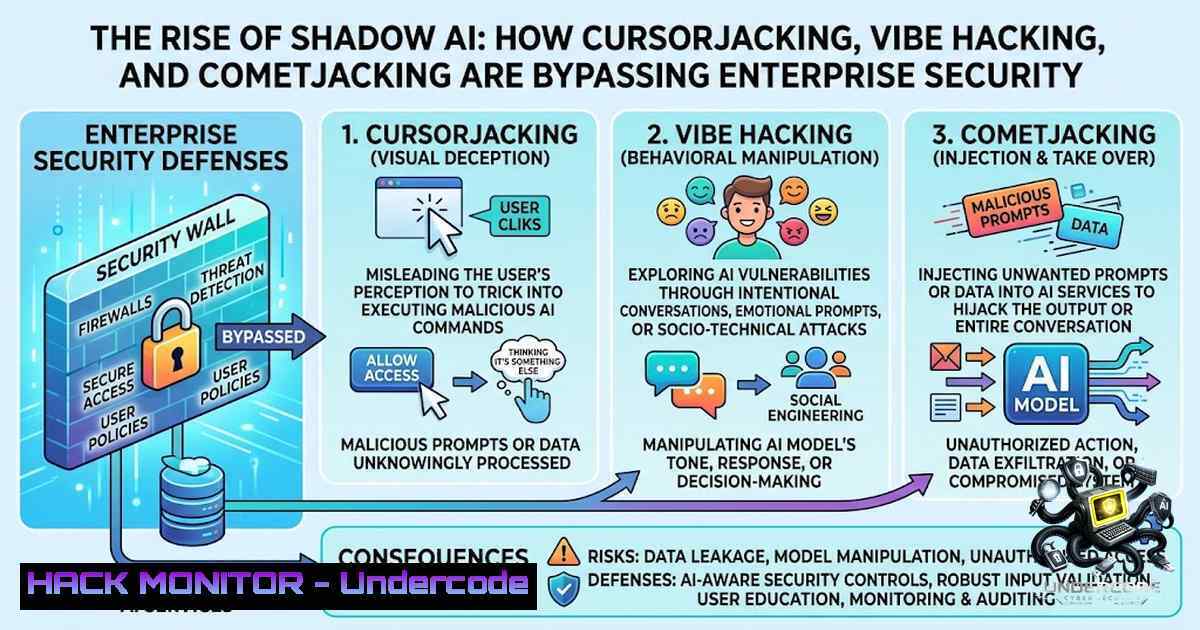
Nearly half of all enterprise AI usage is happening completely off the security radar, according to Akamai’s latest State of the Internet (SOTI) report. What began as cautious AI experimentation in early 2025 has now solidified into a structural mandate—but this rapid integration has outpaced traditional security guardrails. The report reveals that sensitive corporate data is being systematically fragmented across millions of fluid prompts, unmanaged personal accounts, and autonomous AI agents, rendering legacy data loss prevention tools obsolete. Three novel AI-1ative attack vectors—CursorJacking, Vibe Hacking, and CometJacking—are actively bypassing perimeter defenses, forcing security leaders to pivot from blocking AI to continuously governing how it operates at the interaction layer.
Learning Objectives & Secrets:
- Objective 1 – Understand Shadow AI’s True Scale: Recognize that nearly 50% of enterprise AI interactions occur outside approved platforms, with risk heavily concentrated among a small group of “AI power users” who drive the vast majority of exposure. Security teams focus on a few approved platforms while a massive “long tail” of unmanaged apps runs silently beneath the surface.
-
Objective 2 – Master AI-1ative Attack Vectors (Secret Tip): Go beyond traditional threat modeling. CursorJacking exploits rogue browser extensions to harvest API keys and proprietary code; Vibe Hacking manipulates local markdown files to trick AI into generating vulnerable code; and CometJacking uses indirect prompt injection via malicious web pages to exfiltrate local files, emails, and session credentials. The secret: these attacks mimic normal developer workflows, making them nearly invisible to conventional monitoring.
-
Objective 3 – Implement Real-Time Governance (Secret Tip): Static DLP is dead. Transition to real-time, contextual analysis of prompts, copy/paste buffers, and document uploads. The secret lies in treating browser and IDE extensions as highly privileged software—nearly 75% demand high or critical permissions, and 16.3% contain known CVEs.
You Should Know:
1. Identifying and Mitigating CursorJacking in Your Environment
CursorJacking occurs when malicious browser extensions exploit broad permissions to silently harvest API keys, proprietary codebases, and conversational history from AI coding assistants like Cursor.
Step‑by‑step guide:
- Audit all browser extensions across your organization. Use your endpoint detection and response (EDR) or mobile device management (MDM) to generate an inventory of installed extensions.
-
Review permission scopes for each extension. Flag any extension requesting “read and change all data on websites,” “access browsing history,” or “communicate with cooperating native applications.”
-
Monitor outbound traffic from browser processes. On Linux, use:
sudo tcpdump -i any -1n 'port 443' -A | grep -E "api[.]|token|key|secret"
On Windows (PowerShell as Administrator):
netsh trace start capture=yes provider=Microsoft-Windows-Kernel-1etwork tracefile=C:\traces\browser.etl
 Then use Microsoft Message Analyzer or Wireshark to inspect
- Deploy extension allowlisting via Group Policy (Windows) or managed Chrome policies (macOS/Linux). Block all extensions not explicitly approved by security.
-
Implement browser isolation for high-risk users. Force AI coding assistant traffic through a secure remote browser that strips sensitive headers and prevents local extension injection.
2. Defending Against Vibe Hacking Through Markdown Integrity
Vibe Hacking covertly manipulates local markdown instruction files within a developer’s environment, tricking frontier coding assistants into generating insecure outputs or executing unauthorized actions.
Step‑by‑step guide:
- Inventory all markdown files (.md, .markdown) in developer repositories and local workspaces that could serve as instruction sources for AI assistants.
-
Implement file integrity monitoring (FIM) on critical markdown files. On Linux with
auditd:auditctl -w /path/to/project/.md -p wa -k markdown_integrity
On Windows, use PowerShell to compute and monitor file hashes:
Get-FileHash -Path "C:\projects.md" -Algorithm SHA256 | Export-Csv -Path "markdown_baseline.csv"
Run periodically and compare
-
Restrict write permissions to markdown files in production-adjacent repositories. Use principle of least privilege—only CI/CD pipelines and trusted developers should have write access.
-
Scan markdown files for obfuscated instructions using regex patterns that detect hidden commands, zero-width characters, or base64-encoded payloads:
grep -P "[\x{200B}-\x{200D}\x{FEFF}]" .md Detects zero-width characters -
Sandbox AI coding assistants in containerized environments where markdown files are ephemeral and cannot persist malicious modifications across sessions.
3. Preventing CometJacking via Indirect Prompt Injection
CometJacking embeds malicious instructions on public web pages, using indirect prompt injection to manipulate agentic AI browsers (like Perplexity’s Comet AI) into exfiltrating local files, emails, and session credentials.
Step‑by‑step guide:
- Deploy content security policies (CSP) that restrict which external domains agentic browsers can fetch. Example CSP header:
Content-Security-Policy: default-src 'self'; script-src 'self' https://trusted-cdn.com; connect-src 'self'
-
Implement input sanitization for all prompts processed by AI agents. Strip or escape any content that resembles executable instructions or system commands.
-
Use prompt injection detection via regex or ML-based filters. Flag prompts containing:
– “ignore previous instructions”
– “system:”
– “you are now”
– “forget all prior”
– Base64-encoded or URL-encoded payloads
- Restrict agentic browser file system access using operating system controls. On macOS:
sandbox-exec -1 com.perplexity.comet -p "(allow file-read) (deny file-write)" /Applications/Comet.app/Contents/MacOS/Comet
On Windows, use AppLocker or Windows Sandbox to confine agentic browsers.
-
Monitor agentic browser outbound requests for unusual data volumes or unexpected destinations. Set up egress filtering to block exfiltration to non-corporate domains.
-
Eliminating Shadow AI Through SSO Federation and Continuous Discovery
Security teams are suffering from a severe visibility gap, focusing on a few approved platforms while unmanaged apps run silently. The solution is SSO federation and continuous SaaS discovery.
Step‑by‑step guide:
- Force single sign-on (SSO) federation across all AI platforms. Use SAML or OIDC to ensure every AI interaction is tied to a verified corporate identity.
-
Deploy a CASB (Cloud Access Security Broker) or shadow IT discovery tool to continuously identify niche AI SaaS tools employees are adopting.
-
Create an AI application approval workflow—employees must request approval before using any AI tool, with security reviewing permissions, data handling, and compliance.
-
Integrate SSO logs with SIEM to detect anomalous authentication patterns (e.g., logins from unusual locations, multiple failed attempts, or off-hours access).
-
Conduct quarterly shadow AI sweeps using network traffic analysis. Look for destinations matching known AI provider domains (OpenAI, Anthropic, Perplexity, Cursor, etc.) that aren’t in your approved list.
5. Securing AI Agents with Least-Privilege Boundaries
Autonomous AI agents acting on behalf of employees require strict behavioral monitoring and least-privilege boundaries.
Step‑by‑step guide:
- Define explicit permission scopes for each AI agent. Agents should only access the specific data sources and APIs necessary for their function.
-
Implement API key rotation for all agent integrations. Use a secrets manager (HashiCorp Vault, AWS Secrets Manager) to automate rotation every 24–48 hours.
-
Deploy behavioral baselining for agent activity. Establish normal patterns (time of day, volume of requests, data types accessed) and alert on deviations.
-
Use runtime application self-protection (RASP) to monitor agent execution. On Linux, use `strace` to observe system calls:
strace -e trace=open,read,write,connect -p <agent_pid> 2>&1 | grep -v ENOENT
-
Enforce network segmentation—place AI agents in isolated VLANs or subnets with egress filtering that only allows outbound connections to whitelisted APIs.
6. Inspecting the Interaction Layer: Beyond Static DLP
Transition from static DLP to real-time, contextual analysis of prompts, copy/paste buffers, and document uploads.
Step‑by‑step guide:
- Deploy a data loss prevention (DLP) solution with real-time prompt inspection capabilities. Configure it to scan all AI interactions for:
– PII (emails, phone numbers, SSNs)
– Financial data (credit card numbers, bank accounts)
– Proprietary code snippets
– Authentication credentials
- Monitor copy/paste buffers for sensitive data transfers between AI assistants and other applications. On Windows, use PowerShell to log clipboard content changes:
Add-Type -AssemblyName System.Windows.Forms while ($true) { $clip = [System.Windows.Forms.Clipboard]::GetText(); if ($clip) { Write-Host $clip }; Start-Sleep -Seconds 1 } -
Inspect document uploads to AI platforms for sensitive metadata. Use `exiftool` to strip metadata before upload:
exiftool -all= -overwrite_original document.pdf
-
Create contextual risk scoring—assign higher risk scores to prompts containing customer data, financial terms, or source code, and enforce step-up authentication or blocking.
-
Log all AI interactions with full context (user, timestamp, prompt, response snippet, data types involved) in a searchable data lake for forensic analysis.
-
Vetting Browser and IDE Extensions as Privileged Software
Almost 75% of AI extensions demand high or critical permissions, and 16.3% contain known CVEs. Treat extensions as highly privileged software.
Step‑by‑step guide:
- Create an approved extension catalog for your organization. Only allow extensions from this list.
-
Scan all extensions for known CVEs using tools like `cve-bin-tool` or vendor-specific vulnerability databases.
-
Perform code review on open-source extensions before approval. Look for:
– Obfuscated JavaScript
– Calls to `eval()` or `Function()` constructor
– Exfiltration patterns (POST requests to unknown domains)
– Access to chrome.storage, localStorage, or `IndexedDB`
4. Implement extension update policies—delay automatic updates by 48 hours to allow security teams to review new versions for introduced vulnerabilities.
- Monitor extension network activity using browser developer tools or a proxy (Burp Suite, Fiddler):
Using mitmproxy to inspect browser traffic
mitmproxy --mode transparent --showhost
What Undercode Say:
- Key Takeaway 1: Blocking AI doesn’t work—it only pushes teams into personal accounts and unmonitored devices. Security must shift from static network perimeter checks to real-time governance at the interaction layer.
-
Key Takeaway 2: The emergence of AI-1ative attack vectors (CursorJacking, Vibe Hacking, CometJacking) represents a fundamental shift in the threat landscape. These aren’t theoretical—they’re active exploits discovered in 2026 that bypass traditional defenses entirely.
The core challenge is that AI has become a “collaborative colleague with direct access to the corporate crown jewels,” as Or Eshed, VP of Enterprise Security at Akamai, puts it. Traditional DLP tools were built for file transfers and emails, not for the fragmented, fluid nature of AI prompts and agentic workflows. Organizations must target the 5% of high-risk “AI power users” driving the majority of exposure, eliminate shadow AI through SSO federation, and treat browser extensions as privileged software. The 2026 CISO roadmap is clear: inspect the interaction layer, secure AI agents with least-privilege boundaries, and continuously discover unmanaged AI SaaS tools. Failure to adapt means sensitive data will continue leaking through unauthorized prompts and novel AI-1ative vectors.
Prediction:
- +1 Organizations that adopt real-time interaction-layer governance will gain a competitive advantage, enabling faster AI adoption with lower risk—turning security into an enabler rather than a blocker.
-
-1 The “Shadow AI” visibility gap will widen as AI adoption accelerates, with power users driving increasingly complex and unmonitored interactions, leading to major data breaches by 2027.
-
-1 Traditional DLP vendors will struggle to adapt, creating a window of vulnerability where enterprises lack adequate tooling to inspect AI prompts and agent behaviors at scale.
-
+1 The emergence of AI-1ative attack vectors will spur innovation in AI security, giving rise to a new category of “AI Firewall” and “Prompt Security” solutions that become standard enterprise infrastructure.
-
-1 Browser extension ecosystems will become a primary attack vector, with malicious AI extensions proliferating in app stores and exploiting the 16.3% of extensions containing known CVEs.
-
+1 CISOs who shift from blocking to governing AI will foster a culture of security-conscious AI adoption, reducing shadow IT and improving overall security posture across the organization.
For the full report: Akamai State of the Internet – Enterprise AI Usage Risk Report 2026
▶️ Related Video (78% Match):
🎯Let’s Practice For Free:
🎓 Live Courses & Certifications:
Join Undercode Academy for Verified Certifications
🚀 Request a Custom Project:
Secure, high-velocity infrastructure and disruptive technological engineering. Contact our engineering team for high-tier development and proprietary systems:
[email protected]
💎 Smart Architecture | 🛡️ Secure by Design | ⭐ Trusted by Thousands
IT/Security Reporter URL:
Reported By: https://lnkd.in/p/e2HHZKUr – Hackers Feeds
Extra Hub: Undercode MoN
Basic Verification: Pass ✅


