Listen to this Post
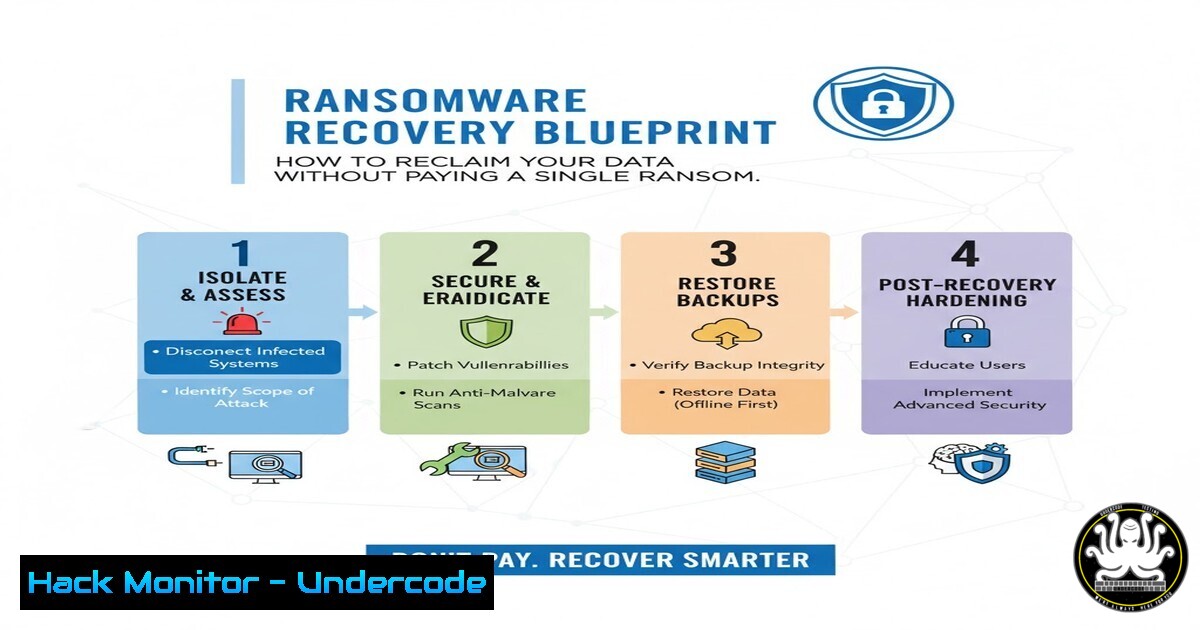
Introduction:
A recent ransomware attack against a UK professional services firm, which resulted in 16 TB of encrypted client data, demonstrates a critical shift in incident response. Instead of capitulating to criminal demands, the firm leveraged expert data recovery and robust backup strategies to fully recover 11 TB of critical information. This case study provides a definitive blueprint for organizations to prepare for, respond to, and recover from ransomware incidents while maintaining operational integrity and refusing to fund cybercrime.
Learning Objectives:
- Understand the critical pre-attack hardening steps, including creating immutable backups and securing infrastructure.
- Master the immediate response actions to contain an ongoing ransomware attack and preserve forensic evidence.
- Learn the advanced data recovery techniques used by professionals to rebuild systems and restore data without paying ransoms.
You Should Know:
1. Creating Immutable and Offline Backups
The cornerstone of ransomware resilience is a backup that attackers cannot alter. The 3-2-1 rule is essential: three total copies of your data, two of which are on different media, with one copy kept offline and off-site.
Verified Command List:
Veeam Backup & Replication Immutable Repository Setup:
`Set-VBRBackupRepository -Name “ImmutableRepo” -EnableImmutability $true -ImmutabilityPeriodDays 7`
Linux: Creating a Local Snapshot with LVM:
`lvcreate –size 10G –snapshot –name “rootsnap” /dev/volumegroup/rootvol`
Windows: Using WBAdmin to Initiate a System Backup:
`wbadmin start backup -backupTarget:D: -include:C: -systemState -allCritical -quiet`
AWS CLI: Applying a S3 Object Lock (Governance Mode) to a Bucket:
`aws s3api put-object-lock-configuration –bucket my-backup-bucket –object-lock-configuration ‘{ “ObjectLockEnabled”: “Enabled”, “Rule”: { “DefaultRetention”: { “Mode”: “GOVERNANCE”, “Days”: 7 } } }’`
Step-by-step guide:
To implement an immutable Linux backup, first, ensure your system uses Logical Volume Manager (LVM). The `lvcreate` command creates a snapshot of your root volume. This snapshot is a point-in-time copy that is read-only by default, protecting it from any encryption process that occurs after the snapshot is taken. Mount this snapshot to a secure location to verify its integrity and then archive it to an offline storage medium. This process ensures you have a clean, unencrypted version of your data to restore from.
2. Immediate Incident Response: Isolation and Containment
The first minutes after detection are critical. The goal is to prevent the ransomware from spreading to backup servers and network shares, thereby limiting the blast radius.
Verified Command List:
Windows: Forcefully Disconnect a Network Share (Potential Attack Vector):
`net use \\malicious-server\share /delete /y`
Linux: Block All Outbound Traffic with iptables (Contain Callbacks):
`iptables -P OUTPUT DROP`
Cisco ASA/Firepower: Quarantine an Infected Host by IP:
`object-group network INFECTED_HOSTS network-object host 192.168.1.50 access-list QUARANTINE_ACL extended deny ip object-group INFECTED_HOSTS any access-group QUARANTINE_ACL in interface inside`
PowerShell: Disable a Compromised User Account:
`Disable-ADAccount -Identity “compromised_user”`
Step-by-step guide:
If you detect ransomware activity, immediately use the `iptables` command on your Linux servers to block all outbound traffic. This is a drastic but necessary measure to prevent the ransomware from communicating with its command-and-control (C2) server, which may be delivering encryption keys or additional payloads. While this will disrupt legitimate services, it contains the threat. After executing this command, focus on identifying the infected host using network monitoring tools before systematically isolating it from the network.
3. Forensic Evidence Preservation for Law Enforcement
Before any recovery efforts begin, it is vital to preserve evidence. This aids in attribution, potential legal action, and understanding the attack vector to prevent recurrence.
Verified Command List:
Linux: Create a Forensic Disk Image using dd:
`dd if=/dev/sda of=/mnt/secure_external/forensic_image.img bs=4M status=progress`
Windows: Create a Memory Dump with WinPmem:
`winpmem_minimal_x64_rc2.exe -o memory_dump.raw`
Volatility 3: Extract Running Processes from a Memory Dump:
`vol -f memory_dump.raw windows.pslist`
SANS SIFT Workstation: Calculate a SHA-256 Hash for Integrity:
`sha256sum forensic_image.img`
Step-by-step guide:
Using the `dd` command, you can create a bit-for-bit copy of a compromised drive. The `if=/dev/sda` parameter specifies the input file (the compromised disk), and `of=` specifies the output file, which should be on a separate, secure storage device. The `bs=4M` sets the block size for efficient copying, and `status=progress` gives you feedback. This image can then be analyzed in a sandboxed environment to identify the ransomware variant and its indicators of compromise (IoCs) without risking the live environment.
4. RAID Array Reconstruction and Data Carving
As demonstrated in the case study, professional recovery often involves rebuilding damaged storage infrastructure. Ransomware can corrupt RAID metadata, but the underlying data is often recoverable.
Verified Command List:
Linux mdadm: Reassemble a Degraded RAID 5 Array:
`mdadm –assemble –force /dev/md0 /dev/sdb1 /dev/sdc1 /dev/sdd1`
Linux: Using TestDisk to Analyze and Repair a Corrupted Partition:
`testdisk /dev/sda`
Linux: Carving for Specific File Headers (e.g., PDFs) from Raw Disk:
`foremost -t pdf -i /dev/sda -o /recovery_output/`
Linux: Using `scrub` to Securely Wipe a Drive Post-Recovery:
`scrub /dev/sdb`
Step-by-step guide:
If a RAID array has been logically corrupted by ransomware, the `mdadm –assemble` command can be used to force a reassembly of the member disks. The `–force` flag is often necessary when the array’s superblock is damaged. Once assembled in a degraded state, you can mount it as read-only and begin the process of copying data off to a new, clean storage system. Tools like `testdisk` can then be run on the individual disks to repair partition tables that the ransomware may have overwritten.
5. System Hardening Post-Recovery
After restoring data, you must rebuild systems to be more resilient than before. This involves closing the initial attack vector and applying the principle of least privilege.
Verified Command List:
PowerShell: Disable SMBv1 (A Common Attack Vector):
`Disable-WindowsOptionalFeature -Online -FeatureName SMB1Protocol`
Linux: Harden SSH Configuration (`/etc/ssh/sshd_config`):
`Protocol 2 PermitRootLogin no PasswordAuthentication no`
Windows GPO: Apply Least Privilege via Command Line:
`secedit /configure /db secedit.sdb /cfg baseline_security_policy.inf`
Nmap: Scan for Open Ports Post-Recovery to Identify Misconfigurations:
`nmap -sS -sV -O -p- 192.168.1.0/24`
Step-by-step guide:
Hardening SSH is a critical step. Edit the `/etc/ssh/sshd_config` file and set `Protocol` to 2 to disable the insecure version 1. `PermitRootLogin no` prevents direct logins as the root user, forcing attackers to compromise both a user account and the root password. `PasswordAuthentication no` mandates the use of key-based authentication, which is far more resistant to brute-force attacks. After making these changes, restart the SSH service with `systemctl restart sshd` for the changes to take effect.
6. Implementing Advanced Endpoint Detection and Response (EDR)
Backups are a reactive measure. Proactive hunting for malicious activity using EDR tools can stop an attack before it leads to encryption.
Verified Command List:
Microsoft Defender for Endpoint (KQL): Hunt for PsExec Execution:
`DeviceProcessEvents | where FileName =~ “PsExec.exe” or FileName =~ “PsExec64.exe”`
Linux Auditd: Monitor for Suspicious Process Execution:
`auditctl -a always,exit -F arch=b64 -S execve`
YARA: Create a Custom Rule to Detect Ransomware Indicators:
`rule Ransomware_Indicator { strings: $a = “IWantMyMoney” condition: $a }`
Sysmon (Windows): Log Network Connections for Forensic Analysis (Configuration XML):
` cmd.exe `
Step-by-step guide:
Configuring Linux Auditd with the `auditctl` command allows you to log every `execve` system call, which is responsible for program execution. This creates an extensive audit trail. You can then pipe these logs to a Security Information and Event Management (SIEM) system where you can create alerts for the execution of known malicious binaries or scripts in unusual locations. This deep visibility is key to identifying the early stages of a ransomware attack, such as when a payload is dropped and executed from a user’s Temp directory.
7. Cloud Storage Hardening Against Ransomware
Attackers increasingly target cloud storage and backups. Configuring versioning and strict access controls can prevent the encryption or deletion of cloud-resident data.
Verified Command List:
AWS CLI: Enable S3 Versioning on a Critical Bucket:
`aws s3api put-bucket-versioning –bucket my-bucket –versioning-configuration Status=Enabled`
Azure CLI: Enable Soft Delete for Blob Storage:
`az storage blob service-properties delete-policy update –enable true –days-retained 7 –account-name mystorageaccount`
Terraform: Enforce S3 Bucket Encryption:
`resource “aws_s3_bucket_server_side_encryption_configuration” “example” { bucket = aws_s3_bucket.example.bucket rule { apply_server_side_encryption_by_default { sse_algorithm = “AES256” } } }`
AWS: Deny S3 Delete Actions via a Bucket Policy:
`{ “Effect”: “Deny”, “Principal”: “”, “Action”: [ “s3:DeleteObject”, “s3:DeleteObjectVersion” ], “Resource”: “arn:aws:s3:::my-bucket/” }`
Step-by-step guide:
Enabling S3 Versioning via the AWS CLI is a powerful defense. If a compromised identity access key is used to encrypt or overwrite files, versioning preserves the previous, unencrypted versions of those objects. You can then easily restore the bucket to a point-in-time before the attack occurred. Combining this with a bucket policy that explicitly denies `DeleteObject` actions adds a layer of protection, even if an attacker obtains valid credentials, ensuring your data versions cannot be permanently erased.
What Undercode Say:
- Paying a ransom is a business decision, not a recovery strategy. It funds criminal enterprises and offers no guarantee of data return.
- The true measure of cyber resilience is not preventing all attacks, but having the capability to return to full operations swiftly and on your own terms.
The successful recovery of 11 TB of data without payment shatters the narrative that capitulation is the only path forward. This case study proves that technical preparedness, embodied by verified offline backups and practiced incident response, is the ultimate leverage against digital extortion. The focus for all organizations must shift from a naive hope of perfect prevention to a pragmatic strategy of assured recovery. Investing in the technical capabilities outlined in this blueprint—from immutable storage to forensic analysis—transforms ransomware from an existential threat into a manageable, albeit severe, operational disruption.
Prediction:
The demonstrated success of non-payment recovery strategies will catalyze a dual evolution in the cyber threat landscape. Ransomware groups, facing reduced profits, will pivot towards more destructive “wiper” malware disguised as ransomware and intensify triple-extortion tactics, targeting clients and partners of victims to apply pressure. Conversely, the cybersecurity insurance industry will aggressively mandate the technical controls detailed in this article—immutable backups, EDR, and hardened configurations—as a baseline for coverage, making robust cyber hygiene a non-negotiable aspect of corporate governance and risk management.
🎯Let’s Practice For Free:
IT/Security Reporter URL:
Reported By: Iainfraserjournalist Data – Hackers Feeds
Extra Hub: Undercode MoN
Basic Verification: Pass ✅


