Listen to this Post
Introduction:
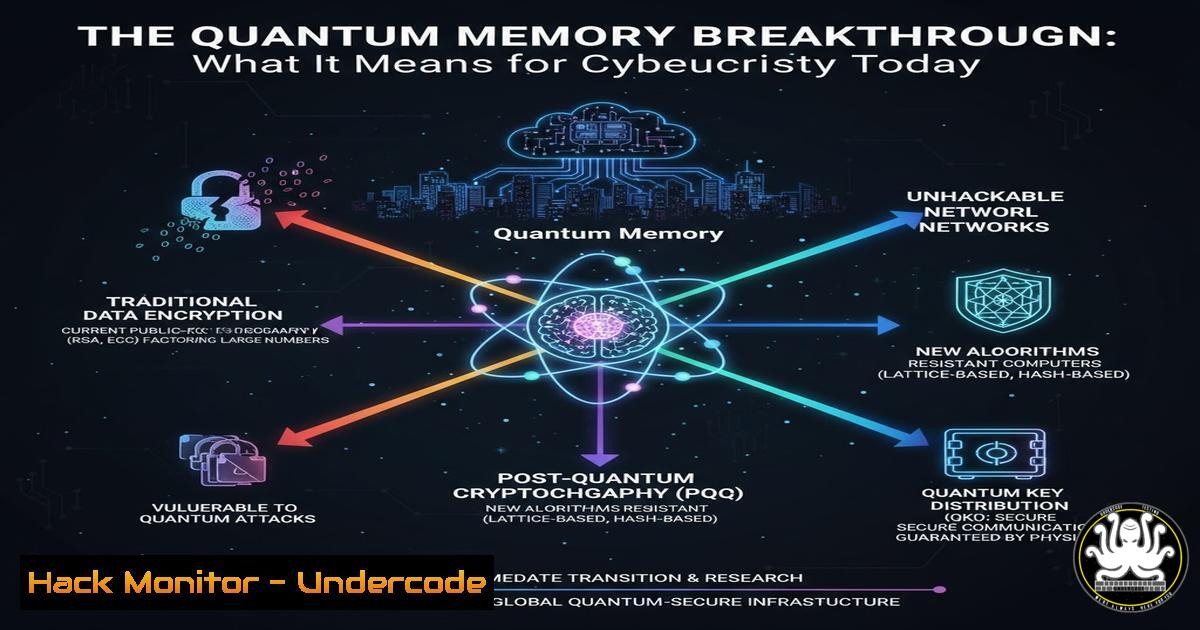
A recent breakthrough in high-efficiency, high-fidelity quantum memory has been announced, promising to accelerate the development of high-speed quantum networks and large-scale quantum computation. While this represents a significant scientific achievement, it simultaneously sounds a clarion call for the cybersecurity industry, heralding the accelerated arrival of threats that can break current public-key encryption. This article provides a practical guide for IT and security professionals to begin their transition to a post-quantum world.
Learning Objectives:
- Understand the immediate cryptographic vulnerabilities posed by quantum computing advances.
- Learn how to inventory and assess systems for quantum-risk.
- Implement initial steps towards cryptographic agility and post-quantum cryptography (PQC).
You Should Know:
1. Inventorying Cryptographically-Attractive Assets
The first step in quantum readiness is identifying your most sensitive data and systems. Any data encrypted with current asymmetric algorithms (like RSA or ECC) that is being stored for the long term is already at risk, as adversaries can harvest it now to decrypt later with a quantum computer.
Verified Command & Guide:
`openssl s_client -connect yourdomain.com:443 -servername yourdomain.com 2>/dev/null | openssl x509 -noout -text | grep “Signature Algorithm”`
What this does: This command connects to a web server and retrieves its SSL/TLS certificate, then filters the output to show the signature algorithm in use.
Step-by-step guide:
1. Open your terminal or command line.
- Replace `yourdomain.com` with the actual domain you wish to check.
3. Execute the command.
- The output will show lines like
Signature Algorithm: sha256WithRSAEncryption. If you see `rsaEncryption` orecdsa-with-SHA256, this service relies on cryptography vulnerable to quantum attack.
2. Assessing Key Strengths for Quantum Risk
Not all key lengths are equally vulnerable, but in a post-quantum context, current key strengths are drastically reduced. Understanding the effective strength of your existing keys is crucial for prioritization.
Verified Command & Guide:
`openssl x509 -in certificate.pem -noout -text | grep -A 5 “Public Key Algorithm”`
What this does: This command inspects a local certificate file to display details about the public key algorithm and its bit strength.
Step-by-step guide:
- Obtain the certificate file (e.g.,
certificate.pem) for the service you are auditing. - In your terminal, navigate to the directory containing the file.
3. Run the command.
- Look for the “Public-Key” line. For RSA, a 2048-bit key is considered equivalent to ~116 bits of post-quantum security, which is below the 128-bit minimum recommended by NIST. A 3072-bit RSA key offers ~128 bits.
3. Initiating a Quantum-Safe Key Exchange with OpenSSH
While full PQC standards are still being finalized, you can begin testing hybrid methods that combine classical and post-quantum algorithms. OpenSSH has support for experimental post-quantum key exchange algorithms.
Verified Command & Guide:
`ssh -o HostKeyAlgorithms=ssh-rsa -o [email protected],ecdh-sha2-nistp521
@[bash]`</h2>

What this does: This command initiates an SSH connection while explicitly specifying the key exchange algorithms, including the Kyber768 post-quantum algorithm (if supported by the client and server).

<h2 style="color: yellow;"> Step-by-step guide:</h2>

<ol>
<li>Ensure your OpenSSH client (version 9.0 or later) is compiled with Kyber support.</li>
<li>Replace `[bash]` and `[bash]` with your SSH credentials.</li>
</ol>

<h2 style="color: yellow;">3. Execute the command.</h2>

<ol>
<li>If successful, the connection uses a hybrid key exchange, combining classical ECDH and post-quantum Kyber. This is a practical step towards cryptographic agility.</li>
</ol>

<h2 style="color: yellow;">4. Scanning for Quantum-Vulnerable Services with Nmap</h2>

Large-scale network reconnaissance is essential to find systems relying on weak or outdated cryptographic protocols.

<h2 style="color: yellow;">Verified Command & Guide:</h2>

<h2 style="color: yellow;">`nmap --script ssl-cert,ssl-enum-ciphers -p 443,22,21,25 [bash]`</h2>

What this does: This Nmap command scans specified ports on a target and uses scripts to enumerate the SSL certificate details and the list of supported cipher suites.

<h2 style="color: yellow;"> Step-by-step guide:</h2>

<h2 style="color: yellow;">1. Install Nmap on your system.</h2>

<ol>
<li>Replace `[bash]` with the IP address or network range you are authorized to scan.</li>
</ol>

<h2 style="color: yellow;">3. Run the command.</h2>

<ol>
<li>Review the output for `ssl-cert` to see the signature algorithm and `ssl-enum-ciphers` to identify services offering only weak, non-quantum-safe ciphers.</li>
</ol>

<h2 style="color: yellow;">5. Implementing a Crypto-Agile HSM Configuration</h2>

Hardware Security Modules (HSMs) are critical for key management. Configuring them for crypto-agility ensures you can seamlessly add new PQC algorithms in the future.

<h2 style="color: yellow;">Verified Command & Guide (Example for PKCS11 Tool):</h2>


`pkcs11-tool --module /usr/lib/libsofthsm2.so --keypairgen --key-type EC:secp384r1 --label "My_Quantum_Resistant_Key" --id 01`

 What this does: This command uses the `pkcs11-tool` to generate a new elliptic curve keypair inside a software HSM (SoftHSM2). While ECC is not post-quantum, the process of managing keys in an agile HSM is the same.

<h2 style="color: yellow;"> Step-by-step guide:</h2>

<ol>
<li>Ensure SoftHSM2 and pkcs11-tool are installed and initialized.</li>
<li>Adjust the `--module` path to your HSM's PKCS11 library.</li>
<li>The `--key-type` specifies the algorithm. When PQC algorithms are standardized, you would replace `EC:secp384r1` with the new algorithm identifier.</li>
<li>The `--label` and `--id` help you manage the key. This practice is vital for future key migration.</li>
</ol>

<h2 style="color: yellow;">6. Automating Inventory with a Python Script</h2>

For large enterprises, manual checks are impractical. A simple script can automate the discovery of TLS certificate algorithms across thousands of hosts.

<h2 style="color: yellow;">Verified Code Snippet & Guide:</h2>

[bash]
import ssl
import socket
from cryptography import x509
from cryptography.hazmat.backends import default_backend

def check_cipher(hostname, port=443):
try:
context = ssl.create_default_context()
with socket.create_connection((hostname, port), timeout=5) as sock:
with context.wrap_socket(sock, server_hostname=hostname) as ssock:
cert_bin = ssock.getpeercert(True)
cert = x509.load_der_x509_certificate(cert_bin, default_backend())
print(f"{hostname}:{port} - {cert.signature_algorithm_oid._name}")
except Exception as e:
print(f"{hostname}:{port} - ERROR: {e}")

Read hosts from a file and iterate
with open('hosts.txt') as f:
for host in f:
check_cipher(host.strip())
What this does: This Python script attempts an SSL/TLS connection to a list of hosts and prints out the signature algorithm of their certificate.
Step-by-step guide:
- Install the required `cryptography` library using
pip install cryptography. - Create a text file named `hosts.txt` with one hostname per line.
3. Save the script as `cipher_check.py`.
- Run it with
python cipher_check.py. The output will help you build an inventory of algorithms in use. -
Preparing for Logging and Monitoring in a PQ World
Quantum computers will break current encryption, but they will also empower new defensive techniques. Security information and event management (SIEM) systems must be prepared to handle new types of quantum-related alerts and cryptographic failures.
Verified Command & Guide (Splunk SPL Query):
`index=network (signature_algorithm=RSA OR signature_algorithm=ECDSA) | stats count by host, signature_algorithm`
What this does: This Splunk Search Processing Language (SPL) query searches network logs for certificates using RSA or ECDSA signature algorithms and provides a count per host.
Step-by-step guide:
1. Access your Splunk instance.
- Ensure your SSL/TLS handshake logs are being ingested into an index (e.g.,
index=network). - Run this query to get a baseline of how many of your internal services are using quantum-vulnerable algorithms.
- This allows you to track your progress as you migrate to PQC and monitor for non-compliant devices.
What Undercode Say:
- The Harvest Now, Decrypt Later Threat is Active. The quantum memory breakthrough shortens the timeline. Any data encrypted with today’s vulnerable algorithms that has been intercepted is already a liability. Data retention policies must be re-evaluated immediately.
- Cryptographic Agility is No Longer Optional. The ability to swiftly update cryptographic algorithms across your entire IT stack is the single most important defensive strategy against the quantum threat. This requires investment in inventory, testing, and deployment processes now.
The announcement of high-fidelity quantum memory is not just a physics milestone; it is a strategic pivot point for global cybersecurity. It demonstrates that the fundamental engineering hurdles to building practical quantum computers are being systematically overcome. For CISOs and IT leaders, this translates a theoretical future risk into a tangible present-day project. The organizations that begin their migration to post-quantum cryptography now will be the ones that avoid a catastrophic, forced migration under duress a decade from now. The time for preparation is not when a cryptographically-relevant quantum computer is announced, but years before, while the foundations of our digital security are still intact.
Prediction:
The maturation of quantum memory and networking components will lead to the first public demonstration of a quantum computer breaking a widely-used, non-trivial RSA or ECC key within the next 10-15 years. This event will trigger a global “Y2K-level” scramble in the technology and finance sectors, causing a massive shortage of PQC expertise and driving urgent regulatory changes. Organizations that have not achieved cryptographic agility will face immense pressure, potential compliance failures, and severe data exposure risks.
🎯Let’s Practice For Free:
IT/Security Reporter URL:
Reported By: Trey Rutledge – Hackers Feeds
Extra Hub: Undercode MoN
Basic Verification: Pass ✅


