Listen to this Post
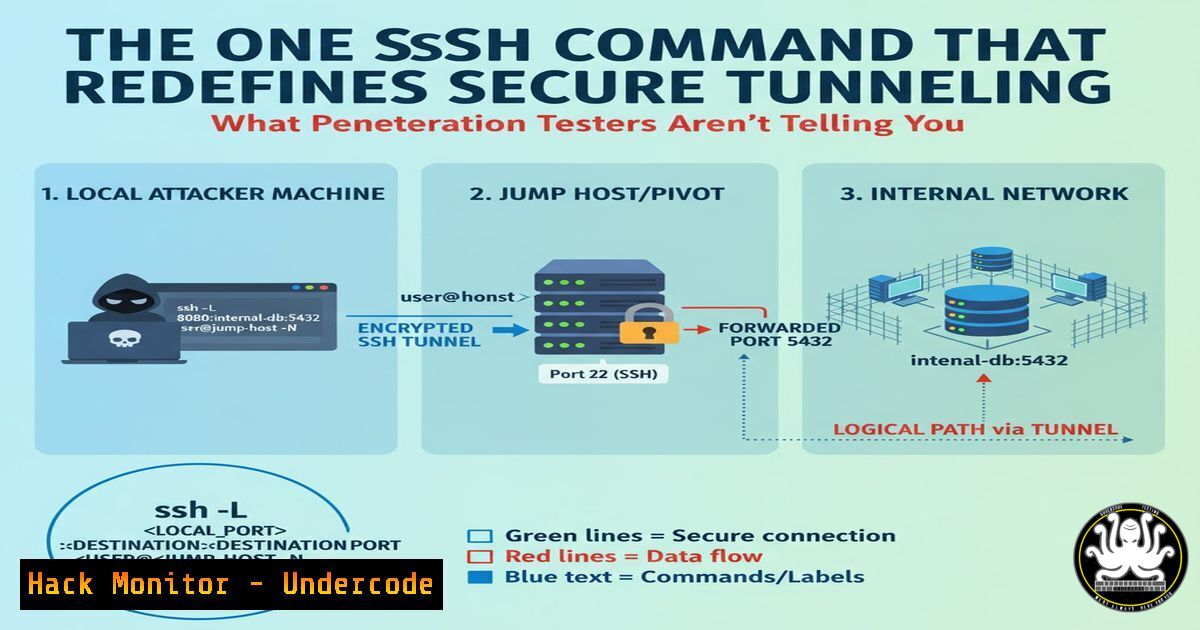
Introduction:
Secure Shell (SSH) tunneling is a fundamental technique for creating encrypted relays through untrusted networks, serving as a critical tool for penetration testers and system administrators. This method allows for secure remote access, port forwarding, and bypassing restrictive network controls, forming the backbone of many red and blue team operations. Mastering SSH tunneling commands is essential for both offensive security maneuvers and defensive network hardening.
Learning Objectives:
- Understand the core syntax and functionality of the basic SSH remote port forwarding command.
- Learn to apply this tunneling technique in various practical cybersecurity scenarios.
- Identify defensive measures to detect and prevent unauthorized SSH tunneling in enterprise environments.
You Should Know:
- Basic Remote Port Forwarding for Internal Service Access
`ssh -R 8080:192.168.1.100:80 [email protected]`
This command creates a reverse SSH tunnel that exposes an internal web service (port 80) to the external jump server. The -R flag specifies remote port forwarding, where 8080 is the port on the remote server that will be forwarded to port 80 on the internal machine (192.168.1.100). This is particularly useful for accessing internal web applications or services from outside the network during penetration testing engagements.
2. Dynamic SOCKS Proxy for Anonymized Scanning
`ssh -D 1080 -N -f [email protected]`
This establishes a dynamic SOCKS proxy on local port 1080. The -D flag creates the SOCKS proxy, -N prevents execution of remote commands, and -F backgrounds the process. This tunnel routes all traffic through the target server, effectively masking your origin IP during reconnaissance activities. Tools like Nmap or Burp Suite can be configured to use this proxy for stealthy network scanning.
3. Local Port Forwarding for Database Access
`ssh -L 3306:internaldb.local:3306 [email protected]`
Local port forwarding creates a tunnel where connections to your local port 3306 are forwarded through the SSH server to the internal database server. This allows database administration tools on your local machine to connect to internal databases as if they were local, bypassing firewall restrictions that block direct database access from external networks.
4. Multi-Hop Tunneling for Enhanced OPSEC
`ssh -J [email protected],[email protected] [email protected]`
The -J flag enables jumping through multiple SSH hosts before reaching the final destination. This technique increases operational security by obscuring the true source of connections and navigating complex network architectures. Each intermediate host only sees traffic from the previous hop, making detection and tracing more difficult for defenders.
5. SSH Config File for Complex Tunnel Management
Host InternalWeb
HostName jumpserver.corporate.com
User pentester
LocalForward 8080 172.16.1.50:80
RemoteForward 2222 192.168.1.10:22
DynamicForward 1080
ServerAliveInterval 60
This SSH configuration file entry automates multiple tunneling operations. LocalForward creates access to an internal web server, RemoteForward exposes an internal SSH service, and DynamicForward establishes a SOCKS proxy. Using configuration files simplifies complex tunneling setups and ensures consistency across multiple engagements.
6. Escaping Restricted Shells Through Reverse Tunnels
`ssh -R 9000:127.0.0.1:22 [email protected]`
When facing restricted shells, this reverse tunnel can provide an escape route. The command creates a connection back to your attacking machine, allowing you to SSH into the compromised host through the tunnel. This technique is valuable for maintaining access despite restrictive environments or limited shell capabilities.
- SSH Over HTTPS for Bypassing Deep Packet Inspection
`ssh -o ProxyCommand=”nc -X connect -x proxy:8080 %h %p” [email protected]`
This command routes SSH traffic through an HTTP proxy, effectively tunneling SSH over HTTPS. Many corporate networks allow outbound HTTPS traffic while blocking SSH. This technique evades such restrictions by encapsulating SSH within HTTP/HTTPS packets, making the traffic appear as normal web browsing to network monitoring tools.
What Undercode Say:
- SSH tunneling remains one of the most effective yet overlooked techniques for both red and blue teams
- Proper SSH key management and network monitoring are critical for detecting unauthorized tunnels
- The simplicity of SSH commands belies their powerful capabilities for both offensive and defensive operations
SSH tunneling represents a double-edged sword in cybersecurity. While penetration testers leverage these techniques to simulate sophisticated threat actors, defenders must implement robust monitoring to detect anomalous SSH activity. The future of network security will increasingly focus on behavioral analysis of encrypted tunnels rather than simple port blocking. As machine learning algorithms become more sophisticated, we predict the emergence of AI-driven detection systems capable of identifying malicious tunneling patterns based on connection metadata, timing analysis, and behavioral anomalies, even without decrypting the actual SSH traffic. Organizations must balance the operational necessity of SSH with comprehensive logging, multi-factor authentication, and regular audits of SSH access patterns to maintain security posture.
🎯Let’s Practice For Free:
IT/Security Reporter URL:
Reported By: Anass Bouacha – Hackers Feeds
Extra Hub: Undercode MoN
Basic Verification: Pass ✅


