
Listen to this Post
Introduction:
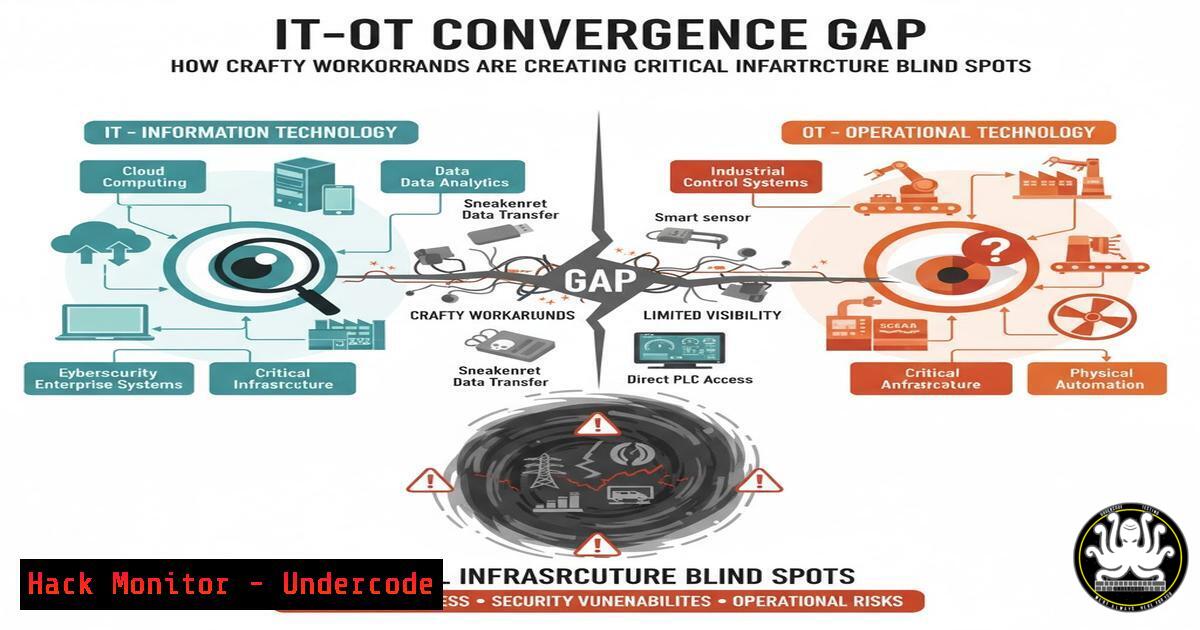
The relentless drive for operational uptime in critical infrastructure sectors like energy is creating a dangerous cybersecurity rift. As IT teams enforce security policies, Operational Technology (OT) personnel, responsible for keeping turbines spinning and grids online, often deploy crafty workarounds to maintain production, inadvertently introducing severe security vulnerabilities. This article dissects the communication gap between IT and OT and provides the technical commands and controls necessary to build a secure, resilient bridge.
Learning Objectives:
- Understand the core security differences between IT and OT environments and the risks of their convergence.
- Acquire practical, verified commands for asset discovery, network segmentation, and monitoring in hybrid IT-OT landscapes.
- Develop strategies to enforce security without impeding the critical operational demands of OT systems.
You Should Know:
1. Discovering Shadow IT-OT Connections
The first step to mitigating risk is discovering all connected assets, especially unauthorized ones. OT workarounds often involve rogue network bridges or wireless access points.
Verified Commands & Tools:
- Nmap Scan for OT Protocols: `nmap -sU -p 44818,502,47808 –script enip-info,modbus-discover
`
– Masscan for Rapid Asset Discovery: `masscan -p1-65535–rate=10000`
– ARP Scan for Local Network: `arp-scan –localnet`
– Windows Network Enumeration: `net view /all`
Step-by-Step Guide:
This process identifies devices speaking industrial protocols that may have been connected without IT’s knowledge. The Nmap command specifically probes for EtherNet/IP (port 44818), Modbus (502), and BACnet (47808). Running a UDP scan (-sU) is crucial as many OT protocols are UDP-based. The accompanying Nmap scripts (enip-info, modbus-discover) will interrogate found devices to extract vendor, product, and device type information, helping you build an accurate asset inventory. Run these scans from a designated security VLAN to avoid disrupting sensitive OT equipment.
2. Enforcing Micro-Segmentation with Firewall Rules
Flat OT networks allow a breach in one system to spread to critical controls. Micro-segmentation is the primary defense.
Verified Commands & Configurations:
- Windows Firewall (Block SMB between zones): `New-NetFirewallRule -DisplayName “Block OT-IT SMB” -Direction Inbound -Protocol TCP -LocalPort 445 -Action Block -Profile Any`
– Linux iptables (Segment by MAC): `iptables -A FORWARD -m mac –mac-source 00:1B:44:11:3A:B7 -d 10.10.20.0/24 -j DROP`
– Cisco ACL Example: `access-list 150 deny tcp any 10.10.30.0 0.0.0.255 eq 443`
– Palo Alto Altos App-ID Rule: `set security policies rule-name “Deny-IT-to-OT” source [IT-zone] destination [OT-zone] application any deny`
Step-by-Step Guide:
Micro-segmentation involves creating granular firewall policies that control traffic between asset groups. The Windows example uses PowerShell to block Server Message Block (SMB) traffic, commonly exploited by ransomware, from entering the OT zone. The Linux iptables rule demonstrates segmenting based on a MAC address, preventing a specific OT device from communicating with a sensitive IT subnet. Always follow the principle of least privilege: start by blocking all traffic and only allow specific, authorized communications.
3. Securing RDP Gateways Against Lateral Movement
RDP is a common “workaround” tool for OT support but a prime vector for attackers.
Verified Commands & Configurations:
- Harden RDP with Group Policy: `gpedit.msc > Computer Config > Admin Templates > Windows Components > Remote Desktop Services > Require user authentication for remote connections by using Network Level Authentication: Enabled`
– Change Default RDP Port: `reg add “HKLM\System\CurrentControlSet\Control\Terminal Server\WinStations\RDP-Tcp” /v PortNumber /t REG_DWORD /d 0x0000d3d /f`
– Restrict RDP Access by Group: `net localgroup “Remote Desktop Users”/add`
– PowerShell to Audit RDP Sessions: `Get-WmiObject -Class Win32_LogonSession | Where-Object {$_.LogonType -eq 10} | ForEach-Object {Get-WmiObject -Class Win32_LoggedOnUser | Where-Object {$_.Dependent.LogonId -eq $_.LogonId}}`
Step-by-Step Guide:
To secure RDP, first enforce Network Level Authentication (NLA) via Group Policy, which requires authentication before a session is established. Secondly, change the default port from 3389 to a non-standard port via the registry to reduce the noise from automated scans. Crucially, use the `net localgroup` command to strictly control which users or groups (e.g., “OT-Support”) have RDP privileges, avoiding granting access to the built-in Administrators group directly.
4. Detecting Unauthorized USB Devices
The use of USB sticks for data transfer and updates is a common OT practice that introduces significant risk.
Verified Commands & Configurations:
- Enable USB Auditing via GPO: `gpedit.msc > Computer Config > Admin Templates > System > Device Installation > Enable “Prevent installation of devices not described by other policy settings”`
– PowerShell to Log USB Insertion: `Get-WinEvent -LogName “Microsoft-Windows-DriverFrameworks-UserMode/Operational” | Where-Object {$_.Id -eq 2000}`
– Windows Registry to Block USB Storage: `reg add “HKLM\SYSTEM\CurrentControlSet\Services\USBSTOR” /v Start /t REG_DWORD /d 4 /f`
– Linux udev Rule to Mount USB as Read-Only: `SUBSYSTEM==”usb”, ACTION==”add”, RUN+=”/bin/mount -o remount,ro /dev/sdb1″`
Step-by-Step Guide:
Implement a layered approach. Start by enabling Group Policy to control device installation. For detection, the PowerShell command queries the event log for Event ID 2000, which signals a successful device setup. For high-security environments, the registry change will completely disable the USB storage driver by setting its `Start` value to 4. In Linux, a udev rule can automatically remount any inserted USB storage as read-only, preventing data exfiltration or malware infection.
5. Implementing Application Whitelisting in OT Environments
Preventing unauthorized software, including malware, from executing is paramount in static OT environments.
Verified Commands & Configurations:
- Configure AppLocker (Windows): `secpol.msc > Security Settings > Application Control Policies > AppLocker`
– AppLocker PowerShell to Enforce Default Rules: `Get-AppLockerPolicy -Local | Set-AppLockerPolicy -Merge`
– Windows Defender Application Control (Code Integrity): `New-CIPolicy -FilePath “C:\temp\BasePolicy.xml” -Level Publisher`
– Linux via SELinux Policy: `semanage boolean –list | grep httpd_enable_cgi`
Step-by-Step Guide:
AppLocker is a key tool for application whitelisting. Using the Local Security Policy editor (secpol.msc), you can create rules that allow executables, scripts, and installers to run only from specific, trusted paths (e.g., C:\Program Files\Industrial_Software\). The PowerShell command applies a set of default, safe rules. Start in “Audit Only” mode to log what would be blocked without impacting operations, then transition to “Enforce” mode once the policy is validated.
6. Monitoring for Anomalous Network Traffic in OT
OT protocols are predictable. Any deviation from baseline behavior is a high-fidelity alert.
Verified Commands & Configurations:
- Zeek (Bro) OT Protocol Logging: `zeek -C -i eth0 protocols/modbus`
– Suricata Rule for Modbus Exception: `alert modbus any any -> any any (msg:”Modbus Exception Response”; content:”|81|”; depth:1; sid:1000001;)`
– tcpdump for BACnet Filter: `tcpdump -i eth0 -A ‘port 47808’`
– Wireshark Display Filter for S7Comm: `s7comm.param.func == 0x04`
Step-by-Step Guide:
Deploy a network tap or SPAN port on the OT network segment. Use Zeek with its specialized OT protocol scripts to generate structured logs of all Modbus, DNP3, or CIP traffic. The example Suricata rule triggers an alert if it detects a Modbus exception response (function code > 0x80), which could indicate a PLC under stress or attack. Regularly review these logs to establish a baseline of “normal” traffic, making anomalies easier to spot.
7. Hardening PLCs and Controllers
The endpoints of the OT world must be locked down to prevent manipulation.
Verified Commands & Configurations:
- Rockwell Automation CLI (Example): `set port disable 1` (to disable unused serial ports)
- Siemens TIA Portal Configuration: Set a secure password for the PG/PC interface access.
- Schneider Electric Unity Pro: Configure the “Read-Only” access level for operator HMI stations.
- General PLC Audit Script (Nmap NSE): `nmap -sS -p 102 –script s7-info
`
Step-by-Step Guide:
PLC hardening is vendor-specific but follows common principles. Always change default credentials. Disable any unused physical ports (serial, USB) or network services (FTP, Telnet) via the engineering software (e.g., TIA Portal, Unity Pro). Use the `s7-info` Nmap script to safely audit a Siemens S7 PLC and report its system info, which helps verify its configuration and firmware version against known vulnerabilities. Ensure programming software is not left connected, and that operator HMIs have the minimum required access level.
What Undercode Say:
- The greatest vulnerability in critical infrastructure is not a software flaw, but the human-driven operational imperative that bypasses security.
- Effective cyber resilience is 30% technology and 70% sociology, requiring translators who can speak the languages of both IT risk and OT production.
The analysis reveals a systemic issue where security is perceived as an obstacle to reliability. The technical controls listed are not merely IT solutions imposed on OT; they are the foundational elements of a modern, safe, and reliable operational environment. Failing to implement them under the guise of “maintaining uptime” is a short-sighted strategy that gambles with national security. The provided commands are the first concrete steps to close the gap, moving from an adversarial relationship to a collaborative defense-in-depth posture.
Prediction:
The continued friction between IT security mandates and OT operational demands will be exploited by state-level actors, leading to a significant, multi-day disruption of a Western critical infrastructure asset within the next 18-24 months. This event will not be caused by a zero-day exploit, but by the manipulation of a known, unpatched vulnerability on a system that was made accessible through an approved OT workaround. The aftermath will force mandatory, government-regulated cybersecurity frameworks for all critical infrastructure operators, fundamentally reshaping the IT-OT convergence landscape.
🎯Let’s Practice For Free:
IT/Security Reporter URL:
Reported By: Kiranraj Govindaraj – Hackers Feeds
Extra Hub: Undercode MoN
Basic Verification: Pass ✅


