Listen to this Post
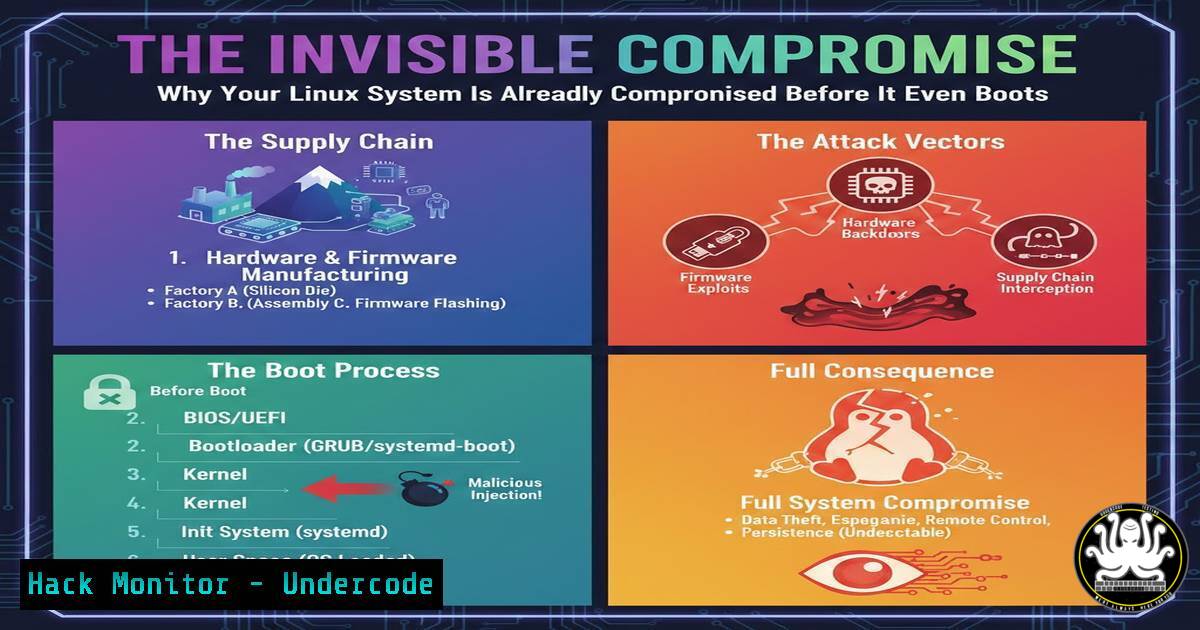
Introduction:
The security of a Linux system is only as strong as its weakest link, and the most critical vulnerabilities often exist long before the operating system even begins to initialize. The boot process represents a foundational chain of trust, where a compromise at any stage—from firmware to kernel initialization—can render all subsequent security measures completely ineffective. Understanding and securing this pre-boot environment is paramount for true system integrity.
Learning Objectives:
- Understand the sequential stages of the Linux boot process and the trust model at each phase.
- Learn how to implement practical security controls like Secure Boot, TPM, and GRUB hardening.
- Identify and mitigate advanced threats like bootkits, rootkits, and firmware-level persistence.
You Should Know:
1. Securing the Foundation: BIOS/UEFI and Firmware Integrity
The firmware, whether legacy BIOS or modern UEFI, is the first code executed by the machine’s hardware. It initializes the system and is completely outside the view and control of the Linux operating system. An attack at this level, such as a malicious firmware flash, is persistent, can survive full disk wipes and OS re-installations, and is fundamentally invisible to the OS. The primary mitigations are hardware-based security features.
Step‑by‑step guide explaining what this does and how to use it.
1. Enable Secure Boot: This UEFI feature ensures that only signed, trusted bootloaders (like GRUB) and operating system kernels can be loaded. It creates a chain of trust from the firmware up to the OS.
Verification: On a Linux system, you can check if Secure Boot is enabled by running: mokutil --sb-state. The output should state “SecureBoot enabled”.
2. Utilize the TPM (Trusted Platform Module): A TPM is a dedicated cryptographic processor that can store platform measurements (hashes) of critical boot components. Any change in a measured component (e.g., firmware, bootloader) will be detected.
Verification: Check for an active TPM with: sudo dmesg | grep -i tpm. You should see lines indicating the TPM was successfully initialized.
3. Physically Secure the Boot Order: Access the UEFI/BIOS setup during boot (typically by pressing F2, Del, or Esc). Navigate to the “Boot” tab and ensure the primary boot device is your encrypted system disk. Disable booting from USB/CD-ROM devices if not routinely required, and set a BIOS/UEFI administrator password to prevent unauthorized changes.
2. Hardening the Bootloader: GRUB Security Configuration
GRUB is the most common bootloader for Linux. It is responsible for loading the Linux kernel and initial RAM filesystem (initramfs). If an attacker can modify the GRUB configuration or binary, they can control the entire subsequent boot process, for instance, by passing malicious kernel parameters to disable security features.
Step‑by‑step guide explaining what this does and how to use it.
1. Set a GRUB Boot Password: This prevents unauthorized users from editing kernel parameters at the boot menu.
Command: First, generate a password hash: grub-mkpasswd-pbkdf2. Enter your desired password and copy the resulting hash.
Configuration: Edit `/etc/grub.d/40_custom` and add:
set superusers="admin"
password_pbkdf2 admin <your-copied-password-hash>
Update GRUB: Run `sudo update-grub` to apply the changes. Now, pressing ‘e’ to edit a boot entry will require the password.
2. Protect GRUB Configuration Files: Ensure the GRUB configuration files are not world-writable.
Command: Check and set correct permissions: `sudo chmod 600 /boot/grub/grub.cfg` and sudo chown root:root /boot/grub/grub.cfg.
- Kernel and Initramfs Integrity: The Core of the OS
The kernel and initramfs are the final software components loaded before the root filesystem is mounted and systemd takes over. A compromised kernel or initramfs can load malicious kernel modules (rootkits) or provide an attacker with an early shell, bypassing disk encryption by capturing the passphrase.
Step‑by‑step guide explaining what this does and how to use it.
1. Verify Kernel and Initramfs Signatures: With Secure Boot enabled, the kernel should also be signed. You can manually verify the integrity of these files.
Command (for distributions using evmctl): sudo evmctl verify /boot/vmlinuz-$(uname -r). Similar tools like `sbverify` can also be used.
2. Audit Kernel Parameters: Review the parameters GRUB uses to boot the kernel. They should not disable critical security features.
Command: Check the current command line: cat /proc/cmdline. Look for security-enhancing parameters like `slab_nomerge` and slub_debug, and ensure none are present that disable features like `selinux=0` or apparmor=0.
3. Re-generate Initramfs Securely: Always use the official distribution tools to update the initramfs after a kernel update or driver change.
Command: sudo update-initramfs -u -k all. This ensures the initramfs is built from trusted sources and matches the current kernel.
4. Leveraging the TPM for Measured Boot
A measured boot, as opposed to a verified boot (Secure Boot), does not prevent execution of unauthorized code. Instead, it meticulously records (measures) each component—firmware, bootloader, kernel—into the TPM’s Platform Configuration Registers (PCRs). These measurements can later be audited or used to release secrets (like disk encryption keys) only if the system’s state is trustworthy.
Step‑by‑step guide explaining what this does and how to use it.
1. Check TPM PCR Values: You can read the current state of the PCRs to see what the system measured during boot.
Command: Install `tpm2-tools` and run sudo tpm2_pcrread. This will output the hash values stored in each PCR. A consistent, known-good baseline is required for comparison to detect changes.
2. Use TPM-based Full Disk Encryption (e.g., with LUKS2): Tools like `Clevis` and `Tang` can bind a LUKS-encrypted volume to the TPM state. The disk encryption key is sealed by the TPM and only released if the PCR measurements match the expected values.
Command (Example for binding an existing LUKS slot): sudo clevis luks bind -d /dev/sda2 tpm2 '{}'. This configures the system to automatically unlock the root partition if the boot process is untampered.
5. Post-Boot Forensic Analysis and Detection
While a successful boot-level compromise is designed to be stealthy, certain anomalies can be detected from within a running system. Post-boot analysis can reveal indicators of compromise that slipped past the preventative controls.
Step‑by‑step guide explaining what this does and how to use it.
1. Analyze Boot Logs: The systemd journal often contains boot messages.
Command: `sudo journalctl -b` to view the log for the current boot. Look for errors from the kernel, ACPI, or hardware initialization that are unusual.
2. Check for Unknown Kernel Modules: Rootkits often load as kernel modules.
Command: List all loaded modules: lsmod. Compare this list against a known-good baseline or your package manager’s database. Investigate any unknown modules.
3. Verify System Files with AIDE (Advanced Intrusion Detection Environment): AIDE creates a database of file hashes and attributes. After a compromise is suspected, you can run a check to see if critical files like the kernel, initramfs, or bootloader have been modified.
Commands:
Initialize the database: `sudo aideinit`
Run a check: `sudo aide.wrapper –check`
What Undercode Say:
- The illusion of a normally functioning operating system is the bootkit’s greatest weapon; if the system appears clean after boot, the investigation is often directed elsewhere, leaving the persistence mechanism undetected.
- A layered defense is non-negotiable; relying solely on endpoint detection within the OS is a fatal strategy when the attacker operates at a layer beneath it.
The fundamental analysis here is that cybersecurity has focused disproportionately on the runtime environment of the operating system, deploying advanced EDRs and antivirus solutions while neglecting the underlying foundation. The boot process represents a critical trust boundary where hardware, firmware, and software intersect. A compromise here is not just another vulnerability; it is a fundamental breach of the root of trust. This shifts the entire security paradigm from “is my OS secure?” to “can I trust the platform my OS is running on?”. The technical controls to mitigate these risks—Secure Boot, TPM, and configuration hardening—are widely available but frequently overlooked in security audits and hardening guides, creating a massive attack surface that is both powerful and attractive for advanced adversaries.
Prediction:
The future of low-level cyber attacks will see a significant shift towards firmware and bootkit persistence as standard operating procedure for advanced persistent threats (APTs). As cloud and container security matures, forcing attackers to find new avenues, and as confidential computing with remote attestation becomes more prevalent, the pre-OS attack surface will be the next major battleground. We will see a rise in “bare-metal” malware sold as a service on dark markets, targeting not just servers but also IoT devices and network infrastructure. This will force a industry-wide re-evaluation of supply chain security, pushing for hardware-rooted trust and measured boot to become default requirements, not premium features, in all computing devices.
🎯Let’s Practice For Free:
IT/Security Reporter URL:
Reported By: Biren Bastien – Hackers Feeds
Extra Hub: Undercode MoN
Basic Verification: Pass ✅


