
Listen to this Post
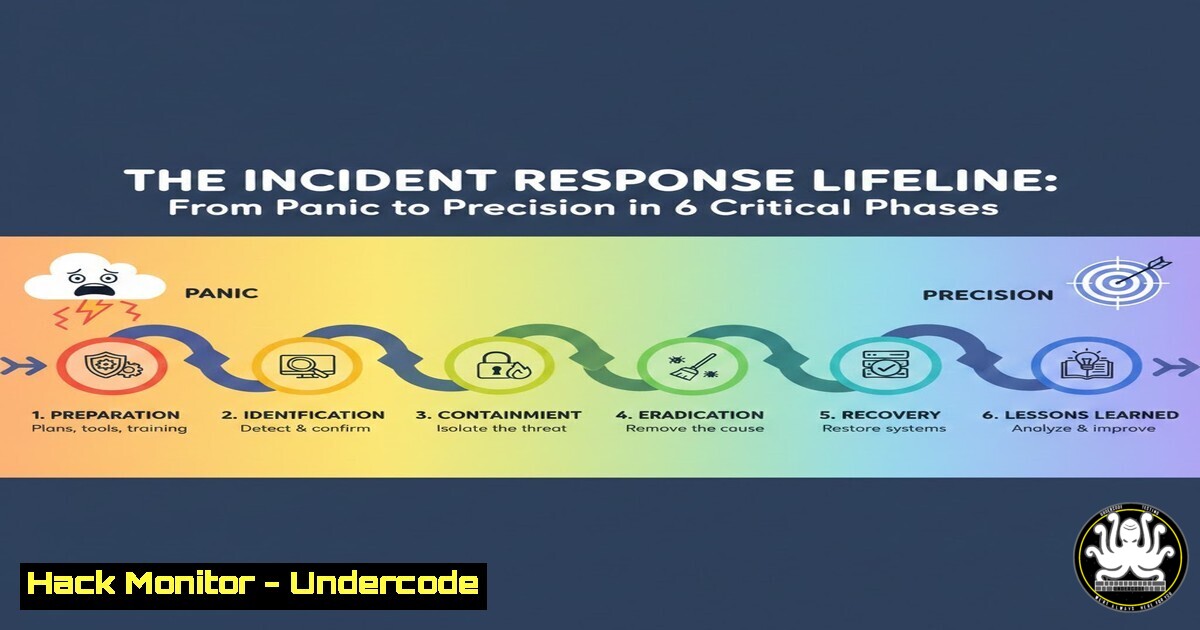
Introduction:
In the relentless digital battlefield, a robust Incident Response (IR) plan is the definitive line between a contained security event and a catastrophic breach. Moving beyond theoretical frameworks, this guide dissects the six critical phases of IR, transforming them from checklist items into actionable, technical protocols. We equip you with the commands, tools, and methodologies to operationalize each stage, ensuring your team transitions from reactive panic to systematic precision.
Learning Objectives:
- Architect a proactive preparation phase with essential tooling and system hardening.
- Execute precise detection and containment using network forensics and system isolation techniques.
- Implement thorough eradication, recovery, and post-incident analysis to close security gaps.
You Should Know:
1. Preparation: Building Your Cyber Fortress
Before the first alert fires, your security posture is determined. Preparation is the non-negotiable foundation of effective IR.
Step‑by‑step guide explaining what this does and how to use it.
Asset Inventory & Hardening: You cannot protect what you don’t know. Use network scanning and system enumeration to build your asset database.
Linux: `nmap -sV -O 192.168.1.0/24` to map network services and operating systems.
Windows: Use PowerShell `Get-WmiObject -Class Win32_Product | Select-Object Name, Version` for installed software inventory.
Toolkit Deployment: Ensure essential forensic tools are pre-installed on analyst workstations and critical servers. A basic kit includes:
Network Analysis: Wireshark, Tcpdump (tcpdump -i eth0 -w capture.pcap).
Memory Forensics: Volatility, Rekall.
Endpoint Detection: Sysinternals Suite, OSQuery.
Plan Documentation & Team Drills: Your IR plan must be a living document. Conduct tabletop exercises simulating ransomware and data exfiltration attacks to validate communication channels and decision trees.
2. Detection & Identification: Cutting Through the Noise
This phase shifts from “something’s wrong” to “this is the specific threat.” It requires correlating alerts with deep system inspection.
Step‑by‑step guide explaining what this does and how to use it.
Alert Triage: Centralize logs using a SIEM (Security Information and Event Management). Correlate firewall denies (iptables -L -n -v on Linux) with unusual login attempts from `Event Viewer > Security` logs in Windows.
Initial Forensic Triage: On a potentially compromised host, collect volatile data before disconnection.
Linux: `ps auxf` (process tree), `netstat -tunap` (network connections), ss -tunap.
Windows: tasklist /v, netstat -ano. Pipe to files for analysis: netstat -ano > C:\evidence\netconn.txt.
IoC Validation: Use gathered data (hashes, IPs, domains) to query threat intelligence platforms (VirusTotal, AlienVault OTX) to confirm malicious intent.
3. Containment: Stopping the Bleed
Containment is tactical; choose short-term (immediate) or long-term (sustainable) actions to prevent threat spread.
Step‑by‑step guide explaining what this does and how to use it.
Network Segmentation: Isolate the affected segment via firewall rules.
Linux iptables: `iptables -A INPUT -s
Windows Firewall (PowerShell): `New-NetFirewallRule -DisplayName “Block_Threat” -Direction Inbound -LocalAddress
Host Isolation: If necessary, disconnect the host entirely.
Linux: `ifconfig eth0 down` or ip link set eth0 down.
Windows: Disable network adapter via netsh interface set interface "Ethernet" admin=disable.
Account Containment: Immediately disable compromised accounts.
Active Directory: `Disable-ADAccount -Identity “username”`
Linux: `sudo usermod -L username` (lock account) or passwd -l username.
4. Eradication: Rooting Out the Threat
Eradication ensures the adversary’s tools, access, and persistence mechanisms are completely removed.
Step‑by‑step guide explaining what this does and how to use it.
Malware Removal: Identify and kill malicious processes, then delete files.
Linux: kill -9 <PID>; find and delete: `find / -name “suspicious_file” -type f -delete` (use with extreme caution).
Windows: Use Sysinternals `Autoruns` to remove persistence entries (Run keys, services, scheduled tasks).
Vulnerability Patching: Address the root cause. If exploited via a known CVE, apply patches immediately.
Linux: `sudo apt update && sudo apt upgrade` (Debian/Ubuntu).
Windows: `wuauclt /detectnow /updatenow` or via Settings > Update & Security.
Credential Reset: Force password resets for all potentially exposed accounts and service principals.
5. Recovery: Restoring Operations with Confidence
Recovery is the controlled return to normal operations, ensuring systems are clean and stable.
Step‑by‑step guide explaining what this does and how to use it.
System Restoration: Use known-clean backups. Validate backup integrity before restoration. For critical systems, restore to an isolated network segment first for testing.
Validation Testing: Post-restoration, verify system functionality and the absence of IOCs.
Re-run scans: `clamscan -r /` (Linux) or use updated AV on Windows.
Check for residual connections or processes.
Monitoring Ramp-Up: Increase logging and monitoring sensitivity on the recovered systems for a defined period to detect any signs of re-infection.
6. Lessons Learned: Transforming Incident Data into Defense
This phase closes the loop, transforming reactive effort into proactive intelligence.
Step‑by‑step guide explaining what this does and how to use it.
Post-Incident Meeting: Assemble all stakeholders. Answer: What happened? How was it contained? What could be better?
IR Plan Update: Revise procedures, playbooks, and communication plans based on gaps identified. For example, if containment was slow, automate isolation scripts.
Security Control Enhancement: Implement new defenses. If the attack used phishing, enhance email filtering and deploy mandatory user awareness training. Update firewall rules and IDS/IPS signatures based on the new threat data.
What Undercode Say:
- Preparation is Proportional to Performance: The technical commands and tools deployed in Phases 2-5 are only as effective as the foundation laid in Phase 1. An undocumented system or a team unfamiliar with `vol.py` or `Autoruns` will falter under pressure.
- The Cycle is a Spiral, Not a Circle: The “Lessons Learned” phase must actively fuel a more advanced “Preparation” phase. The goal is not to return to the baseline but to elevate it, using forensic data (like malware hashes or attacker TTPs) to harden systems and sharpen detection for the next incident.
Prediction:
The future of IR is being shaped by AI and automation. We will see the rise of AI-driven Security Orchestration, Automation, and Response (SOAR) platforms that can autonomously execute phases like containment (by isolating IPs) and initial eradication (by killing known malicious processes) based on real-time threat intelligence. However, the human-centric phases of “Lessons Learned” and strategic “Preparation” will become even more critical. Analysts will evolve from first responders to AI trainers and strategy architects, focusing on interpreting complex attack narratives and refining the algorithms that handle the instantaneous, tactical response. The IR lifecycle will accelerate, but its strategic core will remain a human-driven discipline.
▶️ Related Video (84% Match):
🎯Let’s Practice For Free:
IT/Security Reporter URL:
Reported By: Ogochukwu Somto – Hackers Feeds
Extra Hub: Undercode MoN
Basic Verification: Pass ✅


